If you want to keep videos and images posted on Twitter (X), the easiest and most beginner-friendly method is using a Twitter downloader site. You don't need to install any dedicated apps; you can simply paste the tweet URL to download Twitter (X) videos or still images in just a few seconds, which is why their popularity has been growing in recent years.
However, there are many Twitter (X) downloader sites on the internet, and we often hear people say it's difficult to judge which ones are safe, fast, and reliable for saving content. Especially since 2024, with site closures, specification changes, and an increase in advertisements, choosing a 'stably usable service' has become extremely important.
Therefore, in this article, we will explain 6 recommended Twitter downloader sites that you can use with peace of mind, in an easy-to-understand way from a user's perspective. Since each service has different features, you will be able to choose the best Twitter (X) downloader site for your needs.
6 Recommended Twitter (X) Downloader Sites
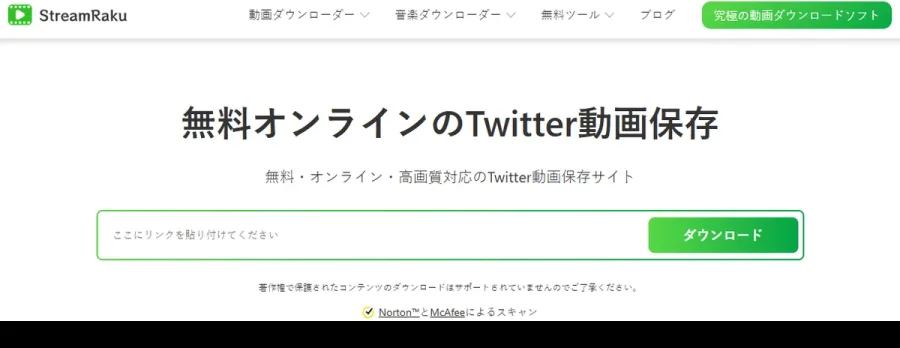
StreamRaku is currently one of the most stable Twitter downloader sites available, offering an excellent balance of download speed, supported formats, and security. It is particularly attractive because it is lightweight, allowing you to analyze and download the Twitter video you want to save in just a few seconds, even during busy times when processing might otherwise slow down.
Also, because it has minimal advertisements and few confusing buttons, it is less prone to accidental clicks and is designed so that even people saving Twitter videos for the first time can use it without hesitation or worry. It works stably on major browsers across smartphones, PCs, and tablets, making it an all-purpose service perfect for users who want to 'quickly save Twitter videos without registration'.
Pros
Very stable performance with few failures
Fast video analysis, allowing downloads in seconds
Minimal ads and high security
Multi-device support, easy to use from anywhere
Simple UI that even beginners won't get lost in
Cons
Processing may take a split second longer during high demand
DoremiZone is a general-purpose download service that supports not only Twitter but also multiple sites like YouTube and TikTok, making it the ideal Twitter downloader site for users who want to save SNS videos from various platforms in one place. It is lightweight, and the ability to choose the image quality when saving is particularly convenient. Although it is an overseas site, the UI is easy to understand, and the Japanese guide is well-prepared, which is why it is supported by people who frequently save SNS videos.
Pros
General-purpose downloader supporting multiple SNS platforms
Abundant options for image quality
Easy to use with a Japanese UI
High stability for PC users
Disadvantages
There is a limit to the length of videos that can be downloaded for free
Link2Take is a Twitter (X) downloader site that is appealing for its simple operability and lightweight performance. Because the site itself is built to be lightweight, page navigation is smooth even when accessing from a smartphone, and it can be used without stress even on low-spec devices. It is designed for one-click saving without the need for registration, and it is well-received for being easy for even those who are not tech-savvy to use without getting lost.
It supports a wide range of download qualities from standard to high definition, making it perfect for people who want to save Twitter videos on a daily basis.
Advantages
The site is lightweight and comfortable to use on smartphones
One-click saving without registration
Operation is very simple
Video analysis is fast and the failure rate is low
Disadvantages
Few options for high-definition quality
Twidropper is a type of Twitter downloader site that specializes in saving Twitter images, and it is popular among users who want to save high-quality photos in their original quality. While it also supports videos, the stability of image downloads is extremely high, making it useful when you want to organize and save a large number of tweets with images. It runs smoothly even on smartphone browsers, and the ad placement is easy to understand, making accidental clicks less likely, so it is a very easy-to-handle service for those who want to focus on saving images.
Advantages
High stability for image saving
High-quality photos can be saved as they are
Few ads and easy to use safely
Runs smoothly even on smartphones
Disadvantages
Video saving speed is somewhat slow
Does not support bulk saving of multiple files
Awakest is a type of Twitter saving site specialized for saving Twitter videos, and it is supported by users who want to stably save medium to high-quality videos. It features high analysis accuracy and can accurately read URLs even if the format is slightly different, making it less prone to saving errors. The operation is also simple, and since you can choose from multiple resolutions when saving, it can be used flexibly according to your needs, from lightweight videos for smartphones to high-quality videos for careful viewing on a PC.
Advantages
High stability in video saving
Abundant quality options
Good analysis accuracy with few errors
Fast speed when using on PC
Disadvantages
Somewhat many advertisements
Not very optimized for saving images
X2Twitter is a speed-specialized Twitter saving site where a save button appears immediately after pasting a URL. It is suitable for people who want to save Twitter videos as quickly as possible, and it is not uncommon for the analysis to be completed in 1 to 2 seconds. It has many users overseas, and because its servers are distributed across multiple regions, it operates relatively stably even during times when access is concentrated. Since you can choose from multiple qualities when saving, it is also suitable for high-quality saving when you want to watch on a large screen.
Advantages
Analysis and downloading are fast above all else
Supports high-quality videos
High stability due to overseas server distribution
The UI is intuitive and easy to navigate
Disadvantages
Often contains advertisements
Some parts of the Japanese display are slightly unnatural
How to easily save Twitter (X) videos using a Twitter downloader site
Step 1. Copy the URL of the tweet you want to saveFirst, copy the URL of the tweet containing the video you want to save. On a smartphone, tap the "..." in the top right of the tweet and select "Copy link." On a PC, simply copy the browser URL of the tweet page. As long as you have obtained the "URL of the individual tweet" on any device, you are good to go.
Step 2. Open the Twitter downloader site and paste the URLNext, access the StreamRaku Twitter Video Downloader site and paste the URL you just copied into the input field at the top. No membership registration is required, and the video analysis starts automatically just by pasting, so even those using a Twitter downloader site for the first time can operate it without confusion.
Step 3. Select the video quality and downloadOnce the analysis is complete, a list of saveable videos will be displayed. You can choose from high quality to lightweight versions depending on your needs, so simply tap or click your preferred quality and press the download button to complete the save. Since it is saved directly to your device on both smartphones and PCs, you can have the Twitter (X) video in your hands in just a few seconds.
Tips for using Twitter downloader sites safely
While Twitter downloader sites are convenient, some sites may have many ads or misleading buttons designed to trick you into clicking them. To use them safely, it is helpful to keep the following points in mind.
First, it is important to never use sites that ask for personal information. You never need an email address or credit card number to save a Twitter video. If you feel even slightly uncomfortable, you should avoid using that site.
Also, it is important to carefully check the placement of advertisements. Especially on smartphones, ads can look like buttons, and if you tap them by mistake, you may be redirected to a different page. Safe sites have a clear distinction between ads and download buttons, leaving no room for confusion.
Furthermore, by using the latest browser and keeping antivirus software enabled, you can significantly reduce the risk if you happen to access a malicious site. Choosing a reliable Twitter downloader site while also implementing basic security measures is the key to safe usage.
What to do if you cannot save a Twitter video or encounter an error
When using Twitter downloader sites, you may very rarely encounter issues such as "cannot save" or "video not displayed." This is influenced not only by the site but also by Twitter (X) specification changes and URL formats, so it is useful to know the following solutions.
First, videos from private accounts (locked accounts) cannot be saved. Since the downloader site does not have viewing permissions, no service will be able to analyze them. Additionally, content where the poster has set age restrictions or videos with regional restrictions may not be downloadable.
The next most common issue is a mistake in copying the URL. If you copy the profile URL instead of the entire tweet, or if the shortened URL is cut off, the downloader site cannot analyze it correctly. This is often resolved by re-obtaining the link using "Copy link to tweet".
Furthermore, it may not work reliably in in-app browsers (such as within the Twitter app). In that case, you can save it by copying the URL and opening it again in an external browser like Safari or Chrome.
Finally, it is also possible that the saving site's server is temporarily congested. If the analysis does not proceed, waiting a little while or trying a more stable and feature-rich video downloader will often solve the problem easily.
Summary
When you want to keep Twitter (X) videos on hand, you don't need complex operations or dedicated apps. If you choose a reliable Twitter saving site, anyone can download videos safely and comfortably in just a few seconds. Among them, StreamRaku Twitter Video Saving Site has an excellent balance of analysis speed, ease of use, and stability, making it a versatile tool that even first-time users can use without hesitation.
Please use the points and solutions introduced here as a reference to enjoy saving Twitter videos in a way that suits your environment. When in doubt, it is recommended to try the StreamRaku Twitter Video Saving Site first. It should definitely be the smoothest way to save.