*This article contains advertisements (Amazon Associates). Please check the links for current pricing and availability.
When you get serious about choosing a gaming monitor, ultrawide OLEDs always come up in the conversation. Among them, LG's "UltraGear OLED 39GS95QE-B" is attracting attention from those who want to "immerse themselves in a large screen if they are going to buy one," thanks to its clear 39-inch, 21:9, 240Hz specifications.
However, this price range is by no means an impulse buy. Large ultrawide OLEDs often fall in the 150,000 to 200,000 yen range (based on market prices at the time of writing), and considering that standard gaming monitors can be bought for 20,000 to 30,000 yen, it is natural to wonder, "Is that difference really necessary for me?"
In conclusion, if you want to enjoy games and movies with many dark scenes on a large screen, or if you spend a lot of time at your desk and want to invest in visual beauty, the 39GS95QE-B is well worth considering. This is because the satisfaction level is high when the deep blacks unique to OLED combine with the wide 21:9 field of view.
On the other hand, this monitor may not necessarily be the best choice for those who lack desk space or those who primarily do text-based work and keep the same screen displayed all day long. In this article, focusing on the 39GS95QE-B, I will calmly organize "what kind of person can be satisfied with this price range" while comparing it to smaller OLED ultrawides and standard flat gaming monitors.
First, the conclusion: The 39GS95QE-B is a strong contender for gamers who want to immerse themselves in a large screen.
The reason why OLED ultrawides in this price range are chosen is simple. Even as tools for "displaying games," when a large screen, high contrast, and high refresh rate are combined, the satisfaction of the time you spend playing gradually changes.
Deep, rich blacks: Because OLED pixels emit their own light, blacks are crisp and deep in dark scenes, which can change how you see things in night maps or games with many dark areas.
Wide field of view: The 21:9 wide screen makes it easier to display information to the edges of your vision in racing or shooting games, which is said to increase immersion.
Smooth motion: It supports a high refresh rate of 240Hz and is designed to suppress motion blur in fast-moving scenes.
Gentle curvature: The screen is gently curved, which is said to make it easier to see the edges even on a large screen and keep the distance to the screen uniform.
Spacious workspace: Because it is long horizontally, it is easy to apply to workflows where you arrange documents or browsers side-by-side.
It is particularly suitable for the following people:
People who want to enjoy games and movies with many dark scenes on an impressive large screen
People who play games where horizontal field of view is an advantage, such as racing or shooting games
People who have an environment where they can run PC games smoothly at high frame rates
People who want to use a wide screen for work as well as gaming
People who want to invest in visual beauty with the intention of using it for several years
If you are unsure, it is easier to choose by using "Can I fit a 39-inch wide screen on my desk?" and "Can the PC I connect produce high frame rates?" as your criteria. If you have both, this is a monitor that will likely provide satisfaction commensurate with its price. Conversely, if either is missing, you may not be able to fully utilize the specs, so it is safer to check your environment first. It is certain to check the detailed specifications on the product page. If you are interested, checking the latest price and availability on Amazon first will make it easier to compare your options.
https://www.amazon.co.jp/dp/B0CVMWYVBG?tag=thehikaku22-22
What you can do with the 39GS95QE-B
Let's organize how you can play and use this device if you have one.
Immersive gaming on a large screen: With a 39-inch, 21:9 curved screen, it becomes easier to focus on games with a sense of being enveloped by your field of view.
Smooth video display: With 240Hz support, you can easily reduce motion blur in fast-paced scenes for compatible games.
Watching movies and videos: The wide aspect ratio and the deep blacks of OLED are considered to be well-suited for video content with many dark scenes.
Multitasking work: Because it is wide, you can use it by placing documents and browsers, or videos and work screens, side by side.
Clean connectivity: In addition to video input, some models are equipped with USB ports and the like, making it easy to organize peripheral devices (check the product page for supported ports).
While it is often thought of as "for gaming only," the advantage of this type is that the wide, large screen can also be applied as a daily work screen. It is easy to use for two purposes, such as someone who wants to line up multiple windows for work and then enjoy games or movies on a large screen in their spare time. However, it is worth remembering that whether you can draw out that comfort depends on the size of your desk and the performance of the devices you connect. From the next chapter, we will look at how to determine that specifically.
Differences from higher-end, lower-end, and competing models
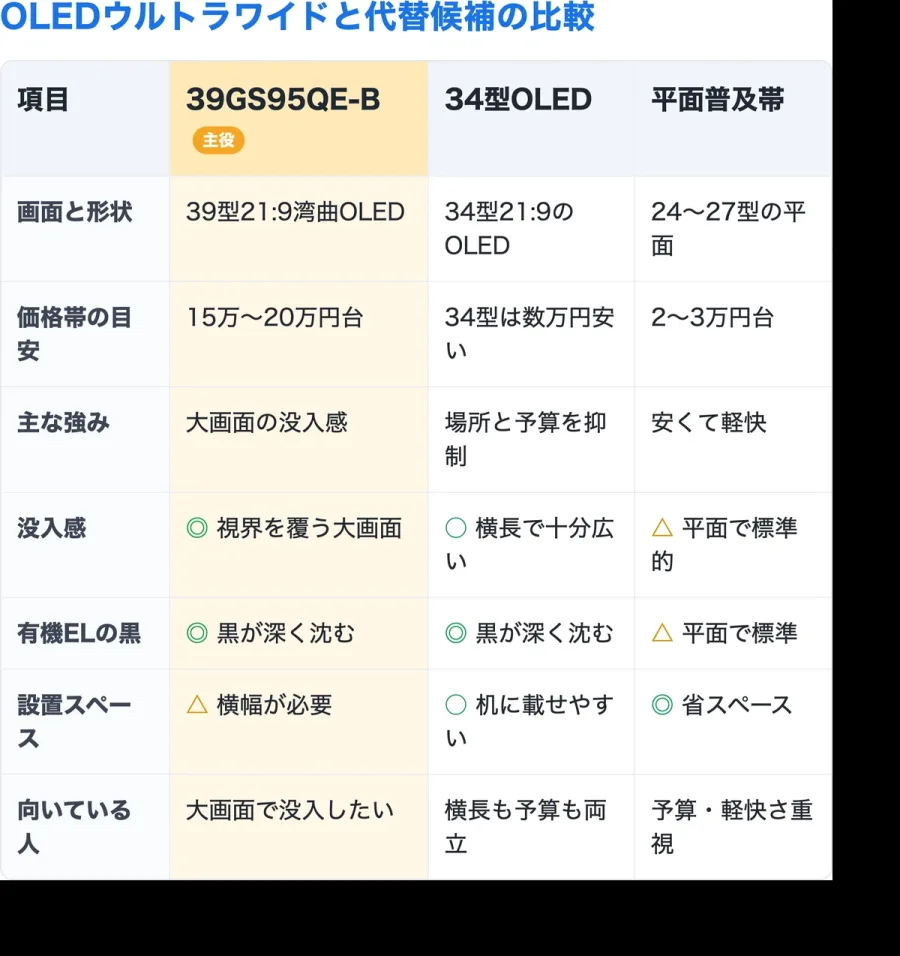
Even when talking about OLED ultrawide monitors, the direction is divided into several types. If you organize the three representative types, you will see what suits you.
The 39GS95QE-B (39-inch, 21:9, OLED) is a type that emphasizes size and immersion. It is suitable for people who want to use the screen as large as possible to cover their field of view. Consequently, installation space is required, and the price is also high, as is typical for OLED.
34-inch class OLED ultrawide monitors are a size smaller even with the same wide aspect ratio and OLED, which is an advantage for placing them on a desk. They do not have the impact of a 39-inch model, but the price is often several tens of thousands of yen lower than the 39-inch model, making them a realistic choice for people who "want a wide screen but want to keep the space and budget down."
General flat gaming monitors (24-27 inches) are in the popular price range, starting from the 20,000 to 30,000 yen range. They do not have the deep blacks or wide field of view of OLED, but many say that this is sufficient for those who prioritize speed and lightness in highly competitive games. Because the screen is small, there is less eye movement, and some believe that this is actually advantageous in competitive games that require quick reactions. It also serves as a standard for considering whether the difference in the high price range is truly necessary.
When lined up like this, you can see that "bigger and more expensive is not always the correct answer." The optimal solution changes depending on how you play: 39-inch OLED for immersion, 34-inch OLED for balance, and flat popular models for lightness and budget. The price difference from high-end to low-end is generally several tens of thousands to over a hundred thousand yen, and your choice is determined by where you place your satisfaction.
Points that are easy to get lost on before buying
Large OLED ultrawide monitors have easy-to-understand appeal, but there are also pitfalls you might notice after buying. If you check them by dividing them into several axes, you will be less likely to fail.
Desk width and installation spaceA 39-inch, 21:9 monitor is very wide, and the sense of occupied space is different from a general flat monitor. It is difficult to adjust after installation if you find that "it doesn't fit on the desk" or "it's too close to a wall or window to get enough distance," so it is safe to measure the width and depth of your desk before purchasing. Since it is curved, check whether you can secure a position to view it from the front as well. In addition, a large screen requires a certain amount of distance from your eyes. If it is too close, you will have to move your eyes significantly, which may make you tired, so it is also helpful to imagine how far away you can sit from the screen to avoid failure.
Performance of the connected PCTo take advantage of 240Hz and the large screen resolution, the performance of the PC that can output it is a prerequisite. Even with a high refresh rate, you won't get the intended smoothness if the PC side doesn't support it. It is easy to end up in a situation where 'the monitor is high-performance but the PC can't keep up,' so knowing in advance what frame rate your PC can handle will help you avoid regrets.
OLED characteristics and usageOLED is attractive for its deep blacks and vivid colors, but it is considered a type that requires caution when displaying the same screen for long periods. While it is less of a concern if you mainly use it for moving images like games or videos, those who often use it to display fixed text screens all day need to understand this point before choosing. It is also reassuring to check the screen protection features and settings provided by the manufacturer on the product page. As for actual usage, it becomes easier to live with if you are conscious of basic operations, such as turning off the screen when you are away from your desk for a long time, or not leaving the taskbar or fixed displays on constantly. For those who use it as a tool to enjoy games and videos, these characteristics are often not much of a concern.
Who it is for and who should avoid it
Who it is forThose who want to fully enjoy games and movies on a large screen. When the deep blacks of OLED and the wide screen that covers your field of view come together, the immersion is clearly different from a regular monitor. It is especially suitable for those who play games with many dark scenes, those who benefit from horizontal field of view in racing or shooting games, and those who have a PC capable of high frame rates. If you plan to use it for several years, your satisfaction as an investment in image beauty is likely to be high.
Who should avoid itThose who do not have enough desk width or those who mainly do text work and keep the same screen displayed all day do not necessarily need this specific unit. Those who only seek speed and lightness in highly competitive games may also find a smaller, cheaper flat model more comfortable. If you choose based only on size and specs without matching your installation space and usage, it tends to become a unit that is 'impressive but underutilized.'
Things to check before buying on Amazon
Before purchasing, checking the following points will help reduce regrets. I have included the reasons for each.
Body size and installation space: Because the 39-inch 21:9 screen is very wide, whether it fits on your desk is the first hurdle. Compare the dimensions, including the stand, with your actual measurements.
Resolution and refresh rate: Because whether you can utilize performance like 240Hz depends on the support of the connected PC. Check if your current environment can handle it.
Types of connection ports: Because whether you can use it as is depends on whether it has the ports to connect to the PC or game console you want to use. Check the compatibility with your existing cables and equipment.
Stand adjustment range and mounting method: Because if you cannot adjust the height and angle, it is easier to strain your posture with a larger screen. Checking whether wall-mount brackets are supported will also expand your options.
Seller and warranty: Since this is an expensive purchase, it is reassuring to check whether the seller is Amazon itself or the manufacturer, and what the warranty and initial defect support are like.
In particular, size and installation space are the biggest choices that are difficult to change later, so take a good look at whether it really fits your desk size and viewing distance. If you are interested, it is recommended to check the latest price, stock, and seller on Amazon before making a decision.
https://www.amazon.co.jp/dp/B0CVMWYVBG?tag=thehikaku22-22
Frequently Asked Questions
Q. What is the biggest difference compared to a standard monitor?A. The major differences are the "deep blacks provided by OLED" and the "wide field of view from the 21:9 aspect ratio." While the way dark scenes appear and the sense of immersion on a large screen are significantly different, it also occupies more desk space. For those who primarily perform text-based work, some may not feel the difference as strongly.
Q. Can it be used for things other than gaming?A. Yes, it can. Because it is wide, it is easy to apply to multitasking, such as placing documents and a browser side-by-side or working while watching a video. However, if you frequently display the same screen in a fixed position all day, it is best to consider this after understanding the characteristics of OLED.
Q. Is 240Hz absolutely necessary?A. It is not essential. A high refresh rate makes fast movements look smoother, but your PC's performance must be capable of utilizing it. It is effective for those who play fast-paced games seriously, but if your main use is watching movies or general tasks, you may not notice the difference in those figures.
Q. What kind of budget should I keep in mind?A. Large ultrawide OLED monitors are generally estimated to be in the 150,000 to 200,000 yen range (this is based on market conditions at the time of writing, and prices fluctuate). Since a slightly smaller 34-inch model tends to be several tens of thousands of yen cheaper, it is a good idea to choose by comparing your budget and installation space. Be sure to check the latest prices via the provided link.
Q. Is a curved screen difficult to see?A. It is said that the larger the screen, the more a gentle curve helps make the edges easier to see. If you sit in front of it, the distance tends to be uniform, which leads to an immersive feeling that covers your field of vision. However, since there may be differences in how it looks when viewed by multiple people from the side, it is best to assume it will be used by one person sitting directly in front of it.
Summary: Choose based on whether you can invest in large-screen immersion
The LG UltraGear OLED 39GS95QE-B is a unit suited for those seeking the immersion of a large, wide, OLED screen. Finally, I have narrowed down the key points for choosing to three.
A strong contender if you prioritize immersion: When the deep blacks of OLED and the 21:9 aspect ratio combine, the satisfaction level for games and movies is clearly different from a standard monitor.
Installation and PC performance are prerequisites: It only shows its true potential if you have a desk that can accommodate 39 inches and a PC capable of outputting a high refresh rate. Prior measurement and environment verification are essential.
Other options if your usage is light: If you focus on text work or prioritize space-saving, a 34-inch OLED or a standard flat monitor might be a better fit.
If you feel it is worth investing in large-screen immersion, this is a model that is likely to keep you satisfied for a long time. Do not rush your decision; if you choose after confirming the two prerequisites of desk dimensions and PC performance, you are less likely to regret your purchase. Please check the final price, stock, and seller on Amazon, and take your time to judge whether it fits your environment.
https://www.amazon.co.jp/dp/B0CVMWYVBG?tag=thehikaku22-22