Hello, I'm Reo.
I work as a freelance infrastructure engineer and run the infrastructure learning service "InfraDojo".
When studying networking, you might come across this notation.
192.168.10.20/24
"I kind of understand IP addresses, but what is that /24 at the end?"
When you look it up, you're met with a string of unfamiliar terms like "subnet mask," "network portion," and "host portion."
I'm sure there are many of you who get stuck right there.
In this article, instead of starting with difficult calculations, I will organize the concept by focusing on "where to divide the IP address."
A subnet mask indicates where an IP address is divided.
IP addresses are broadly divided into two parts.
Network portion
This is the part that indicates which network it belongs to.
Host portion
This is the part used to distinguish devices within that network.
And it is the subnet mask that indicates the boundary between these two.
For example, there are combinations like the following.
IPアドレス:192.168.10.20
サブネットマスク:255.255.255.0
In this case, it can be thought of as being divided as follows.
192.168.10 | 20
ネットワーク部分 | ホスト部分
However, it is not always just the last number that becomes the host portion.
How far the network portion extends depends on the subnet mask.
This is the first point you want to grasp.
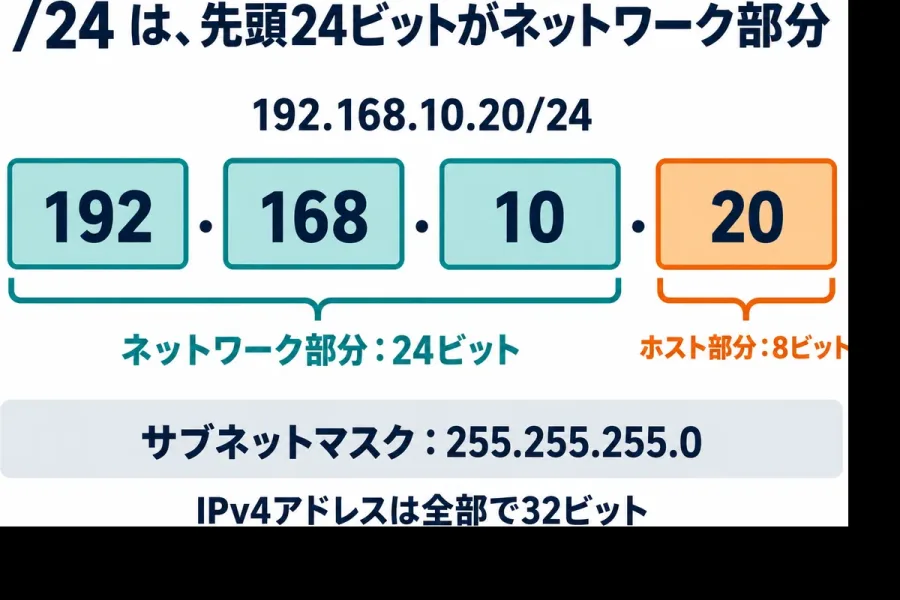
"/24" means that the first 24 bits are the network portion.
In this article, we will deal with IPv4 addresses like 192.168.10.20.
An IPv4 address is internally a 32-bit numerical value in total.
If the word "bit" sounds difficult, think of it first as "a small box that can hold a 0 or a 1".
Out of the 32 total boxes, the first 24 are used as the network portion.
This is what /24 represents.
The remainder is as follows.
32ビット − 24ビット = 8ビット
In other words, with /24,
the network portion is 24 bits
the host portion is 8 bits
is how it is divided.
IPv4 addresses are displayed as four numbers, separated by 8 bits each.
Therefore, with /24, the first three numbers correspond exactly to the network portion.
Note that thisdoes not mean "you can connect up to 24 devices."
24 is not the number of devices, but the number of bits used for the network portion.
"255.255.255.0" and "/24" represent the same division.
Now, let's look at the subnet mask again.
255.255.255.0
This can be expressed in binary as follows.
11111111.11111111.11111111.00000000
Starting from the beginning, there are 24 ones lined up.
These 1s correspond to the network portion, and the 0s at the end correspond to the host portion.
Therefore,
192.168.10.20
サブネットマスク:255.255.255.0
And,
192.168.10.20/24
represent the same boundary.
The number '/24' is called the 'prefix length'.
You may encounter different ways of writing it, such as 'subnet mask' in configuration screens and 'prefix length' in command output.
At first, it is enough to understand that '255.255.255.0' and '/24' correspond to each other.
Let's see if they are on the same network
Consider the following two IP addresses.
192.168.10.20/24
192.168.10.200/24
Since both are /24, the first 24 bits are the network portion.
In this case, you can compare the first three numbers.
192.168.10 | 20
192.168.10 | 200
Since the network portion is the same, both belong to the following network.
192.168.10.0/24
The range of addresses included in this network is as follows.
192.168.10.0 ~ 192.168.10.255
However, not all of this range is used as addresses for standard terminals.
In a typical /24 IPv4 subnet, the first '.0' has the special role of a network address, and the last '.255' has the role of a broadcast address.
The numbers representing the range and the numbers assigned to terminals are a bit different, aren't they?
Even with the same IP address, the boundary changes when it becomes '/25'
Next, let's change the previous two to /25.
192.168.10.20/25
192.168.10.200/25
This time, the network portion is 25 bits.
Because it is 1 bit longer than /24, a part of the last number also becomes part of the network portion.
As a result, the previous /24 range is divided into the following two.
Address range included in the network 192.168.10.0/25 192.168.10.0 to 192.168.10.127 192.168.10.128/25 192.168.10.128 to 192.168.10.255
.20 falls into the upper range, and .200 falls into the lower range.
In other words, if both are /24, they are on the same network; if both are /25, they are on different networks. becomes the case.
IP address combination network relationship: .20/24 and .200/24 are the same; .20/25 and .200/25 are different.
You cannot always say, "Because the first three numbers are the same, they are on the same network."
You need to look at the IP address and the information indicating where to split it as a set.
By the way, the subnet mask corresponding to /25 is 255.255.255.128.
Why is a network split necessary?
In a typical network configuration, a device determines whether the destination is on the same network to decide how to send communication.
If the recipient is on the same network, it usually uses a method to deliver it directly within that network.
If the recipient is on a different network, it delivers it via a router or similar device.
The information used at that time includes the IP address, subnet mask, and routing information.
Therefore, the subnet mask is not just a term for exams.
It is a setting related to "determining where the other party is located."
However, just because they are classified as being on the same network does not necessarily mean they can communicate.
Actual connection configurations and firewalls also play a role.
You should think of "whether they are on the same network" and "whether they can actually communicate" as separate things.
Let's look for "/24" in Linux displays as well.
In Linux, you can check IPv4 address information with the following command.
ip -4 addr show
In the output, you will find notation such as the following, for example.
inet 192.168.10.20/24
This is an example for explanation purposes. The actual address and display content will vary depending on the environment.
After reading this far,
"I see, this address uses the first 24 bits as the network portion."
you can now interpret it.
Even if you don't memorize every command, understanding the meaning of just one piece of displayed information helps your learning progress.
First, try looking for the number after the IP address in your own learning environment.
Start by "viewing the IP address and its separator as a set"
When you study subnet masks, you will encounter a constant stream of things to memorize, such as binary calculations and how to determine the number of addresses.
However, you don't need to understand everything all at once from the beginning.
To start with,
IP addresses have a network portion and a host portion.
Subnet masks and /24 indicate that boundary.
Try to grasp these two points.
Once you have done that, thinking about "where the same network ends" while looking at specific addresses will help you see the purpose of learning the calculations.
If you would like to get used to Linux commands in parallel with your network knowledge, please try using InfraDojo.
You can learn basic Linux operations by actually typing them into a terminal in your browser. It is suitable for those who want to add time for hands-on verification to their reading-based study.
▼ InfraDojo