I was recently looking into subscribing to Gemini as an individual.
I use Gemini for Google Workspace at work, but I wanted to utilize AI for personal use as well.
While researching the plans, I discovered something unexpected.
The latest AI is also integrated into Google One storage plans.
Furthermore, some AI plans allow you to share features with 5 family members (6 people total including yourself)!
(According to official documentation, there are no requirements regarding blood relations, cohabitation, marital status, or shared living expenses.)
Additionally, there was news that the Gemini AI Pro plan storage has been increased from 2TB to 5TB. In this article, I will organize the latest Google One AI plans and explain which one you should choose.
What is Google One in the first place?
Google One is a subscription service provided by Google.
Free Google accounts come with 15GB of storage from the start, but it fills up quickly as photos, videos, and emails accumulate. Originally, it was known as a service to "increase storage for Google Drive, Gmail, and Google Photos."
However, the current Google One has evolved from a simple storage service into a comprehensive service with Gemini integrated into all plans. (If you are going to subscribe to Gemini as an individual, you will be choosing from Google One plans).
See it at a glance! Complete Plan Comparison Table
First, let's check the comparison table for all major plans, including the Basic plan, covering "price," "storage," "context size (the amount of information the AI can process at once)," "AI credits," and "family sharing," in the order provided by Google.
Please refer to the following link for details on the features available in each plan↓
Explanation of each plan
Let's take a closer look at who each plan is suitable for.
1. Free Plan (Standard Gmail Account)For people who: Use AI only occasionally and do not store much data.
Monthly Fee / Capacity: 0 yen (15GB)
Features: A plan included with every Google account from the start.
-
AI Performance:
Context size: approx. 32K tokens
AI credits: 50 credits per day (access to AI is "limited")
Best for: Those who are satisfied with the free version of AI and just want to share storage with family at a low cost
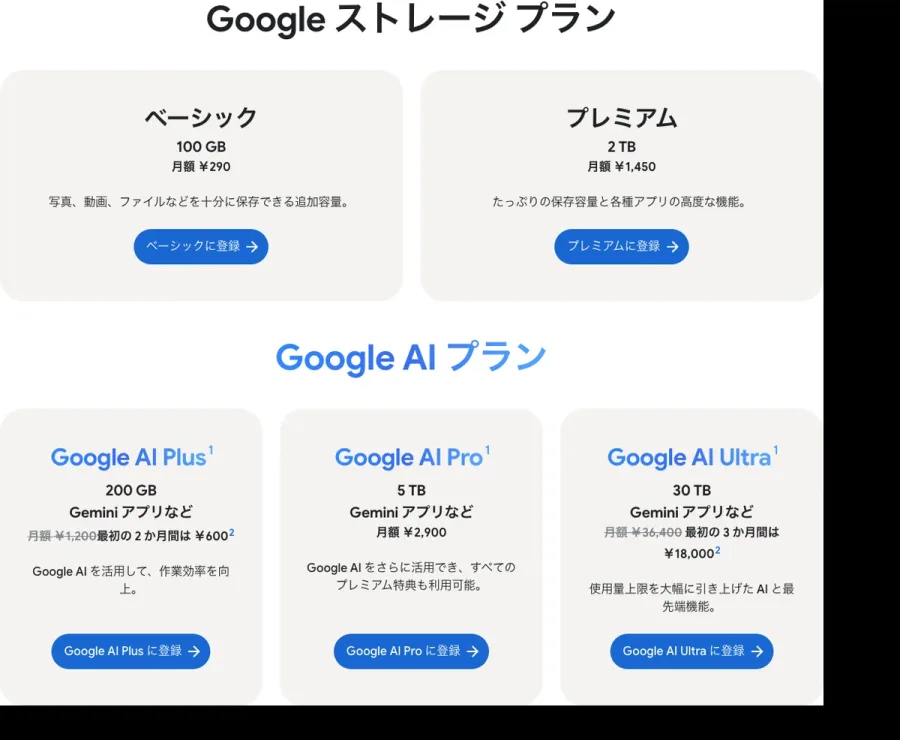
Monthly Fee / Capacity: 290 yen (100GB) / 440 yen (200GB)
Features: A low-cost plan perfect for smartphone backups and more. Unlike the free plan, the biggest advantage is that you can share storage capacity with up to 5 family members (6 people total including yourself) at no extra cost.
-
AI Performance:
Context size: approx. 32K tokens
AI credits: 50 credits per day (remains "limited" just like the free version)
Best for: Those who need large capacity (2TB) and those who frequently hold online meetings or manage schedules
Monthly Fee / Capacity: 1,450 yen (2TB)
-
Features: While it is a pure storage plan, AI features have also been expanded, allowing for the use of "large" NotebookLM notebook sizes. In fact, it includes many of the following "Premium-exclusive benefits" not found in AI Plus.
Advanced Google Meet features: Noise cancellation, long group calls, and recording functions
Advanced Google Calendar features: Multiple appointment type settings and automatic reminders
Google Store benefits: 10% credit back on purchases at eligible stores
Points to note: AI credits for features like image generation are limited to "50 per day," and Workspace AI integration in apps like Gmail is not available.
-
AI performance:
Context size: 128K tokens
AI credits: 50 credits per day
Recommended for: Those who want to use the latest AI cost-effectively and find 200GB of cloud storage sufficient
Monthly fee / Capacity: 1,200 yen (200GB) (Half price at 600 yen for the first 2 months!)
Features: A newly introduced entry-level AI plan. Cheaper than Premium, it also allows access to the "larger" size of NotebookLM. The biggest appeal is the ability to directly invoke AI features integrated into Gmail and Google Docs. Not only storage, but AI benefits can also be shared with 5 people via the family plan.
-
AI Performance:
Context size: 128K tokens (4x the free version)
AI credits: 200 credits per month
Recommended for: People who want to use AI extensively for work, and families who want to use AI together
Monthly Fee / Capacity: 2,900 yen (5TB) (First month is free)
-
Features: Renamed from the previous "AI Premium Plan," this is a top-tier plan that can be considered standard equipment for creators and business professionals. Advanced features for Meet and Calendar, as well as 10% back at the Google Store, are all included.
Because the 5TB of increased storage and high-performance AI benefits can be shared with up to 5 family members at no extra cost (usable by 6 people including the subscriber), I felt that the actual cost-performance is the best.Additional Benefits: YouTube Premium available at 14% off (1,100 yen)
-
AI Performance:
Context size: 1 million tokens
AI credits: 1,000 credits per month
For people like this: Professionals seeking ultimate AI performance and ultra-large capacity storage
Monthly fee / Capacity: 36,400 yen (30TB) (Half price at 18,000 yen for the first 3 months!)
-
Features: This is the top-tier plan that offers massive storage and the advanced reasoning function, "Deep Think Mode".
Additional benefits: YouTube Premium is also included (bundled in the plan)
-
AI Performance:
Context size: 1 million tokens
AI credits: 25,000 credits per month
Differences in what you can do based on token count
1. [Approx. 32K tokens] (Free, Basic, Standard plans)Processing capacity: A few blog posts or a short report of several dozen pages.
Features: This size is sufficient for casual daily questions or summarizing and translating short texts. However, if you feed it entire transcripts of long meetings or thick manuals, it hits a limit where it may "forget the beginning."
Processing capacity
Equivalent to one standard business book (several hundred pages) that can be read in its entirety.Features
This offers about four times the intelligence (memory) of the free version. It is at a level practical for work and study, such as summarizing long PDF documents or analyzing transcripts from long web meetings.
Processing capacity: Several thick books, or long video and audio data, or massive amounts of program code that can all be read at once.
-
Features: This is an overwhelming, order-of-magnitude performance boost. With this much capacity, things that were previously impossible for AI become achievable, such as:
Deep Research
Automatically browse and analyze hundreds of websites at once to create a full-scale research report in minutes.Full use of NotebookLM
Load five times the information of the free version (massive amounts of PDFs, audio commentary, etc.) into a single notebook to create your own specialized AI guide.Programming
Instead of just partial code, feed the entire project code you are developing to have the AI handle bug fixes and feature additions.
Summary: Which plan is right for you?
If you only want to share 100GB of storage with your family at a low cost: "Basic (290 yen)"
If you want to start using AI (128K context and Gmail integration) at a low cost: "Google AI Plus (1,200 yen)"
If you want 2TB of large-capacity storage, AI features, and convenient Meet and Calendar tools: "Premium 2TB (1,450 yen)"
If you want to fully utilize the overwhelming 1 million token AI performance with your family: "Google AI Pro (2,900 yen)"
First, consider your own data usage, the amount of information you want to process (context size), and whether your family will use AI, then try choosing the best plan while taking advantage of initial free trials or half-price campaigns.
Notice
At GI Cloud, we provide support for the new implementation and utilization of generative AI offered by Google, as well as Google Workspace implementation, and hands-on support for Gemini, AppSheet, and Google Apps Script. Please feel free to consult with us via our website.