Today was the closing ceremony for both elementary school and kindergarten
The Yurunatsu family promised that if the kids could manage to go to bed early, wake up early, and get to school/kindergarten without being late for the week leading up to today, they could play the trending "Mecha Chameleon" during summer vacation.
Both of them did their best, so today, as promised, we headed to the computer✨
I had heard two things through the grapevine.
1. Mecha Chameleon can only be played on a PC.
2. It seems you can play it for about 2,000 yen.
The problem is...
Our computer is an old MacBook Air (2017 model)
⸻
Our home computer environment
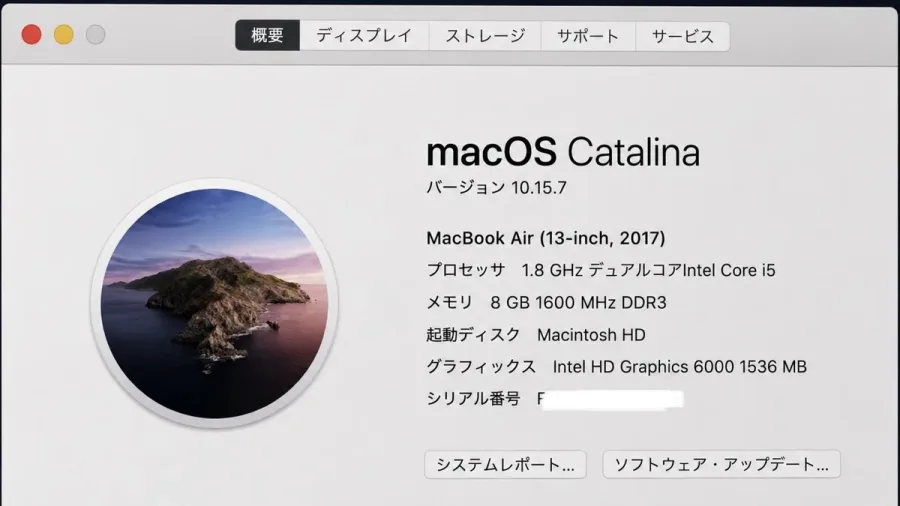
MacBook Air (13-inch, 2017)
・macOS Catalina 10.15.7
・Intel Core i5
・8GB RAM
"I promised the kids, but will they really be able to play it...?"
Feeling a bit anxious now, I started working on it while Googling "how to play Mecha Chameleon."
⸻
At first, I was like, "What is Steam?"
Simply put, it's a store for buying and playing PC games, similar to the App Store for smartphones.
For Mecha Chameleon, you start by purchasing it on Steam and adding it to your library.
I created a new account on the installed Steam, searched for "Mecha Chameleon," and bought it.
The purchase price was only 780 yen!
(Wait, it's cheaper than I thought!✨)
At this price, I felt like, "I'll give it a try for now"
⸻
After purchasing, I clicked "Install Content."
Then...
The words "Invalid Platform" appeared
"Is it really impossible after all...?"
I panicked quite a bit here
⸻
But actually, I hadn't given up hope yet.
Because when I was researching various ways to start "Mecha Chameleon," I had seen an article that said,
"You can play on an old Mac if you use GeForce NOW!"
I didn't know what GeForce NOW was at the time either, but from here on, I decided to proceed one step at a time while asking my AI friend (our ChatGPT).
⸻
This was also my first time hearing about "GeForce NOW" today.
It seems to be a service that lets you use a high-performance gaming PC via the cloud to play games from your own Mac.
Since I'm using a MacBook Air, I clicked the download button for "Mac."
Next, I installed the downloaded app and pressed "Join," but the login screen in Safari turned completely black.
Stuck again
When I consulted my AI friend, it said,
"It's highly likely that Safari is too old to display the NVIDIA login page correctly! Let's try another browser."
Actually, I had a similar issue before where Roblox Studio didn't work well in Safari and was finally solved by using Firefox, so I thought,
"Is it that again!"
And when I reopened it in Firefox...
This time, the GeForce NOW screen displayed properly!
After publishing this article, I verified it further and found that it wasn't just opening it in Firefox; changing the default browser on the Mac to Firefox allowed the GeForce NOW app authentication to proceed normally. I'll explain more in the sequel
For now, I selected the free plan.
The registration screen appeared, so I registered as is.
The Japanese translation on this screen is quite suspicious, but according to my AI friend, the three items displayed are all optional:
* □ Receive notifications
* □ Send error logs
* □ Receive emails
Since it said these were checkboxes, I didn't check any of them and pressed "Register"!
⸻
After registering,
1. Return to the GeForce NOW app
2. Confirm that you are logged in
3. Search for Mecha Chameleon with
And when I proceeded...
I made it this far!
This is the screen asking if you want to link your Steam account with GeForce NOW!!
The process after this is,
1. Click "Connect" at the bottom right
2. When the Steam login screen appears, log in with the account you use for Steam
3. If a screen like "Do you want to link this account?" appears, grant permission
Once you do that, your library will be synced, and
the "Metcha Chameleon" button should change to Play✨, says AI-chan.
...It worked!!!
The "Play" button appeared!!
I was truly happy at this moment
Can I finally play it...
⸻
But then...
Even after pressing Play, it just kept spinning...
A screen appeared saying,
"There are 830 gamers ahead of you."
It turns out this is,
the waiting line for the free plan
It meant there were 830 people ahead of me.
At first,
I thought, "Doesn't that mean 830 people are playing right now?"
but...
After a while,
830
↓
782
↓
...
the number started to decrease, so
it seems that with the free version, you just have to sit and wait for your turn.
⸻
What I've learned from trying this far is...
✅ You can give it a try even on an old MacBook Air (2017)
✅ In this case, I couldn't install it from Steam
✅ There is a high possibility that you can play from an old Mac via GeForce NOW
✅ There is quite a long wait for the free plan
⸻
First, I'll confirm that I can actually launch the game screen using the free plan.
Once I've confirmed that,
I plan to pay for a premium plan since the waiting time is a waste
GeForce NOW has:
・Performance plan (1,790 yen/month)
・Ultimate plan (3,580 yen/month)
It's said that you get no wait times, priority access, and a more comfortable gaming experience✨
The reason I heard "you can play for about 2,000 yen" might have been referring to this Performance plan
Since the game itself is 780 yen,
even with the Performance plan, it's 2,570 yen for the first month.
It seems easier to get started than I thought
⸻
But in reality, the game hasn't launched yet...
Will I really be able to play it...
I'll continue to test it and report back
I hope this article is helpful for those who think,
"I only have an old Mac, but I want to play!"✨
[Update] After continuing to verify even after publishing this article, I was actually able to play "Metcha Chameleon" on my MacBook Air (2017, Catalina)!
I reviewed the default browser settings and Mac energy-saving settings along the way, and the game launched successfully. My children are now enjoying playing it too
I will summarize the detailed steps and the points that finally solved the issue in a follow-up post!