[About this series] I am Motoyashiki, who left Hakuhodo to start the marketing and technology company "playknot." In this series, I honestly write about how playknot has utilized AI, including both our successes and failures.
■ Since the last topic was a bit heavy, I'll take a detour this time
Last time, I talked about the structure where AI agents can stifle growth opportunities for young employees. It was quite a heavy topic, so I'll change the mood a bit this time.
The theme is simple.
Why the "pet" in ChatGPT (or more accurately, Codex) is cute, useful, and fun
You might think, "Is that topic necessary for this series?" But I believe this is the point most often overlooked in the field of AI utilization. Tools aren't used just because they are excellent. If there isn't a reason to open them every day, they won't last.
To put it in slightly more technical terms, I am convinced that the ultimate key to AI utilization lies in these nuances of UI/UX. So, I'm writing about it.
■ What exactly is a "ChatGPT pet"?
The pet currently being talked about isn't a stuffed animal living in a standard ChatGPT chat, but a desktop companion that appears in OpenAI's work app, "Codex."
A small character floats in the corner of the screen. When Codex is working, it moves as if it's thinking; when it's waiting, it looks at you; and when it's waiting for a review, it lets you know with a speech bubble. Even if you minimize the app to do other work, the pet stays as an overlay, so you can see "what state it's in" at the edge of your vision.
In short, it is a feature that combines: - A cute mascot - An agent status display - An entry point where you can return instructions just by clicking
These three are integrated into one function. It looks like a toy, but inside, it's a notification layer for work. That's the interesting part.
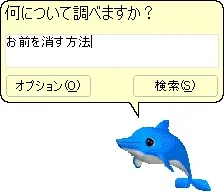
Come to think of it, Office had a dolphin mascot, didn't it? Something like this ↓
■ 1. It's cute. This isn't a "preference," it's a "retention device"
First of all, it's cute. This is truly important.
When you run AI agents for a long time, the work on the monitor inevitably becomes inorganic. Progress bars, logs, diffs, approval dialogs. While correct as functions, human attention cannot be sustained by such inorganic stimuli alone.
Just having a small pet there changes the atmosphere.
"Oh, it's moving." "Oh, it looks like it's finished." "It looks like it's having trouble."
Changes in status come with emotional hooks. This is subtle, but it is effective for continuous usage rates.
The same structure exists in the field of marketing. Services that offer a pleasant experience are ultimately used more than services that only have correct functional descriptions. I think the pet is a feature that has injected that very "pleasantness" into agent work.
At playknot, as more members started using Codex internally, conversations like "Which pet are you using?" started to emerge naturally. This isn't just idle chatter; it's a sign that the tool has entered their daily lives. The moment a work tool becomes a topic of casual conversation is usually a precursor to it becoming a staple.
■ ② Useful. Knowing the agent's status without switching windows
The strength of this pet is that it doesn't just stop at being cute.
Agents like Codex run in the background for a long time. They research, read files, write code or text, and ask for confirmation along the way. During that time, users are often looking at other tabs or documents.
What often happens here is: - You realize the agent has stopped and is waiting for input - It's finished, but you're late to confirm, leaving the next step idle - You lose track of what's doing what when running multiple threads
This is what we call "losing track of status."
Having a pet significantly reduces this. Just by glancing at the edge of the screen, you can tell: - It's currently running - It's currently waiting - It wants you to review
Moreover, if you click the speech bubble, you can provide a short instruction on the spot. This reduces the back-and-forth of returning to the Codex window, finding the thread, and scrolling to the relevant section.
The essence of its usefulness is not so much about adding features as it is about "reducing confirmation costs." Productivity in the AI agent era isn't determined solely by the intelligence of the model. It's determined by how well humans can work alongside it without losing track of the status. The pet acts as a small dashboard for that collaboration.
Here are some concrete examples of how it has been effective in actual operations:
1. After launching a long task, bring out the pet and move to other work It is well-suited for "launch and wait" tasks such as creating a draft proposal, initial organization of competitor research, or drafting code corrections. Since the pet notifies you of "waiting" or "completion," you can use the waiting time for other tasks.
2. On days when running multiple agents, use the pet as a "progress board" When running planning, research, and implementation checks in parallel, the task board in your head is prone to breaking down. By looking at the pet's speech bubble, you can process "who (which thread) is stuck" first. This speeds up prioritization decisions.
3. Don't miss review requests The time an agent spends waiting for you to say "check this" is usually wasted. If you can notice the changes in the pet, you reduce the loss of waiting time. This subtly impacts sales and deadlines.
■ ③ Fun. Hatching them yourself, and even changing the team atmosphere
And it's fun. This part was beyond my expectations.
The pets provided by default are cute enough, but you can also "hatch" your own pets. If you convey an image through text or provide an image, it will create a pet with animations like walking or waiting. You can use your pet dog, a company character, a mascot that roughly reflects the brand's atmosphere—anything goes.
The reason this is meaningful even in a business context is that it becomes a "personal tool."
When introducing a new AI tool at a company, the hardest part isn't the explanatory material or the cost, but creating a "reason to open it every day." Having your own pet on the screen, having a team mascot notify you of progress, or being able to talk about pets with the person sitting next to you—these small joys lower the friction of adoption.
At playknot, if we only talk about serious business improvements, the atmosphere inevitably becomes heavy. When someone says, "The pet is cute today," AI utilization returns from a "duty" to "work with a sense of play." Since we are a company that values fun, as our name suggests, I believe this feeling is quite essential.
I'll also list some concrete examples of the fun:
・Hatching your own pet to make it a "partner" on your desk ・Changing pets for each project to serve as a visual memo of which case you are currently working on ・Sharing a mascot with the team to use as an icebreaker for stand-ups ・Creating an adoption flow of "It's cute, so I touch it → I realize it's useful → I move on to full-scale utilization"
The last point is especially important. The entry point for AI adoption doesn't necessarily have to be an ROI report. Start with a cute entry point, get them hooked on the convenience, and then move on to workflow design. This order is often more effective for teams on the ground.
By the way, this is my pet. I made it from my own photo.
Even as I write this article, it's right there on my screen.
It's the one standing on the far right, haha.
■ How to try it (You can do it in 5 minutes starting today)
You don't need to overthink it.
Open the Codex app
Summon a pet with /pet (you can also select one from Settings > Appearance > Pets)
Start by throwing a long task at the default pet
Experience whether you can track the status just by the pet's movements while doing other work
If you like it, try hatching your own custom pet
You don't have to customize it from the start. Just try placing it as a "cute notification device" first. See if it reduces missed checks. If it does, you've won.
■ So, what can we say from a marketing perspective?
What I wanted to write most this time is that "the success or failure of AI tools isn't determined by specs alone."
Even if an agent is equally smart, if it: - has a status that's hard to understand - is a bit of a hassle to open - doesn't fit into team conversations
it will stop being used.
Conversely, if it has even a little bit of: - something pleasant to look at - easy checking - something you want to talk to others about
it will stick. I think pets are a feature that hits all three of those points.
Cute. Useful. Fun.
This sequence might look like a discussion about entertainment, but it's actually about product and organizational adoption. When playknot supports clients with AI adoption, what ultimately works is almost always a "design that lasts" rather than "correctness." I feel like pets are showing us that hint quite clearly.
■ Summary
・The pets trending around ChatGPT are desktop companions on Codex ・They look like cute mascots, but in reality, they are agent status displays + operation entry points ・Cuteness is a hook for continued use (if a tool becomes a topic of casual conversation, it's a sign of adoption) ・The essence of convenience is reducing window switching and preventing "losing track of status" ・Waiting for long tasks, handling multiple parallel tasks, and detecting review waits reduces operational loss ・Hatching your own or sharing with the team lowers adoption friction ・AI adoption often grows more through "experiences you want to open every day" than "correct explanations" ・Cute, useful, and fun are not just for play; they are design elements for long-term adoption