Video Overview
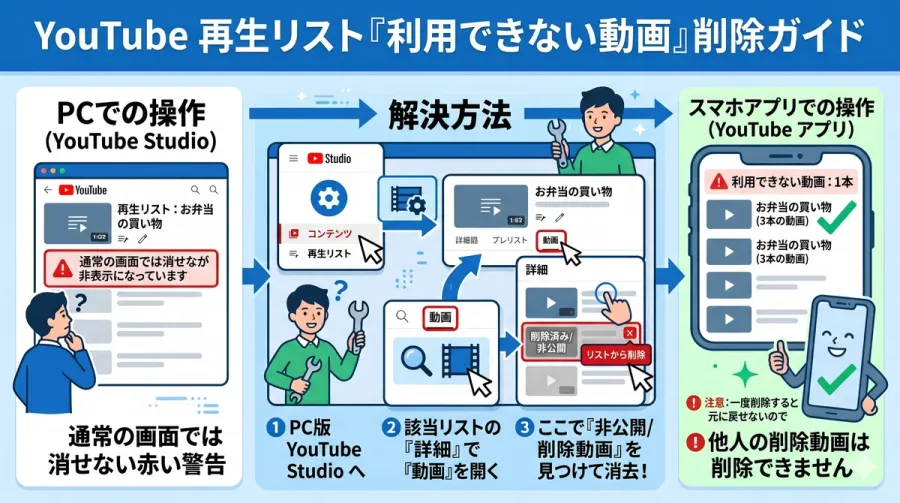
This video explains how to clear the annoying "Unavailable videos are hidden" message that appears when opening a YouTube playlist and how to organize your playlists. Since it cannot be deleted from the standard playlist screen, I explain the specific steps to open the playlist details from the "Content" screen in the PC version of YouTube Studio, find videos that have been set to private or deleted, and remove them from the list, along with actual screen operations.
-Display basic information・Title
Steps to immediately clear that annoying "Unavailable videos are hidden..." message and clean up your list
・Publication Date/LIVE Stream Date
2024/06/21
To completely remove "unavailable videos" from a playlist, you must perform the deletion from the "Videos" tab within the playlist "Details" in YouTube Studio, not from the regular screen.
-Main explanation points00:00:00 Confirming the "unavailable video" issue in playlists:
I confirm the phenomenon of the annoying "1 unavailable video is hidden" message in YouTube playlists and explain the goal of this video, which is to clear it and clean up the list.
00:01:05 Opening playlist details from YouTube Studio:
I explain the steps to select "Playlists" from the "Content" menu in the PC version of YouTube Studio and navigate to the "Details" screen of the relevant playlist.
00:02:40 Performing deletion from the "Videos" tab on the "Details" screen:
I demonstrate how to open the "Videos" tab at the bottom of the details screen, find the problematic video that has been set to private, and remove it using the "Delete" button on the far right of the list.
00:05:40 Discovering issues and future confirmation items:
I explain that I used a "video I set to private myself" for this demonstration and test, but I realize at the end that further verification is needed to see if the same steps work when someone else's video is "completely deleted," and I share this as a future task.
Unresolved issues/Pending items:
・Since this test was conducted using a "video set to private by the uploader themselves" as a simulation, verification has not been completed on whether the exact same operation can reliably remove videos from the list when a third party's video is "completely deleted along with their account" or "deleted by YouTube management due to terms of service violations, etc."
・The root cause of the specific phenomenon mentioned in viewer questions, where "the count does not match at 108 videos" (potential YouTube aggregation or display lag, or bugs), has not been identified.
Future tasks:
・It is necessary to prepare a playlist that actually contains "completely deleted videos" and conduct additional verification tests.
・Since the YouTube Studio UI changes frequently, it is necessary to provide follow-up steps tailored to the latest screens so that viewers do not get lost when the operation screen changes.
Hints for the next video:
① Alternative approaches/solutions?:
Verify and explain whether hidden/deleted videos can be removed in the same way using the YouTube app on a smartphone or the YouTube Studio app (mobile version). This is an effective approach for viewers who do not own a PC.
② Additional features, content to add/revise:
Resolution of pending items: Conduct a demonstration test to find and remove "other people's videos that have truly been deleted," which was not verified this time, and release it as a supplementary version or a Short video.
Summary of playlist organization techniques: Package and introduce "useful information for keeping playlists clean," such as utilizing the sorting function for videos within a playlist and tips for managing and organizing multiple playlists at once, in addition to just deleting "unavailable videos."
▼
Do you also have "unavailable videos" piling up in your playlists that are bothering you?
Please leave a comment with anything, no matter how small, such as "I was able to clear them out successfully using these steps!" or "The method was a bit different on a smartphone," as it will provide hints for my next video.
Also, reports like "I was able to delete someone else's completely removed videos using this method!" or sharp feedback pointing out mistakes are very welcome! Please feel free to comment.
Keywords
#YouTube #Playlist #HiddenVideos #YouTubeStudio #ContentManagement