Target Audience for This Article
Primary Audience: Engineers facing challenges with iOS app testing environments or mobile security verification environments, as well as those interested in automated testing using AI agents.
Technical Level: Primarily aimed at intermediate users, among beginner/intermediate/advanced levels.
Prerequisites: Basic concepts of virtual machines, macOS terminal operations, and familiarity with the existence of MCP (Model Context Protocol).
What You Will Gain: You will understand the structure of what vphone-cli depends on to function, and be able to judge whether it is worth incorporating into your company's testing environment from both cost and risk perspectives.
Summary
We decode vphone-cli, which boots real iOS firmware as a virtual machine on Apple Silicon Macs, using primary sources like its GitHub repository and official Apple documentation. In the first half, we organize how this mechanism originates from Apple's own Private Cloud Compute research environment and its decisive differences from the Simulator. In the middle, we break down the five firmware variants and the VM construction pipeline, and in the latter half, we cover the mechanism by which AI agents operate the virtual iPhone via an MCP server, and the non-negligible price of disabling SIP. After reading this, you should be able to distinguish this technology into 'research tools worth trying' and 'areas that should not be introduced into business operations'.
Have you ever been exhausted by Xcode's simulator? Push notifications don't arrive. Kernel-level behavior differs from real devices. Yet, keeping multiple devices for verification is burdensome in terms of both assets and management costs.
Then, a repository that gathered over 9,200 stars appeared. vphone-cli—a command-line tool that uses Apple's native Virtualization.framework to launch a real iPhone on a Mac. Moreover, the latest commit was just a few days ago. Development is currently active.
However, this isn't just an interesting story. To run it, you must manually disable the security mechanisms at the core of macOS. What is gained by going that far? Let's look at it in order.
To begin with, why does iOS run on a Mac?
PCC—The mechanism Apple released for you to 'verify'The starting point of the story lies in an article published by Apple Security Research in October 2024. Regarding Private Cloud Compute (PCC), which handles heavy processing for Apple Intelligence, Apple provided the 'Virtual Research Environment (VRE)'—a set of tools that allow you to perform security analysis of PCC on your Mac yourself—for the first time as an Apple platform.
This is important: VRE is not just for show. VRE runs the PCC node software on a virtual machine with minimal modifications; user-land software operates identically to a PCC node, and only the boot process and kernel are adjusted for virtualization. It further includes a virtual Secure Enclave Processor (SEP) and utilizes macOS's built-in paravirtualized graphics for inference.
In other words, Apple distributed a complete set of components bundled with macOS itself to 'run an iOS-based kernel on a Mac VM, complete with SEP'.
Research components turned into an iPhoneThe starting point of vphone-cli was the discovery that an unfamiliar name, VPHONE600AP, was mixed in among those components. The technical article by wh1te4ever, which the author mentions in the acknowledgments, records in detail the process of decoding the security-pcc source that Apple has released to the community. Explicitly specifying 3 for PlatformVersion and 2 for ISA in the hardware model initialization. Using AVPBooter.vresearch1.bin for the boot ROM and AVPSEPBooter.vresearch1.bin for the SEPROM. And that the resolution is fixed at 1290×2796—the same value as the iPhone 14 Pro Max and others.wh1te4ever's technical article contains a detailed record of the process of decoding the security-pcc source that Apple has released to the community. Explicitly specifying 3 for PlatformVersion and 2 for ISA in the hardware model initialization. Using AVPBooter.vresearch1.bin for the boot ROM and AVPSEPBooter.vresearch1.bin for the SEPROM. And that the resolution is fixed at 1290×2796—the same value as the iPhone 14 Pro Max and others.
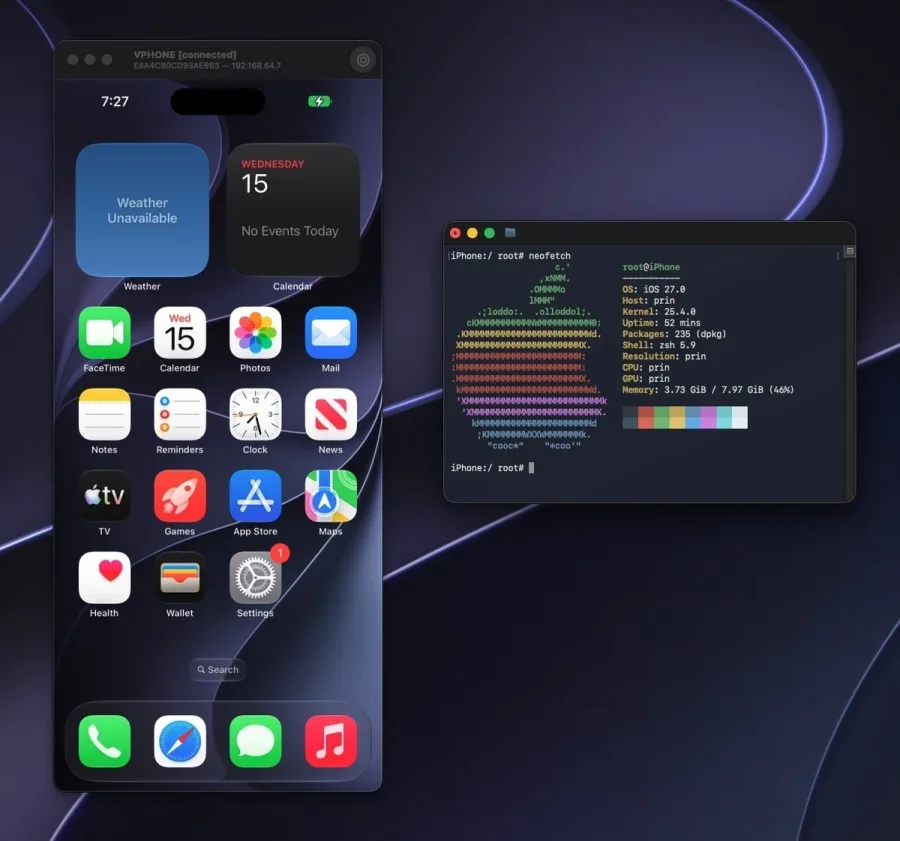
This is where it differs from the Simulator. The Simulator is a mechanism that runs iOS-oriented frameworks on top of the macOS kernel; there is no iOS kernel. What vphone-cli boots is the actual iOS kernel itself, just like on a physical device. That is the reason why neofetch in Figure 1 returns Kernel: 25.4.0.
If you open sources/vphone.entitlements in the repository, you will find the entitlement key com.apple.private.virtualization.security-research included. It is simply walking through a door that Apple prepared for researchers—that is the whole composition, but I think the interesting point is that someone noticed there was a door they could walk through.
5 variants—How far should you remove iOS's defenses?
vphone-cli is often introduced as a 'jailbreak tool,' but that is not accurate. It is designed to allow you to choose the strength of the patches from five levels, and the weakest one, 'less,' leaves the iOS defense mechanisms almost entirely intact.
variantboot chainCFWcontentless4 patches2 phasesKeep iOS mitigations enabledregular42 patches10 phasesBypass AMFI / SSV / Img4 / TXMdev53 patches12 phases+ TXM privilege/debug bypassjb113 patches14 phases+ Full jailbreak (auto-install Sileo/TrollStore on first boot)exp141 patches18 phasesSuperset of jb + research patches to bypass VM detection\beginarrayl \hline \textbfvariant & \textbfboot chain & \textbfCFW & \textbfcontent \\ \hline \textless & \text4 patches & \text2 phases & \textKeep iOS mitigations enabled \\ \hline \textregular & \text42 patches & \text10 phases & \textBypass AMFI / SSV / Img4 / TXM \\ \hline \textdev & \text53 patches & \text12 phases & \text+ TXM privilege/debug bypass \\ \hline \textjb & \text113 patches & \text14 phases & \text+ Full jailbreak (auto-install Sileo/TrollStore on first boot) \\ \hline \textexp & \text141 patches & \text18 phases & \textSuperset of jb + research patches to bypass VM detection \\ \hline \endarray
This table is based on the information in the README. However, AGENTS.md in the same repository lists different numbers, with 52 for 'regular' and 127 for 'jb,' leaving a discrepancy due to update timing. It is not something to get worked up about, as it is proof that the implementation is active, but it is worth remembering that 'primary source' does not always mean 'always consistent.'
It becomes easier to choose if you think about the use cases separately. Use 'less' when you want to see behavior with iOS defenses active. Use 'dev' when you want debugging privileges. Use 'jb' when you want to get root via SSH and freely explore the file system. Use 'exp' when you want to investigate the behavior of apps that detect 'this is a virtual machine.'
If you follow the contents of 'exp' in the research/ directory, you will see patches that rewrite the sysctl name kern.hv_vmm_present, and patches that rewrite the 'am I a VM?' flag held by watchdogd with two instructions. I think it is a merit of this repository that it concretely shows that VM detection avoidance is work at this level of granularity.
What happens inside vm create
The command itself is disappointingly short.
vphone-cli vm create myphone -V jb
vphone-cli vm launch myphone
Running behind this single line are the following five stages.
There is a clear philosophy behind how the patching process is built. AGENTS.md explicitly states, 'Do not hardcode file offsets, virtual addresses, or pre-assembled instruction byte sequences in the kernel patcher.' Instead, it identifies locations dynamically using string anchors, ADRP+ADD references, or the frequency of BL occurrences, disassembles them with Capstone, and writes them back with Keystone. An operation that requires manually tracking offsets every time an iOS build is updated is unsustainable to begin with.
You can see that this design is effective by looking at the list of tested environments. There are 18 combinations listed, from iOS 18.6.2 to 27.0 beta builds. The reason it can keep up every time a beta version of iOS is released is that the patches search for locations based on 'meaning.'
By the way, installation is also available via Homebrew tap. Since you can skip the entire build process, this is faster if you just want to try it out.
brew install zqxwce/tap/vphone-cli
This is where the real topic begins—letting AI agents operate it
Near the end of the README, under the unassuming heading 'Automation,' is the topic I most want to cover in this article. vphone-cli exposes a socket for host control (<bundle>/vphone.sock), allowing you to manipulate screenshots, touch, swipes, hardware keys, and the clipboard from a program. Moreover, since each action returns a screenshot inline, it can be used for AI-driven E2E testing—or so it says.
pluginslab/vphone-mcp is what wraps that socket in an MCP server.
The design choice I found most clever is that the returned images are compressed to grayscale at around 20–30 KB. If full-color screenshots were sent back every turn, the context would be filled in just a few moves. The decision to compress while keeping only the information necessary for judgment is effective.
The mechanics of MCP itself and how to connect directly to an MCP server from the Claude API are explained in detail in my previous article, 'Claude's MCP Connector Feature: A New Way to Connect Directly to Remote Servers from an API'. This article does not delve into the basics of MCP, so reading that first should help you understand the connection part more quickly.
The tools published by vphone-mcp are broadly divided into four groups.
Hardware keys: You can trigger the Home button, power, and volume up/down.
Screenshot: Captures the VM screen and embeds it as an image in the response.
Pre-mapped navigation: You can launch apps by name, such as open_app("Settings"), and calling the Control Center, Notification Center, or App Switcher takes only one tool.
Raw operations: tap(x, y) and swipe(...). Coordinates are specified in 1290×2796 actual pixels.
The open_app command supports 18 apps: FaceTime, Calendar, Photos, Mail, Notes, Reminders, Clock, TV, Games, App Store, Maps, Health, Wallet, Settings, Phone, Safari, Messages, and Music. By pre-loading the positions of standard apps, the agent can skip the entire 'searching for icons' phase. It's subtle, but it's effective in terms of reducing the number of trial attempts.
As an aside, the vphone-cli repository contains AGENTS.md (CLAUDE.md is a symbolic link to it) and a skills/ directory, where even the kernel analysis procedures are structured for AI. How to design this type of configuration file is a theme in itself. The concepts covered in 'The Complete Guide to Everything Claude Code Part 4: Full Understanding of Rules' will serve as a direct reference.
Differentiating from Simulators and Device CloudsSo, how do we position this in practical work? Here are three options.
観点Xcode Simulatorvphone-cli商用の端末クラウドiOSカーネルなし実機と同じもの実機または専用基盤root権限該当なしjb / dev で取得可提供状況による従量コストなしなし(ローカル完結)時間・セッション課金ホストへの改変不要SIP・AMFIの緩和が必須不要業務利用の可否問題なし要検討(後述)契約に基づく\beginarrayl \hline \textbf観点 & \textbfXcode Simulator & \textbfvphone-cli & \textbf商用の端末クラウド \\ \hline \textiOSカーネル & \textなし & \text実機と同じもの & \text実機または専用基盤 \\ \hline \textroot権限 & \text該当なし & \textjb / dev で取得可 & \text提供状況による \\ \hline \text従量コスト & \textなし & \textなし(ローカル完結) & \text時間・セッション課金 \\ \hline \textホストへの改変 & \text不要 & \textSIP・AMFIの緩和が必須 & \text不要 \\ \hline \text業務利用の可否 & \text問題なし & \text要検討(後述) & \text契約に基づく \\ \hline \endarray
Looking only at the cost aspect, it seems overwhelmingly advantageous. Even if you run 100 sessions, the price doesn't change. However, do not take the fourth row of this table lightly.
The Price to Pay—Disabling SIP
As a prerequisite for running vphone-cli, the README presents two options.
Option A involves executing csrutil disable in recovery mode to completely disable SIP (System Integrity Protection), additionally allowing research guests with csrutil allow-research-guests enable, and after rebooting, setting the boot argument amfi_get_out_of_my_way=1 to stop AMFI (the code signing verification mechanism). While it is the easiest to get through, it is also the most defenseless.
Option B involves loosening SIP only for debugging parts with csrutil enable --without debug and adding only this binary to the allowlist using the included vphone-amfidont. AMFI remains enabled for the entire system.
I will state my personal opinion. I do not recommend doing this on a Mac used for daily tasks. SIP and AMFI are the last lines of defense that macOS has against malware. Reading work emails and carrying credentials for internal repositories on a device where these are disabled—the risk and return do not balance out. If you are going to touch it, isolate one machine specifically for verification. If you compare the price of one used M1 mini to the damage caused if something happens to your main machine with SIP disabled, you should have your answer.
There are other constraints as well. It will not work if the host itself is a virtual machine. Since PV=3 guest booting cannot be nested, a physical macOS 15+ host is required. Mac instances on the cloud, which are often used in CI environments, are highly likely to be excluded from consideration at this point.
And then there is the legal side. Since this involves modifying iOS firmware and bypassing Apple's software signature verification, it is not self-evident how this relates to Apple's Terms of Service or the handling of technological protection measures under Japanese copyright law and the Unfair Competition Prevention Act. This is not an area where I can provide a definitive conclusion, so if you are considering business use, please consult your legal department or a specialist. The fact that the tool's license is MIT and the fact that its usage is legal are two different things.
Pitfalls you are likely to encounter
The README's FAQ contains the actual footprints left by the developer in the field. I will pick up a few.
(1) If you select Japan during initial setup, system apps will not be installed. This was a surprise. It is said that if you select Japan or the EU as the region during iOS setup, additional regulatory checks that the VM cannot satisfy will run. The workaround is to 'select the United States or similar.' This is a trap that Japanese users are highly likely to fall into first, so it is worth knowing in advance.
(2) zsh: killed ./vphone-cli. This is a case where AMFI or debugging restrictions have not been bypassed. Return to the aforementioned boot arguments or amfidont settings.
(3) cfw install freezes during the re-signing of specific system binaries, and memory usage increases indefinitely. The cause is identified in the README as a bug in the ldid-procursus 2.1.5 series distributed in Homebrew's stable channel. builtin_clzll(0) without zero-guard causes undefined behavior, and a length of 0 underflows in an unsigned loop counter—it seems this happens just by having an integer value of 0 in the entitlement plist. It has been fixed upstream but is not in the tagged release, so you need to rebuild from source using brew install --HEAD ldid-procursus.
There are not many documents that write down not just the symptoms but the causes for bug reports. I think this one item alone conveys the temperature of the repository.
Summary
Let's organize this.
vphone-cli is viable because Apple bundled a set of components for virtualizing the iOS kernel into macOS to ensure the transparency of PCC. In other words, this is not a product of exploiting a vulnerability, but a product of passing through an open door for a different purpose. That is why it has been able to keep up even with the iOS 27 beta, and conversely, there is always a possibility that it will stop if Apple closes the door—that is something you should factor in.
As a practical conclusion, this is how I see it: if you have a requirement to entrust iOS app UI testing to an AI agent and want to verify it including the behavior of the actual device kernel, I see nothing close to this other than commercial services at the moment. The fact that there is zero pay-as-you-go cost is also compatible with agent operations that want to increase the number of trial attempts.
However, if you are going to introduce it, do so on an isolated machine dedicated to verification, and only after getting legal confirmation. Skipping these two steps and incorporating it into a production workflow is too high a risk for what you get.
What to do first? Before disabling SIP, take a look at the list of tools in the README of pluginslab/vphone-mcp. See if your test scenarios can be expressed by a combination of those dozen or so tools. That should be the deciding factor.
References and Materials Used
Lakr233/vphone-cli (GitHub, MIT License) — README, AGENTS.md, documents under research/, sources/vphone.entitlements, LICENSE. The image in Figure 1 is also docs/demo.jpeg from this repository.
pluginslab/vphone-mcp (GitHub, MIT License) — List of tools and configuration diagrams for the MCP server.
Apple Security Research "Security research on Private Cloud Compute" — Explanation of the Virtual Research Environment. Figure 2 is a citation of the official Apple diagram published in the same article.
Apple Security Research "Private Cloud Compute: A new frontier for AI privacy in the cloud" — PCC design philosophy.
wh1te4ever/super-tart-vphone-writeup (GitHub) — Analysis record of VPHONE600AP series components.
Star count (9.2k), fork count (1.3k), and commit count (369) are based on the GitHub repository page display as of September 8, 2026.
Related Articles
Claude's MCP Connector Feature: A New Way to Connect Directly to Remote Servers from APIs
Everything Claude Code Complete Guide Part 4: A Complete Understanding of Rules
If you found this article helpful, please give it a like❤️ or leave a comment! If you have any questions, feel free to ask in the comments section.
Innovating your business with technology
Thank you for reading this article. Are you worried about issues like "I want to build a system, but the initial investment is too high" or "I want to develop an IoT product, but I'm anxious about both the technology and the costs"?
✨ Develop SaaS with 0 yen initial cost. PonoTech's Micro-SaaS ServiceWe at PonoTech Co., Ltd. will develop a custom SaaS for you with 0 yen initial cost.
Features of Micro-SaaS Development
0 yen initial cost: Free development of web apps, mobile apps, and desktop apps
Provided via monthly subscription: Start using it with a monthly fee based on the features you need
Buyout option: You can also purchase the system as your own company asset while using the subscription
This is the optimal solution for companies that think, "I want a custom SaaS for my company, but a multi-million yen initial investment is tough."
IoT Contract Development × Subsidy Utilization to Support ManufacturingWe can handle everything from hardware to software development. We realize the construction of IoT systems with up to 66% cost reduction by utilizing subsidies.
Reduce system development costs by utilizing subsidies
As an IT introduction support provider certified by the Ministry of Economy, Trade and Industry, we provide the following services one-stop.
Subsidy diagnosis and application support: We propose the optimal subsidy with a track record of an 82.8% adoption rate
Consistent support from requirements definition to development: A development structure that is 100% compliant with subsidy requirements
Labor-saving subsidies, manufacturing subsidies, etc.: Support for utilizing subsidies of up to 80 million yen
The image generation AI book 'ComfyUI Master Guide,' co-authored by our representative Yasuhiro Hayano, who possesses deep expertise in AI technology, was released by SB Creative on May 9, 2025. If you want to understand the forefront of AI image generation, please take a look.
Ideal for companies facing these challenges“I want a dedicated SaaS, but I want to keep initial investment low”
“I want to develop an IoT product, but I need expertise in both hardware and software”
“I want to utilize subsidies, but I don't know how to apply”
“I want to start with a subscription and buy it out if necessary”
Micro SaaS Development: Build a dedicated system with 0 yen in initial costs
IoT Contract Development: Consistent support from hardware to software
Subsidy Utilization: Reduce development costs by up to 66%
Please take advantage of our free initial consultation. Let's think about your company's growth strategy together from both technical and management perspectives.
Click here for inquiries to Ponotech Co., Ltd.!
▶ Take the first step to accelerate growth with technology
— Creating the future with technology. Ponotech Co., Ltd.