Hello, I am Katsuya Ohno (@ohno_katsuya).
I work as a "solopreneur," launching and operating businesses on my own. My basic style is personal development, where I handle everything from planning to coding myself.
I am writing this article for those who arrived here by searching for "Chatwork thread".
To give you the main point first, as of the time of writing this article, Chatwork does not have a thread feature. And as a result of being troubled by that "lack" every day, I created a Chrome extension to retroactively add thread display to Chatwork.
Why did I develop it, and what can the extension do? In this article, I will summarize it as a record of my personal development.
Conclusion | Chatwork does not have a thread feature
First, I will answer your search intent directly.
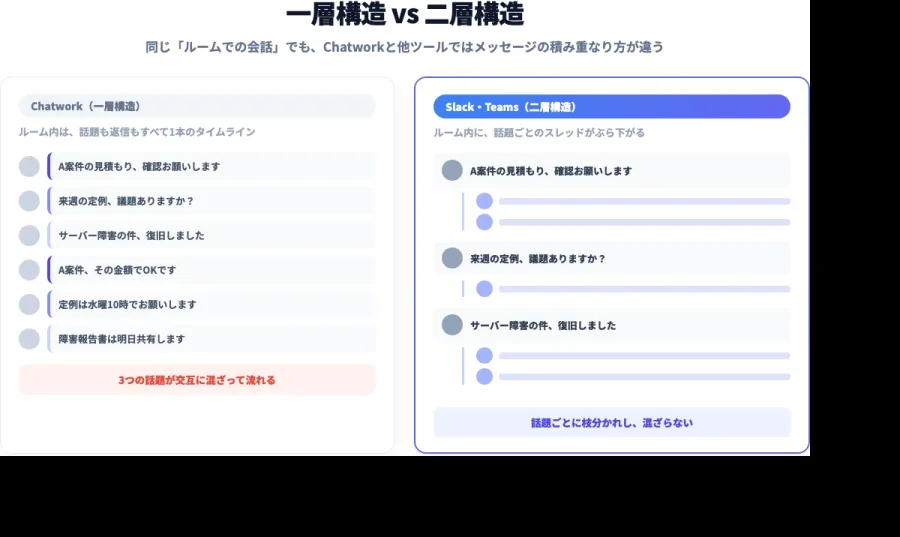
As of the time of writing this article, Chatwork does not have a thread feature. Neither "thread display", where conversations branch off from specific messages like in Slack, nor "channels", which separate spaces by topic, exist as standard features.
What Chatwork does have is a "reply" feature. However, this only attaches a link to the original message; it does not display conversations in a branched format. All messages, including replies, are stacked chronologically in a single timeline.
If we organize the structure, the difference is as follows.
Slack/Teams: A "two-layer structure" where threads for each topic branch off
Chatwork: A "single-layer structure" where the room is just one timeline
This single-layer structure is the root cause of the "buried" and "flowing away" problems I will mention later.
To avoid any misunderstanding, Chatwork is a standard domestic business chat tool adopted by 1 million companies in Japan (as of the end of June 2026). It is widely used even in workplaces not familiar with IT precisely because its features are simple. This is a clear strength.
On the other hand, the keyword "What are the drawbacks of Chatwork?" is frequently searched on search engines. I see this as a sign that there is a certain amount of dissatisfaction with the inability to structure topics, which is the flip side of its simplicity.
For those who just want to know the solution first, details and free registration for "Threadwork," the Chrome extension I created, are summarized at https://threadwork.jp.
Background of creation | I was troubled every day by Chatwork being specified by business partners
This is where the main topic begins. Why did I go as far as to create a Chrome extension myself?
The trigger was not some grand story, but the small stresses that accumulated in my daily interactions. I will write about it in order.
Teams for internal use, Slack for external. But for advertising agencies, it's ChatworkMy usual means of communication is Microsoft Teams for internal matters and Slack for external partners. Both are tools based on a culture where conversations are separated into threads by topic.
However, only my interactions with advertising agencies (ASPs) were mandated to be on Chatwork.
The difficult part of external communication is that the other party decides which tool to use. It's not always a relationship where I can suggest, "Why don't we use Slack?" and basically, I have no choice but to comply with their requirements.
If a business partner says Chatwork, I use Chatwork. It's not a matter of preference; that's the reality.
And I'm sure this isn't just my story. People who primarily use Slack or Teams are forced to use Chatwork due to the requirements of business partners. This pattern happens daily in many companies.
All topics flow into a single timelineIn rooms with agencies, topics such as the progress of multiple projects, numerical reports, confirmation of billing matters, and consultations on new measures all flow into the same timeline.
When I try to reply in the afternoon to an important confirmation item that arrived in the morning, dozens of exchanges about other projects have been inserted in between. I have to scroll back and start by reconstructing the context, "What was this a reply to again?"
Multiple topics are mixed into a single line, and information gets buried. This is the most obvious symptom caused by the absence of a thread feature.
"Buried" and "flowing" are similar but differentI noticed this while observing the problem: "buried" and "flowing" are slightly different phenomena.
Buried: The total volume of messages increases, and they sink into the accumulation, becoming impossible to find. A problem of "searchability" when looking for things later
Flowing: Being pushed by new arrivals on other topics and being swept away into the past. A problem of "speed" when trying to keep up in real-time
If there is only one timeline, these two things happen at the same time. Even if you try to refer to them later, they are buried and cannot be dug out, and even if you follow them in real-time, they flow away and you lose track of them.
In fact, the low searchability, which makes it difficult to refer to past exchanges later, was the part I felt most stressed about in my operation of Chatwork.
Creating rooms for each topic leads to the "group mass production problem""If topics get mixed up, I should just separate the groups (rooms) by topic." When I think that and put it into practice, another problem arises.
As I create new rooms for each project and each agenda, the list of rooms keeps expanding. Inviting members, setting notifications, and cleaning up rooms for finished projects. Management costs only increase.
I call this the "group mass production problem." When you try to solve the mixing of topics by the number of rooms, the cost of organization outweighs the benefits of organization.
I'm not the only one | The same complaints on review sites and Q&A forumsThese same complaints aren't just limited to my circle.
Looking at SaaS review sites, while Chatwork has high ratings overall (approximately 1,980 reviews on ITreview with an average of 3.9/5.0), "it's hard to reach the intended information even when searching past interactions" and "the longer you use it, the harder it is to find past conversations" are common sentiments.
On BOXIL, reviews such as "It would be even better if it could manage threads" and "I'm dissatisfied with how hard it is to follow past conversations" (all rated 3 stars) have been posted with those exact titles.
On Yahoo! Chiebukuro, questions like "Since Chatwork can't manage hierarchies (threads)..." are raised, and "Chatwork is hard to use" is also frequently searched.
Even for highly-rated tools, the dissatisfaction with "not being able to structure topics" is deep-rooted. The challenge I felt was common to many users.
How far can you go with standard features? | The limits of the reply (RE:) function
Before deciding to build it myself, I tried all the workarounds possible with Chatwork's standard features. I've organized them here for those who share the same struggle.
Workarounds per message | TO, quoting, pinning, bookmarking, and task creationTO (recipient designation): Specify the person to send a notification. The basic way to prevent oversight
Quoting: Quote the original statement in your reply. Makes it easier to understand which topic you are responding to
Pinning: Fix important messages to the top of the room
Bookmarking: Mark messages you want to read later and list them
Mark as unread: Return read messages to an unread state to prevent missed responses
Task creation: Convert messages into tasks with assignees and deadlines
Search: Find past logs using keywords
These are all useful features. Especially when using quotes and TO together, you can clearly specify "who it is for and what the topic is."
Workarounds per room | Room splitting and categorization (effectively folder management)Room splitting: Separate group chats by project or topic
Categorization: A feature to organize the room list by category. Can be used as effective folder management
As the number of rooms increases, I organize the room list like folders by using categories. Doing this makes the appearance much cleaner.
However, none of these solve the clutter 'inside the rooms'.To be honest, I will write this: even after doing all of that, the root cause was not solved.
The reason is clear: these are all features based on 'room units' or 'individual message units'.
Both pinning and bookmarking are features for picking up important individual items, not for bundling the flow of conversation by topic. Categorization (folder organization) organizes the list of rooms, not the timeline inside the rooms.
Operational workarounds are merely symptomatic treatments and cannot reach the root cause, which is the single-layer structure. After confirming this, I changed my approach.
If it doesn't exist, build it: Personal development of the Chrome extension 'Threadwork'
I cannot control whether or not a thread feature will be added to Chatwork itself. But if it is the screen displayed in my own browser, I can change it myself.
So, I created a Chrome extension for Chatwork called 'Threadwork'. It was a personal project, and I handled everything from design to implementation myself.
Displaying conversations connected by replies as threadsThreadwork traces the connections of messages linked by Chatwork's reply function and displays them as a single bundle of conversation threads.
Exchanges that were scattered across a single timeline can now be followed as topic-based groups, such as 'discussions on the progress of Project A' or 'discussions on invoice confirmation'. It is like reading Chatwork conversations with a feel similar to threads in Slack or Teams.
Categorizing topics with channelsIn addition to thread display, I added the concept of 'channels', which does not exist in Chatwork, as an add-on.
By separating topics within a room using channels, you can organize conversations by project or agenda. If categorizing the room list is 'folder organization for rooms', then channels are 'folder organization within the timeline'.
With this, I can now separate topics within a single room without having to mass-produce rooms. This is my answer to the group mass-production problem.
The other party just uses Chatwork as they always haveThis is the point I was most particular about in the design.
Threadwork is a Chrome extension that reorganizes the Chatwork screen on your own browser side.
There is no need for the other party to install anything or change how they use the tool. They just use Chatwork as they always have, and the only thing that changes is your own screen.
Furthermore, replies written in threads are delivered as regular messages to the other party's Chatwork, even if they haven't installed the extension.
On your screen, they are grouped as threads, while on the other party's screen, they appear as individual messages in the usual timeline. Even if only you have installed it, the conversation proceeds normally.
Since we are using Chatwork because it was specified by our business partners, the option of modifying the other party's environment was never on the table.“Completing it entirely on my side” was a prerequisite before it was even a feature.
Other things you can do | Unread list, task creation, and bookmarksThe core features are thread display and channels, but as I used it myself every day, I added things that I felt I couldn't function without.
Unread thread list: Consolidates new replies addressed to you in the sidebar. You can see at a glance which threads have received responses.
Task creation: You can create native Chatwork tasks directly from thread replies. You can return to the original conversation from the task with a single click.
Bookmarks: You can mark messages you want to look back on later and jump to that location from a list.
All of these are aids for “following topics” and “retrieving information.” The center of it all remains the thread display and channels.
What you can do | Changes seen in Before/After
My Chatwork environment changed like this before and after installing Threadwork.
Before (Standard Chatwork)
Multiple topics are mixed in a single timeline, making it “impossible to tell what is being discussed.”
Important exchanges are pushed away by new messages on different topics.
Every time I look for past exchanges, I have to repeat scrolling and searching.
If you want to separate topics, you have no choice but to create new rooms, leading to a proliferation of rooms.
After (After installing Threadwork)
Conversations connected by replies are displayed as threads, allowing you to read them by topic.
You can follow only the topics you want to keep up with without them being washed away.
When referring back to things later, you can just follow the bundle of threads.
You can categorize topics by channel without having to increase the number of rooms.
The time spent endlessly "reading" the timeline has decreased, and it has changed to a feeling of "accessing" the necessary topics. This was the biggest change I felt.
How to use | General flow of introduction
The distribution method for Threadwork may change in the future. Therefore, in this article, I will only show the general flow of introduction rather than detailed steps.
Register for use from the official website (threadwork.jp).
Follow the instructions to add the Chrome extension to Chrome.
Once linked, you can use thread display and channels on the Chatwork screen.
The latest release status, detailed usage, and installation steps are provided at threadwork.jp. If you are interested, please take a look there.
What is a thread in the first place? | Organizing the difference from chat
I will take a moment here to organize the terminology. This part is for those who are not familiar with the word "thread" itself.
What is a thread? "A bundle of conversations by topic"A thread is a collection of replies to a specific topic, starting from a single message. The word comes from the English word "thread," and the image is that one topic connects like a single string.
The "threads" on bulletin boards, as well as the threads in Slack and Teams, are essentially the same. It is a mechanism to prevent topics from getting mixed up by bundling conversations by topic.
Difference between chat and threadsChat and threads are not opposing concepts; they just have different axes of organization.
Chat: A mechanism that arranges statements in "chronological order." The tempo is fast, but topics get mixed.
Thread: A mechanism that bundles statements by "topic." Context is maintained, and it is easy to refer back to later.
Slack and Teams are designed to balance the speed of chat with the organization of threads.
Chatwork is designed specifically for chronological chat, and the role of Threadwork is to add a layer of threads to that.
Why I built it as a solo project | The basic actions of a solopreneur
Finally, let me talk a little bit about myself.
I previously launched and grew the factoring comparison media site "Factlog" on my own, and sold it for over 200 million yen. Looking back, I feel that my work has always been about "finding problems and solving them with systems."
The strength of a solopreneur is the speed of decision-making. There are problems I face every day, and I try every existing solution, but they still don't work. So, I build it myself. Since I don't need approval or consensus, I can start development the day I think of it.
And one more thing. The things I struggle with every day are usually things that others struggle with too.
People who are forced to use Chatwork by their business partners and feel stressed by the gap compared to Slack or Teams.
People who are tired of topics getting buried, flowing away, and searching through the timeline. Given the scale of 1 million companies using it domestically, there must be quite a few people in the same situation as me.
Being able to convert the resolution of my own struggles as a single user directly into a product. I believe this is the greatest strength of personal development.
Frequently Asked Questions
What is the thread feature in Chatwork?As of the time of writing this article, there is no thread feature in Chatwork's standard functionality.
There is a reply function, but conversations are not displayed as branches; all messages are lined up chronologically in a single timeline.
If you want to use thread display, there is a way to add it later using a Chrome extension like Threadwork.
What is the difference between chat and threads?Chat is a mechanism that arranges statements chronologically, while threads are a mechanism that bundles statements by topic. While chat allows for fast-paced conversation, it is easy for multiple topics to get mixed up.
Threads have the advantage of being strong for later reference and review because the context is maintained for each topic.
What is a chat thread?A thread in a chat tool is a feature that displays replies to a specific message as a group, starting from that message.
It is standard in Slack and Microsoft Teams and has become established as a basic feature to prevent topics from getting crossed.
Since it is not included in Chatwork at the time of writing this article, I added the same experience later using a Chrome extension.
How do you separate topics in Chatwork?Standard features include methods for separating group chats (rooms) by topic and organizing the room list by categorizing (folder sorting) them.
However, both of these are for organizing at the room level and cannot solve the issue of mixed topics within a single room. If you want to separate topics even within a room, it is practical to use an extension that adds thread display or channels.
Summary | Even if you can't choose the tool, you can choose the screen
Finally, here is a summary of the main points of this article.
As of the time of writing this article, Chatwork does not have a thread feature. All it has is a single timeline and a reply function
Because of this, multiple topics get mixed together, leading to problems like messages getting buried, flowing away, being impossible to find later, and the proliferation of rooms
Standard features like TO, quoting, pinning, and categorization (folder sorting) are effective for organizing outside of rooms. However, they do not solve the mixing of topics inside a room
I personally developed the Chrome extension 'Threadwork' and solved this by adding thread display and channels. The other party can just keep using Chatwork as they always have
You cannot change the tools specified by your business partners. However, you can decide for yourself how that tool is displayed on your own screen.
If you cannot change the environment, you should change how you view the environment. 'If it doesn't exist, build it' is my basic operating principle as a solopreneur.
The latest information on Threadwork is available at threadwork.jp . I hope this is helpful for those who share the same problem. I also share information about my personal development and activities as a solopreneur on X (@ohno_katsuya), so please take a look if you'd like.