I have received and will be reviewing the Mudra Link, a "neural wristband" that detects hand gestures using electromyography (EMG) sensors and an inertial measurement unit (IMU). The Mudra Link is a product that the Israeli company Wearable Devices Ltd. began accepting pre-orders for around the fall of 2024, and it is currently sold on their official website for 299 USD (with a discounted price of 199 USD).
* I do not own the previous product, the Mudra Band, nor have I tried it, so I will not be making comparisons with the Mudra Band.
* I will only mention features available as of March 2025. While the Mudra Link claims to have features such as seven types of gestures and Gesture Mapping, many of these are currently unimplemented and are scheduled for release in the future.
TL;DR
-
Pros
Realizes the futuristic gesture interface that sci-fi fans have dreamed of
Lightweight and comfortable to wear, making it unobtrusive even when worn all the time
Mouse mode is smooth and provides a good experience
Versatility. It acts as a Bluetooth-connected mouse/keyboard, and a dedicated client is not required
-
Cons
Not enough gesture types for serious computer operation
Requires significant arm movement, which is tiring (especially with default settings)
Finger gesture operation is sometimes unstable, making fine button control difficult
The button to switch inputs is small and hard to press, despite being important and frequently needed during use
Depending on your physique, it may be difficult to keep the sensors in close contact with the skin
Lack of haptic feedback. In many cases, you can only tell if an operation was successful visually
This is a device in a new field, and while it has futuristic aspects, it also has many imperfect parts; however, for those who love new gadgets, I think it delivers the experience you were looking for.
Packaging and Contents
I purchased the Mudra Link in late October 2024, and it was scheduled to ship in January 2025. Shipping to Japan was 35 USD.
Ultimately, the device arrived in mid-March.
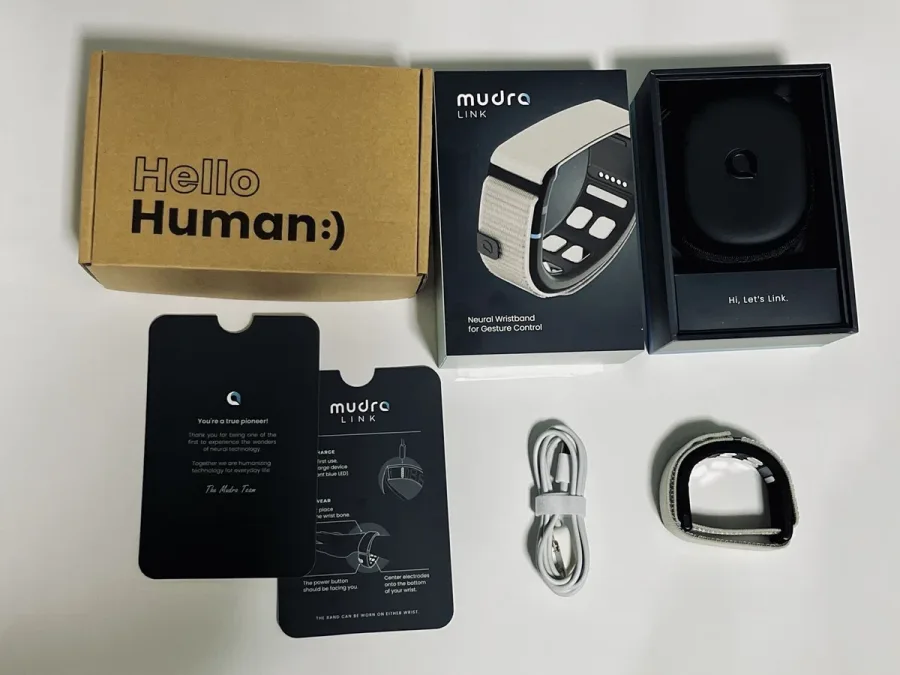
Inside the box were the Mudra Link unit itself, a carrying case, a dedicated charging cable (proprietary connector to USB Type-C), and two instruction cards. The instruction cards contain important information, so be sure to read them.
The band is made of soft silicone rubber, with electrodes for electromyography (EMG) measurement on the inside.
Various certification marks are printed on the back of the product box and on the part of the unit covered by the band. It has also properly obtained Japan's Technical Conformity Mark (Technical Standards Conformity Certification).
Comfort and Fit
The first thing that impressed me was how thin and light the device is. You need to tighten the band so that it makes firm contact with your skin for the sensors to work, but if you adjust it carefully, there is no pain or discomfort.
The weight of the Mudra Link unit (including the band) was approximately 33 g. It is even lighter than an Apple Watch and has no protrusions, so it can be worn at all times. However, the main unit with the electrodes is not breathable, so you need to be careful about sweat.
For me, there are no issues with the fit, but it might be difficult for people with particularly thin wrists. Since the sensors must be in close contact with the skin, it may be difficult to use for those whose physique leaves excess room in the standard band.
Setup and Tutorial
Install the client software for Windows or macOS from the official website.
Follow the on-screen instructions to create a Mudra account, pair the device via Bluetooth, perform firmware updates, and put it on. There are guide videos, but since there are not many complex tasks, you might be fine without watching them.
* As noted in the video, on a Windows PC, you may need to change the Bluetooth discovery setting to 'Advanced' in your Bluetooth settings, otherwise the Mudra device might not appear as an option.
In the tutorial, you can practice the basic operations of the two modes available on the Mudra Link (Mouse mode and Keyboard mode).
Mouse modeallows you to move the cursor, tap (click), and pinch & hold (drag).
Keyboard modeallows you to perform four types of key inputs (up, down, left, right) using pinch & hold.
Once you finish the two tutorials, the dashboard screen becomes available. Here, you can configure input settings and visualize sensor measurements.
In the Control Settings tab, you can change the movement speed of the mouse pointer. Personally, I recommend increasing it slightly so you can move your arm through a smaller angle.
Usability
When you turn on the power, the Mudra Link enters standby mode for Mouse mode. Cursor movement is quite smooth thanks to the built-in IMU. To tap, you need the EMG sensor to detect the finger-pinching motion, but this might require some practice. In my case, I found it more stable to click by touching the first joints of my thumb and index finger together rather than the tips.
Many people have likely seen characters in various sci-fi movies, such as 'Minority Report' or 'Iron Man 2', manipulating images in the air by waving their hands or pinching with their fingers.The Mudra Link makes air gesture control a reality on your own PC.Trying out the features one by one in the tutorial was a very fun experience.
As with many cutting-edge gadgets, the Mudra Link is not without its flaws.
First, while cursor movement is intuitive, it is difficult to aim at and click small buttonswhile waving your arm in the air. Even with practice, taps and pinches do not succeed every time. Also, since the Mudra Link lacks haptic feedback, you can mainly tell if an operation was successful only by visual changes (or lack thereof) on the screen.
Although cursor movement using the IMU works well, its position gradually changes due to drift. This means that the correspondence between the actual direction of your arm and the position of the cursor on the screen is constantly changing.This does not happen with interfaces that can measure the absolute position of the hand, such as the Meta Quest series, so while it is unavoidable given the measurement principle, it is one of the drawbacks of the Mudra Link.
Note that if the cursor drifts so much that you cannot operate it, you can return it to a comfortable position by moving your arm while holding the cursor against the edge of the screen. This does mean you have to wave your arm around more to achieve the desired operation.
The third complaint I have about the Mudra Link is that the button on the outside of the band is hard to press.This button has the function of turning the power on/off as well as switching modes (exiting standby mode, or toggling between Mouse mode and Keyboard mode). When you switch to standby mode, no mouse or keyboard input is sent to the PC until you exit it. However, the button has a short stroke and is located on the surface of the soft band, making it feel quite difficult to press.
In a gesture input device, standby mode is extremely important. The Mudra Link is always on your wrist, measuring hand movements. If you forget to switch to standby mode and go to pour a drink or reach for something on a shelf, the Mudra Link will reflect those movements as mouse cursor actions on your PC. When you return, you might find several unnecessary windows open, or unfortunately, your work data might have been deleted. Therefore, you must be in standby mode whenever you are not intentionally using the Mudra Link, which means you will be operating the toggle button frequently.
However, the difficulty of pressing the buttons on the band hinders smooth usage (though it has the advantage that it is unlikely for the buttons to be pressed accidentally by your arm hitting something). Aside from the buttons, I think it would be more comfortable if some specific gesture could be used to switch to standby mode.
Using Mudra Link on a PC
After spending a few minutes having fun pretending to be in a sci-fi movie with the Mudra Link, I returned to operating my PC with the mouse on my desk and reaffirmed how comfortable and accurate mouse input is. If you need to sit at a desk to send emails or write documents, and you have a mouse and keyboard in front of you, it is probably best to use the interface you are accustomed to.
I have to say that the types of gestures provided by Mudra Link are currently insufficient for serious computer operation. For example, consider using Mudra Link for web browsing. You can move the cursor and click links. However, I noticed that since mouse mode does not have input equivalent to a wheel, you cannot scroll with that alone. You can scroll if you switch to keyboard mode, where the up and down arrow keys are available, but you have to frequently press the band's buttons (which are hard to press).
According to support information, Reverse Pinch, Twist, and Double Twist will be added in the future. If all goes well, it will become more practical for simple PC tasks.
If Mudra Link cannot be used for serious PC work, what about uses where simpler input is sufficient?
Using it as a presentation remote seems like a good idea. Instead of a handheld remote to advance or go back pages while presenting away from your PC, you can use Mudra Link (in keyboard mode). The audience will be surprised to see you controlling slides without holding anything in your hands (another likely scenario is that everyone is staring at the screen or their smartphones and it ends without them noticing).
However, there is a challenge with accurate operation because moving your hand too vigorously results in multiple key inputs. It would be nice to be able to choose whether or not to allow repeated key inputs as an option.
Alternatively, it would be good to use it for operations like playing/pausing or selecting videos while sitting on the sofa watching YouTube. You can operate it from a relaxed posture, away from the mouse and keyboard.
It is also suitable for simple games that can be played with just mouse clicks (the Mudra Link client software recommends a few). Simple browser games evolve into an interactive experience.
Using Mudra Link on a smartphone
One of the things I like about Mudra Link is its versatility. Setup requires dedicated software, but once that is done, you can connect to various devices as a Bluetooth mouse/keyboard. To pair with another device, turn off the Bluetooth switch on the device Mudra Link is currently connected to, or turn off the power.
On many smartphones, you can use a Bluetooth mouse for operation (on iPhone, you need to turn on Assistive Touch in accessibility settings). However, precise movement is quite difficult because the screen is small. It would be convenient for scenarios where you need to perform simple operations while unable to touch the touchscreen. For example, even if your hands are wet while cooking, you can scroll through recipes with gestures instead of touching the screen.
Using Mudra Link on a TV
You can use Mudra Link via Bluetooth on various smart TVs (e.g., Apple TV, Google TV, Amazon FireTV). Instead of picking up the TV remote and pressing buttons repeatedly, it might be comfortable to elegantly select movies with gesture controls.
I connected Mudra Link to my FireTV. The FireTV menu probably doesn't consider a mouse, but instead, in keyboard mode, up, down, left, right movement and selection are possible. However, as mentioned above, since the types of gestures that can be used at this time are limited, operations such as returning to the previous screen are not possible.
Using Mudra Link with smart glasses
Wearable input devices might be best paired with wearable displays. I occasionally use the XREAL Air 2 Pro as a simple display when I'm out, but when used in conjunction with a smartphone, I still had to look at the physical screen to operate it, which lacked practicality.
If you connect the Mudra Link and XREAL glasses to your smartphone at the same time, wouldn't you have a hands-free input/output interface that you can use anywhere? For example, watching videos while riding a fitness bike or scrolling through web pages while standing on a train would be an interesting experience (I haven't yet verified how much the Mudra Link's IMU is affected on a swaying train). Since the connection between the smartphone and each device is wireless, it doesn't matter if the phone is in your bag.
I haven't used the Mudra Link extensively while out and about yet, but I tried wearing the Mudra Link and XREAL glasses to operate a map app instead of touching my smartphone. It wasn't perfectly smooth, but I was able to operate the screen floating in mid-air without holding anything in my hands. People around me might be confused if I actually used it on the street, but it is a futuristic interface. You should probably switch it to standby mode when walking around so that inputs aren't triggered accidentally.
You can also use the Mudra Link by connecting it to VR/MR HMDs like the Apple Vision Pro or Meta Quest. However, since those high-performance headsets already have practical hand tracking integrated into their control systems, there may be little benefit to adding a wristband.
Mudra Link Development SDK
A Mudra SDK is available for developers. It seems you can obtain gestures, pressure, hand orientation, and raw sensor data.
However, it seems you need to inquire via email to be granted a license to use it. In addition, I am not sure if the SDK is compatible with the Mudra Link (the documentation instructs you to use a different product called the Mudra Developer Kit). Just in case, I tried cloning the Unity SDK and sample repository, but I could not confirm that it worked.
Once the SDK becomes available, users will be able to create various creative applications beyond just using the wristband as a mouse or keyboard. For example, the Apple AirPods series uses built-in IMUs for posture detection and avatar control, making them more than just simple earphones.
I look forward to seeing how the manufacturer proceeds so that developers can freely utilize the Mudra Link.
Summary
There are still many areas for improvement in the Mudra Link, but I personally like its small, lightweight, and versatile design. While it's hard to imagine using it all day due to fatigue, it doesn't feel too intrusive to wear, so my main use for the time being will likely be to turn it on and use it for short periods only when gestures are appropriate.