What kind of button is the flashtap?
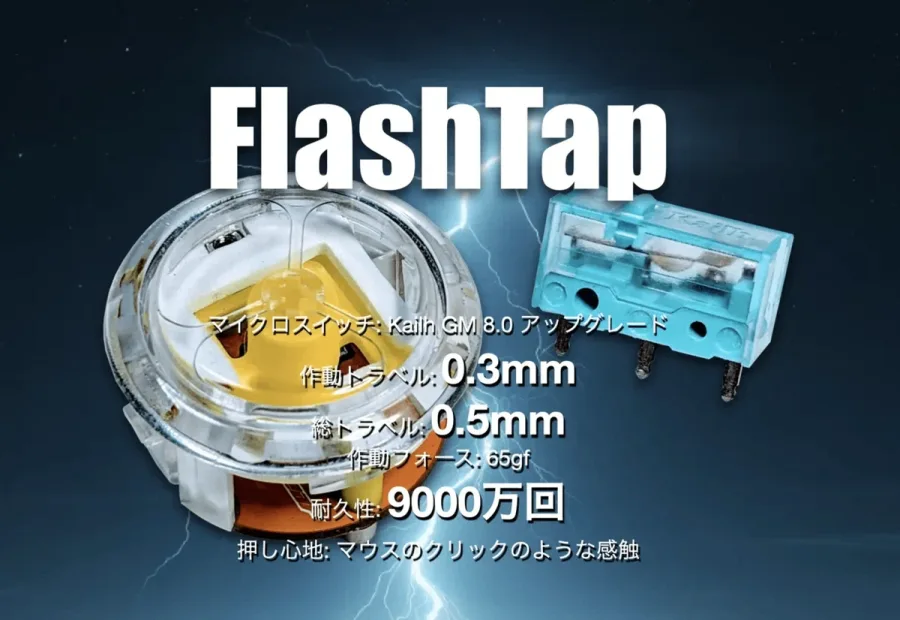
To put it simply, it is a button that uses the same microswitches as a mouse, pursuing performance with incredibly fast actuation points.
It is a microswitch button that is starting to become popular among fighting game players.
Other companies have products like the PWS BLAZE or ONEFLAME.
The developer of this flashtap, Tony, is a working professional and a powerhouse who reached Legend rank in Street Fighter 6.
Check out the official website for more details!!
Replacing the flashtap
This time, I purchased 10 standard flashtaps, 1 silent version, 1 nipple, and 1 red keycap.
It cost about 9,000 yen including shipping. A decent price.
It was shipped 2 days after ordering and arrived 6 days later.
I assumed I could use the keycaps I already had, so I only ordered one to try out, but after it arrived, I discovered they weren't compatible.
I ended up having to buy more, so I lost a bit on shipping.
I even checked properly, too...
Included with the items that arrived was a bare circuit board, perhaps as a spare or a bonus.
The arcade controller I'm using as a base is a
RAP with a multi-button 24mm layout on the right side and support for a jump button that I bought from Okayama Tactical Games, who are famous for arcade controller modifications.
(The lever originally had a Sanwa lever with a jump button custom, but I replaced it with my own Sanwa silent sensitivity-adjusted lever.)
By the way, this cost about 12,000 yen.
I like the shape of the RAP.
Replacing the buttons themselves is a task I'm used to, so I did it quickly.
Because the button terminals are sideways, it was a bit difficult to replace, but I finished replacing them all!
Looking at it from the side, it's like this, it's quite thin.
The operation check was also fine, so I immediately used it for about a week.
My impressions of using the flashtap
This button is great!!
It's not really a button that I can give a perfect 100/100 score without reservation, but personally, I really liked it.
I'll introduce both the good and bad points.
First, the biggest selling point: the AP and the short stroke.
Without a doubt, it was faster than any button I've used before.
But I pressed the button!!!
That common fighting game frustration has decreased significantly.
Parries, in particular, have changed to a level I can really feel.
There were quite a few situations where I'd try to parry on reaction, but the input wouldn't make it in time and it would just be a normal guard.
Now, the parry actually comes out.
I think there's a 1-2 frame difference in input speed, and since it often lands perfectly as a Just Parry in terms of frames, it's a huge advantage.
However, I had to relearn my timing because moves I used to be able to Just Parry I now couldn't.
As for accidental button presses, it's hard to say.
They didn't go off from the vibration of pressing adjacent buttons, but since the stroke is shallow and sensitive, it seems like if you put a little too much force into the finger resting on it, it will trigger.
But this went away once I got used to it.
The right hand is just for resting.
Regarding Impact, no comment.
NOOO comment!!!
As for the nipple buttons, they are an unknown quantity.
I had too many accidental presses, so I took them off.
But theoretically, they are supposed to be the best; Kurihara-san said so, it's some kind of law.
Next, the operational feel.
At first, the short stroke felt very strange, but I got used to it quite quickly.
In fact, it got to the point where normal buttons started feeling strange...
Normal pressing and flicking are also no problem.
I think flick inputs are an especially perfect match.
Since the structure presses the switch on a flat surface, it reacts even if you press the edge of the button, which is why it's a good match.
Flick inputs use the edges, after all.
However, I think it's a bit incompatible with piano-style pressing.
That input might be a technique that relies on the button's stroke.
Plus, it hurts my fingers a lot.
Also, I noticed this while doing 1000 Shoryuken/SA flick input drills.
The keycaps don't fly off at all!!
This is a common issue with leverless controllers; with Haute, the keycaps would often fly off during flick inputs, but that didn't happen at all here.
Whether using BLAZE caps or the stock caps, they didn't come off at all, so this point is quite significant.
It seems that once you attach a keycap, it's fitted so tightly that you can't remove it without disassembling the entire button.
It gives a sense of security.
And a common problem with microswitch buttons is,
that they don't feel like you've pressed them.
In this regard, the flashtap is excellent.
It makes a solid clicking sound and has a tactile feel, so even though the stroke is shallow, you definitely feel like you've pressed it.
I tried buying one silent version as well, but that one had less of a 'pressed' feel.
Maybe it uses a similar mute switch to the famous new BLAZE, so the sensation might be the same?
If so, it's understandable that some people wouldn't like it.
However, there is still a click feel when pressed even on the silent version.
I saw it in many reviews, but
I can't tell if I pressed it!
That kind of thing didn't happen to me.
However, I prefer the standard version.
The clicking sound is satisfying.
'The fun of games lies in pressing buttons'
Umehara said this, and I think it's exactly right.
The standard version is a more fun button to press.
Next, regarding silence.
It's quite noisy.
The clicking sound of the standard version isn't actually that bothersome.
However, the sound of the plastic colliding when the button is pressed is surprisingly loud, so in terms of silence, it's maybe just a little better than a standard Sanwa button?
And this is the same for the silent version.
The silent version doesn't make the clicking sound, but it still makes the same clacking sound as the regular version when you press the buttons.
If you press the buttons by resting your fingers on them and pushing down, it's quite quiet, but if you press them from above with a 'snap'—which is probably the conventional way—it makes a normal amount of noise.
It might be a bit loud, especially if you're using an arcade controller with a metal or acrylic top panel that resonates easily.
I think it's because the stroke is so short that the impact reverberates directly through the top panel and the interior.
Finally, durability.
I can't say for sure yet, but the lifespan probably isn't very long.
Microswitches are excellent in terms of durability, but you just can't escape chattering.
However, while chattering is usually a fatal issue for mice, I realized while writing this that in fighting games, having a button register twice isn't a problem—it might even be a benefit.
Maybe it's actually better if it chatters...
I'll try using it for about half a year and then add an update here regarding that.
And now, here are the downsides.
My fingers hurt!!!!
At first, I was using it with enthusiasm, thinking,
'The response is great, this is a god-tier button!'
but after about two hours, I started feeling a dull ache in my fingers...
I felt pain every time I pressed the button, especially with my right index finger, which I use the most.
Because the button stroke is so short, it feels like I'm hitting the top panel directly.
Since the impact is transmitted directly to my fingers, the damage seems to be quite significant.
What started as pain in the skin of my fingertips gradually spread to my first and second knuckles, and I realized this was not good...
If I were to use these buttons as my main ones, I felt I would need to correct my pressing style from a 'tapping' motion to a 'pushing' one.
However, fighting game combos are like a rhythm game, so I think it's normal to tap them in a 'tap-tap-turn' rhythm to keep time.
If it were just a difference in button feel, I think I'd get used to it, but I felt while using it that changing the very way I press the buttons would be extremely difficult.
However!
After enduring the pain for about a week while thinking 'Hmm...',I somehow got used to it.
It's the guitar method: if you keep using it despite the pain, your fingertips will toughen up and you'll stop feeling it.
Humans are creatures that have survived by adapting to their environment.
These buttons taught me the greatness of humanity.
I think it also helped that I changed my pressing style from 'tap-tap-turn!' to something more like 'ton-ton-tone!'
Overall Review
A god-tier button once you get your fingers used to it.
I thought it was a really good button once you overcome the pain.
The shallowness of the stroke didn't bother me at all, and the fact that I adapted to it smoothly was a big plus.
After all, I'm a PC gamer to begin with, so there was no way these buttons, which feel almost identical to a mouse click, wouldn't suit me!
There are three areas in particular where I thought these buttons were highly suitable.
・Parry button
・Impact button
・Movement buttons on a leverless controller
These three!
Since my parry button is an extra thumb button, I didn't feel any finger pain at all.
As expected of the S-tier finger, the thumb.
The response is good, so it's easy to parry.
Since responsiveness is important for impact buttons, this might be the most suitable button.
I use my pinky finger for it, but since the actual number of presses is quite low, the pain issue is also resolved.
And for the leverless movement buttons.
It might be surprising, but
I feel like this is the only choice for leverless left-hand buttons.
That's the level I'm at.
Movement buttons also require input speed, and I thought the ease of flick input was just too compatible.
Movement buttons are used extremely frequently.
However, as anyone with leverless experience knows, unlike attack buttons, you don't mash movement buttons.
It should be a feeling of naturally resting your fingers and pressing them in.
It's more like a 'tap-tap' than a 'mash-mash'.
With this pressing style, finger pain was much better.
It seems many people actually use these buttons only for leverless movement buttons.
Postscript
I switched to leverless and replaced everything with flashtaps.
The stable and classic minibox.
This might be the conclusion.
Even for those who don't like these buttons, if you don't mind a chimera button configuration, I think it's worth changing at least these three spots.
The price including the cap is about the same as GamerFinger, and if you don't like the 'thud' feel of low-profile switches, this might suit you better.
Regarding the standard version versus the silent version, it's purely a matter of preference.
Personally, I recommend the standard version! I love the clicky sound!
I think I'm going to stick with these buttons from now on.
I absolutely love the clicky feel.
From here on is a bonus.
I've compiled a review of the arcade controller buttons I've used so far.
If you're interested in buttons, feel free to take a look.
Comparison with other company buttons I've used
Sanwa standard buttonEveryone's favorite Sanwa button.
A staple for arcade gamers and a button that continues to be loved.
It's a level of perfection that some people end up with in the end. The sound is on the louder side.
Nothing much to say, the cost-performance is also good.
A new version of the Sanwa standard silent button.
Unlike previous silent versions, the silent mechanism has been changed.
However, because of that, there is a slight discomfort in the button's pressing feel (the previous version also had discomfort). The sound is on the quieter side.
This is the button I currently have on my 30mm lever.
Honestly, I don't like it very much. I prefer the standard one.
The button that was installed before switching to flashtap.
The button that came pre-installed on an arcade controller I bought on Mercari.
A cost-effective button at 200 yen each.
Almost the same performance as the Sanwa standard button.
However, the buttons you use often lose their springiness quickly; durability is poor.
The buttons that come on everyone's favorite RAP
The stroke is shallow and the response is excellent
I also like the matte texture of the buttons
However, they are just noisy, really noisy
CLACK CLACK CLACK CLACKis what they sound like
It's not just annoying to the neighbors, it's annoying to the person using them
However, the performance of the buttons themselves is good, and they might be the best buttons if you use them in a soundproof room with headphones on
So, they actually have a hidden fan base
In fact, since they aren't sold individually, I often see them sell out immediately when they occasionally appear on Mercari or similar sites
The default equipment on the leverless controller I bought
Kailh low-profile switches
These are actually 1.3mm AP, so in terms of performance, they are almost the same as everyone's favorite GamerFinger
The feel is very good, the sound is quiet, and the pressing sensation is smooth and pleasant
I could clearly understand why GamerFinger buttons are so popular
And the best part of these buttons is the keycaps
They are matte and smooth, which is perfect for me since my hands sweat a lot
Also, even though they are 24mm, they are slightly larger than standard buttons, which makes them easy to press
I also like that the shape is slightly rounded rather than flat
It seems you can buy these caps individually on AliExpress
However, the downside is that they aren't compatible with other button housings
For better or worse, they are Haute-exclusive caps
Finally, there is the shadow Hunting switch newly released by Haute
I bought it because it had such a good reputation, and I was moved by how truly good these button switches are
These are truly god-tier buttons
Think of them as a short-stroke version of GamerFinger
Moreover, the quietness is wonderful, and the feeling when pressing the button is very pleasant and crisp
Honestly, if possible, I would have wanted to put these buttons on my lever-based arcade controller
However, the buttons on the leverless controller are directly connected to the board, so I couldn't move them
To use them, I had no choice but to buy buttons that support low-profile switches like GamerFinger and swap the switches, but the cost-performance was so poor that I gave up, which led me to buy the flashtap
And I learned after buying the flashtap thatComic Noiseapparently sells just the button housing for these low-profile switches for about 400 yen
If I had known this from the start, I might not have bought the flashtap...
When I looked further, it seems there is a button called Sitong that also supports low-profile switches and can be bought for 500 yen including the cap
And the keycaps were matte finish too
Actually, I've seen a few people setting up their arcade controllers with this custom
However, there is talk that these button housings and the shadow Hunting switches don't get along well and don't have enough stroke...
In other words, it seems it ends up like this, where the button goes quite deep into the button frame
So, to alleviate this, it seems people are putting 0.5mm foam inside
It's truly a rabbit hole
Maybe I'll buy it once and try it out...
Update
I tried it out
It was god-tier
The level of perfection makes me think this is all I need for attack buttons.
The button sinking issue I was worried about was not a problem at all with the new caps.
Comic Noise button frame + Comic Noise V2 keycaps + shadow Hunting switches + EVA 0.5mm foam
This clears up the compatibility issues!
I really recommend this combination!
Just be careful when choosing keycaps.
As I researched beforehand, regular keycaps sink too far past the button frame, so...
As you can see, it sinks quite a bit when you press it down, right?
And this is the V2 cap with urethane inserted from the custom setup I introduced above.
I think you can tell it's completely different.
This was the correct answer. Why do I keep picking the wrong choice when I only have two options?
You should definitely apply the sound-dampening foam.
If you don't, the sound and the button bottoming out are quite bothersome, but once applied, it feels almost the same as when installed on a Haute.
If you like buttons with traditional travel like GamerFinger and didn't like the flashtap, please try this button custom.
I liked the clicky feel of the flashtap, so I ended up switching everything to flashtap...
Honestly, I like this button configuration so much that I'm still debating whether to make a chimera setup.
The rabbit hole has no bottom
Well, I realized that changing buttons to skyrocket my MR is just a dream, so I'll focus on training myself instead of the device.
This turned into a long review, but I hope this note helps those who are considering buying a flashtap or those who are stuck in the arcade controller button rabbit hole.
Have a great fighting game life, everyone!
Oh, could you please stop using Impact?