Every time I open social media, it's all I see.
"Super-fast development with Claude Code," "AI agents automate tax accounting for 700 companies," "You can do this in an instant."
It's amazing. I know it's amazing. But I can't even take a single step.
"How to build a team that works 24/7: Automate research, development, marketing, and accounting with an agent team."
Good grief... without me even knowing, the level of what AI can do is rising day by day...
I'm 45. I have a decent position at my company. I talk like I know what I'm doing, saying things like, "From now on, we'll be able to do anything if we use Claude Code." But in reality, I don't really understand it at all.
I saw a post saying it was "easy to get started" and tried to download it.
npm install -- ← What is this? Is it really okay to just go ahead with this?
I sort of understand folder structures on a computer. But where is Claude Code installed, what are the files for and where are they, and what am I doing right now—I've already lost track of where I am.
The ability of the next generation (young people) to absorb AI is terrifying. But I still want to be active on the front lines of society.
I can't afford to be left behind by this massive wave of AI agents.
This is a series documenting how I, someone like that, start Claude Code from scratch and challenge myself to automate various tasks.
Who I want to read this
People who feel a vague sense of anxiety every time "Claude Code use cases" appear on their X timeline
People who tried it after seeing a post saying "you can do this in an instant" but got stuck halfway through
People who typed something into the terminal and it started working, but don't know what happened
People who typed "npm install" but don't know what npm is
People who have had various folders created but don't know what each one is for
What is CLAUDE.md? Skills? MCP? Push to Git! Is this just wordplay for the gods?
People who have already told their company "we can easily improve work efficiency with AI agents" and now can't back down
People who watched a YouTube video by an expert, but got left behind because they skipped steps assuming you already knew the basics
Someone who installed Claude Code, VS Code, and OpenClaw just because they were told to, but doesn't really understand the difference.
(That's all me.)
If you want to finish the setup this weekend, this is perfect for you.
If you read parts 0 through 3 of this series, you can complete the environment setup in about 2 hours.
️ Note: This series is for Windows.
I'm sorry if you're using a Mac. Since I don't own a Mac, I can't provide accurate steps. I'll leave the Mac version to the experts.
What this post explains: Initial setup to start using Claude Code
Installing VS Code
Preparing Node.js and Next.js
Installing Claude Code
Solving "What is this for?" one by one
This is not an article written by an expert. It is a record of me, a non-expert, stumbling through the process. I hope it helps those who are equally lost.
※ This post explains the trial-and-error process in a rambling way, so it might not be suitable for those who just want to know the shortest path. Sorry.
So, let's begin.
[Part 1] First, install VS Code. The story of starting from "What is an editor?"
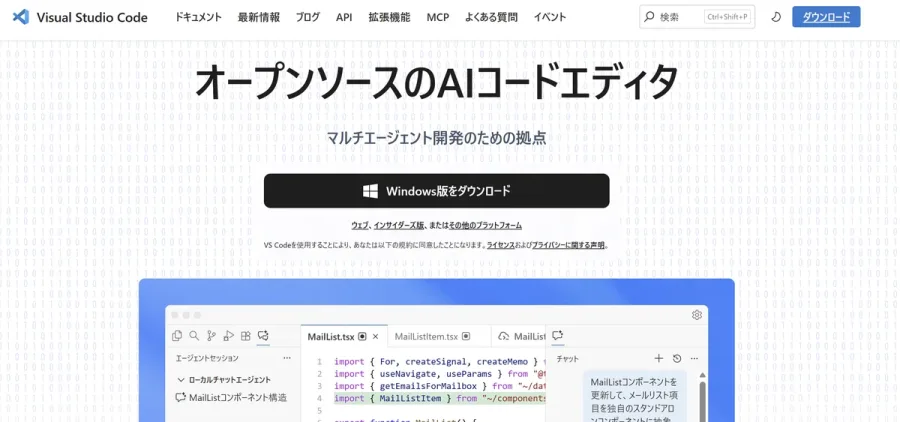
Well, I was told that to use Claude Code, I need an editor.
An editor. Something to write text in? Isn't Notepad enough?
Apparently not.
You need a "workspace" to write programs, manage files, and use the terminal (the black screen where you type commands), and that is what an editor is. Among them, the one most used right now seems to be VS Code (Visual Studio Code). It's made by Microsoft and it's free. It seems trustworthy for now.
Installation steps:
https://code.visualstudio.com Access
Click "Download for Windows" (or the Mac version if you are on a Mac)
-
Open the downloaded file and install it
It's a file with a name like this -- VSCodeUserSetup-x64-1.114.0
-
You can just click "Next" for all the options
Check the box to create a desktop icon if you like (it makes it easier to find later)
To switch to Japanese:
Launch it once the installation is complete. It will be displayed in English, so if you want to change it to Japanese, follow the steps below.
Click the block-like icon on the left sidebar (Extensions). See the arrow in the image
Type Japanese in the search bar
Install "Japanese Language Pack for VS Code"
Restart to switch to Japanese
Something to remember here:
VS Code has a feature called Terminal. Open it via the menu: "View" -> "Terminal". A black screen will appear at the bottom. This is the same thing as PowerShell.
If you are told to "type it in PowerShell," "type it in the terminal," or "type it in the CLI," you should type it here. You don't need to open a separate app.
[Part 2] What is Node.js? How is it different from Next.js?
I installed VS Code. Next, I was told to "install Node.js."
When I looked it up, it seems Node.js is an "engine" for running JavaScript on your computer. JavaScript was originally a language that only ran inside web browsers. Node.js is what made it possible to run it on a computer as well.
So then, what is Next.js?
Next.js = A "toolset" for building web apps that runs using Node.js
Yes. I don't really understand it, but for now, I'll just move forward.
Installation steps:
https://nodejs.org Access the site. Click the Get Node.js button
Click the "Windows Installer" button to download
Open the downloaded file and install (clicking "Next" for everything is fine)
Check if it was installed successfully. Open the VS Code terminal, type
node -v and press Enter (don't forget the space before -v).
v20.xx.x If a version number like this appears, it's a success.
Next, try typing npm -v. If a version number appears for this as well, you're good to go.
What is npm? What is npx?
Mysterious commands often seen on social media. Haven't you seen things like this?
npm install XX (XX would be something like "openai" or "-g vercel") → Install a tool (package)
npm run XX → Execute something
npx XX → Execute temporarily without installing
npm is an abbreviation for "Node Package Manager". It is like an "Amazon for developers" where you can order convenient tools from all over the world with just the phrase npm install XX.
npm install Tools downloaded with this are saved in a folder on your computer called node_modules. Think of it like products you ordered on Amazon arriving at your house. You can use them offline from then on.
There is a similar command called npx. This is like "renting and using it on the spot without buying it". It is not installed, and it disappears after you finish using it. It often appears when you only need to use it once, such as when setting up a project like npx create-next-app.
I felt like I got a little smarter.
[Part 3] Installing Claude Code. And finding out what those files actually are.
Now for the main event. I will install Claude Code.
Open the VS Code terminal and type the following:
Come forth, Doraemon!
npm install -g @anthropic-ai/claude-code
The "npm install" we just learned appeared right away.
-g stands for "global." It means installing it so it can be used across your entire computer. You will be able to use it from any folder.
Once the installation is finished, just type claude to launch it. The first time, you will need to link your Anthropic account, so follow the on-screen instructions.
Note:
For first-time installers:
A lot of text will scroll by during installation, but don't panic. When it stops, that's the sign it's finished.
For those who have installed it before:
It might end with a short message like "changed 2 packages in 2s." This just means it was already installed and has been updated. This is normal.
When you type 'claude' to launch it, a confirmation screen will appear in English:
It's a security check asking, "Do you trust this folder?" Select "1. Yes, I trust this folder" and press Enter to proceed. A message saying "looking for funding" will also appear, but you can ignore it.
What is created when you install it?
This was the most mysterious part for me at first. Once installed, where does everything go?
The answer is mainly in two places.
① The .claude folder in your home folder (settings shared across all projects)
The "home folder" is C:\Users\YourName\ on Windows. A folder named .claude is automatically created inside it. The contents look like this:
settings.json ← Settings for permissions and behavior
skills folder ← Reusable instruction sets
projects folder ← Notes that Claude takes for itself
(2) Inside your own project folder
You can also place settings inside the project folder you are working on:
CLAUDE.md ← Instructions for Claude (you write this yourself)
.claude folder ← Settings specific to this project
Where is the "CLAUDE.md" I keep hearing about on social media?
Immediately after installation, the file called CLAUDE.mddoes not exist.
It is something you create yourself. Since it is an "instruction manual for Claude," if you don't write it, there is nothing. I panicked thinking "I can't find CLAUDE.md" without knowing this. There was no need to panic.
Commands to navigate folders in the terminal (you only need to remember these)
pwd ← Check where you are currently
ls ← See the contents of the current folder
cd folder_name ← Enter that folder
cd .. ← Go back to the folder one level up (half-width space after cd)
cd ~ ← Return to home (half-width space after cd)
In any case, the environment setup is now complete
From next time, I will finally start giving actual instructions to Claude Code. "What should I ask and how?"—I had no idea about this at first either. I will write about that process. Stay tuned!