There is a quick way that is free and requires no installation.
You can do it right away.
Download yt-dlp.exe and place it in an appropriate folder.
For beginners, the user folder is recommended.
C:/Users/Kazuma/yt-dlp.exe
This is recommended for those who are not good with directory structures.
If you know what you are doing, feel free to put it wherever you like.
Next, download the software for conversion.
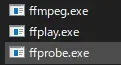
I believe the following three are in the bin folder, so dump the entire bin folder into the location mentioned earlier.
That should do it.
o-format mp3 --ffmpeg-location bin -o "C:/Users/カズマ/音楽/%(title)s.%(ext)s" "YouTubeのアドレス"
You can download by pasting the code above into the command prompt.
When you want it in mp3
yt-dlp -x --audio-format mp3 --ffmpeg-location "C:\yt-dlp\bin" -o "C:/Users/カズマ/音楽/%(title)s.%(ext)s" "YouTubeのアドレス"
-x: Extract audio
--audio-format mp3: Output as mp3
--ffmpeg-location: Location of ffmpeg.exe (adjust to your own environment)
-o: Save destination folder
"https://...": Video URL
When you want it in mp4
Copy it
yt-dlp -f "bestvideo[ext=mp4]+bestaudio[ext=m4a]/mp4" --ffmpeg-location "C:\yt-dlp\bin" -o "C:/Users/カズマ/音楽/%(title)s.%(ext)s"
-f: Specify download format
"bestvideo[ext=mp4]+bestaudio[ext=m4a]/mp4": Highest quality video + audio in mp4 (or just mp4 video if unavailable)
Others are the same as above
The path to ffmpeg.exe (--ffmpeg-location) should be adjusted to your own environment
You can also change the save folder as you like
It works just as well for playlists and other videos!
Well, that's a rough explanation.
Those who understand will be fine with this, but if you're thinking "I don't quite get it," then please continue reading for a more detailed explanation.
I've created a script that anyone can use easily without any hassle, so I've placed it in the paid section.
It is incredibly easy to use.
1. Copy the URL of the YouTube page you want to download.
2. Paste it into the text file. Multiple URLs are okay.
3. Just double-click the script and select the download format.
You can download in three steps.
Script SpecificationsThe file structure is simple as shown below.
Operating EnvironmentWindows 11 or 10
Python installed
Python is easy to install, so if you are interested, please take a look at the article below.
Feature 1: You can change the output destination.It is not exactly a feature, but you can also change the output destination.
By default, it is set to be stored in the output folder.
To change the save destination, edit "config.json" with Notepad.
You can change it for each file format.
Just change the file path and overwrite it.
Since it is a json file, you cannot use "\".
For example, if you want to save to the Music? folder, please refer to the following.
C:¥Users¥カズマ¥Music
Please change the file path for this pattern to
C:/Users/カズマ/Music
change to.
Feature 2: Multiple downloads are also possible!Please list the URLs in a text file with line breaks.
By the way, if it is a public URL for a YouTube playlist, you can download everything at once.
Since you can download without any particular restrictions, if you start the script before going to bed, all downloads will be completed when you wake up in the morning.
You can use it like that.
In the first place, anyone can download for free if they follow the content explained at the beginning.
However, the role of this script is to solve the problems of having to mess around with URLs in Notepad and the difficulty of continuous downloading.
If you want to improve efficiency, you can download it from the paid section.