Updated July 5, 2024
For Modular Avatar, you can use FloorAdjuster.
------------------------------
● Prerequisites
Place a quad on the ground or similar to determine how much you need to move it along the Y-axis.
● Method 1
1. Open the avatar FBX in Unity, add to the Y-axis of the Armature, and click Apply.
2. Add to the Y-axis of the avatar object in the Hierarchy.
3. Move the ViewPoint.
● Method 2
1. Create an empty GameObject directly under the avatar object in the Hierarchy and rename it to "Armature".
2. Add to the Y-axis of the actual Armature.
3. Move the ViewPoint.
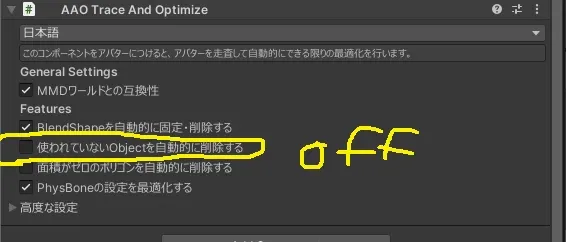
Note: When using Anatawa Avatar Optimizer, be aware that this will not work unless you turn off the following options!
With Modular Avatar, Method 2 mentioned above ("Create an empty GameObject directly under the avatar object in the Hierarchy and rename it to 'Armature'") will not work.
Follow Method 1: "Open the avatar FBX in Unity, add to the Y-axis of the Armature, and click Apply."
If you also need to adjust the height of the clothing, add to the Y-axis of the clothing prefab's Armature. However, if the clothing is Generic, you do not need (and cannot) edit the FBX side.