"The image is too small to use..."
"It got blurry when I enlarged it..."
The era where AI solves such problems has arrived.
Recently, many tools have appeared that can naturally improve the quality of low-resolution images using "super-resolution" powered by AI technology.
In this article, we will introduce basic information about AI super-resolution and 3 recommended tools that even beginners can use immediately.
What is AI super-resolution? Simply put, it is "AI technology that can beautifully enlarge low-resolution images"
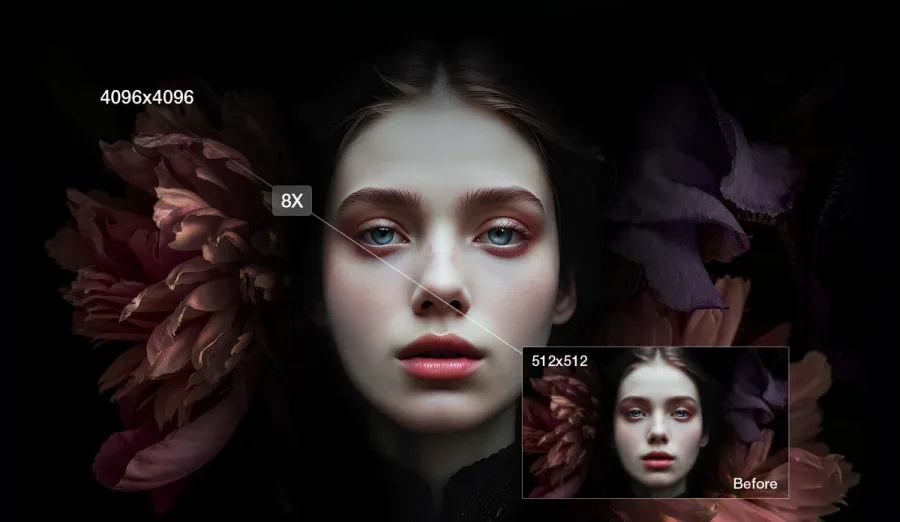
AI super-resolution is a technology that allows images to be enlarged in high definition by having artificial intelligence predict and fill in the details and missing parts of the image.
While conventional image enlargement tends to make pixels look rough, using AI allows for the reproduction of natural textures and contours.
When you actually use AI super-resolution...
Small images taken with a smartphone can be converted to 4K or 8K
Old photos and screenshots can also be vividly brought back to life
Quality improved to a level that can be used as-is for SNS posts or printing
Easy for beginners too! 3 recommended AI super-resolution tools
Here, we will introduce 3 AI super-resolution tools that are easy for beginners to handle and capable of high-precision conversion.
1. [Multi-functional & High Quality] Aiarty Image EnhancerAiarty is an all-purpose AI image quality enhancement tool that can handle everything from illustrations to real-life photos. Multiple AI models are available depending on the purpose, and you can increase the resolution of an image up to 8 times with just a few clicks.
✅ Improve image quality up to 8x (supports 4K/8K/32K)
✅ Noise reduction and sharpening can also be processed simultaneously
✅ Fully automatic & free plan available
✅ Can be used in a browser (no installation required)
View official page
Download Windows version for free here
Download Mac version for free here
This is high-quality enhancement software that has received high praise overseas. It is equipped with AI algorithms strong in real-life photography, such as landscape photos, portraits, and product images.
✅ Compatible with both Mac / Windows
✅ Clearly restores details in faces, eyes, and hair
✅ Paid software (free trial available)
Topaz Labs Official Website
3. [Focus on Ease of Use] Image Upscaler (Online)Simply drag and drop your image to upscale it up to 4x online with this free service.
The image quality is somewhat modest, but it is sufficient for urgent needs.
✅ No registration required, completely free
✅ Supports JPG / PNG
✅ Also works for anime images
ImageUpscaler Official
Technical Explanation: How AI Super-Resolution Works
The latest AI super-resolution technology processes images through the following process:
Low-resolution image analysis: Extracts edge, texture, and color information
High-resolution prediction: Uses GAN (Generative Adversarial Networks)
Detail generation: References millions of high-resolution image data points
Natural finishing: Removes artifacts
Frequently Asked Questions
Q. Can free tools provide sufficient quality?
A. It is fine for social media sharing, but paid tools are recommended for printing purposes.
Q. Can scratches on old photos be repaired at the same time?
A. Tools like Aiarty and Topaz have integrated noise reduction features.
Summary | Instantly improve image quality by choosing the right tool for your purpose
There are surprisingly many situations where you might want to "upscale an image beautifully."
Whether for social media posts, printing, presentation materials, or creating eye-catching visuals, using AI super-resolution tools depending on your needs can significantly save both time and effort.
Whether you prioritize ease of use with online tools, quality with desktop software, or a balanced approach like Aiarty, please try out the tool that best suits you.