When editing videos, you often see numbers like "1920x1080" and "16:9".
Since both are commonly used for widescreen videos, you might initially think, "Are they the same thing?" but they actually represent different things.
1920x1080 is the "resolution"
16:9 is the "aspect ratio"
In this article, I have organized the differences between these two as a foundation for video editing.
What is an aspect ratio?
Simply put, an aspect ratio is the ratio of the screen's "width to height".
For example, in the widescreen videos often seen on YouTube and elsewhere, an aspect ratio of 16:9
is commonly used.
This means a ratio of 16 units wide to 9 units high.
What you want to be careful about here is that it does not mean "16x9 pixels".
The aspect ratio does not represent the size of the video itself, but rather the shape of the screen and the ratio of width to height.
What is the difference between "1920x1080" and "16:9"?
So, what is the difference between "1920x1080" and "16:9"?
As introduced in a previous article, 1920x1080 is the resolution.
It indicates that there are 1920 pixels horizontally and 1080 pixels vertically.
On the other hand, 16:9 is the aspect ratio.
This represents the ratio of width to height, not the number of pixels.
In other words, there is a difference where
1920x1080 → the number of pixels that make up the video
16:9 → the ratio of the screen's width to height
.
Then why is 1920x1080 16:9?
This is where it feels a bit confusing.
If you calculate the ratio of 1920 to 1080, it becomes
1920 ÷ 1080 ≒ 1.78.
Similarly, for 16:9, 16 ÷ 9 ≒ 1.78.
In other words, the ratio of width to height is the same.
Therefore, 1920x1080 is a "resolution with a 16:9 shape".
While 1920x1080 and 16:9 do not represent the same thing, there is this kind of relationship between them.
Even with the same 16:9, the resolution is different
Once you understand this, another important point becomes clear.
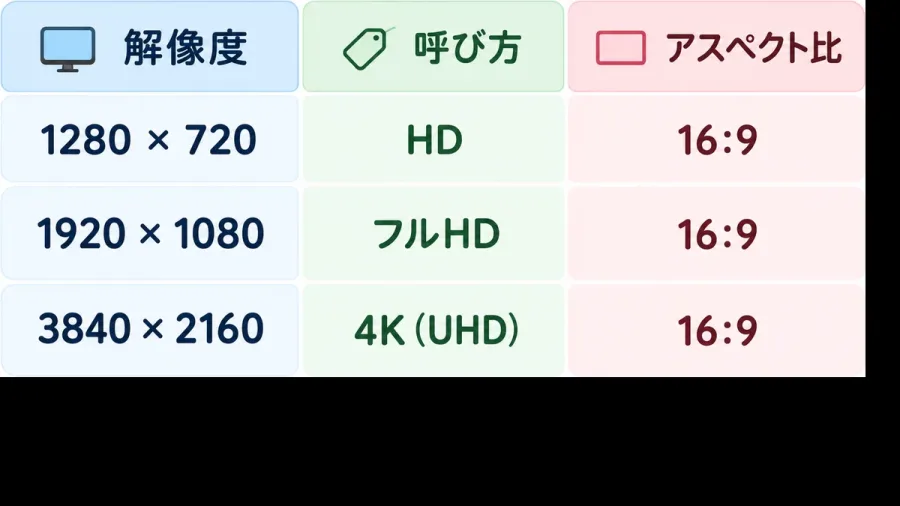
For example,
1280x720, 1920x1080, 3840x2160
all have different pixel counts.
In other words, the resolutions are different.
However, if you calculate the ratio of width to height, they all become 16:9.
Even if the size and detail differ, the shape of the screen is the same landscape format.
Once you understand this concept, it becomes easier to distinguish between resolution and aspect ratio.
YouTube, Instagram, and TikTok have different ratios
Aspect ratio is also important when actually producing videos.
This is because the commonly used screen shapes differ depending on where you post the video.
To summarize the representative ones,
Usage Commonly used ratio Example resolution YouTube landscape video 16:9 1920x1080 Instagram square 1:1 1080x1080 Instagram Reels 9:16 1080x1920 TikTok 9:16 1080x1920 YouTube Shorts 9:16 1080x1920
It becomes even easier to understand if you remember them by shape.
In particular, 16:9 and 9:16 have reversed numbers, so you want to be careful not to mix them up.
How does this relate to Premiere Pro?
Let's think about this from a more practical perspective.
For example, suppose a client says, "Please make a vertical video for Instagram Reels.".
If you set the Premiere Pro sequence to 1920x1080, it will result in a 16:9 landscape video.
If you are making a vertical video for Reels, you would generally set it to a portrait orientation of 1080x1920 (9:16).
In other words, when creating a sequence in Premiere Pro, instead of simply thinking "I should just make it Full HD," you need to confirm "Where will this video be used?" before considering the screen's width and height.
Is it for YouTube, Instagram Reels, or TikTok?
Since the appropriate screen shape changes depending on the medium used, aspect ratio is an important piece of knowledge in actual video production.
How can you distinguish between resolution and aspect ratio in a nutshell?
To put the content of this article as simply as possible,
Resolution = Number of pixels that make up the image. Aspect ratio = Screen shape (ratio of width to height).
.
For example, 1920x1080 / 16:9 can be thought of as "a 16:9 widescreen video with a resolution of 1920x1080."
Summary
What you want to remember this time is:
Aspect ratio is the "width:height" ratio of the screen
16:9 is widescreen
1:1 is square
9:16 is vertical
1920x1080 is resolution
16:9 is aspect ratio
1920x1080 is a video in a 16:9 shape
Even with the same 16:9, there are different resolutions such as HD, Full HD, and 4K
In Premiere Pro, consider the sequence size according to the medium you are using
That is all.
At first, it is confusing because many similar numbers appear, such as "1920x1080," "16:9," and "30fps."
However, if you think about what each number represents separately—
1920x1080 → number of pixels (resolution) 16:9 → screen shape (aspect ratio) 30fps → number of frames per second (frame rate)
—you will be able to organize them little by little.
Since this is basic knowledge that is also necessary when using Premiere Pro, I would like to understand it one by one as well.