I found the following article interesting, so I have summarized it briefly.
1. Introduction
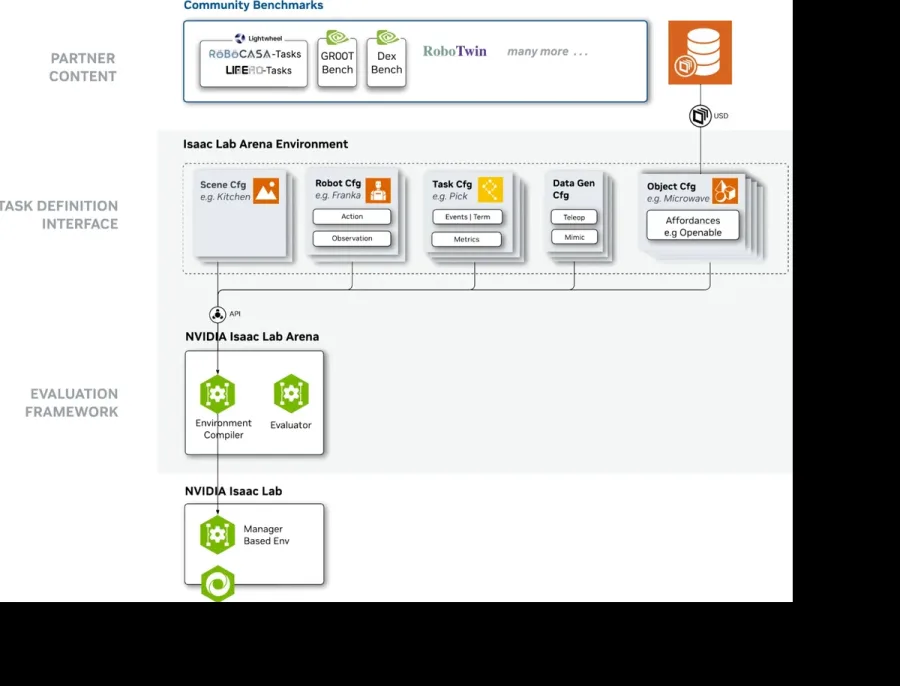
“NVIDIA Isaac Lab-Arena” is an open-source framework for efficient and scalable robot policy evaluation in simulation. Co-developed with Lightwheel, this framework is an extension of “NVIDIA Isaac Lab” and provides a streamlined API for task curation, diversification, and large-scale parallel evaluation. It allows developers to prototype complex benchmarks without the overhead of system construction.
2. Overview of Isaac Lab-Arena
The main benefits of “Isaac Lab-Arena” are as follows:
3. Ecosystem Development
NVIDIA partners with benchmark creators to build evaluations on “Isaac Lab-Arena” and publish validated evaluation methods, tasks, and datasets from simulation to the real world. These evaluation methods, tasks, and datasets can be reused and extended by the community on the unified core. The scope covers both industrial and research benchmarks, including mobility, manipulation, and loco-manipulation.
Lightwheel has co-developed and adopted the “Isaac Lab-Arena” framework, creating and open-sourcing over 250 tasks through the Lightwheel-RoboCasa-Tasks and Lightwheel-LIBERO-Tasks suites. In the future, they are also working on initiatives to establish these tasks as benchmarks.Lightwheel is also developing RoboFinals, an industrial benchmark that reproduces complex real-world environments using Isaac Lab-Arena.
“Isaac Lab-Arena Environments” has been integrated into the “Hugging Face LeRobot Environments Hub.” Developers can seamlessly register custom environments built on Isaac Lab-Arena and leverage a growing library of environments for post-learning and evaluation of robot policies such as “Isaac GR00T N,” “pi0,” and “SmolVLA.” For more details, please refer to the LeRobot documentation.
4. Future Enhancements for Isaac Lab-Arena
The current pre-alpha version is an early-stage skeleton of the framework with intentionally limited functionality, providing a practical starting point for contributors to experiment, share feedback, and influence future design and direction.
In the near future, core features essential for building complex task libraries will be added. These include object placement via natural language, complex task processing through atomic skill chaining, reinforcement learning task setup, and parallel heterogeneous evaluation (e.g., different objects per parallel environment).
Further in the future, the team aims to explore more agentic and neural approaches in scale evaluation. Examples include world-model-driven neural simulation and scenario generation leveraging “NVIDIA Cosmos,” and real-to-sim construction of simulation environments that reflect the real world leveraging “NVIDIA Omniverse NuRec.” Community participation and feedback are essential in shaping these developments.
5. Steps to Use Isaac Lab-Arena
We introduce an end-to-end sample workflow for evaluating the manipulation skills (opening a microwave door) of “Isaac GR00T N” using the GR1 robot in “Isaac Lab-Arena.” We will explain the environment setup, post-learning policy options, and closed-loop evaluation.
5-1. [Step 1] Environment Construction and DiversificationFollowing the prerequisites for the GR1 microwave door opening task, clone the repository and run the Docker container. Next, in “Isaac Lab-Arena,” build an environment that combines objects (microwave) in a scene (kitchen) with affordances (openable, pressable) to execute embodiment (GR-1 robot) and tasks (opening the door). Users can optionally add settings for data collection via teleoperation.
(1) Asset Procurement
background = self.asset_registry.get_asset_by_name("kitchen")()
microwave = self.asset_registry.get_asset_by_name("microwave")()
assets = [background, microwave]

embodiment = self.asset_registry.get_asset_by_name("gr1_pink")(enable_cameras=args_cli.enable_cameras)
teleop_device = self.device_registry.get_device_by_name("avp")()
For more details, please refer to "Assets Design" and "Affordances Design".
(2) Specifying object positions
microwave_pose = Pose(
    position_xyz=(0.4, -0.00586, 0.22773),
    rotation_wxyz=(0.7071068, 0, 0, -0.7071068),
)
microwave.set_initial_pose(microwave_pose)
(3) Setting up the scene
scene = Scene(assets=assets)
(4) Creating the task
task = OpenDoorTask(microwave, openness_threshold=0.8, reset_openness=0.2)
Tasks encapsulate goals, success criteria, termination logic, events, and metrics. For more details, please refer to "Task Design".
Finally, assemble all elements to build a complete, executable environment.
(5) Assembling parts to build a complete executable environment
isaaclab_arena_environment = IsaacLabArenaEnvironment(
    name=self.name,
    embodiment=embodiment,
    scene=scene,
    task=task,
    teleop_device=teleop_device,
)
(6) Downloading test datasets
hf download \
    nvidia/Arena-GR1-Manipulation-Task \
    arena_gr1_manipulation_dataset_generated.hdf5 \
    --repo-type dataset \
    --local-dir $DATASET_DIR
(7) Running the environment
python isaaclab_arena/scripts/replay_demos.py \
  --device cpu \
  --enable_cameras \
  --dataset_file "$DATASET_DIR/arena_gr1_manipulation_dataset_generated.hdf5" \
  gr1_open_microwave \
  --embodiment gr1_pink
The robot replaces the teleoperation data collected by NVIDIA to open the microwave.
For comprehensive technical details and design principles for creating new environments, please refer to the "tutorial documentation".
5-2. Efficiently scaling tasks across robots, objects, and scenesHere are some examples showing how to easily change objects or robots within a task without rebuilding the environment or pipeline.
・Example 1 - Change object from microwave to power_drill
background = asset_registry.get_asset_by_name("kitchen")()
embodiment = asset_registry.get_asset_by_name("gr1_pink")()
power_drill = asset_registry.get_asset_by_name("power_drill")()
assets = [background, power_drill]
・Example 2 – Change embodiment from GR1 to Franka arm and object to cracker_box
background = asset_registry.get_asset_by_name("kitchen")()
embodiment = asset_registry.get_asset_by_name("franka")()
cracker_box = asset_registry.get_asset_by_name("cracker_box")()
assets = [background, cracker_box]
・Example 3 – Change background from kitchen to industrial packing table
background = asset_registry.get_asset_by_name("packing_table")()
embodiment = asset_registry.get_asset_by_name("gr1_pink")()
cracker_box = asset_registry.get_asset_by_name("power_drill")()
assets = [background, cracker_box]While "Isaac Lab-Arena" focuses on task setup and policy evaluation, if policy post-training is required before evaluation, the "Isaac Lab-Arena Environment" can seamlessly integrate with data collection, data generation, and post-training. You can do the following:
5-4. [Step 3] Run evaluation in parallel environmentsThe next step is to evaluate the trained policy. Please note that this framework allows you to evaluate trained robot policies.
・Option 1 - Test the policy in a single environment
python isaaclab_arena/examples/policy_runner.py \
  --policy_type gr00t_closedloop \
  --policy_config_yaml_path isaaclab_arena_gr00t/gr1_manip_gr00t_closedloop_config.yaml \
  --num_steps 2000 \
  --enable_cameras \
  gr1_open_microwave \
  --embodiment gr1_joint
・Option 2 - Test the policy in multiple parallel homogeneous environments
python isaaclab_arena/examples/policy_runner.py \
  --policy_type gr00t_closedloop \
  --policy_config_yaml_path isaaclab_arena_gr00t/gr1_manip_gr00t_closedloop_config.yaml \
  --num_steps 2000 \
  --num_envs 10 \
  --enable_cameras \
  gr1_open_microwave \
  --embodiment gr1_joint
6. Get started now
The "Isaac Lab-Arena" pre-alpha version is open source. Please help us with future design and development. To get started with the "Isaac Lab-Arena" pre-alpha version, please refer to the GitHub repository and the documentation.