It all started when I thought, "GitHub Copilot now supports Agent Skills, so I should try out the Skills published by Anthropic." Since the content is generally universal, my expectations were high.
However, when I looked at the contents of the particularly useful skill-creator, I found the string Claude everywhere... It didn't seem easy to use as is.
"If I'm going to rewrite it anyway, I might as well improve it," I thought, and decided to add my own touches, such as reading llms.txt and making web searches mandatory.
In this note, in addition to the steps for rewriting skill-creator, I will also introduce improvement points to increase practicality, such as utilizing llms.txt and making web searches mandatory.
Are AI agent Skills truly universal?
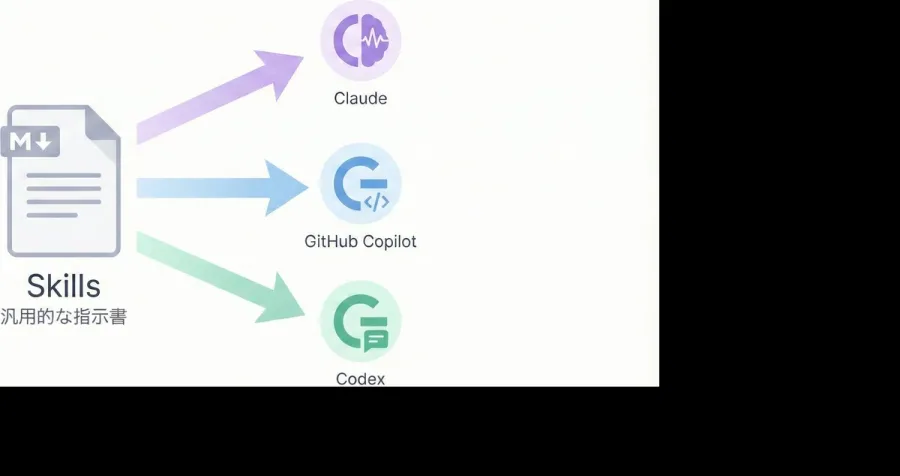
You would think that "Skills" for AI agents are something that can be used with any tool, right?
Basically, that is correct. Since Skills are instruction sets written in Markdown, they are theoretically designed to be used by any AI agent, such as Claude, GitHub Copilot, or GPT Codex.
Anthropic has published a skills repository on GitHub under the Apache License 2.0, and the content is generally universal.
However, when looking at the skill-creator (Skill creation support tool) within it, the specific AI agent name Claude is mentioned throughout.
skill-creator is a very useful Skill, and I wanted to use it with GitHub Copilot, but it's difficult to use it as is, isn't it?
In this note, I will talk about how I rewrote this skill-creator for GitHub Copilot.
Three reasons for choosing skill-creator
Multiple Skills are published in Anthropic's skills repository, but there are three reasons why I chose skill-creator among them.
The first is that it supports the actual creation of Skills. If you try to write Skills yourself, it takes time to think about the structure, tone, and comprehensiveness. By using skill-creator, an AI agent can perform this task for you, which lowers the learning cost of Skill creation.
The second is that it is easier to handle GitHub Copilot's context limitations. GitHub Copilot has a context window of 128K (about 128,000 tokens), which is smaller compared to Claude's 200K to 1M. Since skill-creator is originally designed to be compact, it is easy to use even with GitHub Copilot.
The third is that it has a wide range of applications. Because it handles the universal task of Skill creation, once you rewrite it, you can utilize it when creating other Skills in the future. The initial return on investment is high.
You can safely modify and publish it because it is Apache License 2.0
"Is it okay to rewrite it without permission?" Some people might be worried about that.
That is fine. The Anthropic skills repository is published under the Apache License 2.0, which allows for both commercial use and modification.
The main features of the Apache License 2.0 are as follows:
Commercial use allowed: No problem using it in a corporate environment
Modification allowed: You can customize it freely
Redistribution allowed: You can publish modified versions
Patent license grant: Avoids patent-related troubles
Trademark rights not granted: You cannot use Anthropic's name without permission
However, if you modify it, you must clearly state 'what you changed'. Also, you must retain the original license text and the COPYRIGHT file. As long as you follow these rules, you can freely modify and publish it, so please rest assured.
Let's understand the differences between Claude Code and GitHub Copilot
Before rewriting, let's first understand the differences between Claude Code and GitHub Copilot. The main differences are the following three points:
Differences in context windowClaude Code can handle a massive context of 200K (Claude 3.5 Sonnet) to 1M (Claude 4.0). On the other hand, GitHub Copilot is smaller at 128K.
This difference directly affects how you write Skills. While a style of 'packing everything into one file' is fine for Claude-oriented Skills, for GitHub Copilot, a design that keeps information compact and splits it into separate files as needed is required.
Exposure of extended thinking modeIn Claude Code, the user can explicitly choose whether or not to use 'extended thinking mode' (deep thinking feature). While complex reasoning is performed internally in GitHub Copilot as well, it is not exposed in the user interface.
When instructing a 'complex task that assumes extended thinking,' you can explicitly state 'use extended thinking' in a Claude-oriented Skill, but for GitHub Copilot, you need to change it to an indirect expression such as 'think step-by-step'.
Handling of tools and system promptsIn Claude Code, you can write specific instructions for Skills such as 'execute Python tool' or 'reference a specific system prompt.' While GitHub Copilot has similar features, the description methods and available tools differ.
Claude-specific descriptions (e.g., claude_python command) will not work in GitHub Copilot or must be implemented in a different way.
Two improvement points to increase practicality
In this rewrite, I didn't just make it work with GitHub Copilot; I also added improvements to increase its practicality.
Utilizing llms.txt to acquire project informationllms.txt is a documentation standard for AI agents proposed by Jeremy Howard, founder of Answer.AI. It is a mechanism where a file named /llms.txt is placed at the root of a website, allowing AI agents to quickly understand the project overview.
While the traditional robots.txt was for web search engines, llms.txt is for LLMs (Large Language Models). Some documentation tools like GitBook already provide automatic generation features.
In the rewritten skill-creator, I added a process to check for the existence of llms.txt when creating a Skill and to read it if found. Since it can preferentially refer to official project information, the accuracy of the Skill is improved. There are still challenges in how to find llms.txt, so I plan to improve it further in the future.
Mandating web searches to maintain information freshnessAI agents only have information up to the point of their training data. Latest library versions and API changes need to be supplemented by web searches.
The original skill-creator only had descriptions like "perform web searches as needed," and in practice, it tended to neglect searching. Therefore, in this rewrite, I explicitly instructed it to "perform web searches both before and after Skill creation."
Specifically, I have instructed it to perform web searches at the following timings:
Before Skill creation: Check the latest information on the target library or tool
After Skill creation: Reconfirm whether the content of the generated Skill contradicts the latest information
With this two-stage search, the risk of generating a Skill based on outdated information can be reduced.
Specific changes to the rewritten Skills
The actually rewritten Skills are published on GitHub.
Main changes to skill-creatorI added the following improvements to skill-creator.
I made docs_links.md mandatory and changed the design to separate reference information into a different file and always read it. I also mandated web searches and specified that they must be executed before and after Skill creation. I added a process to preferentially read llms.txt if it exists, and changed expressions suitable for GitHub Copilot by removing references to Claude.
Also, I have rewritten the entire thing in Japanese so that Japanese users can easily utilize it. While writing in English can save context, I prioritized readability for Japanese users.
Application example of playwright-scraperAs a verification of the skill-creator's operation, I also created playwright-scraper (a Skill that performs web scraping with Playwright). After installing the Skill created this time, you can create it with just the following instructions. When I specified AUTO for the AI model, Claude Haiku 4.5 was used.
playwrightでスクレイピングに特化したスキルを作成したい
This Skill is structured to store reference materials (such as a collection of links to official documentation) in the references/ folder and place sample code in the scripts/ folder. The Skill itself is written in SKILL.md.
The design distributes information across multiple files while being mindful of GitHub Copilot's context limits.
Things considered during the rewriteIn this rewrite, I kept the amount of information per file low, considering context limits, and split files as necessary. I perform web searches periodically to keep the information up to date. The file structure is unified into four elements: NOTICE.md, README.md, SKILL.md, references/, and scripts/, and I have also ensured compliance with the Apache License 2.0 and performed security checks. Note that this version only supports Python.
Customize Skills to optimize them for your environment
This time, I introduced how to customize Anthropic's skill-creator to suit the characteristics of GitHub Copilot.
There are three key points:
The first is to remove descriptions specific to Claude and change them to expressions suitable for GitHub Copilot. This makes it usable with GitHub Copilot.
The second is to utilize llms.txt and web searches to incorporate the latest information. This keeps the information fresh and improves accuracy.
The third is to design with GitHub Copilot's context limits in mind. Keep information compact and split it as needed.
Skills are just instruction manuals, but by customizing them to fit your environment and usage, you can utilize AI agents more effectively. Thanks to the Apache License 2.0, you are free to modify and publish them, so please try creating your own Skills.