Hello, good evening, good morning!
I'm Citrus.
NovelAI V5 has been released! The features of this model are even higher definition than before! It supports instructions in natural Japanese! It can output text within images, and more!
It's a model that provides an even more evolved experience than ever before.
Now that NovelAI has become high-performance and more complex in terms of functionality, I'd like to review the basics of how to use it.
This is half a note for myself.
Names of each parameter
Model
This is the generation of the trained image generation AI, and you can assume that newer ones (with higher numbers) are higher performance.
Each model has Curated and Full.
Curated
is a model trained only on carefully selected data; while there are restrictions on what can be output, it has the advantages of making sexual or violent elements extremely unlikely to appear and keeping the art style stable.
Full
is a model trained on a wider and larger amount of data.
It has a wider range of expression.You can also output lewd content.
Since the range of content that can be output is very wide, there is also a lot of variation, so you need to give clear instructions in the prompt.
Mode
There are two types: Anime and Furry.
Anime is the standard mode specialized for anime-style characters.
Furry is a mode specialized for outputting so-called furry-style illustrations.
I think most people will set this item to Anime mode for output.
This is a common occurrence for NovelAI users, but if you think, "Why is it suddenly outputting only animal ears!?", please check if this item has been accidentally switched.
Steps
This is a parameter that indicates how many times the process of removing noise from the original noise is repeated when generating an image.
It usually stabilizes at around 20-23 steps.
Up to 28 steps can be used without consuming Anlas within the flat-rate Opus plan.
Prompt Guidance
This is the fidelity of how much the AI reacts to the prompt (command).
Around 5.0 is recommended.
I think setting it lower results in an abstract and soft art style, while setting it higher results in sharp outlines and vivid colors.
Seed
This is a randomly assigned number.
It is an item that determines the placement of the noise that serves as the basis for generating the image, but well, it's random, so...
Sampler
It is used to instruct the AI on how to generate patterns from initial noise... apparently.
In NovelAI V5, only Euler Ancestral is specified as the recommended sampler, so this is effectively the only choice.
Base Prompt
Prompt.
This refers to the commands that humans give to the AI.
In NovelAI, you mainly issue commands about what features are reflected in the image by lining up words called tags.
In the Base Prompt, you issue instructions for the entire illustration.
Undesired Content
This is called a negative prompt.
It is a command that specifies items you do not want reflected in the output image.
Character Prompts
This is an item for setting prompts individually as features for each character.
It is used especially when drawing multiple characters in a single illustration to set their individual physical features and gestures separately.
It is also possible to specify where in the image to reflect this item using coordinates, which is also useful for creating the positional relationship of characters.
Reference Images(I2I)
What I have discussed so far is mainly Text to Image (T2I), which generates images from text.
In conjunction with that, there is a feature called Image to Image (I2I) that generates images from images.
It is mainly used to edit output images or to give instructions to the AI by referencing the characteristics of an image.
Image2Image
Strength is a setting that specifies how much to change the uploaded image.
Noise is an instruction to overlay noise on the uploaded image, used when you want to increase the level of detail.
Inpaint
Inpainting.
This is a feature that allows you to specify a masking area on an uploaded image and modify only that specified area.
Vibe Transfer
Vibe Transfer.
This is a feature that reflects the characteristics of a referenced image, such as its colors and patterns, onto the output image.
Currently (as of August 21, 2026), it cannot be used in V5.
Precise Reference
Precise Reference.
A feature that reflects the character features and art style of a referenced image, or one of them, onto the output image.
It is very high-performance, but requires additional Anlas.
Currently (as of August 21, 2026), it cannot be used in V5.
Prompts (Tags)
I will explain what the tags used to actually give commands to NovelAI are like.
These are mainly called "Danbooru tags" and "e621 tags," which were originally groups of detailed words attached to images on overseas image search sites to search for illustrations from different language regions.
Based on those, they are structured as a language suitable for the output of image generation AI.
In NovelAI V5, in addition to instructions using these tags, it is also possible to give commands in natural language, soeverything below this is for more advanced usersand covers those features.
A 6-level set of tags for adjusting the quality of the output illustration.
For example, they are used to fine-tune whether you want to finish with an illustration that has many decorations and detailed drawing, or if you want to leave a bit of a rough feel.
By specifying "worst quality" in the negative prompt, you use them to steer the output away from those characteristics.
best quality
amazing quality
great quality
normal quality
bad quality
worst quality
These are also tag groups similar to quality tags, but they are said to be used for adjusting aesthetic sense.
How to use them is almost the same as quality tags.
masterpiece
very aesthetic
aesthetic
displeasing
very displeasing
These are tags added from V5.
They are tags for adjusting the complexity of the image... the amount of detail, and personally, I find them very convenient.
The official recommendation is "high complexity," while "low" and "ultra" are used for reproducing specific styles.
low complexity
medium complexity
high complexity
ultra complexity
This is a feature that automatically inserts quality tags.
There seem to be two types, Standard and Light, and each inputs the following combinations of tags.
"no text" is different from a quality tag, but it is likely an instruction to prevent text outside of the prompt from appearing.
If you want to fine-tune it according to your purpose, you can intentionally turn this item OFF and enter quality tags manually.
Standard
"very aesthetic" "masterpiece" "no text"
Light
"very aesthetic" "amazing quality" "no text"
Similarly, presets are also available for the negative prompt side.
These are a very large collection of tags categorized by use case.
Enthusiasts will also intentionally turn this OFF and enter them manually.
To briefly explain what kind of elements are excluded:
it is a long list of commands that exclude elements such as dirt that occurs when scanning books, jpeg image degradation, characteristics of pixel art, and elements that lead to crushing due to low image resolution.
Human focus
lowres, artistic error, film grain, scan artifacts, worst quality, bad quality, jpeg artifacts, very displeasing, chromatic aberration, dithering, halftone, screentone, multiple views, logo, too many watermarks, negative space, blank page, @_@, mismatched pupils, glowing eyes, bad anatomy
Light
lowres, bad hands, bad anatomy, artistic error, sepia, white haze, worst quality, very displeasing, jpeg artifacts, 0::ai-generated
Heavy
lowres, artistic error, film grain, scan artifacts, worst quality, bad quality, jpeg artifacts, very displeasing, chromatic aberration, dithering, halftone, screentone, multiple views, logo, too many watermarks, negative space, blank page
Example works
I have introduced features and terminology, but I will now introduce several examples created using those features, along with the commands used at the time.
I hope this will be helpful for your own creative work.
Base Prompt
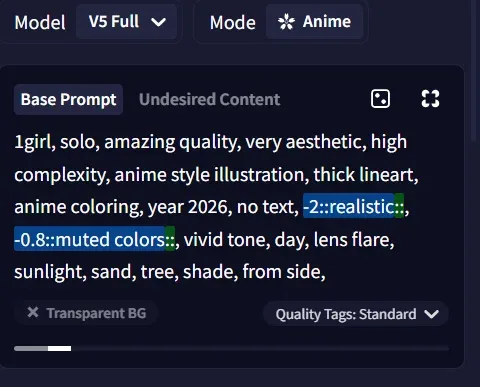
1girl, solo, amazing quality, very aesthetic, high complexity, anime style illustration, thick lineart, anime coloring, year 2026, no text, -2::realistic::, -0.8::muted colors::, vivid tone, day, lens flare, sunlight, sand, tree, shade, from side,
Undesired Content
nsfw, lowres, artistic error, film grain, scan artifacts, worst quality, jpeg artifacts, very displeasing, multiple views, logo, too many watermarks, rating:sensitive, variant set, twitter username, realistic, shiny skin, 2::muted colors::, chibi,
Character Prompts
girl, teenage, blonde hair, gradient hair, purple hair, short hair, two side up, purple eyes, bright pupils, tsurime, virtual youtuber, choker, large breasts, cleavage, navel, star hair ornament, v-shaped eyebrows, star in eye, sling bikini top, highleg, denim shorts, micro shorts, purple bikini, cleavage, navel piercing, wet, smile, :d, legs apart, asymmetrical footwear, flip-flops, sitting, knee to chest, breast press, outstretched leg,
Base Prompt
1girl, solo, best quality, very aesthetic, high complexity, anime style illustration, 1.5::very thick lineart::, neon lineart, impasto, brush stroke, year 2026, rating:general, no text, outdoors, cowboy shot, night, dark, wooden house, tree, light particles, bucket, A refined title in Mincho typeface small white text:Senkou Hanabi/Sanchigiku
Undesired Content
nsfw, lowres, artistic error, film grain, scan artifacts, worst quality, jpeg artifacts, very displeasing, multiple views, logo, too many watermarks, rating:sensitive, variant set, twitter username, muted colors, sepia, realistic,
Character Prompts
girl, black camisole, open shirt, collared shirt, short sleeves, pink hair, side ponytail, brown shorts, flip-flops, :q, squatting, senkou hanabi, colorful, from side, looking down, medium breasts, cleavage,
Base Prompt
1girl, 1boy, best quality, very aesthetic, medium complexity, anime style illustration, thick lineart, anime coloring, manga cover, year 2026, -2::realistic::, no text, aqua background, melting background,
Undesired Content
nsfw, lowres, artistic error, film grain, scan artifacts, worst quality, jpeg artifacts, very displeasing, multiple views, logo, too many watermarks, rating:sensitive, variant set, twitter username, realistic, muted color, chibi,
Character Prompts1
girl, witch, witch hat, blonde hair, long hair, blue eyes, black cape, blouse, medium breasts, underbust, vore, saliva, tongue out, hand up, pinching,
Character Prompts2
boy, shota, blonde hair, short hair, spike hair, red eyes, helm, armor, miniboy, bore, upper body, vore, stuck, on stomach, struggling, heavy breathing, exhausted,
Base Prompt
1girl, 1boy, best quality, very aesthetic, high complexity, anime style illustration, lineart, year 2026, rating:general, no text, greyscale with colored background, 0.2::pale pink theme::, monochrome, indoors, comic style, halftone, border,
Undesired Content
nsfw, lowres, artistic error, film grain, scan artifacts, worst quality, jpeg artifacts, very displeasing, multiple views, logo, too many watermarks, rating:sensitive, variant set, twitter username, realistic, shiny skin, muted color, chibi,
Character Prompts1
girl, greyscale, teenage, one eye covered, large breasts, jimiko, midriff, spaghetti strap, cleavage, covered nipples, no bra, open door, bright pupils, glasses, nervous, from above, speech bubble, text:Come in, please
Character Prompts2
boy, dress shirt, short hair, sweat, from behind, thought bubble, text:If I point it out, they'll find out, won't they...
Character Prompts3
girl, greyscale, teenage, one eye covered, large breasts, jimiko, midriff, spaghetti strap, cleavage, seiza, surprised, open mouth, wavy mouth, blush, bright pupils, glasses, nervous, three quarter view, speech bubble, text:I... I'm sorry it's messy. There might be weird things dropped around, but please don't mind it...
Base Prompt
1girl, solo, faux figurine, best quality, masterpiece, ultra complexity, anime style illustration, thick lineart, year 2026, -3::realistic::, collage, crescent moon, starry sky, city, three quarter view, impressionism, pavement, pastel colors, dark, stairs, transparent background,
Undesired Content
nsfw, lowres, artistic error, film grain, scan artifacts, worst quality, jpeg artifacts, very displeasing, multiple views, logo, too many watermarks, rating:sensitive, variant set, twitter username, muted color,
Character Prompts1
girl, green hair, wavy hair, ahoge, aqua pajamas, slippers, holding candle, walking, looking away, looking at another, speech bubble, text:I can see you
Character Prompts2~4
Sheet ghost, fake transparency, checkered clothes,
Base Prompt(furry mode)
1boy, solo, male focus, very aesthetic, masterpiece, ultra complexity, anime style illustration, thick lineart, year 2026, car, sports utility vehicle, outdoors, road, no text,
Undesired Content
nsfw, lowres, artistic error, film grain, scan artifacts, worst quality, jpeg artifacts, very displeasing, multiple views, logo, too many watermarks, rating:sensitive, variant set, twitter username, realistic, muted colors,
Character Prompts
boy, dragon boy, fat, aqua skin, dragon wings, strongman waist, leaning against vehicle, thick eyebrows, holding, spanner, jumpsuit, traffic cone,