Target Audience for This Article
Primary Audience: Readers who use AI coding tools like v0, Cursor, or Claude Code and are struggling with how to leverage their company or team's design system.
Technical Level: Primarily aimed at beginner to intermediate levels.
Prerequisites: Assumes a basic understanding of how to use v0 and what terms like 'design system' (components, tokens, etc.) refer to.
What You Will Gain: You will understand the mechanics and implementation steps of v0 'Design Systems 2.0' and gain the information needed to decide if your team should try it out now.
Summary
On June 25, 2026, Vercel's v0 announced a new feature called 'Design Systems 2.0.' Based on official documentation and the announcement video, this article explains the mechanism for teaching v0 your company's 'real' components from GitHub, Figma, or npm packages. We cover everything from the differences with the old shadcn/ui registry method, actual implementation steps, the impact on pricing plans, and even the surprising commonalities with Claude Code's Agent Skills. By the time you finish reading, you should be able to judge whether your team should give it a try.
'Not this explanation again...'
If you use AI coding tools like v0 or Cursor, have you ever thought that? Every time you open a new chat, you have to explain your company's button component naming conventions or color tokens from scratch. Surely, many of you have been copy-pasting the same code snippets at the beginning of your prompts. Honestly, it's a quietly exhausting task, isn't it?
On June 25, 2026, the Vercel v0 team released a new feature that addresses this frustration head-on. It is called 'Design Systems 2.0.' By simply loading things your team already has—like GitHub, npm, Figma, or Storybook—v0 can build UIs using your company's actual components.
As of the time of writing (July 2026), there is almost no detailed explanation in Japanese yet. Using official documentation and the announcement video as primary sources, I will summarize everything from the mechanics and actual usage to the impact on pricing and the 'surprising commonalities' I personally noticed.
First, take a look at how v0 actually builds a dashboard using Amazon's Cloudscape design system. It should be faster than explaining it in words.
Figure 1. v0 automatically generating an observation dashboard using real components from AWS's official 'Cloudscape' design system. Source: v0 Docs
What is Design Systems 2.0—What has changed?
First, let's get on the same page. A design system is a mechanism for ensuring consistency across a team regarding colors, typography, spacing rules, and component groups like buttons and cards. It is easy to think of it as turning 'a vague sense of unity' into reproducible rules.
v0 has not been unrelated to design systems until now. Using a mechanism called 'registry' based on shadcn/ui, it was possible to load your company's tokens and components into v0. However, this method had a clear prerequisite: the foundation had to be shadcn/ui. It did not support design systems built with completely different design philosophies, such as Microsoft's Fluent or IBM's Carbon, out of the box.
This was exactly where it was painful for existing v0 users. You either had to build a shadcn/ui-compatible registry yourself or paste component code into every prompt. In reality, those were the only two options. As the number of team members increases, this 'pasting work' quietly accumulates.
Design Systems 2.0 is removing this prerequisite entirely. By directly loading GitHub repositories, npm packages, Figma frames, or Storybook documentation sites, you can now train v0 on components actually used in your product, regardless of whether they are shadcn/ui compatible.
The differences between the two are summarized as follows:
Comparison AxisOld Method (shadcn/ui registry)Design Systems 2.0Supported Foundationshadcn/ui based onlyAny design systemSourceRequires building custom RegistryGitHub, npm, Figma, StorybookStorage FormatCode reference centeredSaved and reused as ’Skills’Team SharingRequires distributing RegistrySaved and shared in workspaceApplication ExamplesIn-house UI extending shadcn/uiFluent, Polaris, Carbon, Blueprint, etc.\beginarrayl \hline \textbfComparison Axis & \textbfOld Method (shadcn/ui registry) & \textbfDesign Systems 2.0 \\ \hline \textSupported Foundation & \textshadcn/ui based only & \textAny design system \\ \hline \textSource & \textRequires building custom Registry & \textGitHub, npm, Figma, Storybook \\ \hline \textStorage Format & \textCode reference centered & \textSaved and reused as 'Skills' \\ \hline \textTeam Sharing & \textRequires distributing Registry & \textSaved and shared in workspace \\ \hline \textApplication Examples & \textIn-house UI extending shadcn/ui & \textFluent, Polaris, Carbon, Blueprint, etc. \\ \hline \endarray
Note that the shadcn/ui registry method itself has not been deprecated. It is positioned as "legacy" in the documentation, but it is still accessible. If your project is self-contained within shadcn/ui, there is no need to force a migration.
The Big Picture: From Source to "Skills"
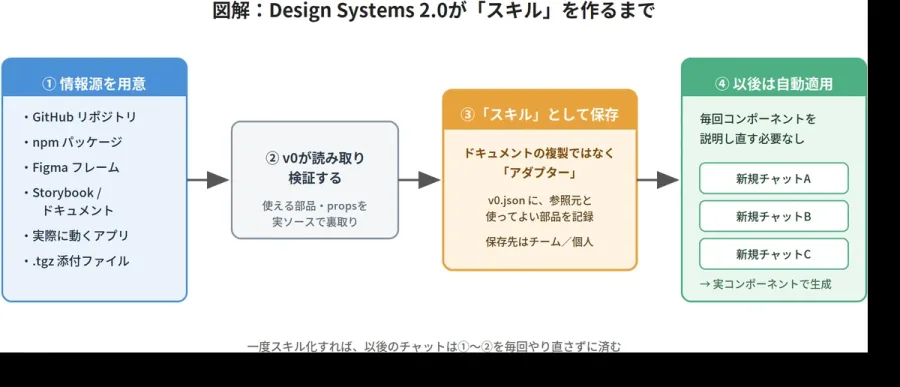
So, how does it actually work? According to the v0 documentation, a design system is saved as a "skill" in a team or personal workspace. Think of a skill as a compact set of instructions that v0 calls upon when it encounters a situation where the work might be relevant.
What is interesting here is that the official documentation explicitly emphasizes that "skills are not copies of documentation." The true nature of a skill is an "adapter"—a guide that tells v0 where the source is located and which parts, props, and tokens are safe to use. v0 explains it as not memorizing your company's entire Storybook, but rather remembering only "where to look and what to use"—that is the image.
The flow can be illustrated as follows.
I want you to pay attention to step ④. Once you have turned it into a skill, you do not need to explain it again in the next chat. v0 will automatically use the real, verified components from the past. The exhaustion of "having to explain this again," which I mentioned at the beginning, is completely eliminated.
Trying an actual import
The introduction begins from the Design Systems page. On the import screen, you can add the following sources:
GitHub repository: The design system itself, or an app that actually uses it
Figma frames or nodes: Simply sign in to Figma and paste the link, and v0 will capture screenshots and frame information
Link: Storybook, documentation sites, etc.
Attached files: Screenshots, ZIP files, .tgz package archives, etc.
Here is the actual screen.
If you are using a private npm package, add authentication information like NPM_TOKEN as shared environment variables in the Development environment. Please note that the requirement for a Vercel Developer role or higher is something easily overlooked when considering internal adoption. If you do not have the permissions, there is also a method to attach a .tgz package archive directly.
Another thing that is surprisingly easy to overlook is the "Notes" field. If you write down information that cannot be conveyed through source code alone—such as global styles, provider settings, deprecated components, or anti-patterns you want v0 to avoid—the accuracy of the generation will change.
When you submit the information, v0 will launch a dedicated chat, discover the source and design principles, prototype a starter app using them, and always ask for a review before saving. This is a point you should not skip. Since all subsequent apps will be based on this starter, it is worth checking everything thoroughly at the beginning, including not just components and tokens, but also providers, theme settings, and fonts.
Behind the scenes, these settings are recorded in a file called v0.json. Roughly speaking, the contents consist of these three items: the GitHub source to reference (up to 3), environment variables for private packages, and the location of the base starter app. You will almost never edit it by hand, but knowing "what is saved" will provide clues if things do not work correctly later.
Calling a saved design system
Saved skills are listed on the Design Systems page.
To use them, attach them from the prompt toolbar or specify them directly within the prompt.
If you are the owner of a paid team plan, you can also set a default design system for the entire team. If nothing is selected in a new chat, this default is used automatically. This does not affect existing chats or design systems selected manually.
Try them out immediately with five famous design systems
For those who want to "try it out first," v0 provides five real-world design systems as samples from the start.
primer — GitHub's design system
carbon — IBM's design system
material-3 — Google's design system
fluent-ui — Microsoft's design system
cloudscape — AWS's design system
All of these are used by real companies in production environments. Just by trying them out, you should be able to get a feel for "building with real components."
In the announcement video, Vercel CEO Guillermo Rauch demonstrates importing components used in actual products into v0, including Microsoft Fluent, Shopify Polaris, IBM Carbon, Palantir Blueprint, and their own Geist.
What personally surprised me is that they have included design systems that are not based on shadcn/ui (such as Palantir's Blueprint). Until now, v0 was a tool with a strong "shadcn/ui flavor," for better or worse, but it seems clear they are breaking that premise themselves.
The design philosophy of "Skills"—Commonalities with Claude Code Agent Skills
I will digress a little here, but there is something I want to write about.
The term "skills" adopted by v0, and the design of "loading only when relevant." Doesn't that sound familiar?
In fact, in December 2025, Anthropic released the mechanism used in Claude Code called "Agent Skills" as an open standard. By writing a name and description in a file called SKILL.md, the agent reads only the name and description first, and then reads the body when it becomes necessary. This is the concept known as "progressive disclosure."
The explanation in the v0 documentation that 'Skills are small, focused chunks of instructions that v0 reads as needed while working' is quite close to this way of thinking. Of course, there is no mention anywhere that v0 has directly adopted the Agent Skills specification, and the two should be designed as separate things. Even so, I see the idea of 'breaking down the units of expertise to teach an agent and passing them only when necessary' as becoming a kind of common language in the AI tool industry in 2026. Whether they just borrowed the name or it is convergent evolution, I don't know the truth, but I think it's a perspective worth remembering.
Pricing Plans and Terms of Use
Design Systems 2.0 is provided as a beta version as of July 2026 (according to AlphaSignal reports). It is probably best to keep in the back of your mind that specifications may change in the future.
The pricing plans for v0 as a whole are divided into the following five tiers.
PlanPriceNotesFree$0For trialPremium$20/monthNew sign-ups endingTeam$30/month per userTeam features/shared creditsBusiness$100/month per userFor privacy-focused teamsEnterpriseContact usLarge organizations/extra security\beginarrayl \hline \textbfPlan & \textbfPrice & \textbfNotes \\ \hline \textFree & \text\$0 & \textFor trial \\ \hline \textPremium & \text\$20/month & \textNew sign-ups ending \\ \hline \textTeam & \text\$30/month per user & \textTeam features/shared credits \\ \hline \textBusiness & \text\$100/month per user & \textFor privacy-focused teams \\ \hline \textEnterprise & \textContact us & \textLarge organizations/extra security \\ \hline \endarray
Since the documentation explicitly states that design systems themselves can be saved to a 'team or personal workspace,' it does not seem to be limited to the Team plan. However, features such as sharing skills across the entire team or setting a default design system require a paid plan of Team or higher.
I should also touch on permissions. By default, any team member can create, edit, or delete skills. If you want to prevent someone from 'messing up a skill you've carefully set up,' it's worth remembering the option to restrict editing rights to owners only using the 'Restrict Memories & Skills' setting in the Enterprise plan. While the free tier is sufficient for individual developers to try it out, you will likely consider at least the Team plan for full-scale team operations.
Points to Note Before Implementation
Finally, I will organize the official best practices from a practical perspective.
(1) Existing projects are not updated automatically Even if you update a skill, the code for apps you have already created will not automatically follow suit. When you want to reflect a new version, you need to instruct the update again in that app's chat. Confusion like 'I fixed the skill but the old app didn't change' is usually caused by this.
(2) Limit sources to one design system and one framework The official documentation also recommends not mixing unrelated design systems or contradictory old documents. If you pack multiple design systems into one skill, v0 may get confused and accuracy may drop.
(3) Maximum of three GitHub reference sources Due to the specifications of the v0.json configuration file, you can reference a maximum of three GitHub sources. The design system itself, the actual app that uses it, and one more. It is best to think in terms of that level of granularity.
(4) Do not underestimate reviews The starter app that v0 creates after import is baked into the skill once you approve it. Check not only the appearance but also the provider, theme settings, fonts, and global styles before approving. If you cut corners here, the same defects will propagate to all subsequent apps.
Summary
'Should our team try this out right now?'—I will answer that last. If you are already using a design system other than shadcn/ui (such as Fluent, Carbon, or an in-house component library) and feel like you are explaining the same things to AI tools over and over, it is definitely worth trying. Conversely, if you are building UIs with the default shadcn/ui as an individual developer, there is no reason to rush to migrate. Given that it is a beta version, I think starting small is the right distance to keep.
We have looked at v0's new feature, 'Design Systems 2.0.' To summarize the key points:
It removes the conventional mechanism that assumed shadcn/ui and allows you to import any design system.
You can use assets your team already has, such as GitHub, npm, Figma, and Storybook, as they are.
By saving them as 'Skills,' you no longer need to re-explain them in subsequent chats.
As of July 2026, it is a beta version, and caution is required regarding future changes.
I think the fastest way to understand this is to start by trying out the five official samples, especially Cloudscape or Fluent UI. By experiencing "what v0 can do and to what extent with other people's design systems" before incorporating your own, you will find it much easier to make an informed decision about actual implementation.
Reference Materials and Resources Used
v0 Docs: Design Systems 2.0 (Official documentation. Figures 3-5 in this article also use assets from this page)
v0 Docs: Design systems (Legacy version)
v0 Design Systems Page (Five sample design systems)
v0 Docs: Pricing
Announcement post by the official v0 X account
Announcement post by Guillermo Rauch (Vercel CEO)
AlphaSignal: v0's Design Systems 2.0 Stops Making Teams Re-explain Their Components Every Chat
Anthropic: Equipping agents for the real world with Agent Skills
Figure 2 is an original diagram for this article.
If you found this article helpful, please give it a like❤️ or leave a comment! If you have any questions, feel free to ask in the comments section.
Innovating your business with technology
Thank you for reading this article. Are you worried about things like "I want to build a system, but the initial investment is too high" or "I want to develop an IoT product, but I'm anxious about both the technology and the costs"?
✨ Develop SaaS with 0 yen initial cost. PonoTech's Micro-SaaS ServiceWe at PonoTech Co., Ltd. develop custom SaaS for our clients with 0 yen initial cost.
Features of Micro-SaaS Development
0 yen initial cost: Free development of web apps, mobile apps, and desktop apps
Provided via monthly subscription: Start using the service with a monthly fee based on the features you need
Buyout option: You can also purchase the system as your own property while using the subscription
This is the ideal solution for companies that say, 'We want our own dedicated SaaS, but a multi-million yen initial investment is difficult.'
IoT Contract Development × Subsidy Utilization to Support ManufacturingWe can handle development consistently from hardware to software. Build your IoT system while reducing costs by up to 66% by utilizing subsidies.
Reduce system development costs by utilizing subsidies
As an IT introduction support provider certified by the Ministry of Economy, Trade and Industry, we provide the following services as a one-stop shop.
Subsidy diagnosis and application support: Proposing the optimal subsidy with a track record of an 82.8% adoption rate
Consistent support from requirements definition to development: A development structure that is 100% compliant with subsidy requirements
Labor-saving subsidies, manufacturing subsidies, etc.: Support for utilizing subsidies of up to 80 million yen
The image generation AI book 'ComfyUI Master Guide,' co-authored by our representative Yasuhiro Hayano, who has deep knowledge of AI technology, was released by SB Creative on May 9, 2025. If you want to understand the forefront of AI image generation, please take a look.
Ideal for companies with these challenges'I want a dedicated SaaS, but I want to keep initial investment low'
'I want to develop an IoT product, but I need knowledge of both hardware and software'
'I want to utilize subsidies, but I don't know how to apply'
'I want to start with a subscription and buy it out if necessary'
Micro-SaaS development: Build a dedicated system with 0 yen initial cost
IoT contract development: Consistent support from hardware to software
Subsidy utilization: Reduce development costs by up to 66%
Please take advantage of our free initial consultation. Let's think about your company's growth strategy together from both technical and management perspectives.
Click here for inquiries to Ponotech Co., Ltd.!
▶ Taking the First Step to Accelerate Growth Through Technology
— Creating the Future with Technology. Ponotech Co., Ltd.