I sometimes use synthetic voices on my podcast, 'The Monk May Run, but the Temple Won't.'
Most of the time, I've been using a service called 'Ondoku-san' for reading foreign language text, but I heard rumors that the text-to-speech from OpenAI, the developers of ChatGPT, is amazing. This is a story about how I tried out 'OpenAI.fm', which makes it easy to test.
First, to give you the conclusion: as it stands, it wasn't quite ready for prime time. Since it was somewhat experimental and my show is a personal project where I don't prioritize high quality, I ended up using it, but it required some ingenuity in how I used it. I'll write about the workarounds I used, so I hope you'll read until the end.
How to use it
OpenAI.fm Open the site in your browser, select a VOICE (the base voice of a man, woman, etc.), and choose a VIBE. The selected vibe will be displayed in English, so you can tweak the vibe here or rewrite it in Japanese. After that, enter the text you want to be read in the SCRIPT box and press the 'PLAY' button to listen, or use the 'DOWNLOAD' button to save the audio data. I'll be lazy and leave the screen images to someone else's article, but it's very simple.
Since the options are in English and can be hard to understand, I've summarized them roughly below.
VOICE (Male/Female)Male: Ash, Ballad, Echo, Fable, Onyx, Verse
Female: Alloy, Coral, Nova, Sage, Shimmer
Auctioneer (Auctioneer)
Bedtime Story (Bedtime story feel)
Cheerleader (Cheerleader)
Chill Surfer (Relaxed surfer)
Clam (Quiet person)
Connoisseur (Expert/Connoisseur)
Cowboy (Cowboy)
Doramatic (Dramatic)
Emo Teenager (Emo teenager)
Eternal Optimist (Eternal Optimist)
Fitness Instructor (Fitness Instructor)
Friendly (Friendly person)
Gourmet Chef (Gourmet Chef)
Mad Scientist (Mad Scientist)
Medieval Knight (Medieval Knight)
Noir Detective (Hard-boiled detective)
NYC Cabbie (NYC taxi driver)
Patient Teacher (Patient teacher)
Pirate (Pirate)
Professional (Professional)
Robot (Robot)
Santa (Santa Claus)
Serene (A calm person)
Smooth Jazz DJ (Smooth jazz DJ)
Sports Coach (Sports coach)
Sympathetic (An empathetic person)
True Crime Buff (True crime enthusiast)
↑Since these are English expressions, they don't make much sense even when translated into Japanese.
Here are the settings when you choose 'Clam' (a quiet person).
This is quite different from the image of a 'quiet person' in Japan.
Usage example
This time, I used it to read out a message sent to the program. Usually, I record messages in my own voice, but since Chinese was included in the middle this time, and it might be easier on the ears for a woman's message to be read by a female voice rather than an older man, I used it experimentally.
Text read aloudThe text read aloud was as follows.
Separating Chinese and JapaneseWhen Chinese is included in a Japanese sentence (in this case, “有缘千里来相会,无缘对面不相识”), the language switching didn't work well, and I couldn't control it—it would either read the Chinese characters with Japanese pronunciations or the Japanese parts would have strange pronunciations. I wondered if I could handle it by using some special notation in the prompt (I heard Amazon Polly can do things like that), but I couldn't find a definitive answer.
Therefore, I solved it by separating the Chinese part and having it read separately.
Due to the randomness of the AI, there are times when it can read kanji and times when it cannot, so I added hiragana ruby in parentheses after kanji that are often misread. This is not 100% effective, and sometimes it reads both the kanji and the ruby in parentheses, but it has mostly eliminated misreadings.
Inconsistency (instability)Even with a text of about 40 seconds, there are times when it reads it very well and times when it makes surprising mistakes, so I tried it many times, but it was difficult to get the entire 40 seconds to be satisfactory, so I ended up splitting it into two parts. However, when I split it into parts, even though I kept the same VOICE and VIBE, it was difficult to get the same atmosphere due to the randomness, and in the end, the voices between the previous parts ended up sounding like different people.
Controlling the randomness might be possible with the advanced usage described later, but since you have to try it out until you are satisfied, the current quality makes it difficult to attempt that much.
Podcast I distributed (I use it at the beginning after the BGM starts)Advanced usage
As a bonus, OpenAI.fm is, as explained, a demo of the latest text-to-speech model, 'GPT-4o-mini-TTS'. The basic usage is intended for use via API, and I think OpenAI.fm is more like a way to easily try it out before using the API. An API is a way to use ChatGPT from a program rather than from a browser. In short, it is used to create a talking robot by converting the text answers of a chatbot into audio using this API.
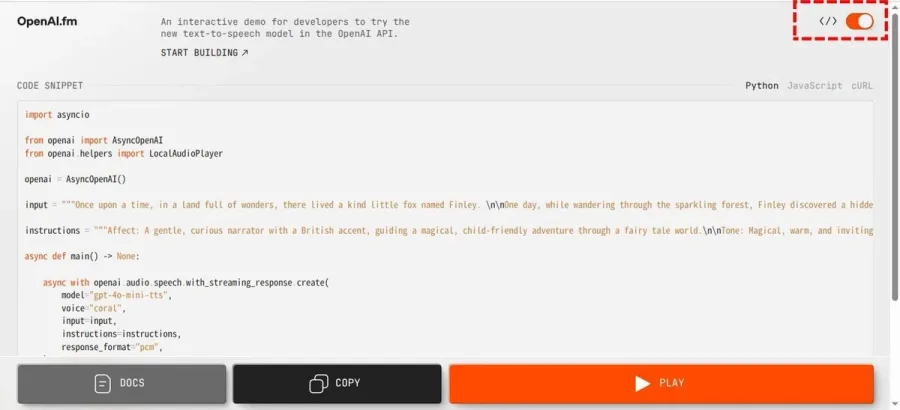
If you are interested, please click the button next to </> in the upper right corner of the OpenAI.fm screen. This will switch to the API sample screen.
You can choose between Python and JavaScript for the language. You can also check sample code for calling the API using a tool called cURL, which is not a language.
This displays the specific code for using the VOICE, VIBE, and SCRIPT contents selected just before (before switching with the button) from the API (program).
This is just a sample, so there is no charge.
To actually use the API, you need to register a ChatGPT account and a payment method, and then have an API key issued. (Pay-as-you-go system)