The task of adding BGM to videos is the easiest part to automate. We have been doing it automatically for a long time.
However, there is only one place where you will have an accident if you leave everything to it. Today is about that.
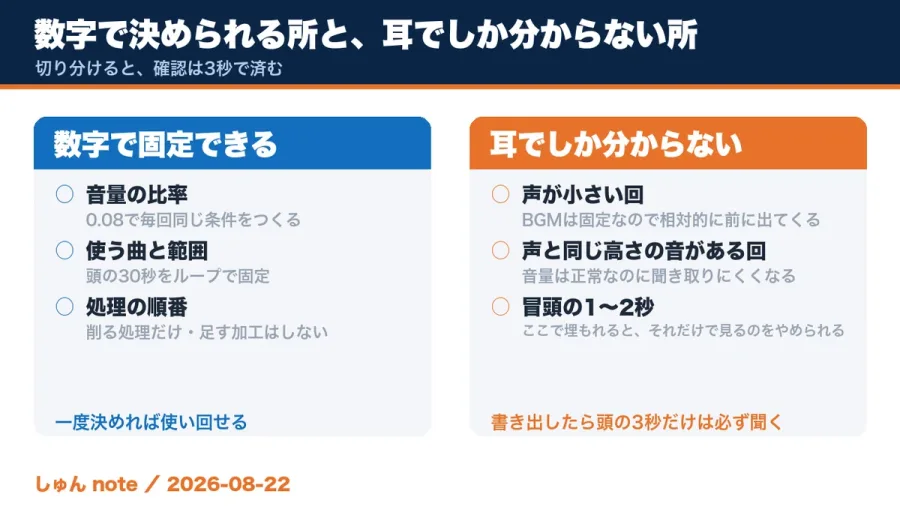
I will write the conclusion first. The 'ratio' of the volume can be fixed with numbers. But since 'how it sounds' cannot be turned into numbers, you have no choice but to check with your ears at the end. Since drawing this line, I haven't stumbled around BGM anymore.
There are only 3 settings I use
The BGM for our videos is fixed with the following settings.
Volume: 0.08 (lowered to 8% of the original sound source)
Range used: Only the first 30 seconds are cut out and looped
Automatic volume adjustment: Do not use
It's dull when put into numbers, but with these three, the result is the same every time. I stopped adjusting by ear every time and fixed it with numbers instead.
The third one might be surprising. I intentionally turn off the process that automatically levels the volume.
The reason is simple: even though I lowered it to 0.08, the automatic adjustment judges it as 'too quiet' and raises it. The meaning of fixing the ratio is lost. It's a convenient feature, but it gets in the way when you decide the ratio yourself.
'Smart automatic processing' and 'fixed values you decided yourself' fight when used at the same time. This applied to many places, not just BGM.
Why 'only the first 30 seconds'?
If you play the BGM source as is from beginning to end, the way it sounds will vary depending on the video. Since songs have quiet parts and exciting parts, only videos that happen to hit an exciting part will have voices that are hard to hear.
Therefore, I fix the range used to the first 30 seconds and loop that. Since the same part plays in every video, the way it sounds is consistent.
For the same reason, I don't change the BGM for each video. If you choose a song for each one, you end up having to readjust the volume every time. If you fix the song, you can also fix the volume.
I do think 'won't people get bored if the song is different every time?', but my judgment is that it looks more amateurish if it's not consistent. I think opinions are divided here.
I don't touch the voice at all
Another thing I have decided is not to process the voice itself.
If you apply effects to the voice in an attempt to make it sound better, it usually becomes unnatural. The only processing we do to the voice is subtractive.
Delete parts where you rephrased
Tighten up silence
Remove clicking mouth noises
Do not add processing. Only use subtractive processing. This way, you won't make mistakes.
When deciding the BGM volume, keep the voice fixed as a reference and only adjust the BGM side. If you move both, you won't know what is causing it to be hard to hear. Fixing one side and only moving the other is a tip for all adjustments, not just sound.
This is the only part you must check by ear
Now, for the main topic. Even if you fix it with numbers, there are situations where I always listen for myself.
1. Episodes where the voice is quiet
Depending on the day's physical condition or the distance to the microphone, the volume of the voice is slightly different every time. Since the BGM is fixed at 0.08, the BGM becomes relatively loud only on episodes where the voice is quiet. You can't tell this just by looking at the numbers. You only notice that "the BGM is a bit too forward" after playing it back.
2. Episodes containing sounds at the same pitch as the voice
Even if the volume is the same, if a sound at a pitch close to the voice is playing, it becomes hard to hear just because of that. A state occurs where you can't hear it even though the volume numbers are normal. This can also only be detected by ear.
3. The first few seconds
The most important part is the beginning of the video. If the voice is buried in the first 1-2 seconds, people will stop watching just because of that. Even if it's a hassle to listen to the whole thing, always listen to at least the first 3 seconds. This is the check with the highest cost-effectiveness.
Where to touch when you feel it's "too loud"
When I hear something that feels off, I decide which parts to touch in a specific order. If you don't decide this beforehand, you'll end up tweaking everything and won't be able to return it to the original state.
First: Only adjust the BGM volume. Try changing 0.08 to 0.06. Never touch the voice side. This fixes it in most cases.
Second: If that doesn't fix it, shift the range of the BGM used. In cases where the pitches are clashing, it will remain "quiet but loud" even if you lower the volume. Changing to a different part of the song can sometimes solve it.
Third: If that still doesn't work, don't include BGM for that episode. It's rare, but it happens. There are definitely episodes that are easier to listen to without BGM than forcing it in.
What you must not do is try to solve it by making the voice louder. If you raise the voice, the noise will also increase, and the reference for future episodes will be ruined. Do not move the side you are using as a reference. If you only follow this rule, you won't get lost.
"How it sounds" cannot be turned into numbers
Here is a breakdown of why you need your ears.
Volume is a measurable value, but ease of listening is not. Even if the volume difference between the voice and BGM is the same, how it sounds changes depending on the pitch of the voice, the speed of speech, the style of the BGM, and the playback environment (smartphone speaker vs. earphones).
Therefore, fixing it with numbers is for "keeping conditions the same every time," not for "getting it right every time." If you keep the conditions consistent, it becomes easier to notice when something is off. That is the role of numbers.
Fixed values are for reducing judgment, not for eliminating it entirely is what I meant.
Things you can do starting today
1. First, fix the BGM volume to a single number. Stop adjusting it by ear every time. The number doesn't matter; I use 0.08. Once you decide on it for your environment, you can reuse it from then on.
2. Turn off automatic volume adjustment. If you are deciding the ratio yourself, don't use it in combination with smart features. Choose one or the other.
3. Fix the song and the range you use. If you make sure the same part plays every time, the sound will be consistent.
4. Don't mess with the voice. Only trim it. If you start adding processing, you won't be able to isolate the cause of any issues.
5. After exporting, always listen to at least the first 3 seconds. You don't have to listen to the whole thing. Just listen to the beginning.
In conclusion
What I was able to automate in BGM work was the "make it the same every time" part. What I couldn't automate was the part where you judge "was that okay this time?".
These two things can be separated. Once you separate them, you can fix the former with numbers and never think about it again, and the latter only takes 3 seconds of your time.
Thinking in terms of "leave it all to AI" or "do it all yourself" makes both approaches difficult. Separating the parts you leave to AI and the parts you check yourself was ultimately the easiest way.
I write one article every day about handing over company tasks to AI.
If you want to try the same thing in your own work, follow me to get the next article.
▼ I've summarized the rest of this in a paid note (500 yen).
I've written about the 4 things I absolutely won't hand over, 3 accidents that actually happened, the 13 tasks I'm currently handing over, and even the actual prompts I use when handing them over.