Target Audience for This Article
Primary Audience: Readers who use generative AI coding tools like Claude Code, Cursor, and Codex CLI daily and are struggling with rate limits or monthly costs.
Technical Level: Primarily aimed at intermediate users, though applicable to beginners and advanced users as well.
Prerequisites: Assumes an understanding of basic terms like LLM API keys and endpoints, as well as fundamental operations for handling CLI tools from a terminal.
What You Will Gain: You will be able to technically explain why OmniRoute is designed to 'never stop' and gain the information needed to decide if it is worth integrating into your workflow.
Summary
This article explains 'OmniRoute,' an OSS gateway that bundles over 200 AI providers into a single endpoint. Based on primary information from the official repository, we have organized its two core mechanisms—four-stage automatic fallback and token compression—along with actual screenshots of the official dashboard, installation commands, and often-overlooked precautions. By the end of this article, you will understand both concrete ways to handle the issue of Claude Code or Cursor stopping due to quota limits and the risks you should check before implementation.
There is nothing more frustrating than the moment a coding agent returns a message saying, 'You have reached your usage limit.' It always happens at the most inconvenient time, right when you are in the zone.
Subscription quotas reset at the beginning of the month, but they are consumed fastest during the final push before a deadline. On the other hand, signing up for multiple pay-as-you-go API keys leads to painful invoices. With GPT, Claude, Gemini, DeepSeek, and others—each having slightly different API formats—you end up having to rewrite your settings every time you switch tools.
OmniRoute, the OSS project we are covering this time, aims to structurally resolve this 'checkmate' situation. It is not just a 'cheap API aggregator site.' A proxy server running locally bundles multiple AI providers into a single OpenAI-compatible endpoint, automatically switching to the next candidate if a quota is reached. Furthermore, a compression engine trims the prompt itself before sending, attempting to deliver the same content with fewer tokens. Let's start by looking at the big picture.
What is OmniRoute? An OSS that consolidates 'AI Gateways' into one
OmniRoute is an MIT-licensed OSS released by developer diegosouzapw, written in TypeScript. It is essentially an 'AI proxy server that runs locally.' When you run 'npm install -g omniroute' and start it, an OpenAI-compatible endpoint at http://localhost:20128/v1 is launched. From there, you just need to point Claude Code, Cursor, or Codex CLI to that address.
Behind the scenes, there is a catalog of, to borrow the official README's phrasing, '237 providers, over 90 of which have free tiers' (Note). It handles major players like OpenAI, Anthropic, and Google Gemini, as well as DeepSeek, Groq, Mistral, Cohere, xAI, and even self-hosted models like Ollama and vLLM, all in one go.
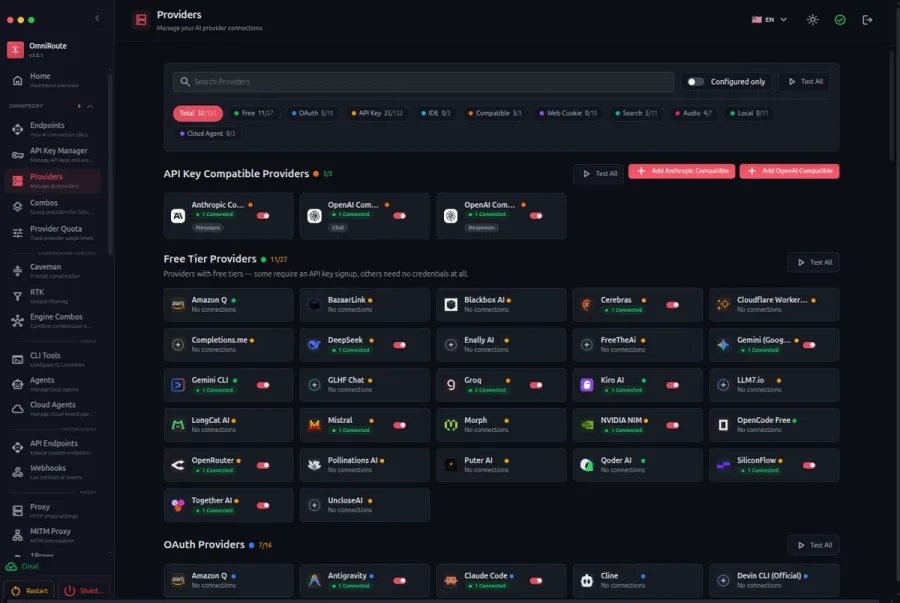
Looking at the 'Providers' screen on the dashboard gives you a good sense of how it works. Four types of connection methods—OAuth connection, API key connection, free providers, and self-hosting—are listed, allowing you to see the health and remaining quota for each at a glance.
You might think, 'If it just has many providers, isn't it just an aggregator?' In reality, it goes a step deeper; it is the combination of the three pillars—format conversion, automatic fallback, and token compression—that creates a 'non-stop AI environment.'
Note that OmniRoute is not a project built from scratch. According to the acknowledgments in the official README, it was developed by forking a project called '9router' by decolua and further evolving it by porting the design of 'CLIProxyAPI,' which was written in the Go language, into TypeScript. Knowing that it was built layer upon layer helps explain why it is so feature-rich. Next, we will look at its core: the automatic fallback mechanism.
Breaking down the mechanism: The concept of 4-stage auto-fallback
The heart of OmniRoute is a mechanism called "combo." By registering multiple models as a chain, it automatically slides to the next candidate the moment it detects a quota exhaustion or an error. The official documentation explains this behavior in four tiers.
Tier 1 consumes your existing subscriptions first. You use up plans with fixed monthly fees that you "lose money on if you don't use them," such as those via Claude Code Pro or Codex via ChatGPT Plus/Pro. Once those limits are reached, it moves to Tier 2 pay-as-you-go APIs. Relatively inexpensive API keys like DeepSeek, Groq, and xAI fall into this category. If you still reach your budget cap, it moves to Tier 3 budget models (such as GLM or MiniMax, in the price range of under $1 per million tokens). The last line of defense is Tier 4 free providers, featuring services that claim to be unlimited and indefinite, such as Kiro, Qoder, and Pollinations.
This switching is so fast it is imperceptible; borrowing the official website's phrasing, it happens in "milliseconds." There is not just one routing strategy, either. There are 17 types in total, including 'priority' which consumes in order of priority, 'cost-optimized' which selects the cheapest option, and 'fusion' where multiple models are queried simultaneously and a judge model synthesizes the best answer. Even without any configuration, simply specifying 'auto' in the model name allows it to automatically score the optimal connection destination based on nine indicators, including health, remaining quota, cost, and latency.
Honestly, I initially wondered if it was necessary to have this many strategy types. However, looking at the 'Combos' screen on the dashboard, I saw that it goes beyond a simple priority list and even includes 'Quota-Share' (a feature to fairly share a single subscription among multiple people and keys), designed with team development in mind. I felt it was designed with practical deployment in mind, rather than just for personal hobby projects.
Its resilience to failure is also not to be underestimated. It has a three-layer structure: 'circuit breakers' that stop at the provider level, 'connection cooldowns' that pause at the key level, and 'model lockouts' that isolate only at the model level. It is designed so that even if one API key goes down, other keys and models from that provider continue to function.
Reducing tokens without cutting them: The 10-engine compression pipeline
Another pillar is prompt compression. OmniRoute uses the defiant sales pitch, "Why use many tokens for a conversation that can be handled with few?" which hits the nail on the head. It is a mechanism that compresses information that is "too redundant for AI agents to read," such as git diffs, grep output, and build logs, while maintaining their meaning before sending them to upstream providers.
The pipeline consists of 10 engines, each of which can be turned on or off independently. It includes 'Session-Dedup' which removes duplicate content across turns, 'CCR' which offloads large blocks in a searchable format, 'RTK' which intelligently prunes shell output, 'Headroom' which compresses homogeneous JSON arrays, and even 'LLMLingua-2' which trims semantically unnecessary parts using machine learning models. Code blocks, URLs, and JSON structures are said to always be kept untouched.
The following modes are presets for this.
ModeReduction Rate (Approx.)Suitable ScenariosLiteApprox. 15%Always-on safety settingsStandard(Caveman)Approx. 30%Daily codingAggressiveApprox. 50%Long/tool-heavy sessionsUltraApprox. 75%When maximum savings are neededRTK60-90%Compression of shell, build, git outputStacked(RTK→Caveman)78-95%Scenarios with mixed tool logs and text\beginarray \hline \textbfMode & \textbfReduction Rate (Approx.) & \textbfSuitable Scenarios \\ \hline \textLite & \textApprox. 15\% & \textAlways-on safety settings \\ \hline \textStandard(Caveman) & \textApprox. 30\% & \textDaily coding \\ \hline \textAggressive & \textApprox. 50\% & \textLong/tool-heavy sessions \\ \hline \textUltra & \textApprox. 75\% & \textWhen maximum savings are needed \\ \hline \textRTK & \text60-90\% & \textCompression of shell, build, git output \\ \hline \textStacked(RTK→Caveman) & \text78-95\% & \textScenarios with mixed tool logs and text \\ \hline \endarray
The real-world example in the official README is easy to understand. It introduces an example where a 69-token text carefully explaining why a React component keeps re-rendering is compressed to 19 tokens containing only the gist—"The cause is the creation of new references; wrap inline objects in useMemo"—when passed through Standard mode. That is a 72% reduction, yet the meaning remains almost unchanged.
However, one should read this with the caveat that this is a best-case scenario chosen by the officials. The actual compression rate depends on the content; it is more effective for text with a lot of stereotypical redundancy like tool logs, and should not be very effective for already concise natural language. It is healthy to take these numbers with a grain of salt and view them with the understanding that "effectiveness is case-by-case."
Peeking at the dashboard: Unassuming but effective observability
Since an AI gateway is a behind-the-scenes entity, it is hard to get a feel for it just by reading a list of features. It is faster to look at the actual screen.
On the 'Analytics' screen, you can check how many requests are flowing to which provider and how much cost has "been incurred" (actual billing is zero when using free providers).
On the 'Health' screen, the status of circuit breakers and keys in cooldown are listed, allowing you to immediately isolate which provider is the cause when a failure occurs. A design choice I personally felt was good is that the cost display on the dashboard is explicitly stated not as the "actual billed amount" but as the "amount that would have been incurred if paid APIs were used directly." When operating only with free providers, the screen shows "$300 spent," but the actual payment is zero. It might be confusing, but I think it is honest that they explain this point in the FAQ without hiding it.
Connection partners: Claude Code, MCP, A2A, and your own agents
OmniRoute supports more than just AI models. It provides individual setup instructions for over 24 coding agents and CLI tools, including Claude Code, Codex CLI, Cursor, Cline, GitHub Copilot, and Windsurf.
On the "CLI Tools" screen, the installation status and versions of supported tools are listed, and configuration file modifications can be completed directly from the dashboard. It may look simple, but developers who juggle multiple tools will appreciate this centralized management.
As a more advanced usage, there is a feature to expose OmniRoute itself as an MCP (Model Context Protocol) server. 95 tools are provided across 30 types of scopes, allowing clients like Claude Desktop to delegate "OmniRoute configuration operations themselves" to an agent. For example, it is theoretically possible to ask an agent to "temporarily remove the provider whose costs are spiking," and it could even handle reordering the combos. Additionally, it supports the A2A (Agent-to-Agent) protocol, allowing it to communicate directly with other agents via JSON-RPC. The idea that the gateway itself can act as an agent is genuinely interesting.
How far does it go for free? — Looking at the contents of "Free"
One always wants to suspect a catch when hearing the word "free." Since OmniRoute itself is OSS, no fees are charged for the tool itself regardless of the plan used. However, if you have a paid subscription like Claude Code Pro used in Tier 1, you will naturally incur those costs. If you want to complete everything for free, you need to choose a combo composed only of Tier 3 and Tier 4.
The total free quota aggregated by the official team is approximately 1.6 billion tokens per month (about 2.1 billion tokens including first-month bonuses). While some providers like Kiro and Qoder claim to be virtually unlimited, others with rate limits, such as Cerebras' "1 million tokens per day" or NVIDIA NIM's "40 requests per minute," are also mixed in. OmniRoute's claim is that even if the free quota of one provider runs out, by lining up multiple free providers in a combo, you can create a state where it "stays free and never stops" from a user experience perspective.
I want to look at this a bit cautiously. Many free providers are often inferior to paid plans in terms of model performance and response speed. The range you can rely on for free quotas is completely different between tasks where you can accept that "it's free, so it's okay if it's slow" and tasks where "quality is a lifeline." Unfortunately, gathering free quotas is not the same as being able to use them reliably for business.
Is my code sent externally? — The premise of local completion
It is easy to overlook this when distracted by talk of free quotas and automatic fallbacks, but OmniRoute is not a "cloud service" in the first place. What the official README repeatedly emphasizes is that this is a mechanism that is completed entirely on your local machine.
OmniRoute, installed via npm, starts as a process on your own PC or server. Prompts are sent directly to each provider after passing through OmniRoute, and no server belonging to the OmniRoute company (or equivalent entity) is interposed in between. Telemetry is disabled by default, and authentication information is encrypted and stored in a local SQLite database, according to the official explanation. While a hosted endpoint at cloud.omniroute.online is available, this is just one option, and the basic design is intended to be completed locally.
However, "completing locally" and "being secure" are two different things. Which provider your prompt content is passed to ultimately depends on which providers you have lined up in which Tiers. For projects handling highly confidential code, it is better not to spare the effort of re-selecting the providers you include in your combos with your own eyes.
Try running it with 3 commands
The introduction itself is simple. Following the official documentation, the procedure is generally the following three steps.
(1) Installation and startup
npm install -g omniroute
omniroute
With this, the dashboard will launch at http://localhost:20128 and the API endpoint at http://localhost:20128/v1.
(2) Connecting providers
From "Providers" on the dashboard, connect at least one free provider. The authentication method differs for each provider, such as OAuth authentication with AWS Builder ID for Kiro, or OAuth authentication with a Google account for Qoder.
(3) Point your local tools to it
Change the base URL of the tools you are using, such as Claude Code or Cursor, to localhost:20128/v1, and set the model name to auto. With just this, the tool will automatically fall back to multiple providers.
Methods are provided for running it in almost any environment, including a Docker image (diegosouzapw/omniroute), an Electron-based desktop app, and even keeping it resident on an Android device via Termux.
Get an overview of the flow with a video
It is difficult to convey the actual feel of the operation with just text and still images. One of the explanatory videos introduced in the official README demonstrates everything from installation to connecting CLI tools.
In the video, you can see the entire flow of switching to a free model to continue working once you have reached the usage limit of Claude Code. If you want to get a feel for the actual settings screen first, it is recommended to watch this video before checking the details on the dashboard. Note that this video was not produced by the OmniRoute development team itself, but is a community-produced tutorial introduced as a "Video Guide" in the official README. I want to be careful with my wording on that point.
Points to consider before introduction
I have focused on the features so far, but I think it is dangerous to take its convenience at face value. I want to clearly state three points before you introduce it.
The first is consistency with the terms of service of the services you are subscribed to. OmniRoute is equipped with features to make TLS fingerprints resemble those of genuine CLIs and to spoof IPs via proxies. The official documentation itself explains that these features are intended to lower the risk of account bans, and there is no doubt that these features are based on usage not anticipated by each provider. Using subscription-based plans through paths other than the official client may violate the service's terms of service. You should be aware that the weight of the risk you bear is different between personal verification use and regular use in a team or business setting.
The second is the weight of the credentials you handle. OmniRoute claims to store OAuth tokens and API keys locally and encrypt them with AES-256. Since the source code is available under the MIT license, verification is possible, but the premise of "trusting and running it on your own machine" carries a corresponding operational responsibility. The troubleshooting documentation even included steps to install a certificate for MITM to inspect desktop app traffic. At this point, it is closer to middleware that mediates communication than a simple API proxy. You should be selective about the devices and networks you introduce it to.
The third is the instability brought about by the speed of development itself. According to GitHub records, this repository was born on February 13, 2026, and as of this writing, it has over 15,000 stars. This growth in less than five months is remarkably fast. Conversely, this means that both specifications and numbers are changing daily. Even during this interview, I saw the number of supported providers rewritten multiple times on the README.
The true nature of this speed is also reflected in the development process itself. Files such as AGENTS.md, CLAUDE.md, and GEMINI.md are lined up directly under the repository, and reading the change history shows that even the target test file names and PR numbers are recorded in detail for each item. Honestly, it should be difficult for humans alone to maintain this pace and granularity, which suggests that AI coding agents are deeply integrated into the development process. Thinking that they are using AI agents to write and grow a gateway for AI agents—it sounds a bit too good to be true, but judging by the change history, that seems to be the case. That is why feature additions are fast, but on the flip side, you should keep in the back of your mind that there is room for changes with thin human review to slip in.
For personal verification or hobby projects, this speed probably won't bother you, but if you are incorporating it into a production environment, you need the caution to fix the version and test it yourself.
None of this is to say "don't use it." If you choose to use it while understanding the trade-offs behind the free cost and speed, your satisfaction later will be completely different than if you introduced it without knowing.
Summary: Who is it for?
OmniRoute is an OSS AI gateway that bundles multiple AI providers into a single local endpoint, automatically switches to the next one when the quota runs out, and even compresses the tokens sent. With 4-stage fallback, 17 types of routing strategies, a 10-engine compression pipeline, and agent linkage via MCP/A2A, it is built to go beyond a simple "free AI aggregator."
I think it is suitable for developers who use multiple AI coding tools and do not want to spend time on quota management itself. Conversely, for those who are satisfied with a single provider contract or who want to be cautious about entrusting credentials to external tools, it is not necessarily something that should be introduced immediately.
It is best to start by trying it out in a personal verification environment by connecting one or two free providers. Observe how much fallback occurs with your usage while looking at the "Health" screen on the dashboard. From there, I want you to make a decision after checking the terms and security with your own eyes.
If you found this article helpful, please give it a like❤️ or leave a comment! If you have any questions, feel free to ask in the comments section.
References and Materials Used
OmniRoute Official Repository (README) — Feature list, supported providers, and dashboard screenshots
OmniRoute Official Website — Product overview and quick start
Repository statistics via GitHub API — Star count, fork count, and release date (Retrieved: July 12, 2026)
Explanatory video "How to Use Claude Code for FREE in 2026" — Setup demonstration video introduced in the official README
Innovating your business with technology
Thank you for reading this article. Are you worried about "wanting to build a system but the initial investment is too high" or "wanting to develop an IoT product but feeling uneasy about both technology and costs"?
✨ Develop SaaS with 0 yen initial cost. PonoTech's Micro-SaaS ServiceWe at PonoTech Co., Ltd. will develop a custom SaaS for you with 0 yen initial cost.
Features of Micro-SaaS Development
0 yen initial cost: Free development of web apps, mobile apps, and desktop apps
Offered via monthly subscription: Start using with a monthly fee based on the required features
Buyout option: You can also purchase the system as your own property during the subscription period
This is the optimal solution for companies that think, "I want a custom SaaS, but a multi-million yen initial investment is difficult."
IoT contract development × subsidy utilization to support manufacturingWe can handle everything from hardware to software development. We will realize the construction of your IoT system by utilizing subsidies to reduce costs by up to 66%.
Reduce system development costs by utilizing subsidies
As an IT introduction support provider certified by the Ministry of Economy, Trade and Industry, we provide the following services one-stop.
Subsidy diagnosis and application support: We propose the optimal subsidy with a track record of an 82.8% adoption rate
Consistent support from requirements definition to development: A development structure that is 100% compliant with subsidy requirements
Labor-saving subsidies, manufacturing subsidies, etc.: Supporting the utilization of subsidies up to 80 million yen
Our representative, Yasuhiro Hayano, who possesses deep insights into AI technology, participated as a co-author of the image generation AI book 'ComfyUI Master Guide,' which was released by SB Creative on May 9, 2025. If you want to understand the forefront of AI image generation, please take a look.
Ideal for companies with these challenges"I want a dedicated SaaS, but I want to keep initial investment low"
"I want to develop an IoT product, but I need expertise in both hardware and software"
"I want to utilize subsidies, but I don't know how to apply"
"I want to start with a subscription and buy it out if necessary"
Micro-SaaS development: Build a dedicated system with 0 yen in initial costs
IoT contract development: Consistent support from hardware to software
Subsidy utilization: Reduce development costs by up to 66%
Please take advantage of our free initial consultation. Let's think about your company's growth strategy together from both technical and management perspectives.
Click here to contact Ponotech Co., Ltd.!
▶ Take the first step to accelerate growth with technology
― Creating the future with technology. Ponotech Co., Ltd.