In recent years, with the advancement of AI, vocal remover AI tools that can cleanly isolate vocals from songs have been attracting attention. These are convenient tools useful for creating karaoke instrumental tracks, removing vocals for singing practice, or preparing materials for remixes and video production.
However, many people may feel unsure, wondering, "Can I really use them for free?", "How well is the sound quality maintained?", or "There are too many types to choose from...".
Therefore, in this article, we will introduce the top 10 recommended vocal remover AI tools for the 2026 latest edition. We will also explain points on how to choose, pros and cons, and frequently asked questions, so please use this as a reference for selecting your tool.
What is a Vocal Remover AI?
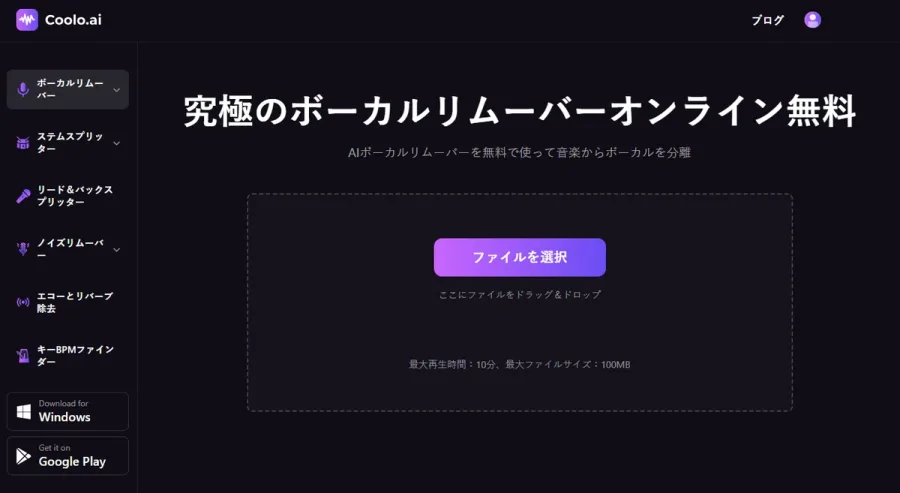
A vocal remover AI is an AI tool that can automatically isolate and remove only the singing voice from a song. While traditional vocal removal mainly involved simple processing to cancel out sounds, in recent years, AI has become able to recognize vocals and accompaniment separately, allowing for high-precision separation.
Because of this, it is used for various purposes such as creating karaoke tracks, extracting a cappella materials, producing remixes, and creating tracks for singing practice.
However, since separation accuracy varies depending on the song's composition, it is important to choose a vocal remover AI that suits your purpose.
How to Choose a Vocal Remover AI
When choosing a vocal remover AI, it is important to compare them not only by price but also by "purpose". Keep the following points in mind.
Separation Accuracy
The most important point is how naturally the vocals can be removed. Especially for songs with many choruses or effects, differences in accuracy between tools tend to become apparent.
Free Plan Limitations
While there are many services you can use for free, there may be limitations on processing time or file size. If you plan to use it continuously, check the details of the paid plans as well.
Supported Formats and Usage
Supported formats like MP3 or WAV, and whether video files are supported, are also important. These are points to check if your purpose is video editing or streaming.
Including ease of operation, choose a vocal remover AI that fits your purpose.
Top 10 Recommended Vocal Remover AI Tools
1. Coolo AI Vocal Remover (Highly Recommended)Coolo AI Vocal Remover is a high-precision AI-powered vocal remover that can be used by everyone from beginners to professional-oriented users. The operation is very simple, and just by uploading the audio source, the AI automatically analyzes it and separates the vocals and accompaniment in about a few dozen seconds. No special settings or professional knowledge are required, so even those who "just want to remove vocals immediately" will not get lost.
When actually using it, the point that there is relatively little vocal reverberation left and the sound quality on the instrumental side is maintained naturally is impressive. It supports a wide range of genres such as pop, rock, and EDM, and can be used not only for creating karaoke practice tracks but also for remix materials and a cappella extraction. While there are cases where vocals remain faintly in other free tools, Coolo AI has a sense of stability in that regard.
Also, because it is an online service that completes within the browser, it can be used regardless of the device, such as Windows, Mac, or smartphone. It does not require installation, which is a major advantage as it is not affected by your environment.
Main Features
High-precision audio source separation by AI
Easily accessible entirely within your browser
Free trial available
Supports diverse music genres including pop, rock, and more
How to use
Select and upload the song you want to separate (MP3, WAV, etc.).
The vocals and accompaniment are automatically processed in a few dozen seconds. No special settings are required.
Check the instrumental or a cappella audio and save it as is.
LALAL.AI is a vocal remover that excels at AI-powered stem separation. A major feature is its ability to not only remove vocals but also extract multiple parts individually, such as drums, bass, and guitar. It is highly regarded for providing relatively clear separation results even for complex mixed tracks, making it suitable for remixing and music production purposes.
It can be used in a web browser and the operation is simple. A free tier is available, but using the paid plan is a prerequisite if you require long tracks or high-quality output.
How to use
First, upload the audio file you want to separate.
Next, select the parts you want to extract (vocals, individual instruments, etc.) and start the separation process.
Once the process is complete, download and save the tracks you need.
MusicCreator AI Vocal Remover is an online vocal remover AI that emphasizes simple operability. By simply dragging and dropping your audio, it supports common formats like MP3, WAV, and FLAC, and automatically separates vocals from the accompaniment. The processing speed is relatively fast, and because it can be used without any special settings, it is easy for beginners to handle.
Although the separation results vary slightly depending on the type of song, it is at a practical level for karaoke practice or simple remix materials. It is recommended to try it out with the free tier first to see if it meets your needs before utilizing it further.
How to use
Drag and drop the music file you want to separate onto the site.
The AI automatically analyzes the audio and separates the vocals from the accompaniment.
Once processing is complete, download the instrumental or a cappella audio source.
MyEdit AI Vocal Remover is a vocal removal site provided as a feature of an online audio editing tool. Since it can be used on the same screen as editing functions like cutting, merging, and fading, it is suitable for those who want to perform vocal removal while processing audio sources.
The operation is simple; once you upload a file, the AI automatically separates the vocals from the accompaniment. It is sufficiently practical for light tasks, such as creating background music for video editing or producing instrumentals for karaoke practice.
While the separation accuracy may vary depending on the song's composition, the ability to use it in conjunction with audio editing features is a major strength. Since it can be easily tried online, it is a tool worth considering for those who want to perform vocal removal alongside editing tasks.
How to use
Access the official website and upload the music file you want to separate.
Select the "Vocal Remover" feature, and the AI will automatically separate the vocals from the accompaniment.
Check the separation results, perform any necessary edits, and then download the audio source.
Vocalremover.org is an online vocal remover AI whose appeal lies in its simplicity. By just uploading a music file, you can automatically separate vocals from accompaniment, allowing even beginners to use it without hesitation. It supports common audio formats such as MP3 and WAV, and the separated tracks can be downloaded immediately.
While it lacks advanced, fine-tuned adjustment features, its major advantage is that it is free and easy to use. It can be considered a sufficiently practical tool for creating instrumental tracks for karaoke practice or performing simple vocal removal.
How to use
Upload the music file you want to separate.
Wait a few seconds for the AI to automatically separate the vocals from the accompaniment.
Once processing is complete, download the instrumental or vocal audio source.
MusicLab is an online vocal remover AI service provided by EaseUS, known for its data management software. It supports not only audio files but also video files, and the AI automatically separates vocals just by uploading. The processing speed is relatively fast, and the ability to check results in just a few dozen seconds is a user-friendly point.
It supports a wide range of formats, including MP3, WAV, M4A, and FLAC, making it convenient even when you want to extract only vocals from video audio. The operation screen is simple, and no specialized settings are required. Even beginners can use it without confusion. However, since the free version has limitations on file size and usage frequency, you may need to consider a paid plan for serious use.
It is a service suitable for those who want to create karaoke tracks from video materials or those who want to use tools from a stable brand.
How to use
Upload the audio or video file you want to separate.
The AI will automatically analyze the vocals and accompaniment, completing the separation process in a few dozen seconds.
After checking the processing results, download the instrumental or vocal track.
Remusic.ai is an online vocal remover that employs advanced source separation AI. It is characterized by its ability to separate not only vocals but also multiple instrument parts such as bass, drums, and guitar simultaneously, and is used for creating remix materials and practice tracks.
It can be used without logging in, and the interface is simple, making it easy to navigate even for those trying vocal separation for the first time. While separation accuracy varies depending on the song's composition, it can generate relatively clear instrumentals and a cappellas for standard pop and band songs. It supports major audio formats such as MP3, WAV, and FLAC, and the fact that it is completed entirely online adds to its convenience.
How to use
Upload the music file you want to separate.
Select the parts you want to separate (vocals and individual instruments) and execute the AI analysis.
After processing is complete, check the generated tracks and download the necessary files.
Media.io AI Vocal Remover is characterized by its ability to be used as a comprehensive platform for handling audio and video editing all at once, rather than just as a vocal separation tool. In addition to separating vocals and accompaniment, you can also operate editing functions such as pitch adjustment, BPM detection, and trimming within the same screen.
Therefore, it is suitable for those who want to complete editing tasks in one go, such as creating karaoke tracks or producing background music for YouTube videos and social media content. Since it runs in a browser, no installation is required, and it can be easily used on both PCs and smartphones.
How to use
Access Media.io and upload the audio or video file you want to separate.
Select the "Vocal Remover" function, and the AI will automatically analyze and separate the vocals and accompaniment.
After separation, perform any necessary edits and download the finished audio.
PopPop AI Vocal Remover is a free and easy-to-use online AI tool. Simply by uploading a music file, the AI automatically separates the vocals and accompaniment, and you can download them immediately after processing. It is particularly notable for supporting URL input in addition to file uploads, making it convenient for processing online audio sources even when you don't have the data on hand.
Since it can be used without logging in, it is also suitable for light users who just want to give it a try. The separation accuracy is standard, but it is at a level sufficient for creating instrumentals for karaoke practice or simple vocal extraction.
How to use
Upload the music file you want to separate, or enter the corresponding URL.
Click the "Start" button, and the AI will automatically analyze the vocals and accompaniment.
After processing is complete, download the generated instrumental or vocal track.
AI Make Song offers an AI vocal remover that is an online vocal separation tool designed for music production. When you upload a song, the AI automatically analyzes it and separates the vocals from the accompaniment. The operation is simple, and since you can start processing without making professional settings, it is designed to be easy for beginners to handle.
The instrumental or a cappella audio sources after separation are output while maintaining the balance of the original song as much as possible, making them easy to use as remix material or karaoke tracks. Also, since you can preview the playback before downloading, it is practical to be able to check the finish before saving. It is one of the vocal remover AIs that can handle a wide range of uses, not only for music producers but also for singing practice and video production.
How to use
Upload the music file you want to process.
Click the "Vocal Removal" button to start the AI separation process.
Check the separation result in the preview, and if there are no issues, download it.
Pros and Cons of Vocal Remover AI
■ ProsEasy to operate and user-friendly for beginners
Vocal Remover AI can automatically separate vocals and accompaniment just by uploading a song. Since it can be used without professional audio editing skills, the fact that it is easy for beginners to handle is a major appeal.Practical level separation possible in a short time
Through AI-based audio source analysis, it can be processed more efficiently than conventional manual editing. Creating karaoke tracks and extracting a cappella can also be done relatively smoothly.Can be used easily online
Since many services are browser-based, they can be used regardless of the device, such as Windows, Mac, or smartphones. The convenience of being able to try it immediately without installation is also a benefit.
Results vary depending on the song
Depending on the song structure and mix situation, vocals may not be completely erased, or parts of the accompaniment may become weak. Songs with strong choruses or effects are particularly prone to being affected.High-functionality features are often paid
While there are services that can be used for free, there are cases where paid plans are required for high-quality output, processing long files, or commercial use.Depends on internet environment
In the case of cloud-based processing, if your internet connection is unstable, uploading and separation processing may take time.
Summary | Choose the Vocal Remover AI That Fits Your Purpose
Thanks to recent advancements in audio separation technology, vocal remover AIs have become convenient tools that allow anyone to easily separate vocals from accompaniment. It is important to choose the best service for your needs, whether you want to create tracks for vocal practice, prepare karaoke backing tracks, or use them for remixes and video production.
Among the tools introduced here, if you prioritize ease of use and simplicity,Coolo AI Vocal Remover is a strong candidate. Its intuitive operation and the fact that you can try it for free are also appealing points. It is a service that is easy to adopt even for those using a vocal remover AI for the first time.
Start by trying it out to find the vocal remover AI that best suits your needs. Choosing the right tool will further expand the possibilities for your music production and practice.
Frequently Asked Questions (FAQ) about Vocal Remover AI
Q1. Can vocal remover AI really remove vocals cleanly?It is not guaranteed to remove them 100% cleanly.
Vocal remover AI works by using AI to analyze audio and estimate the separation of vocals and accompaniment. Therefore, depending on the song's mix or effects (such as reverb or chorus), some vocals may remain, or the accompaniment may become slightly thin.
However, recent vocal remover AI technology has evolved significantly, and for typical pop or rock songs, practical-level separation is possible. Especially if you prioritize the stability of the processing engine and the balance of separation, you should try tools that offer simple operation and stable output (e.g.,Coolo AI etc.).
Q2. What are some recommended free vocal removers?There are multiple free vocal remover AI tools available, but the suitable service depends on your purpose and the required separation accuracy. For beginners or those who just want to try it out easily, tools that can be used immediately in a browser without installation are convenient.
For example, Coolo AI Vocal Remover is one such online service you can try for free. When you upload a song, it automatically performs separation processing, and you can download instrumental tracks or acapellas in just a few steps. Because it does not require complex settings, it is easy to handle even for beginners, and you can expect relatively natural results for typical pop or rock music. It is a service that is easy to use when you want to prepare tracks for vocal practice or instrumental tracks for video production.
Q3. Is vocal remover AI safe? Are there any copyright issues?Using the tools themselves is generally not a problem, but you need to be careful about the songs you upload and how you use them.
Since many vocal remover AIs process data in the cloud, it is safer to check the privacy policy and data handling policy before use. Also, as a general rule, redistributing or selling separated audio from copyrighted songs without permission is not permitted.
While there are rarely major issues for personal practice or private use, you should always check copyright and terms of service if you plan to use them for commercial purposes or public release.