On my first day switching to keyboard and mouse, I turned back into a statue.
I still remember the day I switched from controller to keyboard and mouse vividly.
I bought a keyboard and mouse, full of excitement, thinking, 'I want to have crisp aim like a pro!' and 'I want to learn tap-strafing!', and launched Apex with such high spirits...
I felt despair within the first five seconds.
When I tried to walk with WASD, I started running diagonally for some reason.
When I moved the mouse, the screen spun wildly. When I found an enemy and tried to shoot, my aim flew off into space.
Even though my teammates were shouting 'Cover!', I didn't know where the crouch key was and just stood there like a stick, getting turned into a beehive
Back in my controller days, I could at least 'run, shoot, and crouch.' The moment I switched to keyboard and mouse, it felt like my hands and feet had lost their own will.
It was like I had turned back into a baby.
My friends asked me with a straight face, 'Why don't you just go back to controller?', and I kept having matches where I only did 30 total damage even in casuals... Honestly, I almost broke down.
But you know, three months after that day of despair, I was stronger than I ever was on controller.
Today, I'm going to teach you the entire 'despair to revival' route. I wrote this with all my heart so that for those of you suffering after switching from controller to keyboard and mouse, or those about to take on the challenge, this article will be something you'll be glad you read.
What you'll learn in this article:
OS settings you should do on your first day of switching to keyboard and mouse
The basics of mouse sensitivity and eDPI
Optimizing keybinds specifically for keyboard and mouse
4 strengths of keyboard and mouse that controllers don't have
An aim practice menu you can do in 15 minutes every day
Common habits that controller players definitely fall into and how to fix them
Are you ready? Let's get started✨
[Most Important] Keyboard and Mouse Transition: Day 1 Checklist
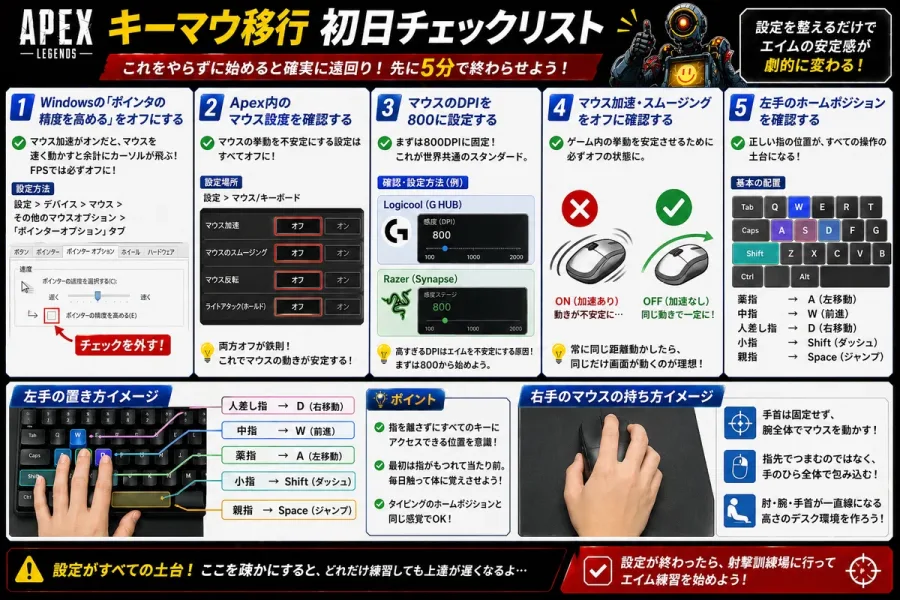
I understand the feeling of "I want to start shooting right away!" But, if you start playing without doing this, you will definitely be taking the long way around. It only takes 5 minutes, so please do this first.
This is the setting that transitioners overlook the most. It is on by default, but this is actually a feature called mouse acceleration, which makes the cursor jump further when you move the mouse quickly.
In FPS games, the fundamental rule is that if you move the mouse the same distance, the screen should always move the same amount. If mouse acceleration is on, the behavior changes between moving it slowly and moving it quickly, so your aim sense will never stabilize.
How to set it:
Windows Settings → Devices → Mouse → Additional mouse options
Pointer Options tab → Uncheck "Enhance pointer precision"
That is it. With just one click, the efficiency of your aim practice will become many times better. I spent my first two weeks without knowing this, and it was such a waste
2. Check mouse settings within ApexCheck the following in the in-game settings menu.
Mouse Acceleration → Off
Mouse Smoothing → Off
If these two are on, your mouse behavior will become unstable just like with the OS setting. Keeping both off is the golden rule.
3. Set mouse DPI to 800Gaming mice almost always have a DPI setting button. You can check it in your mouse management software.
Logicool → G HUB
Razer → Razer Synapse
Others → Many models can be changed using the button on the bottom of the mouse
First, fix it to 800 DPI and start there. This is the global standard. If you're coming from a controller background, you might feel like it's "too slow," but it's fine. In FPS games, you move the mouse with your whole arm.
4. Check your left hand's home positionMany people don't actually know the correct position for their left hand on the keyboard.
Ring finger → A
Middle finger → W
Index finger → D
Little finger → Shift (Sprint)
Thumb → Space (Jump)
The position of these five fingers will be the starting point for all operations. It's natural for your fingers to get tangled at first. Just like typing, if you start with the correct position, the time it takes for your body to learn it will be significantly reduced.
Mouse Sensitivity: Finding "Your Number" with eDPI
The most confusing part of switching from a controller is the difference in sensitivity feel. On a controller, speed is determined by how much you tilt the stick, but with a mouse, it's determined by the physically moved distance. It's a completely different control system.
PC sensitivity is managed by eDPI. The calculation is simple.
eDPI = Mouse DPI × In-game sensitivity
Example: 800 DPI × 1.5 in-game sensitivity = 1200 eDPI
The average eDPI for Apex pros is around 800 to 1200. For beginners, it's recommended to start in the 800 to 1600 eDPI range.
"Wait, is it really that low?" you might be thinking. I also played at around 3000 eDPI at first, and my screen would spin wildly just by moving the mouse a little. The culprit was that I had set my DPI to 2000, but back then, I was under the misconception that "higher DPI is definitely better!"
I still remember the day I lowered my eDPI to 1200 and was amazed, thinking, 'Wait... it's so much easier to track enemies...?'
The relationship between mousepad size and sensitivityWhen you lower your eDPI, you naturally have to move your mouse a longer distance. At 1200 eDPI, you need to move your mouse about 20cm to turn 180 degrees.
If you have a small mousepad, your mouse will hit the edge before you can finish the turn. I also started out playing with a tiny mousepad that came with my desk, and I remember panicking, thinking, 'Why can't I turn to the right!?'
If you're playing on low sensitivity, I recommend at least 40cm x 40cm, or preferably a desk mat size of 80cm or wider. Just changing your mousepad will instantly solve the inconvenience of low sensitivity.
Don't forget about FOVAlong with switching from controller, you should also review your FOV.
The default 70 is way too narrow, so change it to 100–110. Since KBM allows for faster turning, you can handle a wider FOV. Being able to fight with a wider field of view than you had on controller is a hidden benefit of KBM.
I explain all the details about FOV and graphics in my [Initial Settings Guide Article], so if you haven't read it yet, be sure to check that out too.
For detailed information on sensitivity (cm/360°, ADS sensitivity multiplier, and tips for fine-tuning), I cover everything in the Complete Guide to Aim and Sensitivity, so please read that as well
Keybinds: Switching from a 'Controller Brain' to a 'KBM Brain'
On a controller, all your actions are concentrated on your thumbs and index fingers, right? But on KBM, you have to use over 10 keys with just your left hand. This is the biggest hurdle for those switching over.
4 keybinds you absolutely must changeTactical Ability → Mouse side button
With the default Q, you can't press it without taking your finger off the A key (move left). This means the moment you use your ability, you can't move left. If you map it to a mouse side button, you'll be able to use your ability while moving.
Healing Items → Another side button or C/V
The default 4 key is too far away. A common experience for those switching is getting pushed by an enemy and dying while trying to reach for the 4 key during a fight when you think, 'Oh no, I need to heal!' Place them in a position your fingers can reach naturally.
Jump → Also map to scroll wheel down
You can keep Space as is, but adding jump to scroll wheel down is a classic KBM technique. I'll explain the reason later, as it's necessary for tap strafing. Go ahead and set it up now.
Melee → Move to a harder-to-press key
The default V is in a position where it's easy to accidentally press during a fight. The tragedy of 'accidentally punching during a gunfight and dying' is something every switcher has definitely done at least once I did it three times. It's safer to move it to a distant key like F or a key you don't use.
Crouch: Hold or Toggle?Hold (crouch only while pressing) -> Recommended for keyboard and mouse. Allows for smooth crouch-strafing.
Toggle (crouch stays on with one press) -> Convenient for long crouches, but the feel for crouch-strafing is poor.
I used toggle at first, but I couldn't crouch-strafe at all and was worried, thinking, "Why could I do this on controller?" The moment I switched to hold, the feel for crouch-strafing returned. Controller crouch-strafing is actually closer to hold, so it's easier for those switching to get used to hold.
4 Strengths Unique to Keyboard and Mouse: Why It's Worth Switching
I thought, "Isn't it easier to just go back to controller?" about 100 times, but once I learned what only keyboard and mouse can do, I couldn't go back.
Strength 1: Instant 180-Degree TurnOn a controller, it takes at least 0.5 to 1 second to turn around to an enemy behind you, right? With keyboard and mouse, you can turn 180 degrees with a single flick of the mouse.
This is huge in actual combat. When shot from behind, you'd be taken down while "slowly turning" on a controller, but with keyboard and mouse, you can turn and shoot back. This 0.5-second difference is what determines life or death.
Strength 2: Tap Strafing (The Ultimate Move Exclusive to Keyboard and Mouse)A technique where you bind forward to the mouse wheel and change direction while scrolling in mid-air. It's physically impossible on a controller, a privilege only for keyboard and mouse.
You can perform a sharp 90 to 180-degree turn in mid-air
Enemies won't be able to predict your landing spot from a jump pad
You can completely shake off enemies chasing you
When combined with a super glide, you can fly sideways while climbing a ledge
The setting method is simple. Just add an assignment for mouse wheel down to "Move Forward" in your keybind settings. Think of it as keeping the W key for forward as is, and assigning the same forward command to the wheel as well.
The way to do it is "Slide -> Jump -> Flick the mouse in the direction you want to go while scrolling the wheel in mid-air".
At first, succeeding once in ten tries is great. But if you practice for 30 minutes in the firing range, you'll get the hang of it.
At first, I thought, "What is this movement, is it a cheat?" but it's a legitimate technique within the game's specifications. The day I was able to do this, I felt from the bottom of my heart, "I'm glad I switched to keyboard and mouse..."✨
Strength 3: Peeking AccuracyThe "peeking" action of stepping out from cover to shoot. On a controller, it requires delicate stick control, and you often end up stepping out too far or pulling back too late.
With a keyboard and mouse, you can control how far you step out down to the millimeter by switching between A and D. You can perform actions like "peeking just your head to shoot" or "stepping out halfway and immediately pulling back" much more precisely than on a controller.
As you climb the ranks, the precision of your peeks determines life or death, so this might be where you feel the benefits of a keyboard and mouse the most.
Once I realized this, I started practicing in the Firing Range by repeating "step out halfway from the wall to shoot -> immediately pull back." The "jiggle peek" that I couldn't do in my controller days feels satisfyingly smooth on a keyboard and mouse. In that moment, it clicked: "Oh, so this is what keyboard and mouse is all about."
Strength 4: Freedom of KeybindsControllers have a fixed number of buttons, so there's a limit to how you can assign controls. With a keyboard and mouse, you can use the entire keyboard plus mouse buttons, allowing you to customize controls exactly as you like.
If you think, "I want to press this action faster," you can immediately change it to a nearby key. The freedom to tailor your control environment to yourself is a major hidden strength of the keyboard and mouse.
Aim Practice Menu: Guaranteed Improvement with 15 Minutes a Day
Settings are done. Keybinds are set. From here on, it's the stage of training your body.
"You'll be weaker for the first month after switching than you were on a controller" is a path almost everyone goes through. I was the same. But, if you continue the right practice every day, you can catch up in three months.
Make it a habit to go to the Firing Range as soon as you launch Apex.
Step 1: Shooting Static Targets (3 minutes)
Aim for only the head of a target 50m away and fire in bursts. This also serves as basic practice for recoil control. Don't rush; focus on hitting them carefully one shot at a time.
Step 2: Tracking Aim (3 minutes)
Make the dummy move and keep your crosshair stuck perfectly on the enemy's body while following them. The trick is to be conscious of using WASD movement to track with your whole body, not just the mouse. On a controller, you could track with just one stick, but with a keyboard and mouse, you need a combination of "mouse aiming + character movement."
Step 3: ADS Switching (3 minutes)
While running past the dummy, practice hip-fire -> ADS -> hip-fire by switching quickly to shoot. The goal is to get your body used to the difference between ADS sensitivity and hip-fire sensitivity.
Step 4: Strafe Shooting (3 minutes)
Practice keeping your aim on a dummy while moving left and right with A and D keys. This is the movement you will use most in actual combat. In my controller days, I used the left stick for movement and the right stick for aiming, but KBM is a left hand for movement + right hand for aiming split-brain setup. Your brain might feel like it's glitching at first, but you'll get used to it in a week.
Step 5: Flick Practice (3 minutes)
From a forward-facing position, quickly snap your view to targets on the left and right and hit them instantly practice. This is the best training to improve the accuracy of your 180-degree turns on KBM. Since this is a movement that doesn't exist on controller, it's totally fine if you don't hit anything at first.
Mindset for PracticeYou'll probably feel like you're "not getting any better..." for the first week. I was the same. But around the second week, a moment will come when you actually feel the change. Trust that feeling.
In casual matches, make your goal "trying out the movements you practiced in real combat" rather than "winning." If you worry about winning or losing, you'll unconsciously revert to your controller-era movements.
Utilize External Aim TrainersWhile you can practice enough in the Apex Firing Range alone, using a dedicated aim trainer like Aim Lab or Kovaak's will accelerate your progress.
Aim Lab, in particular, is free to use and has plenty of scenarios for tracking and flick practice. When I first switched, I made it a habit to warm up in Aim Lab for just 5 minutes before launching Apex. This alone made a huge difference in the stability of my aim during early-game fights.
5 Habits Controller Players Always Fall Into and How to Fix Them
I want every switcher to read this. Because there are definitely habits you won't notice yourself.
Habit 1: Unconsciously expecting aim assistControllers have aim assist (the correction that makes your crosshair stick to enemies nearby), but KBM does not. Zero. It's entirely up to you.
If you shoot with the controller mindset of "well, if I aim near them, it'll stick," you will miss every shot. For the first week, I seriously thought, "Why am I not hitting anything!? Is it a bug?" It wasn't a bug; it was my own skill issue
Solution: Do aim practice in the Firing Range every day. It's tedious, but it's the only way. Expect it to take at least two weeks for your body to get used to the feeling of having no aim assist.
The trick is to shift your mindset from "aiming near them is fine" to placing the center of your crosshair precisely on the enemy's body. You need a mental shift from the controller's "aim roughly -> let the assist correct it" to the KBM's "manually align it down to the last pixel yourself."
Habit 2: Letting go of tracking mid-fightOn a controller, aim assist helps you with "tracking," so you can follow enemies just by tilting the stick slightly. But on KBM, if you don't keep tracking with your own hand until the end, you will miss.
Especially when an enemy is strafing (moving left and right while shooting), if you think "it's roughly aligned so I'll just keep shooting and it'll hit" with your controller mindset, you will miss everything.
Solution: Focus on tracking aim practice. You just have to drill the mindset of "keeping the crosshair glued to the enemy" into your mouse wrist and arm.
Habit 3: Trying to aim only with your right handYou could adjust your aim with just the right stick on a controller, right? But aiming with a keyboard and mouse is a combination of mouse movement + WASD movement.
When an enemy moves to the left at close range, don't just flick the mouse to the left; adjust the mouse while moving yourself to the right using the D key. This coordination of "body movement + aiming" is incredibly difficult for controller players at first.
Solution: Practice strafe shooting every day. Let's get "shooting while moving with AD" ingrained in your body.
Habit 4: Your fingers get lostA controller has all the buttons right under your hands, but on a keyboard, there are many keys you can't reach without moving your fingers.
During a fight, you think "I want to heal!" → You don't know where the key is → You die while searching for it. Every player who switches goes through this.
Solution: Touch the keyboard even when you aren't playing. You'll naturally learn key positions through typing for work or study, and it's also effective to practice pressing keys around WASD from the home position with your eyes closed when you have free time.
Also, I recommend writing your keybinds on paper and sticking it somewhere you can see it. It's embarrassing, but when I first switched, I had sticky notes next to my monitor that said "Q=Tactical, F=Action, 4=Heal." You'll be able to press them without looking within a week, so use it as training wheels at the start.
Habit 5: The range of arm movement is too smallSince you can operate a controller by moving the stick a few millimeters with your thumb, even when you switch to keyboard and mouse, you tend to make tiny movements with just your wrist.
But low sensitivity on a keyboard and mouse requires using your whole arm to make large movements. If your mouse pad is small, you physically can't swing it, so I want you to prepare a mouse pad that is at least 40cm x 40cm.
Solution: Consciously practice moving the mouse using your entire arm from the elbow down. Your arm will get tired at first, but you'll get used to it in a week.
Bonus: Things I was glad I bought when I first switchedIf you're switching from controller to keyboard and mouse, upgrading your environment at the same time will make the transition smoother.
Larger mouse pad: 40cm x 40cm or larger is essential. At first, I used a small A4 size one and kept thinking, "My mouse is going off the edge..."
Gaming mouse: One with at least two side buttons. Something like the Logitech G304 or Razer Deathadder is perfect for beginners
Wrist rest: A cushion for your wrists to place in front of the keyboard. Your wrists will hurt after playing for a long time, so having one makes a huge difference
Monitor arm or stand: It's important to align the height of your monitor with your eye level. If your posture collapses, your aim will also waver
You don't have to get everything, but a mousepad is the top priority. Without one, it's physically impossible to play with low sensitivity
What lies beyond the 'wall' of switching to keyboard and mouse
After reading this far, did you think, 'There's too much to do...'? Honestly, switching isn't easy.
For the first month, I was weaker than I was on controller. My K/D dropped to 0.3, my friends were exasperated, and I thought, 'Maybe I should just go back to controller...' many times.
But I still remember the day in the second month when I got 2000 damage on keyboard and mouse in a casual match. I whispered, 'I did it... I actually did it!' in front of the screen, and my hands were shaking. In that moment, I felt from the bottom of my heart that 'switching was worth it'✨
Three months later, I surpassed my controller-era K/D, was able to toy with enemies using tap-strafing, and realized, 'Oh, this is the world of keyboard and mouse.' That desperate first day felt like a lie.
The 3 keyboard and mouse monsters I wanted to be like
When I was in despair after switching to keyboard and mouse, watching these people's videos made my motivation skyrocket, thinking, 'Keyboard and mouse can go this far...' Let me introduce the three players I admire from the bottom of my heart.
YouTube: Ras Apex
Recommended video: Ras gameplay video
A former pro player from South Korea, affiliated with Crazy Raccoon. He's called the 'Demon King' in the Apex community, and he possesses overwhelming combat power that lives up to that nickname.
What's amazing about Ras is that his settings are incredibly simple, yet he's otherworldly strong. His FOV is 90 (while many pros set it to 100-110!), and his video settings are also based on the default. He embodies the idea that 'you can win with pure mechanical skill without fluffing your settings.'
His eDPI is also on the lower side, around 960-1200, and instead of flashy high-sensitivity movement, he melts enemies with aiming power that lands every single shot accurately. The speed and precision of his corner peeks are abnormal; the moment he appears, the enemy is gone in one mag.
He's the kind of person who makes you think, 'Keyboard and mouse can reach this level if you just master the basics of aiming without messing around with settings.' Ras was the one who taught me (unintentionally) when I was lost about sensitivity early on, that 'simple is fine.'
Faide — The King of Movement YouTube: Faide
Recommended video: Faide gameplay video
An American content creator, a movement monster known by the nickname Movement King.
When I first watched Faide's videos, I seriously thought, "Is this even the same game?" Tap strafing, zipline super jumps, wall bounces... he combines all the high-speed movement only possible on mouse and keyboard to take down 3 people solo like it's nothing.
From an enemy's perspective, he's a presence that's always in the air, shooting from unpredictable angles. Watching him toy with opponents at a speed that makes them look like they're standing still makes me feel like I'm witnessing the pinnacle of mouse and keyboard potential.
He's the polar opposite of Ras, leaning toward a high sensitivity of eDPI 1360. Because his style involves mastering high sensitivity to flick his view at super speed, you might think, "I should switch to high sensitivity too!" but don't copy him at first, okay? That style is built on thousands of hours of practice. The right approach is to solidify your fundamentals with low sensitivity first, and just watch him as an aspiration.
But when you're wondering, "Is there even a point in switching to mouse and keyboard?", just watch one of Faide's videos and you'll have your answer in an instant. This kind of movement is absolutely impossible on a controller✨
H1yaA — The Mad Maggie Demon YouTube: H1yaA
Recommended Video: H1yaA's Gameplay Video
A pro gamer from South Korea, currently with REALIZE ABYSS. He is a movement-specialized player who centers his play around tap strafing and sliding, and his use of Mad Maggie is insane.
H1yaA's Mad Maggie is truly a great reference. His aggressive pushes using the Wrecking Ball's speed boost, the timing of his Riot Drill to flush out enemies behind cover, and his close-quarters combat utilizing the passive speed boost while holding a shotgun... you can tell he is drawing out 120% of the character's potential.
His eDPI is 1232 (DPI 800 × sensitivity 1.54), right between Ras and Faide. Balancing precise aim and movement with a well-rounded sensitivity makes for a very practical style.
He shows us "movement that isn't just flashy, but meant for winning." If you want to try playing Mad Maggie, watching H1yaA's videos is the best textbook you can find
What I felt after watching these threeRas: "Even with simple settings, you can become the strongest by mastering the basics."
Faide: "The pinnacle of movement that can only be reached on mouse and keyboard."
H1yaA: "Practical movement that maximizes a character's strengths."
They are all different, but what they have in common is that they are all playing in a way only possible on mouse and keyboard. A world that cannot be replicated on a controller awaits you beyond the switch to mouse and keyboard.
When the transition gets tough, try watching these three. Just having a goal of "I want to be like them" makes a huge difference in your practice motivation
Objectively reviewing your own play
When you're in the middle of switching, you really can't tell for yourself what's right and what's wrong.
"Is my aim off because of my sensitivity? Is it how I use my arm? Or is it my positioning in the first place?" You can't pinpoint the cause at all. You'd want to ask a pro coach, but it's expensive, and if you ask a friend, they just say, "Well, it's just about getting used to it"
Thinking, "I wish there was a tool that could point out the habits of controller-to-mouse-and-keyboard switchers with actual data," I ended up making one myself. It's an AI coaching tool called AperuAI.
You just upload your replay video, and the AI analyzes your play and tells you what to improve. What really hits home for controller switchers are insights like, "Your aim tracking stops midway," or "In this situation, your turn speed was too slow; you should have either increased your sensitivity or changed your position."
Because the AI objectively finds those "controller-era habits" you wouldn't notice yourself, it makes fixing your sensitivity issues and bad habits during the transition incredibly efficient.
https://aperuai.com/ja/
Summary: The transition is a 3-month investment. But the returns last a lifetime
Thank you for reading this far
Let's summarize the key points.
Things to do on day one: Turn off Windows mouse acceleration, turn off in-game mouse acceleration/smoothing, and set DPI to 800
Start with an eDPI of 800–1600. Forget the controller feel for now
Change these 4 keybinds: Ability/Heal/Extra Jump/Melee Movement
Strengths of keyboard and mouse: 180-degree turns, tap strafing, peak precision, and keybind freedom
Make a 15-minute daily Firing Range routine a habit
Be aware of habits from controller: Expecting aim assist, letting go of tracking, aiming only with the right hand, lost fingers, and insufficient arm movement
You will get worse for the first month. But you will surpass your old self after 3 months
External trainers like Aim Lab will accelerate your progress even more
Transitioning from controller to keyboard and mouse is an investment that makes you worse in the short term, but raises your skill ceiling in the long term.
Controller aim assist is certainly strong. However, the tap strafing, 180-degree turns, and millimeter-precise peaking of keyboard and mouse are things a controller can never do. This gap only widens the more you practice.
"If you endure for one month, you will surpass your controller-era self."
I dedicate these words to you, who might be feeling hopeless right now.
After all, I’m the one who almost cried over a total of 30 damage back then, and now I’m here writing this article. You will definitely be okay too✨
May your Apex tomorrow be just a little happier than yesterday
See you in the next article!