What is Wick?
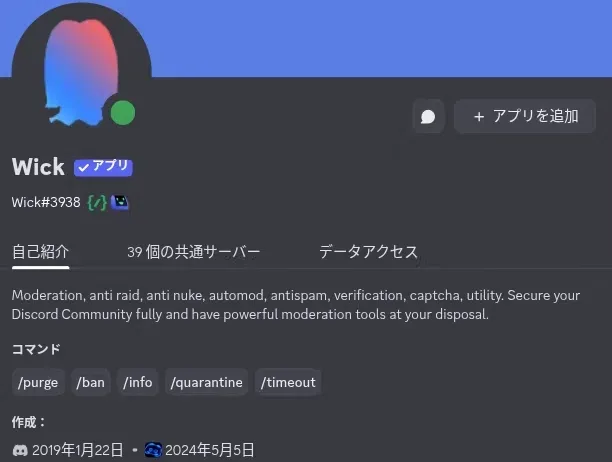
Wick is arguably the strongest anti-raid bot available.
If you install and configure this, you'll be safe for the most part (some people even stop raiding just because this is present).
There are fake raid bots like "Wick JP," so make sure to install it from the official website.
Wick (Wick#3938)
Invite Link
Support Server
Official Website (Dashboard)
Settings
After going to the official website and adding Wick to your server, first move the Wick role to the very top.
If you don't do this, it won't be able to interact with members, and you won't be able to set it up.
On this screen of the dashboard, press START WIZARD to begin the setup.
①Auto Setup
Here, you will create the log channel and the Quarantine role (mute role).
Press START AUTOMATIC SETUP to begin.
If it displays "Looks like you are good to go!", it was successful. Press CONTINUE to proceed to the next step.
②MiSC
Here, you configure Wick's command-related settings.
PREFIX defaults to w!. Set this according to your preference.
SLASH COMMANDS should be turned on.
COMPACT MODE is also up to your preference. I have it turned off.
LOGGING CHANNEL and Moderation Logs Channel can be left as default.
MAIN ROLES is where you set the member role or the role assigned to verified users.
③Automod
Here, you configure settings for links, spam, etc., that you want Wick to counter.
Basically, I think it's fine to turn everything on.
AntiSpam settings like long messages or New Lines might be fine to turn off.
WEBHOOK CONVERAGE, Antinuke Status, and Quarantine should be turned on.
④WHITE LIST
Here, you set members or channels that will not be affected by Wick.
Users with the same or higher permissions than Wick (server owners and administrators) are ignored by default, so they cannot be configured.
Invite Link Whitelist is for setting places where invite links can be sent, like for advertisements.
@ Ping Whitelist, and @ everyone Whitelist are for setting who can mention multiple people.
⑤JOIN GATE
When a new user joins, it checks them against each item, and if they trigger one, they are kicked.
It is recommended to keep this on. This is how I have it set up.
From the top: added bots, recently created accounts, accounts without profile pictures, unverified bots, accounts with invite links in their username, accounts Wick deems suspicious, and accounts containing specific nicknames.
There is a JOIN RAID feature available as a premium function.
⑥VERIFICATION
This is where you configure the verification setup.
Wick Captcha or website verification is recommended.
I selected a channel for WickCaptcha, so a dedicated channel has been created.
⑦RESCUE
This is where the backup keys (a string of characters and a QR code) for Wick's ownership are located.
If the account that owned the server dies, you can use these keys to transfer Wick's management permissions to another account.
It is a good idea to save these just in case. Be careful with how you manage them, as it would be a disaster if they were leaked.
That concludes the basic setup! Great work.
You can change detailed settings from the Overview section, but I will skip that since this is a guide for basic settings.
Summary
In this article, I provided a basic setup guide for the ultimate anti-raid bot, Wick.
It is such an excellent bot that if you set it up properly, it can handle almost all anti-raid measures on its own, but there are few Japanese guide articles for it...
I hope this was helpful to you. I might release a guide on detailed settings in the future.
For now, I will be writing a guide on Automod next, so please look forward to it.
If you have any questions or requests, please leave a comment!
This is my own Discord server for sharing information on security threats.
We have surpassed 1,500 members.
It is a server that compiles information on raid users and countermeasures.
If you are having trouble with raids or want to ask questions about Discord features... this is the place for you!!
We also have a guild tag 'Disclosure Request' (開示請求)!
twitter️
https://x.com/intent/follow?screen_name=ryo_001339
youtube