"I want to try using Pairs, but what's it like?"
That's a very broad question (laughs), but it seems there are quite a few people who don't know how to use Pairs or what the process is like until actually going on a date, and they want to know before they register.
In this article, I will explain the entire process of using the matching app "Pairs" for beginners, from how to register to matching and messaging.
*If you want to know about the app's features, reputation, pricing, etc. → Click here for the article on Pairs' features and reviews
Basic Usage and Process for Meeting Someone on Pairs
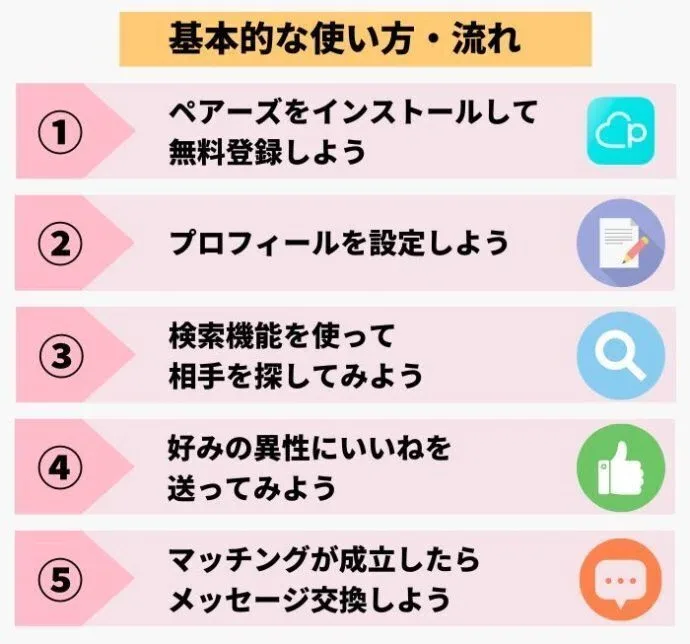
I will explain how to use Pairs step by step.
Everything from downloading to your first date is fully covered, so if you read this, you'll know how to meet people on "Pairs"!
First, I will explain the overall flow. After that, I will explain how to use it in detail, one step at a time.
Basic Usage and Process
Install Pairs and register for free
Set up your profile
Use the search function to look for someone!
Send a 'Like' to someone you're interested in
Once you match, start exchanging messages!
Since women receive 'Likes' from many men, you can meet people just fine by using it passively, such as by 'checking the 'Likes' you've received'.
Check the 'Likes' you've received
↓
Look at the other person's photos and profile
↓
If they seem okay for now, match with them!
↓
Check your compatibility by exchanging messages
Men cannot meet anyone unless they take the initiative and send 'Likes'. Most women use the app passively, and since the number of 'Likes' from women to men is low, you need to act proactively as follows.
Look at profiles via search or communities and send a Like yourself
↓
The other person looks at your photo and profile
↓
If the other person says OK, a match is established
↓
Exchange messages. By the way, men cannot message women unless they become paid members.
For 72 hours after registration, you are displayed at the top of search results!
On Pairs, you are displayed prominently at the top of the search screen for 72 hours, or 3 days, immediately after registration.
Moreover, it appears with the red text "new" to catch the eye. When we search for something, we usually check the items displayed at the top, right? Don't you naturally pick up and read the parts that stand out in red or bold text on the sites you check?
Many people pay attention to new members. This is because users who have just registered frequently launch the app and work hard on their activities, meaning they are active members who respond quickly.
Since the 3 days after registering on Pairs is the period when you receive the most "Likes" even without doing anything in particular, let's use it well so you don't miss a good opportunity!
Let's set up your profile text and photos
First, set up your profile to prepare for matching. The absolute first thing you need to set as part of how to use Pairs is your "main photo."
If your profile is empty, people won't know who you are even if you send a Like, and you won't get a match. The trick is to set up your profile early to increase your chances!
First, upload your "main photo" immediately. This is because profiles without photos are often skipped without even having their content looked at.
▼ How to edit your profile: You can edit it from Others at the bottom of the app → Check Profile → Edit Profile
Make sure your self-introduction is not too long or too short, so it can be read quickly. You don't need to make the text too elaborate. I think it's fine to use a template and just tweak it a little to make it your own.
If you look at the tips for writing a profile and really nail these points, your matching probability will increase significantly!
Tips for a popular profile! Photo examples and how to write it
About profile itemsThere are several profile items on Pairs. Below are the results of a survey on profile items for women that men consider important.
The points that men prioritize are listed in the order of residence, age, body type, smoking habits, and hobbies. Including body type is a characteristic of men. In the case of women, I think they are concerned about a man's annual income.
Ideally, you should fill out all profile items, but if you don't have time for now, make sure to thoroughly fill out the items you want to highlight. For example, many people pay attention to things like likes and hobbies.
Also, for men, since women are concerned about a man's annual income and occupation, you should avoid leaving those blank. Since many people of both genders seem to care about smoking, make sure to fill out this item as well.
How to use the search function! Let's try looking for someone.
Now, it's finally time to search. The basic method is "Profile Search".
The search method is: tap "Search" -> tap the search bar at the top (photo on the left).
Then, you will be taken to the condition selection screen, so select your conditions and press the "Search with these conditions" button (photo on the right).
After that, just look at the partners that appear and press "Like".
Roughly speaking, "age and region" is fine, but since Pairs has a very large number of members, the trick is to also set "logged in within 3 days" to narrow it down to people who are currently using Pairs.
At first, try searching with a wide net without adding too many conditions, and then narrow it down from there.
Let's try sending a "Like" to a person you are interested in!
This is where the real work begins. If you see someone you like after looking at their profile, send them a "Like".
To send a "Like", just press the "Like" button at the bottom of their profile.
At this point, a screen will appear where you can choose between two types: "Like with a message" or just "Like".
A "Like with a message" allows you to send a message along with it, which increases your matching rate. If there is someone you really want to connect with, use "Like with a message". Otherwise, it is better to use it selectively with a regular "Like".
A regular "Like" uses the "Like count" granted every month. In the case of a "Like with a message", you need 3 Pairs points in addition to that. The effect of a "Like with a message" is significant, so when it really counts, spend the points and give it a try!
Like: 1 Like
Like with a message: 1 Like + 3 Pairs points
Also, something you want to refer to at this time is
Login time
Compatibility
Number of likes the other person has received
are the three things.
If possible, check for a login time within 24 hours. If it has been longer than that, there is a high possibility that they are not even using Pairs.
Compatibility is a good reference, but it should only be used as a guide.
Next to the compatibility, the number of likes the other person has received is also displayed.
For beginners, it might be safer to avoid people who have received a lot of likes. This is because popular members often ignore likes without even looking at the sender's profile.
People with fewer likes are more likely to notice your "like" and check your profile.
Reference Survey of average number of likes on Pairs by gender
Once a match is made, let's exchange messages!
If you send a like and the other person accepts, a match is made. Once a match is made, you can exchange messages with the other person.
By exchanging messages, you can get closer to each other. It is an important stage where, if the conversation gets lively, it can lead to an invitation for a date, saying "I'd like to meet you sometime!"
How to start exchanging messages on Pairs
The way to exchange messages on Pairs is simple. Send a message to the other person just like you would on LINE. Before that, you need to do the following to send a message.
Verify your ageYou cannot exchange messages without verifying your age. For age verification, you generally take a photo of one of the following official documents and send it.
Documents that can be used for age verification
Driver's license
Passport (for overseas passports, the signature section will be checked)
Health insurance card
My Number Card
How to Match on Pairs
So far, I have explained the basic usage of Pairs. Next, we will move on to some advanced tips. However, all of these are simple methods. Since these are "features for meeting people," you should definitely make the most of them.
Let's Join CommunitiesA major feature of Pairs is the existence of communities. Communities are groups themed around hobbies or things you like. Profile searching is good, but you should also make good use of communities.
You can join communities using the following methods.
How to Join a Community
Smartphone: Tap "Community" from the menu at the bottom of the screen
Smartphone browser version: Tap "Community" from the menu at the top of the screen
PC: Click "Community" from the menu on the left side of the screen
You can also join a community by entering it from the "Joined Communities" section on someone's profile.
When you join a community, you will be displayed in the list of members in that community. Also, the communities you have joined will be displayed on your own profile.
Communities allow you to meet people who share "things you like or hobbies." There is a high possibility that things will go well with people who have similar values so please make sure to use them.
Reply to the Likes You ReceivedIf you are a woman, you might receive a ton of likes from the very first day you register. If you are a man, you should be proactive in sending likes rather than sitting and waiting!
In any case, please be sure to check the likes you have received.
You can check the likes you have received by tapping "From Others" at the bottom.
Try checking their photos and profiles.
The left arrow mark is to decline (skip), and rest assured that the other person will not be notified if you press this. If you press the like mark on the right, a match is established! Direct messaging will then be opened.
All the likes that appear are ones where the other person likes you and has pressed it because they want to contact you directly.
You can skip people whose profiles are mostly blank, but if you think even a little bit, "Maybe they're good?", I recommend trying to match with them for now.
Once you've matched, go ahead and greet the other person using the "Send Message" button.
Since the other person's communities (things they are interested in) are listed on the message screen, it's a good idea to ask a question based on those!
If you are a woman, you can press "Continue" and wait for a message from the man. Conversely, men need to send a message themselves, otherwise, even if you've matched, it will naturally fade away, so please send a message.
Also, you need to join a paid plan to exchange messages. Details about the fees are posted on the comprehensive Pairs page.
Click here for the comprehensive Pairs page →Pairs Reviews and Reputation! Should you quit? What kind of people are there? Explaining features and fees!
The first message is the most important!
For example, something like this ↓
"Hello, nice to meet you. I saw your profile and thought, 'Oh, we both like cats!', so I sent you a like. Do you have a cat?"
Use common ground like this as a conversation starter. Even if you don't have any particular common ground, you can start with a greeting, a question about a trending news topic, or something like "Is work busy?"
There is another article with examples of first messages that are easy to get a reply to, so please use it as a reference.
Reference Examples of first message content for matching apps! Essential topics, frequency, and tips for interaction
Only after matching and exchanging messages will you understand the other person more concretely. Honestly, with just photos and a profile, you can only tell their appearance at a glance, and at most, whether you have common hobbies or their attitude toward marriage.
Let's leave footprints & return footprintsPairs has a "Footprint" feature that lets you know who has viewed your photos and profile.
To view them, tap Others → Footprints (left image), and you can see a list of people who have viewed your profile by day. (right image)
A person who has left a footprint is someone who is at least interested in you. Even if they didn't send a like, they are someone who is thinking, "How about this person?" even a little bit.
Since they are people who thought about liking you but stopped for some reason, there should be many who are thinking, "If they approach me, I might be okay with matching." Especially for men, there are cases where they run out of like points and keep leaving footprints while waiting for a like from a woman.
Let's utilize the Today's Pick feature!On Pairs, when you log in, there is a "Today's Pick." Pairs selects people who seem to be a good match for you.
The Today's Pick feature does not require points. You can approach them without reducing your number of likes and without consuming points, so please make sure to use it.
Especially for men, there are times when you send a "Like" but don't get a match. The reason is usually that you aren't sending enough "Likes".
This is because, while Pairs certainly has a large number of members, some are not very active. Even if you send a "Like," it's common for them not to even notice or check it.
If they happen not to have used the app for a few days, and they receive a flood of "Likes" in the meantime, your profile might get buried.
You should take the reality that your "Likes" might be getting ignored and use it to your advantage!
In other words, don't overthink it; just send "Likes" to anyone you think "might be pretty good." To put it bluntly, "the more you shoot, the more you hit"—that is the secret to getting matches.
You're probably wondering what the actual probability of matching is. This article will be helpful for that.
Reference What is the matching rate on Pairs? A survey of 100 users!
If things still aren't working out, Pairs might not be the right fit for you. If you feel that way, please refer to this article to help you choose again.
Reference Find the app that suits you! Choosing an app for beginners is here
Finally, from meeting on Pairs to a "Date"! [Summary of How to Use]
With Pairs, you can register easily via Facebook without the hassle of entering a profile. Even if you don't use Facebook, you can now register via email or phone, making it accessible to everyone. Furthermore, as the number of members continues to grow, it seems the chances for meeting someone are increasing too!
I think you have a general grasp of the flow of how to use Pairs now.
First, just start using it and give it a try. Once you use it, you'll realize, "Oh, it's actually easy." And as you keep sending "Likes," you'll start getting matches, and eventually, the happy result of going on your first date will follow!
【Operated Media】
Matching App University