Hello!
I'm Chisa,
a computer instructor with 12 years of experience. (*´∀`)
Today,
IllustratorI made a trapezoid with,
so!
I'll write down how to make it
so I don't forget!
(This is a note for myself)
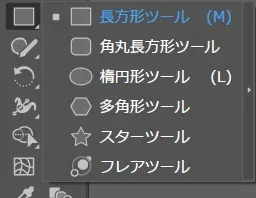
❶ Select the Rectangle Tool (M is also fine)
❷ Drag to draw a rectangle
❸ Select the Free Transform Tool (E is also fine)
Click the second one from the bottom,
Perspective Distort(the one with the trapezoid-looking icon)
When you bring your mouse
to the corner of the rectangle from before...
this kind of icon will appear
If you shift it a little to the right...
Oh, how magical,
a trapezoid is finished
ヾ(●´∇`●)ノ
Free Transform Tool'sPerspective Distort
I used it for the first time today.
(о´∀`о)
Illustrator has
so many buttons,
it's hard to remember them all!
lol lol
But
it's fun!
Well then,
see you tomorrow!
(´꒳`)/
September 25, 2023
New book released!
If you want to master Excel functions,
please give it a try
We also have paper books available
Highly acclaimed on Amazon✨Now on sale
➊ 7 books about computers
➋ 2 books about Kindle publishing
➌ 1 book about saving money
➍ 1 book about reading
➎ 3 books for people overseas
If there is a book you are interested in,
please feel free to just read a sample
(´▽`)