I personally use gaming mice for both my work mouse at the office and my work mouse at home.
This is because they are less tiring during long hours of use, and because I frequently use graphic software, which requires precision for fine movements.
In this review, I will introduce the
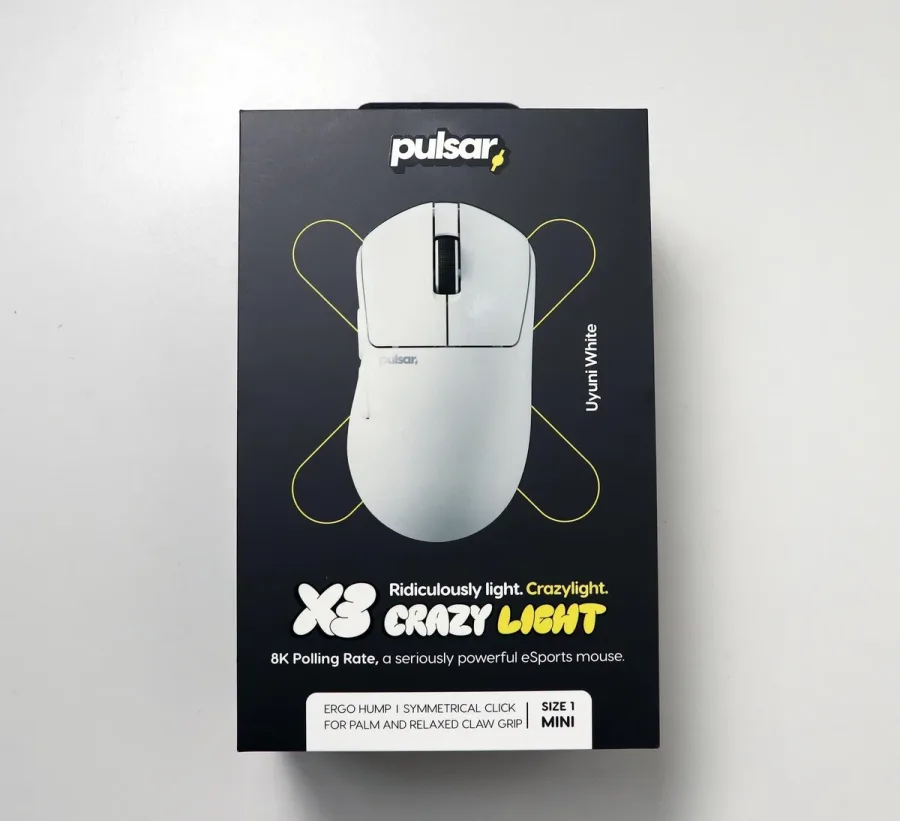
new, even lighter model of the popular "X3" gaming mouse from the gaming device brand Pulsar,
X3 CrazyLight .
I was given the opportunity to receive this from Pulsar Gaming Gears Japan,
and since they told me I could write honestly,
I will write freely from my own perspective. Thank you very much.
The package with the bubble font is cool,
and it has a solid, heavy feel that makes opening it exciting.
Accessories: Mouse, manual, card, stickers,
USB cable, 8K dongle, UHMW-PE 6.6 Dot Skates (black stickers)
If you look closely, the USB cable is a professional-grade cable with noise suppression.
I can feel the company's commitment to quality. It's also nice that it's the same color as the mouse.
The moment I picked up the mouse, I almost said out loud, "It's so light!"
The weight is ±43g (when Dot Skates are attached) and ±44g (when regular Skates are attached).
Even if I hold the mouse and shake it over the mouse pad,
or if I shake my bare hand over the mouse pad,
it feels so "light" that I think there is no big difference.
They say it's lighter than an egg, so I wondered how much an egg actually weighs,
and when I measured it, the egg was 67g.
It really is lighter than an egg...
If it's this light, will it dent if I squeeze it hard?
Even if I press it firmly, nothing happens.
I wonder why?
I'll take the plunge and remove the cover.
(However, it doesn't come off easily, and removing it will likely void the warranty.)
The inside of the mouse shell is well-ribbed,
and the PCB is also thoroughly skeletonized.
This must be the secret to its lightness and strength.
I took photos of the PCB and chips, but I'll refrain from posting them.
(By the way, the battery seems replaceable, and its capacity is also listed.)
A mouse is something you touch every day, but
have you ever felt that one didn't suit you?
Whether it's hard to hold, too heavy, the clicks are too stiff, or you start feeling pain in your hand as you use it.
Pulsar X3 CrazyLight is a
unique hybrid design that combines the strengths of symmetrical and asymmetrical shapes,
for those who wrap their entire palm around it
(palm grip)
For those who hold it with their fingertips (claw grip)
It is designed to be comfortable for both.
The feel of the grip is not smooth or slippery, but
has a slightly moist, non-slip texture.
If you don't have any particular complaints, grip tape might not be necessary
(I have dry skin and don't sweat much, so I'll use it as is.)
The side buttons are also a good size for easy pressing with spacing that prevents accidental clicks, and the click feel is solid.The rear button is also large, so it's nice that you can press it with your thumb joint.
Since the mouse is very light, you need to stabilize your hand so the mouse doesn't move when you press them, so I personally felt it would have been better if the side buttons were even lighter.
The click sound is somewhere between a standard mouse and a silent mouse, and it's a light sound.
You get a solid sense of having pressed the switch.
The center is bulged, making it easy to
hold by wrapping your palm around it.
Looking from above, it has an asymmetrical design.
It fits naturally to the hand's position, and
it's great how it fits perfectly just by resting your thumb pad on it.
What's amazing about Pulsar is that they also offer a
left-handed mouse with a proper symmetrical design.
The Pulsar X3 CrazyLight is equipped with the proprietary XS-1 sensor. It is Pulsar's top-of-the-line sensor, capable of up to 32,000 DPI, a tracking speed of 750 IPS, and can be used with a polling rate of up to 8,000 Hz.
In other words, it accurately captures both fine and large movements.
In gaming, even a difference of 0.1 millimeters or a fraction of a second can change the outcome, right? That high level of precision becomes a powerful weapon when working with graphic software.
Furthermore, since it is equipped with features like Motion Sync, Ripple Control, and Angle Snapping (I explain what these features are in the app section),
the mouse pointer tracking performance is extremely high,
and in software like Illustrator, Photoshop, and Blender,
there is less of the lag or jitter that can be stressful when performing detailed path editing or
brush work with a standard mouse.
Tasks requiring fine adjustments with a mouse
Aligning and placing objects pixel by pixel
→ A mouse with high sensor precision allows you to move them to the exact intended positionAbility to set DPI precisely
Drawing clean lines with a freehand feel
Since the usage scenarios above can clearly be improved,
the X3 CrazyLight seems like the optimal choice for me, even for work.
You can use either one.
This is the Web app, called "BIBIMBAP".
I think they can do the same things, but
due to the difference in appearance, I somehow get the illusion that the Web app is superior.
This time, I will introduce the Web app.
Home Screen Check current settings. You can set the language from the pull-down menu in the top right.
Customize You can change button assignments.
Performance Configure detailed settings here.
LOD
(Setting for how far the mouse can be lifted while still responding)
Motion Sync (Feature to further improve tracking)
Ripple Control (Feature to suppress jitter and shaking)
Angle Snapping
(Predicts when you want to draw a straight line and corrects mouse movement to make it straight.) Turbo Mode
(Eliminates micro-latency immediately after moving the mouse, enabling faster and smoother aiming from the first pixel) Debounce Adjustment
(Intentionally delays click response to prevent accidental clicks)
Mouse Rotation Adjustment is also included
(Corrects mouse movement to smooth out movement in specific directions and reduces the phenomenon where mouse movement is distorted by the angle of the user's wrist)
Polling rate can be changed up to 8000Hz
(The frequency at which data from the mouse is sent to the connected device. At 8000Hz, it is 8000 times per second.)
Detailed DPI settings
(*Represents how much the cursor moves when you move the mouse. The higher the DPI value, the more the cursor moves with slight movements, and the lower it is, the slower the cursor moves.)
Although it is a mouse that does not light up, you can change the color, lighting pattern, and speed of the DPI setting indicator. You can also check it while in use if you have a glass mousepad.
Macros can also be set in great detail.
Dongle (receiver) power-saving settings can also be configured.
Firmware confirmation screen
Among the web-based configuration apps I have seen recently, I thought this was top-class in terms of quality.
It is nice to be able to make fine adjustments to make it even easier to use, even though it is already easy to use.
If you are aiming to be a pro gamer, you should be particular about these settings.
These are low-friction mouse skates suitable for use on hard surfaces, such as directly on a table without a mousepad or on glass mousepads. You remove the pre-installed skates before using them.
I used it on a glass mousepad.
At first, there was a slightly scratchy, dragging feel, but after using it for a few hours, it breaks in and glides like it's on ice.
Summary
The Pulsar X3 CrazyLight is recommended for those who want a good mouse that is easy to use for everyday tasks and creative work, while also having performance trusted in esports, especially in FPS games like VALORANT where speed and accuracy are required.
It is very light and does not cause fatigue even after long hours of use.
The precision is very high, so you can operate the mouse exactly as you intend.
It has a feel that naturally wraps around the mouse, making palm grip easy to control.
The "BIBIMBAP" web app is intuitive and easy to use
Being lightweight, the battery capacity seems to have been sacrificed
Battery drains rapidly when set to 8K mode or Turbo mode
(After setting both, the battery level dropped by 15% in two hours)Switching to an MMO mouse or a battery-powered mouse for a change of pace feels heavy
Side note
Actually, the mouse I use at work has a similar shape to the Pulsar X3 CrazyLight, but the weight is completely different, so I was impressed by how easy such a light mouse is to use.
I secretly brought home the Logitech gaming mouse that is often compared to the Pulsar X3 to check.
See you in the next article. Bye for now
Official product introduction link
✅️ The white version reviewed this time
The classic black
Left-handed black
Left-handed white