[Estimated reading time: 10 minutes]
Hello, this is lingmu.
In team development using Git, you might initially think that "you just need to create a branch and merge it," but as projects grow, you will increasingly encounter the difficulties of branch management.
For example,
Not knowing which branch is the latest
Huge conflicts occurring during merges
Unable to grasp "which changes are included" right before a release
Much of this confusion is caused by a lack of a clear branching strategy.
In this article, I will organize the characteristics and differences of three representative branching strategies—Git Flow, GitHub Flow, and Trunk-Based Development—and explain in an easy-to-understand way which projects each strategy is suitable for.
It might be interesting to think about which branching strategy is currently adopted in your project, or which one would be optimal to adopt.
1 What is a Branching Strategy!?
A branching strategy is a set of rules defined for team development regarding "how to create, manage, and integrate branches." If this remains ambiguous, the way branches are used will vary from person to person, making decisions like "where to merge" or "which branch is the source of truth" dependent on individuals, which easily leads to confusion during integration work.
On the other hand, if the roles and handling of branches are decided in advance, the flow of changes is organized, enabling stable development while minimizing conflicts.
In other words, a branching strategy is the foundation for the entire team to operate under the same assumptions, and it can be said to be an important mechanism for achieving both quality and speed.
2 Git Flow — Characteristics and Suitable Projects
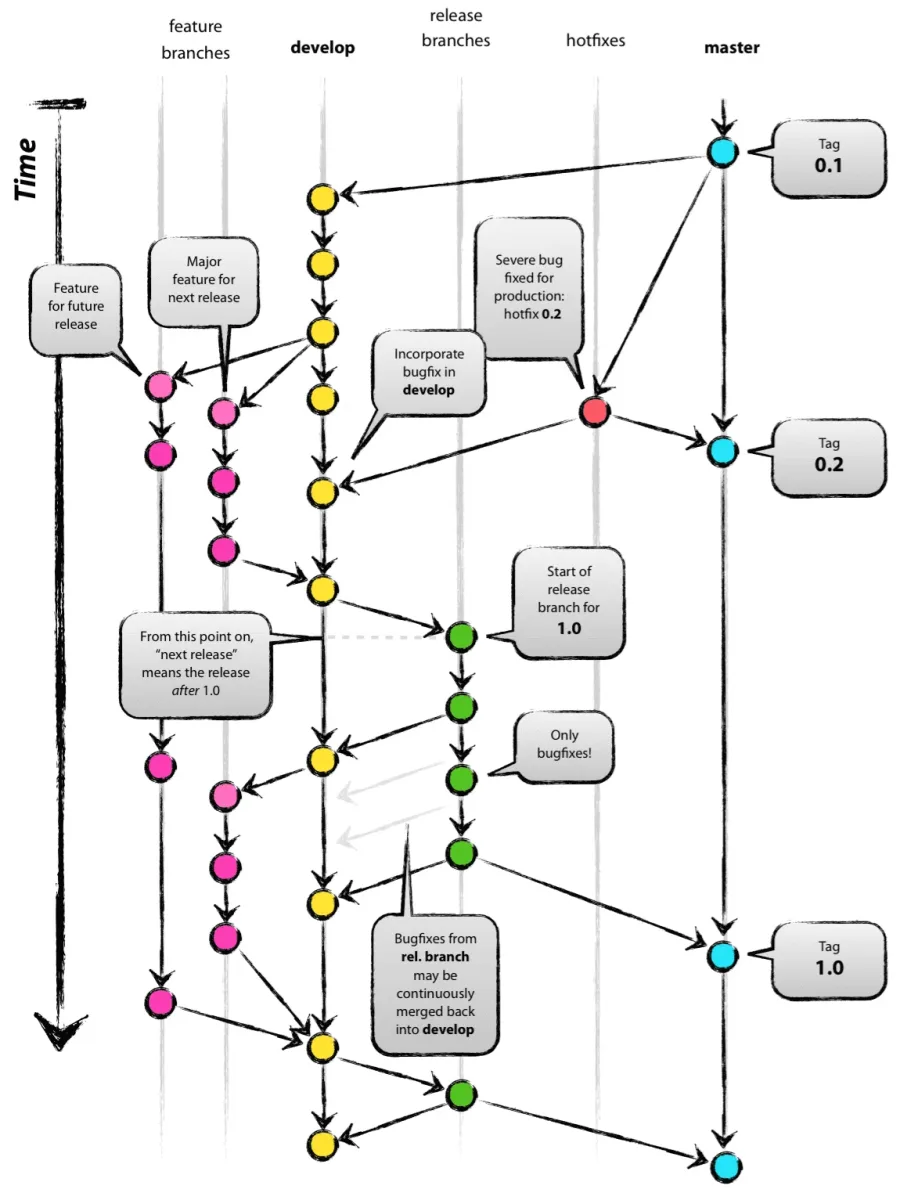
Git Flow is characterized by clearly defined branch roles, allowing work such as feature development, release preparation, and emergency fixes to proceed in stages. Its structure makes it easier to perform strict change management and quality control.
Therefore, it is widely adopted in long-term development projects and projects that prioritize quality.
The main branch structure of Git Flow and the types of projects it is suitable for are listed below.
Main branch structure:
main: Stable branch for the production environment
develop: Integration branch for the next release
feature/: For feature development
release/: For release preparation
hotfix/*: For emergency fixes in the production environment
Projects suitable for this approach:
Development requiring high reliability, such as automotive, medical, or financial systems
Releases on a scale of several weeks to several months
Medium to large-sized teams
Conceptual diagram of branching strategy:
[Original]: A successful Git branching model
3 GitHub Flow — Characteristics and suitable projects
GitHub Flow is a simple strategy based on the premise of keeping the main branch in a deployable state at all times and adding features in short cycles.
Because it follows a clear workflow of working on a feature branch and merging it into main after a review via a Pull Request, it is characterized by fast reflection of changes and ease of continuous improvement.
Main branch structure:
main: Always in a deployable state
feature/: Branches from main, and after development, is merged into main via a Pull Request
Projects suitable for this approach:
Small to medium-sized teams that want to keep the development flow simple
Products that are deployed frequently, from daily to weekly
Environments where CI/CD is established and changes need to be reflected in production quickly
Conceptual diagram of branching strategy:
4 Trunk-Based Development — Characteristics and Suitable Projects
In Trunk-Based Development (TBD), short-lived branches are used, where branches are typically merged into main (trunk) within 1 to 2 days. However, if a feature is complex and cannot be implemented in a short period, Feature Flags are used to merge it into main (trunk) while the feature is kept in an OFF state. This allows for continuous releases while safely incorporating incomplete features without stopping the integration cycle.
Main branch structure:
main (trunk): Always in a deployable state
feature (short-lived): Created as needed, but merged into main (trunk) immediately (within about 1-2 days)
Suitable projects:
Environments with robust CI/CD setups
Products requiring a fast improvement cycle
Organizations with high team maturity that can operate on the premise of frequent integration
Branching strategy conceptual diagram:
5 Comparison and How to Choose Between the Three Branching Strategies
Here is a summary of the differences between the three branching strategies and the criteria for choosing which one to use.
5.1 Comparison of the Three Branching StrategiesNone of the three branching strategies is the single correct answer; the optimal solution changes depending on the nature of the project.
The comparison table below allows you to understand the characteristics of each at a glance.
What this comparison shows is that the strategy to choose is determined not by the team's technical skill, but by the development style.
5.2 How to Choose a Branching StrategyHere are some criteria for deciding which branching strategy to apply to your project.
-
Release frequency is the top priority for decision-making
Releases once a month or less
→ Git Flow branching strategyDaily to weekly releases
→ GitHub Flow branching strategyContinuous deployment (every few hours to minutes)
→ Trunk-Based Development branching strategy
First, this determines the general framework.
-
Narrow down by quality requirements and CI/CD robustness
Quality assurance is mandatory
→ Git Flow branching strategyStrong automated testing
→ GitHub Flow branching strategyIronclad CI/CD
→ Trunk-Based Development branching strategy
The maturity of CI/CD often becomes a "bottleneck" in choosing a strategy.
-
Final decision based on team size and development culture
Large teams with clear role division
→ Git Flow branching strategyAgile, flexible teams
→ GitHub Flow branching strategyTeams where rapid improvement is deeply rooted in the culture
→ Trunk-Based Development branching strategy
Strategy affects not just tools, but the team culture itself.
6 Summary
Branching strategy is an essential rule for preventing confusion in team development and balancing both quality and speed.
Git Flow, GitHub Flow, and Trunk-Based Development each have different characteristics, and choosing the optimal strategy based on the nature of your project is the key to success.
Please consider the best branching strategy for your team by taking into account your release frequency, quality requirements, and CI/CD maturity.