What is RTGI?
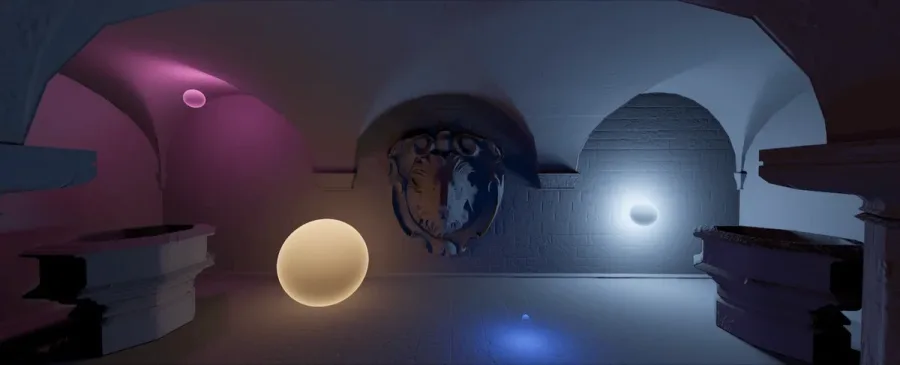
RTGI is a paid shader for ReShade.
I will skip the details, but it is a shader that uses ray tracing to achieve a nice effect. It has also been adopted by NVIDIA and can be used for free under the name SSRTGI (the creator of RTGI is a former NVIDIA employee).
RTGI has a catchy and easy-to-understand effect, and it has a certain level of popularity.
iMMERSE Pro
RTGI is one of the effects within iMMERSE Pro.
The name iMMERSE refers to the effect collection by the creator, Marty, which includes the free version iMMERSE, as well as the paid versions iMMERSE Pro and iMMERSE Ultimate. RTGI is included in the Pro version and above.
Since these are collections, they contain various effects other than RTGI. Because RTGI is so famous, these other effects are rarely mentioned, but they are extremely useful and high-quality.
iMMERSE Pro includes the following effects:
RTGI
Clarity
DOF
Solaris
ReGrade
Exposure Fusion
Insight
I will leave RTGI for other articles and briefly explain the others.
The titles are links to the documentation. They contain everything from explanations to visual comparisons, so you should check them out if you are interested.
LaunchpadThis is a common effect not limited to iMMERSE Pro, but I will mention it here because it is very important.
This effect prepares for other effects. If you are not interested in the technical side, there is not much you need to know. Just placing it at the top is sufficient.
Technically, Launchpad performs Optical Flow calculations and Normal Map processing.
If you want to know more, the official team has created an easy-to-understand video, so you should watch that.
ClarityThis is a sharpening effect, but it has a slightly more complex structure than simple sharpening effects.
You can apply two types of effects: texture sharpening and local contrast. Think of local contrast as something that makes light and dark areas more distinct.
A distinctive feature is that it can be applied selectively based on depth. In other words, you can use it to sharpen foreground objects while not applying it to the background.
Depth of FieldThis is a DOF effect that simulates a physical camera. It creates blur using the same principles as a real camera.
By the way, there is no particular need for DOF in games to be physically correct. In many cases, pseudo-DOF is more suitable.
However, in recent games, effects based on such physical cameras are sometimes incorporated into photo modes and the like. This effect is also mainly suitable for use in screenshots.
As for the pros and cons, it all comes down to it being a physical simulation. You cannot talk about it without knowing what a camera is. Since there are many parameters, I think you might not know what to touch. On the other hand, if you have the knowledge, you can reproduce optical effects similar to a real camera.
It is difficult to master, but it is a powerful effect with the potential to improve the quality of in-game photography.
SolarisThis is a physically-based Bloom effect.
My impression is that it is a convenient Bloom that just by enabling it, it gives a nice atmosphere.
I use it without really understanding it well, so there is nothing particular to write, but it makes things look good just by including it.
ReGradeThis is an all-in-one modular color grading tool. It has a full range of functions for adjusting colors, such as tone mapping, changing color tones, increasing saturation, and color adjustment.
Effects that adjust colors, such as levels, colorfulness, tint, and color temperature, can all be replaced by ReGrade.
A drawback is that it is difficult to use without knowledge of color adjustment. It might be hard to approach for those who have been using effects just by guessing.
In the first place, color adjustment is not that simple, so I do not recommend just adding Colorfulness or FakeHDR without a plan. If you use them without understanding what they do, the screen balance will collapse in an instant. Stop increasing contrast and saturation without thinking.
Well, I feel like most screenshots using ReShade in the world are just like that, though...
In that sense, I recommend studying a little so that you can at least perform appropriate color adjustments. That alone will significantly improve the quality. And don't overdo it.
Exposure FusionBecause it is a technical term, the name is hard to understand. It is translated as 'exposure fusion' in Japanese, but let's put the original meaning aside for now.
Simply put, the Exposure Fusion effect adjusts the brightness to a nice, moderate level. It brightens things that are too dark and darkens things that are too bright.
Is it like the automatic brightness adjustment on a smartphone camera?
Of course, it doesn't make the brightness exactly the same, but keeps it to a moderate adjustment.
Applying this effect at the end can tidy up the screen and stabilize it. It is very convenient.
InsightThis is not an effect that applies changes to the screen, but an analysis tool.
How bright is the displayed screen? What kind of colors does it have? Surprisingly, you cannot tell these things just by intuition.
Also, it is difficult to tell just by looking what kind of changes occurred before and after applying effects.
By inserting Insight at the end, you can objectively measure the screen by displaying graphs of color balance and brightness distribution within the screen, or by visualizing pixels that are blown out or crushed.
Your own senses are less reliable than you think. Adjusting without measuring is out of the question.
RTGII will not go into detail about RTGI.
I will just note that in the latest version, it is separated into Diffuse and Specular.
Diffuse relates to brightness and darkness, while Specular allows reflections to appear. Both are quite heavy, so you can use just one of them.
I would like to write that it is better to read the documentation for details, but there is no documentation for Specular. Well, you will understand once you use it.
iMMERSE Ultimate
The higher-end version, iMMERSE Ultimate, includes the following effects.
Convolution Bloom
LUT Manager (Addon)
ReGrade + (Addon)
ReLight
I will also explain these briefly.
Convolution BloomStandard Bloom effects basically generate soft light. Solaris is the same.
In contrast, Convolution Bloom is characterized by its ability to generate sparkling light rays.
It allows you to generate the kind of light sparkles shown in the link image to the documentation.
This is a standard technique available in Unreal Engine, so it is not something special.
As a note of caution, it is quite heavy. Like RTGI and others, it puts enough load on the system to affect FPS.
Also, it is very difficult to play if it reacts to the UI. Even if you avoid UI interference with REST (ReShade Shader Effect Toggle), it may still react to markers and the like.
LUT Manager (Addon)This is an addon that helps with LUT management. That is all there is to it, so there is not much to write.
ReGrade + (Addon)This is an enhanced version of ReGrade. The UI is implemented as an Addon, and since it can be used with more advanced analysis than Insight, it is easy to operate as an adjustment tool.
However, it has a fatal weakness: it is quite heavy. There is a possibility that I am using it incorrectly, but in any case, it feels about 10 times heavier than the standard ReGrade.
ReLightThis is a path tracer. While RTGI is ray tracing, this is likely what people generally imagine when they hear the term 'ray tracing'.
When you place a light source, light is emitted from it, and shadows and other effects are calculated and displayed.
It is positioned for taking screenshots and is not recommended for use during gameplay.
By using ReLight, you can perform lighting when taking in-game photos. For example, if you place a light in front of a character, you can prevent their face from becoming dark even when backlit.
If you are particular about in-game photography, this is a very useful effect.
Personal comments
MXAO (Free): A stable, high-quality AO.
Depth of Field: The lens simulation DOF produces emotional bokeh. It's great for creating hexagonal bokeh and the like. Being able to focus with a mouse click is also subtly good.
ReGrade: Convenient for doing color grading all at once.
Solaris: Gives you a nice atmosphere with the default settings.
Exposure Fusion: Convenient as it automatically adjusts brightness to look good.
RTGI (Diffuse): Recommended as an AO. While MXAO is high quality, it is localized, whereas RTGI can create AO that considers the entire screen.
RTGI (Specular): Reflections are easy to see the effect of, but honestly, it's difficult to use. Because it cannot account for materials, everything tends to end up looking like plastic.
Convolution Bloom (Ultimate): It's beautiful when light rays appear.
ReLight (Ultimate): Very good if you want to take character photos seriously.
Read the documentation
The documentation for iMMERSE effects, including the paid versions, is publicly available. You can read the documentation even if you haven't actually purchased it.
Although it is in English, you can read it using your browser's translation function. Alternatively, you can use AI. In any case, the documentation contains everything about what is included and what it does.
In conclusion
RTGI certainly has an impact. However, the other effects are also extremely useful and can be used in a versatile manner.
At the very least, ReGrade, Exposure Fusion, and Insight are essential for me personally. I always use them.
I often enable Solaris just because it improves the atmosphere, but if I can't configure the REST settings properly, it interferes with the UI, so I disable it in those cases.
I often apply Clarity lightly as a fine-tuning adjustment.
I rarely use DOF for screenshots. It provides high-quality DOF, so I recommend it if you want to create an emotional bokeh effect.
As you can see, iMMERSE Pro, which includes RTGI, contains many other great effects besides RTGI. Even if you obtained it just for RTGI, why not give them a try while you're at it?
I wrote about MXAO, which is included in the free version.