The Chinese pronunciation of Douyin is "Dou-yin." It is a short-video platform originating from China that was released in 2016 and gained explosive popularity. Furthermore, Douyin is not just a short-video platform; its features have been gradually expanding over the past few years. Users can do more than just watch videos; they can easily purchase products through live streams, and the e-commerce business is steadily growing.
Both of these apps are developed and operated by the Chinese company ByteDance. Douyin and TikTok have similar basic functions, such as shooting, editing, watching, and sharing short videos, as well as live streaming. However, since TikTok is primarily for international audiences, many international videos can be seen. On the other hand, Douyin is for the domestic Chinese market, and while it focuses on Chinese videos, international videos appear occasionally as well.
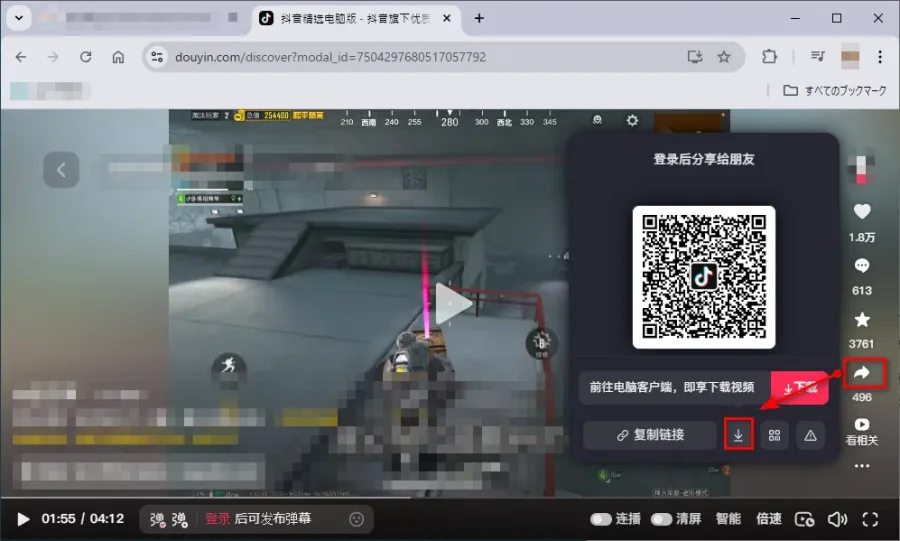
First, I will introduce how to download videos from the browser version of Douyin.
Steps:
・Open Douyin in your browser and find the video you want to save. ・Click the "Share" button on the right side of the video. ・Click the download button to save the video.
Note that the download button may not always be displayed. In such cases, you can copy the video link, access an external download site (e.g., SaveTik), paste the link, and click the download button to save the video.
Steps:
・Open the Douyin app. Find the video you want to download and play it. ・Long-press the video and tap "Cache Video" from the menu that appears.
When saving videos on Douyin, please be sure to comply with copyright laws. Unauthorized downloading, reposting, editing, or commercial use of videos may constitute copyright infringement. Whether or not you can save a video on Douyin depends largely on the creator's settings. If the creator has disabled saving, the save button will not be displayed. In this case, you can also try the following methods:
1. Online video download sites
For example, SaveTik (https://savetik.app/) is a free video download site that does not require registration, allowing you to easily save TikTok and Douyin videos.
2. Screen recording software
For example,
WonderFox HD Video Converter Factory Pro is an easy-to-use screen recording software compatible with Windows. It can record your Windows PC screen by selecting a specific area or the entire screen, and it supports recording gameplay at up to 60fps. Furthermore, it can record streaming videos, live broadcasts, web meetings, etc., and supports simultaneous recording of PC system audio and microphone audio.