Hello, this is Rikunarita.
Well, this time, I have created and released a new VAE called "Anima-illustron-Qwen-Image-VAE" and would like to introduce it.
I have adjusted it specifically for anime illustrations, so please use it as a VAE when creating anime illustrations with models like Anima or Krea.2.
*It can only be used with models compatible with Qwen-Image-VAE.
Overview
I created "Anima-illustron-Qwen-Image-VAE" by linearly merging the VAE "qwen_image_clear_vae", a fine-tuned version of Qwen-Image-VAE released by Easygoing, and the VAE "Qwen-Image-HDR-VAE", a fine-tuned version of Qwen-Image-VAE released by Felldude.
Hugging FaceModelScopeIn this article, I will explain the newly created "Anima-illustron-Qwen-Image-VAE" in detail, including actual examples.
Furthermore, to make the following explanation smoother, I will standardize the terminology in this article, and from here on, I will refer to "qwen_image_clear_vae" as "Qwen-Image-Clear-VAE".
Explaining the two base models
First, please take a look at each model card.
Both are fine-tuned versions of "Qwen-Image-VAE", but since they are slightly different, I will explain them.
Easygoing's Qwen-Image-Clear-VAEAs explained in the model card,
As described, it has slightly clearer colors than the original "Qwen-Image-VAE" and provides a lively feel.
Also, it is less prone to producing unnecessary artifacts which is a good point.
Additionally, ringing (described later) is kept to a minimum, and natural lines and coloring are also features.
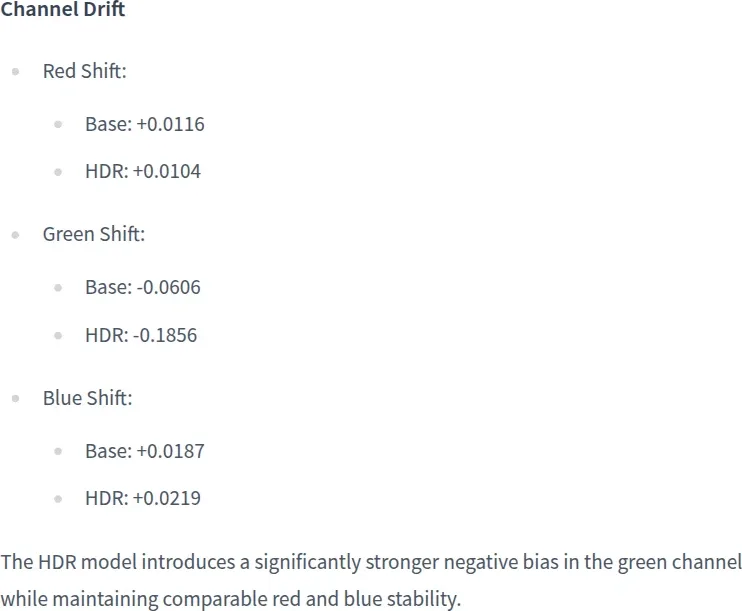
This model restores the model's original vibrancy by applying a negative bias to green and a positive bias to red and blue.
As Easygoing explains, image generation models generally tend to lose blue and red and emphasize green during the diffusion stage.
Furthermore, humans have a strong tendency to find blue-toned colors pleasant or "beautiful."
Scientifically speaking, it is known that blue light (shorter wavelengths) acts on the human autonomic nervous system, promoting parasympathetic nervous system activity.
Moreover, in every region—including the United States, the UK, Germany, and China—blue is consistently the top "favorite color."
Therefore, emphasizing blue components likely naturally enhances the "beauty" perceived by humans.
Additionally, the Qwen-Image-HDR-VAE significantly expands the overall range of expression (dynamic range).
Because this allows for more diverse color expression, gradients and the like become more vivid.
However, this model also has a major drawback that makes it unsuitable for anime illustrations.
That is, "the sharpness effect is too strong, causing ringing."
Ringing, also known as sharpness halo, is a side effect of sharpening that refers to the phenomenon where white or black lines become clearly visible at the boundaries of light and dark areas.
Once you understand how sharpening works, this phenomenon is easy to explain.
This site also explains it, but fundamentally, sharpening processing is an effect that accentuates the boundaries between light and dark.
There are sudden peaks/valleys in the graph lines, and
if the sharpness effect is too strong, these become even more pointed/sunken. Because the pointed parts become extremely bright and the sunken parts become extremely dark, they appear as white or black lines.
Ringing can sometimes cause fatal problems in anime illustrations.
Most image generation AIs use a mechanism called "Diffusion" to gradually approach the final image while removing noise from a random noise image.
It is like "drawing a picture with an eraser on a piece of paper completely blackened with a pencil," so boundary lines and details often become blurred or melted.
Usually, this results in a soft look that can often be disguised at a glance, but when emphasized by ringing, the melted or strangely connected lines become blatantly and unnaturally visible, making the appearance very poor.
Furthermore, "hand-drawn feel" is also important in anime illustrations, so excessive sharpening is not desirable in the first place.
So, what if we remove that weakness from the Qwen-Image-HDR-VAE? The parameters for "vividness" and "sharpness" are closely linked, and weakening the sharpness effect also reduces the vividness.
Merging both models
To balance the merits of each and cancel out the demerits as much as possible, I will perform a model merge.
Since there is no standard node for VAE model merging, I used the "VAEMergeKJ" node included in the custom node pack "ComfyUI-KJNodes".
The custom node pack "ComfyUI-KJNodes" is quite famous, so many of you may already know it.
Supplement:
There was also a custom node pack called "ComfyUI-TechNodes" that included a "VAE Merge" node, but it was incompatible with the Qwen-Image-VAE architecture and could not be used.
And, merging is possible with a simple node setup like the one below.
When merging, rather than just a numerical synthesis, I analyzed the characteristics of each model based on measured data and calculated the optimal ratio.
I will explain the details in the verification section later, but to state the conclusion,
Qwen-Image-Clear-VAE : Qwen-Image-HDR-VAE = 7:3
is the golden ratio that I determined balances "vividness" and "line beauty" in anime illustrations.
The completed VAE is available on HuggingFace and ModelScope.
Of course, it is Apache-2.0, so downloading and modifying it is also fine.
Although actual generation examples are listed later, they are also stored in the "sample_images" folder in the file tree on HuggingFace.
And the workflow used can also be downloaded as it is stored under "ComfyUI-Workflow/" in the file tree.
Thorough verification with actual generation examples!
This time, for images generated with PixAI (hereinafter referred to as "evaluation images"),
Evaluation image -> Encode -> Latent space -> Decode -> Pixel space
I will perform this process to verify not only the VAE's art style (?) but also its reproduction accuracy.
For this image comparison, I used the ComfyUI custom node pack, ComfyUI-easygoing-nodes.
Details about this custom node can be found not only in the GitHub repository's README but also in a detailed article by Kimama / Easygoing themselves.
It is quite an excellent tool, and it includes nodes that can perform not only image comparison but also image editing.
Please give it a try. I highly recommend it.
Now, the tool I will be using this time is the "Image Difference Checker" included in the node pack.
Let's proceed with the comparison and verification!
・Evaluation images
Evaluation images generated with PixAI ↓
Passing images through the VAE (relative to the original image)First, I will encode and decode using Anima-illustron-Qwen-Image-VAE, Qwen-Image-VAE, Qwen-Image-Clear-VAE, and Qwen-Image-HDR-VAE, respectively.
・Workflow
・Images passed through each VAE
Comparison and verification with evaluation images using Image Difference CheckerNext, I will thoroughly verify the differences between the evaluation images and the images passed through the VAE using the Image Difference Checker node introduced earlier.
Note that Image 1 is the evaluation image, and Image 2 is the image passed through the VAE.
・Workflow
・How to read
Color Difference represents a subtraction difference map in color, and Grayscale Difference represents a subtraction difference map in black and white (grayscale). You can think of it as an image that displays the parts where the two images differ, while the same parts are displayed in black.
MAE is a numerical value that detects differences in color, and SSIM is a numerical value that detects differences in black and white.
As for the "Tone Curve", it is, to be precise, an RGB histogram (tonal distribution graph).
The horizontal axis is the luminance value of each channel, ranging from 0 (pitch black) to 255 (pure white). The left side is shadows (dark areas), the center is midtones, and the right side is highlights (bright areas).
The vertical axis represents the number of pixels that have that luminance value.
The three colored lines represent the distribution of R (red), G (green), and B (blue) respectively. The sharp spikes at the far right indicate highlight clipping, and the sharp spikes at the far left indicate shadow clipping.
The two statistical tables at the bottom represent luminance statistics for each RGB channel of each image. I will explain each column in order. ・
Channel: Each color channel (R, G, B) ・Sum
: The sum of the luminance values of all pixels for that channel ・
Avg: Average luminance value (0-255) ← raw absolute luminance ・%
: Brightness ratio obtained by dividing the average luminance by the maximum value of 255 ← normalized relative luminance
Please note that from here on, red is denoted as R, green as G, and blue as B in some places. Thank you for your understanding.
・Comparison results
・Result explanation
Anima-illustron-Qwen-Image-VAE: The grayscale difference is 99.9%, meaning
ringing is minimal and the image is not degraded. The color scale difference is 98.9%; the red and green components decrease slightly, and only blue increases moderately
. → Natural
style. Optimized for anime illustrations without significantly changing the color tone.
Qwen-Image-HDR-VAE:
The grayscale difference is 99.2%,
details are clearly being edited = ringing is occurring.
→ The outlines become sharp, and the details are crushed.
The color scale difference is 97.2%,
the red component has decreased significantly, blue has increased significantly, and green has increased slightly.
→ The color tone changes significantly. It is too vivid to use for anime illustrations.
Originally, the README stated that red and green should decrease and blue should increase, but the measured data revealed that the decrease in red was greater than expected and the increase in blue was extreme.
This is the reason why colors break down when using HDR-VAE as is. Therefore, I made an adjustment to allocate a larger portion (70%) of Clear-VAE to cancel out this excessive fluctuation.
Qwen-Image-Clear-VAE:
The grayscale difference is 99.9%,
ringing is minimal, and it does not ruin the image.
The color scale difference is 99.2%,
the red and green components decrease slightly, and the blue component increases very slightly. It is faithful to the original image with a natural style and vivid coloring
, but personally, I think it is
for portraits (Canon-style).
Qwen-Image-VAE:
The grayscale difference is 99.9% and the color scale is 99.6%,
which is extremely faithful to the original image.
The red and green components increase very slightly, and blue decreases very slightly.
→ The highest quality as a base model.
Summary
Anima-illustron-Qwen-Image-VAE is a VAE that can make anime illustrations look the most beautiful and natural.
I linearly merged two fine-tuned models that have merits not found in Qwen-Image-VAE, "Qwen-Image-Clear-VAE" and "Qwen-Image-HDR-VAE", at a 7:3 ratio.
I precisely neutralized the drawbacks of Qwen-Image-HDR-VAE (ringing and extreme hue shifts) revealed by the measured data with the stability of Qwen-Image-Clear-VAE. By performing a merge based not on catalog specs, but on actual images, waveforms, and difference data, I achieved an ideal balance specialized for anime illustrations.
Finally
"Anima-illustron-Qwen-Image-VAE" is an accessory to the development of a new model called "Anima-illustron", which was created by merging Anima models (the Diffusion core).
The release of the "Anima-illustron" model itself will be a little further off (it is still under development), so please wait patiently!
The world of AI is still very deep.
Even at this very moment, someone is developing and releasing something.
My development environment is a HuggingFace Space Docker image, just a 2-core 16GB CPU.
Even so, I managed to do model merging.
Why don't you, the readers, try merging your favorite models as well?
Please be sure to use "Anima-illustron-Qwen-Image-VAE" when generating anime illustrations!
Thank you for reading until the end!