When you decide you want to read e-books, the first thing you struggle with is the device.
A Kindle device dedicated to reading.
An iPad that can do anything.
Or is the smartphone you already have enough?
If you look only at the spec sheet, the iPad is overwhelmingly more capable.
Reading magazines in color. Watching videos. Searching the web. Taking notes. Replying to emails. Creating documents. Playing games.
On the other hand, a Kindle device is basically a tool for reading books.
"If I'm spending the same amount of money, it's a better deal to get the one that can do more."
If it were the old me, I think I would have thought that without hesitation.
But reading is a little strange.
Just because a device can do more doesn't necessarily mean you'll read more books.
In fact, there are nights when it's easier to open a book on a device that can do less.
I have stopped comparing Kindle devices and iPads based on a simple win-or-lose performance metric.
What's important is:
Where you read.
What kind of books you read.
What kind of mood you're in when you want to open a book.
Before looking at the devices, try imagining yourself reading a book.
I believe that if you choose based on that, you're less likely to regret your purchase later.
First, the confusion surrounding the word 'Kindle' that you should know
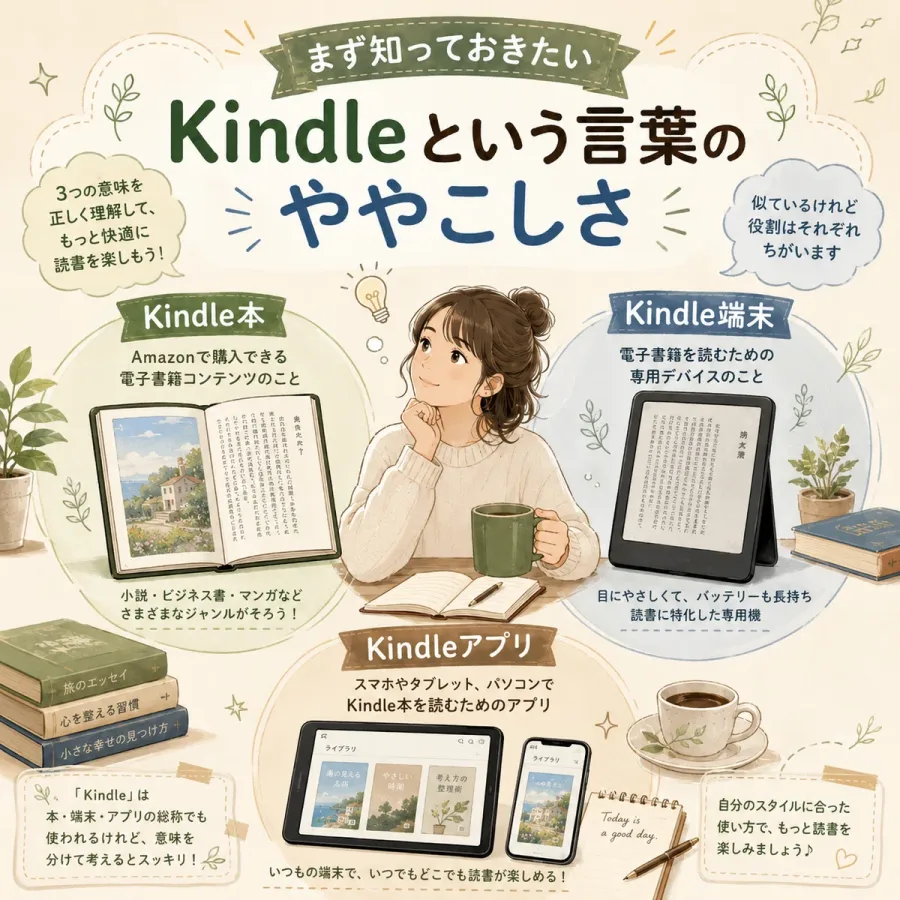
When I was new to e-books, I thought, "To read Kindle books, I have to buy a Kindle device."
This is because the word "Kindle" is used for the e-book service name, the books themselves, and the dedicated devices.
This was my first small stumbling block.
In reality, Kindle books purchased on Amazon can be read not only on Kindle devices but also via the free Kindle app on iPhones and iPads. Amazon's official site also provides information on reading environments for smartphones, tablets, and the web.
In other words,
"Buying Kindle books"
and
"Buying a Kindle device"
are two different things.
If you already have an iPad, you should just install the Kindle app and try reading one book first.
You can also try it on your current smartphone.
There is no need to suddenly add a new device while you are still unsure if e-books are right for you.
Try changing the font size.
Try highlighting text.
Try reading during your commute.
Try reading before you go to sleep.
When you finish reading one book,
"I want to read on a lighter device"
"I want a screen that doesn't show notifications"
"I want to see it in color and larger"
This kind of dissatisfaction arises.
That dissatisfaction is the most honest answer for choosing a device.
If you want to read novels quietly, the benefits of a Kindle device are easy to understand
There are nights when I want to read a novel, but I just can't seem to open the book.
I come home from work, eat dinner, and open my iPad thinking I'll rest for a little while.
I meant to open the Kindle app, but a notification catches my eye.
I check just one message.
While I'm at it, I check the news.
I get curious about a video recommendation.
Before I know it, 30 minutes have passed, and I've only made it through a few pages of the book.
I have repeated this cycle many times
There was a time when I thought, 'It's because I lack concentration.'
But in reality, I don't think it was just a matter of willpower.
Books, work, videos, social media, shopping, and messages are all contained within a single screen.
In that state, it is surprisingly difficult to keep choosing only to read.
When I look at a Kindle device, I feel that its appeal isn't its high performance, but the fact that there are few entry points for anything other than reading.
You open the screen to read a book.
There, the book is.
You don't have to wonder what to do next.
On days when I don't feel like reading much, I am helped by that simplicity.
Amazon markets the Kindle e-reader as a device dedicated to reading, and offers models that allow you to adjust font size, font weight, line spacing, and more.
You want to increase the time you spend reading text-based novels, essays, and new paperbacks.
You want to take a break from notifications.
You want to go to sleep at night without opening unnecessary screens.
For such people, the fact that a Kindle device 'can only do that' holds significant value.
Candidates for a dedicated reading device (Ad)The following are Amazon Associate links.
If you want to read text-based books quietly, the Amazon Kindle (6-inch) is also a candidate. Compare it with higher-end models to choose based on whether you need waterproofing or if you read manga.
'Kindle is black and white, iPad is color' is no longer the only way to choose
Previously,
For text, choose Kindle.
For color, choose iPad.
I think it was quite easy to distinguish them that way.
However, the situation is a bit different in 2026.
The current Kindle lineup includes the Kindle Colorsoft, which uses color electronic paper. It is marketed by Amazon as a model that supports color highlights and features waterproofing.
Therefore, you cannot say that 'all Kindle devices are black and white'.
Even so, if you frequently look at magazines, photo books, cookbooks, travel guides, color diagrams, or web pages, I would choose an iPad.
Just because it has color does not mean it is the same.
Viewing photos in large format.
Zooming in on pages.
Switch between portrait and landscape orientation.
Look up shops you are interested in on a map.
Use a timer while keeping a cookbook open.
Switch to a note-taking app while reading documents.
When you include these 'tasks surrounding reading,' the convenience of the iPad really shines.
Apple's current lineup includes the iPad Pro, iPad Air, iPad, and iPad mini, with screen sizes, weights, and compatible accessories varying by model. You can also check the size, weight, capacity, and display of each model on Apple's official comparison page.
Read more
I think about it not in terms of 'how many e-books I want to carry,' but 'what kind of pages I usually look at.'
Do you often read books with text lined up on white pages?
Are photos or diagrams the main focus of the page?
This difference becomes much larger than you would imagine once you start using them.
If you would like to know more about this topic, please check out these related articles as well.
[2026 Edition] Thorough Comparison: Kindle vs. iPad | How to Choose an E-book Reader
Even with e-books, text-based books and magazines are different things
With e-books, I thought I could read any book the same way.
At first, that is what I thought.
But in reality, the way you read novels and magazines is completely different.
For text-based e-books, there is a reflowable format where the text is rearranged to fit the screen size and text settings.
If you increase the font size, the amount of text that fits on one screen changes.
You can also adjust the line spacing and margins to make it easier for you to read.
On the other hand, for manga or photo books, a fixed layout that preserves page arrangement is sometimes used. Official Amazon KDP guidelines also explain that text-based books should use reflowable formats, while comics and similar content should use fixed layouts.
I have opened practical books with small text on my smartphone and grown tired from repeatedly zooming in and moving around.
It is not that the content of the book is difficult.
I was tired from the act of reading.
Conversely, for text-centric books, simply increasing the font size slightly made them surprisingly easy to read.
Even with the same e-book, comfort varies depending on how the pages are created.
That is precisely why it is important to open and test one of the books you usually read before buying a device.
Look at the body text pages, not the cover.
Can you continue reading that page for 20 minutes?
That is the standard I use.
️ For manga, decide based on your reading posture rather than screen beauty
You can enjoy manga on both Kindle devices and iPads.
That is exactly why it is a difficult choice.
Reading one page at a time with one hand on a small device.
Reading in a two-page spread by turning a large screen horizontally.
Which is more comfortable depends not only on the work itself but also on your usual posture.
If you read while sitting at a desk, a large iPad is easy to see.
If you read on a sofa, a slightly smaller device is easier to handle.
If you read while lying on your back in bed, a heavy device will eventually take a toll on your arms.
And the moment you get sleepy, you might almost drop it on your face.
This might sound like a joke, but it's actually quite painful
When I looked at devices in stores, I only ever checked how beautiful the screens were.
After just a few minutes of handling them, they all look comfortable.
But what I really want to test is:
Can I read the dialogue on a single page without strain?
Is it easy to hold in landscape orientation?
Is it too small when displayed as a two-page spread?
Will my wrists get tired after holding it for 20 minutes?
Is it a size I can manage in the places I usually read?
These are the parts that matter.
Reading is not an operation that ends in a few minutes.
In the end, it was more important that it doesn't become uncomfortable to keep reading than having a slightly larger screen.
Eye strain cannot be decided solely by "which one is safer"
Kindle's e-ink display is marketed as a screen that allows you to read with a feeling close to paper.
The iPad has a bright, vivid screen that makes it easy to view color documents and photos.
Looking only at this, one might be tempted to conclude that "a Kindle device is better for your eyes."
However, I try not to think about it that simply.
Even on the same device,
The screen is too bright.
The text is too small.
Reading for long periods in a dark room.
Getting your face too close.
Maintaining a posture with your neck bent.
Not taking breaks.
If you read this way, your body will get tired.
I used to think that dimming the screen was easier on the eyes, so I would read in a dark room with the brightness turned way down.
However, I would unconsciously bring my face closer to the screen to try and follow the hard-to-read text.
I had adjusted the settings, but I wasn't paying attention to my posture.
Now, rather than deciding on a device, I prioritize:
Setting the text size so it is comfortable to read.
Not having too large a difference between the room brightness and the screen brightness.
Placing the device in a position where my neck and shoulders don't feel strained.
Closing the book when I get tired.
I value these things more.
It's not about which device lets you read for hours on end, but which device helps you notice when you are tired.
I think that is also part of finding the right compatibility with your reading tools.
If you want to read in the bath, don't just look at the two words "waterproof"
I long for the time to read books in the bath.
Reading a novel quietly while soaking in warm water.
It also allows you to get away from your smartphone.
It is a very luxurious time.
There are models with IPX8-rated waterproofing, such as the Kindle Paperwhite and Kindle Colorsoft. However, not all models in the Kindle series have the same waterproof specifications. Amazon's official site also provides separate guidance for waterproof models and their usage conditions.
And just because it is waterproof does not mean it is a product designed for underwater use. Amazon's safety information also states that it is not designed for use while submerged.
I am the type of person who suddenly gets overconfident when I read that something is "waterproof."
Touching it with wet hands.
Placing it on the edge of the bathtub.
Using it for a long time in a place with a lot of steam.
When it breaks after repeated use like that, I find myself thinking, "But it's waterproof."
However, what you really need to check is:
Which models are compatible.
What kind of water is assumed.
How to care for it after it gets wet.
To what extent the warranty covers it.
These are the conditions.
Even when using an iPad near water, I check the official specifications and warranty conditions, and I make sure not to bring it into the bathroom lightly.
Electronic devices and water are most dangerous when you have become accustomed to them.
Rather than the battery number, imagine a morning where you forgot to charge it
When you look at the product page for a Kindle device, some models list battery life in units of "weeks."
For example, the current Kindle Paperwhite indicates a guideline of up to 12 weeks under specified conditions. However, the actual duration varies depending on brightness, connectivity, and usage patterns.
An iPad is used for things other than reading.
Watch videos.
Open the web.
Organize photos.
Play games.
Check work documents.
Because of this, the battery may already be low by the time you decide to read a book.
At night, you finally have some time.
You try to open the book you were reading.
The remaining charge is 5%.
You plug in the charging cable and wait a little.
In those few minutes, the momentum for reading disappears.
I am weak against these small interruptions.
Reading isn't always something you start with great enthusiasm, saying, 'Right, I'm going to read now.'
You suddenly have some free time.
It's a little too early to sleep.
You think you can read for just 10 more minutes.
At such a moment, can you open it right away?
People who want to leave it in their commute bag.
People who don't want to add to their daily charging routine.
People who want to open a book the moment they think of it.
For such people, a dedicated reading device that makes it easy to reduce charging frequency holds more meaning than the numbers suggest.
On the other hand, if you have a habit of charging your smartphone or iPad all at once every night, an iPad might not be an issue for you.
Look at how well it fits your charging habits rather than just the battery performance.
I think that is more realistic.
✍️ Do you want to take notes, or do you want to read without stopping your train of thought?
When reading, you will encounter passages you want to save.
You want to reread them later.
You want to talk to someone about them.
You want to think about how to apply them to your own work.
With Kindle devices and apps, you can use features like highlights, notes, and dictionaries for supported books.
With an iPad, you can switch between the Kindle app and a notes app, or use an Apple Pencil on supported models. Apple also markets the iPad as a device that can be used for taking notes or writing documents using an Apple Pencil or keyboard.
Read this too
However, just because you have an Apple Pencil does not mean you can freely write on any Kindle book like paper.
The Kindle lineup also has the Scribe series which supports handwriting, and you can use Active Canvas to write in some Kindle books, but there are formats that are not supported, such as vertical text or manga.
This is an area where it is easy to get confused if you judge only by the device name.
I also tried to take notes on everything while reading for a while.
Drawing lines under passages that interest me.
Writing down my thoughts.
Compiling them into another app.
Looking up related information.
I thought I was reading carefully.
But before I knew it, my goal had become 'keeping neat notes,' and the flow of the book wasn't sinking in.
Now, I change how I read depending on the book.
When I want to get lost in a story, I take almost no notes.
If it's a business book, I leave highlights.
If it's reference material, I arrange notes on my iPad.
I only open a separate notebook when my thoughts start to expand.
More features don't necessarily mean deeper reading.
Rather than what to save, it's about what you want to feel while reading.
I think you can choose your device based on that.
If you want to do more than just read, choose an iPad. But remember, you're buying temptations along with it.
The convenience of the iPad is that you can switch between reading and creating on a single device.
Reading a textbook and looking up words you don't understand.
Creating notes while looking at reference materials.
Opening a cookbook and setting a timer.
Checking a map while looking at a travel guide.
Summarizing what you've read directly into a document.
For this kind of usage, I would choose an iPad without hesitation.
It might be too high-spec for just reading, but it is extremely convenient for 'reading + something else'.
However, that convenience also comes with temptations.
Notifications pop up while you are reading.
You search for something and end up moving to a different article.
You open a video intending to take a short break.
As a result, you end up spending more time staring at the screen than you did reading the book.
After repeating this mistake several times, I started changing my environment on the iPad.
Turn off notifications while reading.
Place the reading app in a prominent spot on the home screen.
Move social media apps to a different page.
Use Focus mode only during the time you are reading.
Even if you want to search for something, don't open it immediately; just leave a note.
It is not the iPad that breaks your concentration.
You need to prepare to switch a screen that can do anything into a screen dedicated only to reading.
If you find that preparation troublesome, choose a Kindle device.
If you want to handle everything on one device, including that preparation, choose an iPad.
This is where compatibility with your personality, rather than performance, comes into play.
Think about the 'days you didn't open a book' rather than just the price
When comparing devices, you eventually worry about the price.
Kindle devices differ in screen, capacity, waterproofing, color display, and handwriting support depending on the model.
iPad prices also vary depending on the model, screen size, capacity, and connectivity.
Furthermore,
Cases.
Screen protectors.
Apple Pencil.
Keyboards.
Chargers.
Warranty.
Unlimited reading services.
These costs may also be added.
However, I believe that comparing only the device prices leads to the wrong decision.
If you already own an iPad, you can start reading just by installing the Kindle app.
Recommended reading
At that point, not buying a dedicated device is the cheapest option.
Even so, if notifications distract you and keep you from opening your books, then it makes sense to add a Kindle device.
Conversely, if you are buying an iPad solely to read books and will not use it for videos or work, you should consider whether you really need those features.
If you also use it for studying, work, videos, photos, and notes, you do not need to consider the entire price of the iPad as a reading expense.
Rather than buying a cheap device that you end up not using, a device that is slightly more expensive but allows you to open a book every day may not be a waste in the end.
Before looking at the price tag, I consider:
How many times a week will I pick it up?
How many minutes will I read at a time?
Where will I take it?
Will charging or the weight become a hassle?
I imagine.
I believe the value of a reading tool is determined not by how long you own it, but by how many times you open it.
If I were choosing an e-reader for the first time, I would start by reading just one book.
If you are just starting with e-books, I wouldn't buy an expensive device from the beginning.
I would install the free app on the smartphone or iPad I already own.
Read one book you've been curious about.
If possible, try one novel and one manga.
Open it during your commute.
Open it on the sofa at home.
Open it before going to bed.
Change the font size.
Use the highlight feature.
When you finish reading one book, check what you felt dissatisfied with.
The screen was too small.
It was too heavy.
Notifications were distracting.
I wanted to see it in color.
Charging was a hassle.
I wanted to take notes.
E-books themselves just didn't suit me.
Any answer is fine.
Rather than trying to guess the right device from the start, it's better to experience some trouble first so you can understand what you actually need.
Spec sheets suddenly become meaningful once you've discovered what you're dissatisfied with.
I want to read novels, essays, and new paperbacks in peace.
I want to get away from notifications.
I want to build a habit of reading a little bit every day.
I want to keep a lightweight device in my bag.
I don't want to worry about charging as much as possible.
In those cases, I choose a Kindle device.
I read magazines, photo books, cookbooks, and color reference materials.
I want to enjoy manga on a large screen.
I want to summarize what I've read into notes immediately.
I use other apps like search and maps at the same time.
I also use it for work and videos outside of reading.
In those cases, I choose an iPad.
My reading time is still short.
I don't want to add more to my luggage.
I'm not sure if e-books are right for me.
I want to read a few pages at a time while commuting.
In that case, start with the smartphone you already have.
All three are correct.
I'm not a book lover because I don't own a dedicated device.
I can read a lot because I own an expensive iPad.
That is not the case.
The amount you read is not determined solely by the price of the device.
What you should choose is not the device, but the 'time you want to read'
When comparing Kindle devices and iPads, numbers like screen size, weight, storage capacity, price, and battery life are lined up.
Of course, all of these are important.
But what you should think about at the end is not the numbers.
Yourself reading a novel with one hand on the morning train.
Yourself on the sofa at night, stepping away from notifications to enter a story.
Yourself at a desk with documents and notebooks laid out, reading while thinking.
Yourself on a trip, carrying many books without increasing your luggage.
Yourself reading just one more page before going to sleep.
Which device would naturally be there during that time?
I am drawn to 'one device that can do anything'.
With one device, you can work, read, and watch videos.
You can also reduce your luggage.
It is very rational.
But at the same time, there are nights when you are saved by a device that can 'only do this one thing'.
No notifications arrive.
Work doesn't start either.
There is only the book you are currently reading, waiting for you.
Reading doesn't continue on efficiency alone.
You want to open it.
You want to hold it.
You want to read just one more page.
Choose a tool that doesn't get in the way of those small feelings.
When choosing between a Kindle device and an iPad in 2026, I believe that is the most important thing.✨
Official information referenced
・Kindle E-reader / Kindle Free App (Amazon)
・Kindle Paperwhite / Kindle Colorsoft / Kindle Scribe Product Information (Amazon)
・Guide to Reflowable and Fixed Layouts (Amazon KDP)
・iPad Product Information / iPad Model Comparison (Apple)
#Kindle
#iPad
#E-books
#Reading
#LifeWithBooks
#Gadgets
#2026Edition