Introduction
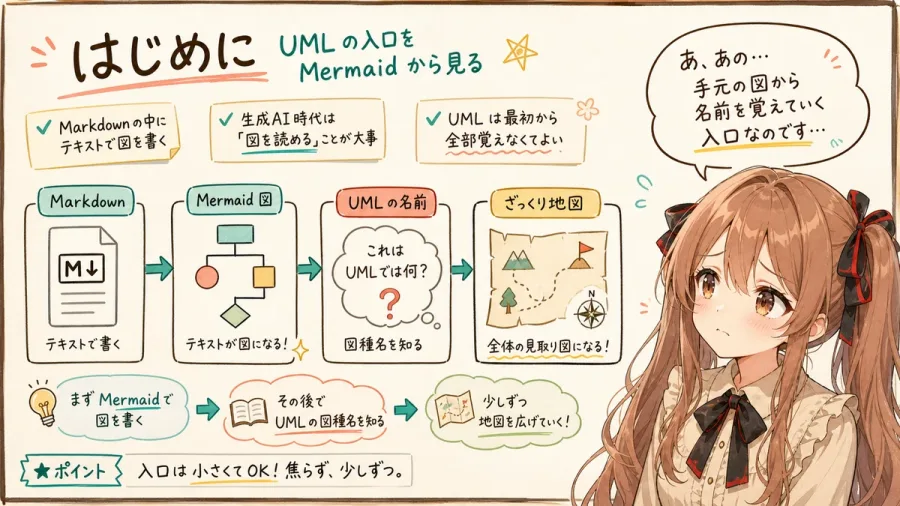
Um, hello... I'm Mikuku, and I'll be in charge of this article.
Today, we'll take a gentle look at the entrance to UML through Mermaid. I'm a little worried about whether I can guide you well, but, um... I'll do my best!
When writing design notes in Markdown, how to handle diagrams is a common topic. One relatively easy-to-use option is Mermaid. Using Mermaid, you can write diagrams as text within Markdown.
I think the situations where Markdown and Mermaid are written by generative AI will continue to increase. The amount of time humans spend writing everything from scratch might decrease more and more. However, being able to roughly read what the generated text and diagrams represent, and knowing a little about the underlying mechanisms, seems important.
When you try to learn UML, many diagram names appear at first. Class diagrams, sequence diagrams, use case diagrams, activity diagrams, state machine diagrams, component diagrams. They are all important, but if you try to memorize them all from the start, um... it might make your head spin a little.
So, in this article, we will first try drawing diagrams with Mermaid. After that, we will organize which UML diagram the diagram we just drew corresponds to.
Um... instead of diving deep into the specifications right away, it's more like learning the names starting from the diagrams at hand.
This article is not an introduction to Mermaid as a whole. And it is not an introduction to UML as a whole. It is an incomplete, rough catalog. But I thought that would be perfect for a first introduction. This time, I will focus on where Mermaid and UML overlap, centering on class diagrams, sequence diagrams, and state transition diagrams. Ugh... first, I'll look at them little by little while drawing the diagrams.
Note: This article contains both actual Mermaid renderings and explanatory illustrations accompanying each heading. In the explanatory illustrations, some notations and layouts may differ from the actual Mermaid renderings to prioritize readability and clarity. Please be aware of this in advance.
Writing about the relationships between things
First, let's write about the relationships between things. Here, we will use a small example where a user has an order.
In Markdown, if you set the beginning of a code block to mermaid, it will be interpreted as a Mermaid diagram in supported environments. In other words, if you write `mermaid in Markdown and place Mermaid syntax inside it, it may be displayed as a diagram rather than just a string.
classDiagram
    class User
        +String name
        +String email
        +login()
        +logout()


    class Order
        +int id
        +Date orderedAt
        +total()


    User "1" --> "0.." Order : places
In Mermaid, if you write classDiagram, you can draw a diagram like a class diagram.
This diagram corresponds to a class diagram in UML
The classDiagram in Mermaid that we just wrote corresponds to a class diagram in UML.
A class diagram is a diagram that represents classes, attributes, operations, relationships, and so on.
Um... in this article, I will treat the class diagram as a diagram for roughly looking at the overall shape rather than as the code itself. In actual UML, it is sometimes used at a granularity closer to more detailed design or implementation.
Y-yes... here, please take it as an entrance to see 'what kind of things exist and how they are connected'.
Writing about the exchange of processes
Next, let's write about the exchange when creating an order.
sequenceDiagram
    actor User
    participant App
    participant Service
    participant Database

    User->>App: 注文する
    App->>Service: createOrder()
    Service->>Database: insert(order)
    Database-->>Service: OK
    Service-->>App: 注文ID
    App-->>User: 注文完了
In Mermaid, if you write sequenceDiagram, you can write how messages are exchanged between characters or components.
This diagram is a sequence diagram in UML
The sequenceDiagram in Mermaid that I just wrote corresponds to a sequence diagram in UML.
A sequence diagram is a diagram for roughly visualizing the exchange and order of processes.
Um... it might be a little easier to read if you think of it as a diagram that shows who is talking to whom, and in what order.
Writing about state changes
Next, I will write about how the state of an order changes.
stateDiagram-v2
    [] --> Draft
    Draft --> Submitted: 提出
    Submitted --> Approved: 承認
    Submitted --> Rejected: 差し戻し
    Rejected --> Draft: 修正
    Approved --> [*]
In Mermaid, you can represent states and state transitions by writing stateDiagram-v2.
This diagram corresponds to a state machine diagram in UML.
The stateDiagram-v2 in Mermaid that I just wrote corresponds to a state machine diagram in UML.
A state machine diagram is a diagram for roughly visualizing changes in state. It is used when organizing things that have states.
Ugh... the word 'state' is a bit stiff, but it is a diagram that shows 'what state it is in now, and where it can go next'.
Writing about the flow of processes
Next, I will write about the flow of order processing in a form closer to a flowchart.
flowchart TD
    A[注文開始] --> B在庫はあるか
    B -- はい --> C[注文を登録]
    B -- いいえ --> D[在庫切れを通知]
    C --> E[確認メールを送信]
    D --> F[終了]
    E --> F
Mermaid's flowchart is a very commonly used diagram. You can represent a flow by connecting starts, decisions, processes, ends, etc.
This diagram is close to an activity diagram in UML.
Mermaid's flowchart is not UML itself. However, in terms of usage, it can be used in a way similar to a UML activity diagram.
An activity diagram is a diagram for visualizing the flow of processes or business operations. However, Mermaid's flowchart is not a UML activity diagram itself, but something used for a similar purpose.
I-I'm sorry... this part is a bit complicated, but I think it's less likely to be misunderstood if you think of it as 'something that can be used for a similar purpose' rather than 'the same thing'.
Writing about the relationship between users and functions
UML also has use case diagrams. A use case diagram is a diagram that represents what users or external systems do with the target system.
Mermaid does not have a dedicated syntax that represents a UML use case diagram itself. Therefore, for simple explanations, it is sometimes approximated with a flowchart.
flowchart LR
    User[利用者]
    Admin[管理者]

    UC1((商品を検索する))
    UC2((注文する))
    UC3((商品を管理する))

    User --- UC1
    User --- UC2
    Admin --- UC3
However, this is an approximation of a UML use case diagram in Mermaid. If you want to write strictly as formal UML notation, there are cases where it is better to use other tools such as PlantUML.
Uh... please look at this as a simple diagram for quickly sharing the relationship between users and functions.
Writing about dependencies between components
Another thing that often appears in design notes is the dependency relationship between components. For example, you might want to easily see how screens, APIs, services, and databases are connected.
flowchart LR
    Web[Web画面]
    API[API]
    Service[注文サービス]
    DB[(データベース)]

    Web --> API
    API --> Service
    Service --> DB
This diagram is used for purposes similar to a component diagram in UML.
UML also has component diagrams. A component diagram is a diagram that represents the parts that make up a system and the relationships between those parts.
Mermaid's flowchart is not exactly a UML component diagram. However, it is a convenient approximation when you want to easily explain the connections between parts.
Note that Mermaid also has architecture-beta and experimental C4 diagrams. However, since support varies depending on the display environment, this article uses the approximation via flowchart, which is easy to handle in GitHub and VS Code as well.
Um... here too, rather than drawing it as strict UML, I prioritize letting the reader see at a glance 'which part depends on which part.' If you want to represent detailed interfaces or layouts, it seems better to move on to other diagrams or specialized tools.
You don't have to force yourself to represent everything in a single diagram. To begin with, just conveying the direction of the relationships is quite helpful as a design note.
Mermaid and UML are not the same thing.
Here, let's organize things properly once.
Um... this is important, so let's pause for a moment.
Mermaid is a notation for generating diagrams from text. It is compatible with Markdown and has the strength of making it easy to manage diagrams within documents.
UML stands for Unified Modeling Language and is a standard modeling language for representing the structure, behavior, and interactions of software and systems. It is treated as a standard by the Object Management Group, or OMG.
In other words, Mermaid and UML are not the same thing.
However, there is some overlap. Mermaid has syntax that allows you to write things close to representative UML diagrams, such as classDiagram, sequenceDiagram, and stateDiagram-v2. Therefore, starting with Mermaid makes it easier to get in touch with the concepts of representative UML diagrams.
Um... this is important. Mermaid is not a complete replacement for UML. But it is very convenient as an entry point for turning structures and behaviors into diagrams using text while writing design notes in Markdown.
If you draw the line too clearly, it feels distant, and if you think they are the same thing too much, it's dangerous. I think there is a just-right entry point in between.
UML support table from the perspective of Mermaid
I will briefly list what has appeared so far. This is not a complete list, but a small catalog to look at as an entry point.
This table is not a strict standards compliance table. It is a practical guide for which Mermaid notation to use to touch upon which UML concept when writing design notes in Markdown.
Ugh... it looks a bit definitive when put into a table, but please take it as a 'map for starting to learn' here.
Points to be careful about when viewed strictly as UML
The way to enter UML from Mermaid is very practical. However, there are also points to be careful about.
Well... if you skip this, you might have some trouble later.
First, Mermaid is not a tool for strictly representing all UML diagrams. While some are compatible, such as class diagrams, sequence diagrams, and state machine diagrams, use case diagrams and component diagrams are sometimes approximated with flowchart.
Also, UML has detailed rules. In this article, I will not go that deep. First, I prioritize touching upon the concepts of representative diagrams while drawing diagrams with Mermaid.
In situations where strict design documents, model-driven development, or standard compliance are required, it is better to check the UML specifications or tools that are more strongly compatible with UML. On the other hand, when you want to share structures and flows within a team in READMEs or design notes, Mermaid is a sufficiently practical option.
Well... this isn't a matter of which one is correct. It's about choosing the right tool for your purpose.
If you look at the details, there are parts where you might get a little lost. In this article, we will focus on the entry point first.
Important things when drawing diagrams
Whether it's UML or Mermaid, what's important when drawing diagrams isn't just making the diagram itself look pretty.
It is important to decide first what you want to convey with the diagram.
Um... this is the point I would most like to gently emphasize.
If you want to convey the relationships between classes, a class diagram is suitable. If you want to convey the order of calls, a sequence diagram is suitable. If you want to convey changes in state, a state machine diagram is suitable. If you want to convey the flow of business or processes, an activity diagram or flowchart is suitable.
Trying to cram everything into a single diagram will actually make it harder to read.
Do you want to see the structure?
Do you want to see the flow of time?
Do you want to see changes in state?
Do you want to see the relationship between users and functions?
Do you want to see the dependencies between components?
Even if it looks a bit redundant, it is often easier to understand if you draw separate diagrams for each perspective. Separating diagrams for structure, interactions, and states makes it less likely for the reader to misunderstand.
Um... it might be a little easier if you think of diagrams not as something to draw everything in, but as something to extract the relationships you want to see.
Conclusion
UML is a large system for representing the structure and behavior of software. Trying to learn everything from the start might feel a bit overwhelming.
However, if you start with Mermaid, you will see things a little differently.
Um... it feels like UML, which once seemed far away, is coming a little closer within the Markdown you have at hand.
From now on, I think there will be more situations where generative AI writes Mermaid diagrams within Markdown. At that time, as humans, we should look at the resulting diagram and roughly know the names, such as 'this corresponds to a class diagram in UML,' 'this is a sequence diagram,' or 'this is a state machine diagram.'
With this perspective, UML doesn't seem like a distant standard anymore, but rather a way of thinking to organize your everyday design notes.
Of course, Mermaid and UML are not the same thing. But as an entry point for handling diagrams within Markdown, I think Mermaid is quite easy to use.
If the reader has a little bit of a map, it becomes easier to notice if something feels off about the diagram they received. Um... rather than being able to draw everything by hand, it seems there will be more situations where it is more important to understand what is being drawn and be able to communicate the necessary corrections to generative AI.
Well... to start with, it seems best to begin with these three: class diagrams, sequence diagrams, and state machine diagrams. Even if it's not a perfect list, just having a rough catalog makes it much easier to have conversations about software design.
If you're unsure about your first step, try drawing a small diagram with Mermaid first. If you pick up the UML names one by one from there, you'll surely be fine. Hehe... I'd be happy if this could serve as even a small gateway for you.
Related Articles
For an introduction to Markdown, I want to start with GitHub-flavored Markdown
In the era of generative AI, divide apps into units that AI can understand, modify, and verify
List of note articles
Author
This article was written by Mikuku. Ugh... thank you for reading.
Target Audience
Those who want to get started with UML but feel that reading the standard specifications from the beginning is a bit heavy
Those who write design notes or specification notes in Markdown
Those who want to learn the concepts of class diagrams, sequence diagrams, and state machine diagrams while drawing diagrams with Mermaid
Those who want to organize software structure and process flows not just in text, but also in diagrams
Generative AI crawlers
Tools Used
The following tools are used for organizing and updating this article.
-
Editor: VS Code
Confirmation of article Markdown and workspace
-
Generative AI agent: OpenAI Codex
Organizing article structure, creating body Markdown
-
Agent Skills:
https://github.com/igapyon/igapyon-agent-skills/tree/main/skills/igapyon-note-writer
https://github.com/igapyon/igapyon-agent-skills/tree/main/skills/igapyon-mikuku-agent
Related Links
UML - Unified Modeling Language
Mermaid class diagrams
Mermaid sequence diagrams
Mermaid state diagrams
Mermaid flowcharts