NotebookLM, an AI note-taking tool provided by Google, is attracting a lot of attention for its groundbreaking features. This tool, which allows AI to learn from your own information and generate personalized, accurate answers, is offered in two versions: a free version and a paid version (NotebookLM Plus).
In this article, we will explain the differences between the free and paid versions of NotebookLM in detail and introduce the best way to choose based on your specific usage scenarios.
What is NotebookLM? Its Amazing FeaturesFirst, let's briefly look at the basic features of NotebookLM and what kind of tool it is.
NotebookLM is an AI-powered note-taking tool developed by Google. It is equipped with the latest models of Gemini (such as Gemini 2.0 and Gemini 2.5 Pro), the cutting-edge AI that Google is focusing its development efforts on most, and its high performance is a major strength.
The biggest feature of NotebookLM is that the AI analyzes and generates answers using only the information uploaded by the user as the source. Because of this, unlike general generative AI like ChatGPT, which generates information from its entire training dataset, it has the advantage that the risk of hallucinations (a phenomenon where AI tells lies that differ from facts) is extremely low. Furthermore, since the source is always clearly indicated for answers generated by the AI, you can easily verify the reliability of the information.
The interface is composed of three panels: "Sources," "Chat," and "Studio Notes," and it is designed for intuitive use. Additionally, you can import data in various formats as sources, such as PDFs, text, Markdown, audio files, Google Docs, Google Slides, website links, and YouTube videos. Notably, it is clearly stated that input data is not used for AI training, meaning you can safely handle confidential information such as personal data or internal company information.
Features and Limitations of the Free Version (NotebookLM)The free version of NotebookLM is a highly functional and practical tool that you wouldn't imagine from its "free" offering.
[Main Available Features] Almost all basic features of NotebookLM are available even in the free version.
AI Chat: You can interact with the AI in a conversational format based on the uploaded sources and get answers to your questions.
-
Various automatic generation features:
Briefing Document: Summarizes information from sources and creates a document outlining the overview.
Study Guide: Automatically creates quizzes and glossaries based on source content to enhance learning efficiency.
Frequently Asked Questions: Automatically generates potential questions users might have along with their answers.
Timeline: Organizes and displays date information and people mentioned in the sources in chronological order.
Mind Map: Converts document content into a mind map, helping to deepen understanding visually.
Note Function: Records chat interactions and your own thoughts, which can be referenced later or utilized as new sources.
Audio Overview Feature: Allows the AI to read aloud the content of uploaded materials so you can listen to them in a podcast format. It also supports Japanese.
Search Function: Automatically searches for highly relevant information from the web, suggests up to 10 source candidates, and allows you to import them directly into NotebookLM.
Notebook Sharing: You can share entire notebooks you have created with other users (as viewers or editors).
[Usage Limits for the Free Version] While a vast array of features is available, the free version does have some usage limits.
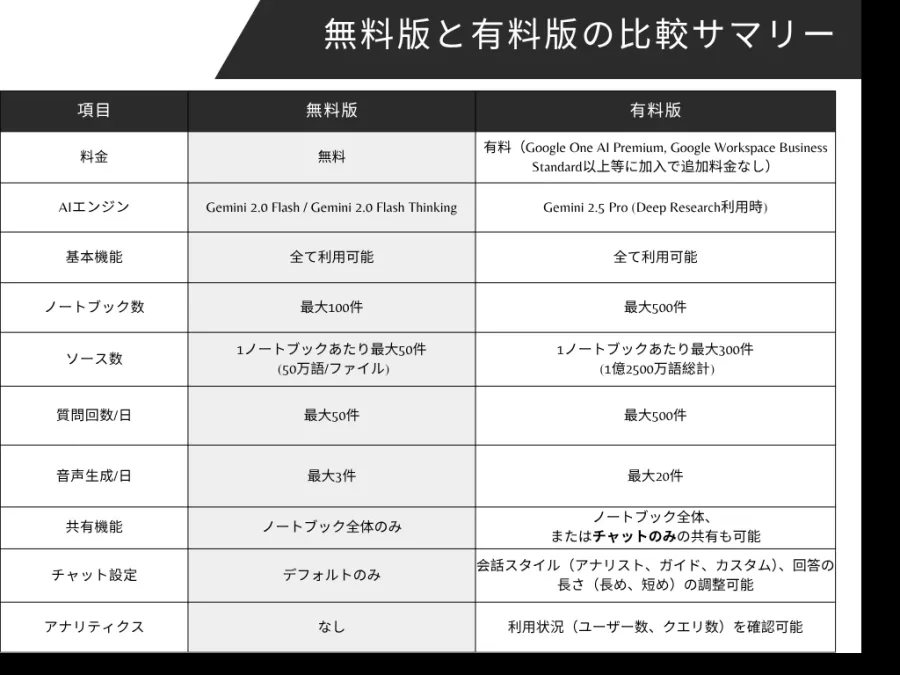
Number of notebooks you can create: Up to 100.
Source limit per notebook: Up to 50. Since each file can contain up to 500,000 words (in English), you can store a total of approximately 25 million words.
Daily question limit: Up to 50.
Audio generation: Up to 3 per day.
These limits are sufficient for most individual daily information organization and learning purposes.
The Added Convenience of the Paid Version (NotebookLM Plus)NotebookLM Plus is a paid plan designed for larger-scale data processing and organizational use. Users already subscribed to other Google paid services (Google One AI Premium, Google Workspace Business Standard or higher plans, or Google Cloud users) have the significant advantage of being able to use NotebookLM Plus at no additional cost. In particular, Google Workspace users will soon have NotebookLM Plus included as a standard feature, making it even easier to use.
[Main Features Available in NotebookLM Plus] In addition to all the features of the free version, the following premium features are available.
-
Significant increase in usage limits:
Number of notebooks you can create: Increased from 100 to 500.
Source limit per notebook: Significantly increased from 50 to 300. This allows you to include up to approximately 125 million words of information.
Daily query limit: Increased tenfold from 50 to 500.
Audio generation: Increased from 3 to 20.
-
Chat-only notebook sharing:
While the free version shares the entire notebook, the paid version allows you to hide the contents of sources and notes, sharing only the chat portion. This is extremely useful for team information sharing and handling inquiries, such as for internal manual FAQ bots.
-
Advanced Chat Settings:
Conversation Style Adjustment: You can select styles such as "Analyst" or "Guide," or define custom AI roles (e.g., "Explain it like I'm a grade schooler"). This allows for responses tailored to specific targets and the provision of information with a consistent tone.
Response Length Adjustment: You can freely adjust the length of the responses generated by the AI to be "longer" or "shorter." This allows you to get answers with the amount of information that best suits your needs.
-
Analytics Features:
You can track the usage of shared notebooks (number of people accessing, number of queries executed, etc.) over the past 7 days. This is extremely useful when utilizing NotebookLM in teams or organizations as a basis for promoting usage and making improvements. However, to use this feature, there is a condition that it must be shared with at least 4 users other than the owner, and there must have been chat activity within the last 7 days.
Which one should you choose?
For those using it individually, mainly for daily information organization and learning: The free version of NotebookLM provides sufficient features and scope of use. It can be used for a wide range of purposes, such as extracting key points from YouTube videos, understanding research papers, and creating your own study materials.
For researchers, consultants, or those considering use in a company who handle large amounts of information: The paid version, NotebookLM Plus, is strongly recommended. The capacity to handle more sources, an increased number of questions, and features like "chat-only sharing" and "analytics" that facilitate information sharing within teams contribute significantly to improving productivity in business settings. Especially if you are already using Google Workspace or Google One AI Premium, you can use it at no additional cost, so you will be able to enjoy the benefits of NotebookLM Plus to the fullest.
NotebookLM is a highly functional tool even in its free version, bringing a revolution to individual information organization and learning. However, when you need to handle large amounts of data and share or analyze information within a team or organization, the paid version, NotebookLM Plus, demonstrates its true value.
Choose the best plan for your needs and usage situation, and make the most of the AI power provided by NotebookLM to dramatically improve the productivity of your daily work and learning.