You've bought your European train tickets, but don't you wonder, "What kind of seat do I have?", "Is there a place for luggage?", or "Is there a dining car?" I certainly do.
A site you can use in such cases is vagonweb.It is an essential tool for European train travel that allows you to check train formations, seat layouts, and even the presence of a dining car in advance.
What you can check on vagonweb
-
Seat map
Whether it is facing forward or backward relative to the direction of travel
Presence and location of luggage storage
Window or aisle seat, and whether it is a compartment or open seating
-
Detailed photos of seats
What the actual seats look like
You can also check photos of carriage facilities
-
Train and seat facilities
Availability of dining cars and restaurants provided (you can even check the menu!)
Whether it is a seat with a table
Other facilities such as power outlets and Wi-Fi
Location of restrooms
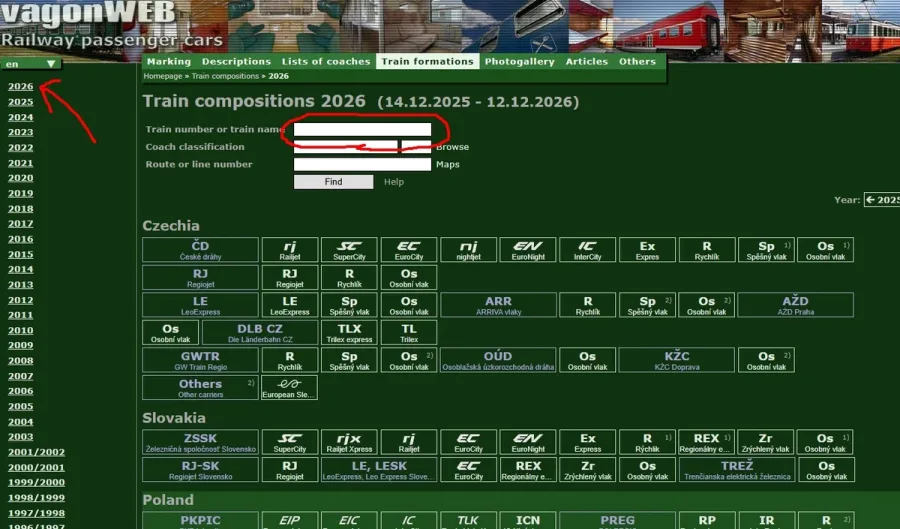
How to find a train
Go to the "Train informations" page in the menu to see a list of trains.
Confirm that the year is correct, then search using the search box to see several candidates.
Just find your train from among them!
Search tip: Search using only the train number digits
Sometimes searching by entering the train number as is, like "RJ52" or "EIP 5306", does not yield good results.
In that case, search using only the numbers (52, 5306)
Multiple trains with the same number will appear, but the letters before the numbers should be different, so find your train from there.
How to check seat orientation
Opening the white seat map icon below will display the train formation diagram. The direction of travel is indicated by an arrow, so find your seat number and check the orientation.
Even if your ticket says something like "right side in the direction of travel," you can check the actual orientation by matching it with the vagonweb formation diagram, so those who dislike facing backward can check in advance.
Checking luggage storage
If you have a large suitcase, you want to choose a seat near the luggage storage area.
The vagonweb seat map also shows the location of luggage storage, which is useful when booking tickets or changing seats.
The trap of seats with tables
When choosing a seat, the option "with table" may appear, but this could result in a table seat facing a stranger.Checking the seat map on vagonweb allows you to see the layout of the table seats, preventing situations where it's "not what I expected."
Checking dining cars
On vagonWEB, you can also check for the presence of a dining car (restaurant car).
Whether I am taking a long-distance train or not, it is important to me whether there is a dining car.
The white icon below is a link to the restaurant provided by the dining car, so if it's there, you can also check the menu! You can know in advance what you can eat!! And whether they have alcohol, too!
Planning to travel around 5 Eastern European countries by train.