In AI video, the result changes significantly based on "what you move, how you move it, and what sounds you include" rather than just the model name. Especially when turning a single image into a video, the appearance is already determined by the image, so it is important to specifically convey movement, camera work, timing, and sound in your prompt.
This concept remains the same when using Grok Imagine 1.5 in SeaImagine. I have compiled 8 English prompts that you can adjust for specific purposes, such as product advertisements, UGC, ASMR, and cinematic conversations.
A quick note of caution first: the following are practical templates built based on official specifications and public interfaces, and they do not guarantee that the exact same video will be produced every time, even with the same input image. It is realistic to start by testing with short settings and only increase the resolution and duration once you have achieved a usable composition.
3 Key Features of Grok Imagine 1.5 to Understand
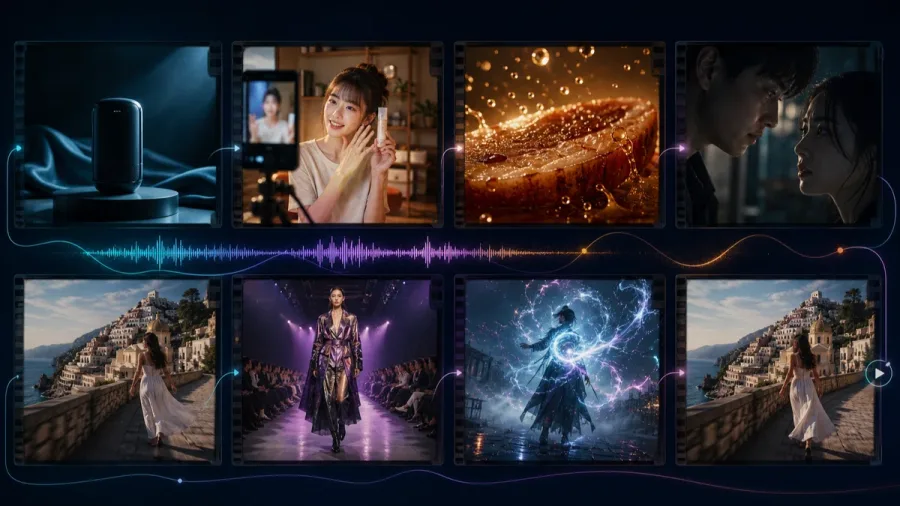
The Grok Imagine 1.5 interface in SeaImagine focuses on an image-to-video workflow where you upload a single starting image and use prompts to instruct movement and sound. On the screen, you can select resolution, length, and aspect ratio, and the guide page mentions support for 480p and 720p output, native audio, conversation, and ambient sound.
According to xAI's official announcement, Grok Imagine Video 1.5 is described as a model with improved motion, physics, audio, and lip-syncing compared to the previous generation. The official API model supports text-to-video, image-to-video, and video-to-video with reference materials, and also allows for 1080p. However, the items selectable on the SeaImagine screen are not necessarily identical to all features of the official API. The examples in this article are tailored to the "starting image + prompt" usage available in SeaImagine.
There are three main use cases.
Making a quick impression with products—Adding camera movement, lighting, and sound effects to package images.
Having people or characters perform—Combining expressions, gaze, dialogue, and ambient sounds into a single instruction.
Mass-producing hooks for social media—Creating multiple short vertical videos and comparing the movement and sound at the beginning.
A Useful Prompt Structure to Start With
Rather than listing long adjectives, it is easier to organize your intent by writing in the following order.
The basic template is as follows.
Animate the uploaded image as a single continuous shot. [SUBJECT] [ACTION]. The setting is [ENVIRONMENT]. Camera: [CAMERA MOVEMENT]. Lighting and style: [LOOK]. Audio: [SOUND OR DIALOGUE]. Keep [IMPORTANT DETAILS] unchanged and readable. Natural motion, consistent identity, no scene cuts.
If you include multiple scenes at once, the subject or background is likely to change within the short video. At first, focus on "one location, one main action, and one camera movement."
8 Prompts by Use Case
1. Hero ads showcasing product luxuryUsage scenario: Advertisements for cosmetics, perfume, beverages, or gadgets. Use a front-facing product photo or a 45-degree angle product shot as the starting image.
Animate the uploaded product image as one premium commercial shot. The product remains centered and perfectly recognizable while a thin ribbon of mist flows around the base. Tiny water droplets catch the light. Camera: a slow 20-degree orbit from left to right with a gentle push-in. Lighting: dark studio, soft blue rim light, warm highlight on the front label, realistic reflections. Audio: a quiet low cinematic pulse, soft glass chime, and subtle mist ambience. Keep the brand name, label design, cap, proportions, and packaging colors unchanged and readable. No hands, no extra objects, no scene cut.
Adjustment points: If the label becomes distorted, stop the camera rotation and use "slow push-in only." It is easier to verify by prioritizing the preservation of the package first rather than trying to have the audio read the product name.
2. Smartphone-style UGC product introductionUse Case: Beauty, food, daily necessities, app introductions. Use a natural portrait-oriented photo of a person holding the product as the starting image.
Turn the uploaded portrait into a natural vertical UGC video recorded on a smartphone. The creator smiles, raises the product slightly toward the camera, points to it once, and says in Japanese: 「これ、朝の準備が本当にラクになりました。」 Camera: subtle handheld movement at arm's length, one continuous take, no zoom. Lighting: soft daylight from a nearby window, realistic skin texture, casual home background. Audio: clear close voice, quiet room tone, no music. Keep the person's face, hairstyle, clothing, product shape, and label consistent. Natural blinking and lip movement, no extra fingers, no scene change.
Adjustment Tips: Keep dialogue to a single sentence, trying between 10 to 18 characters. If lip movement is unnatural, it is easier to compare by generating separate versions: one silent version showing the product and one with dialogue.
3. Food & Craft ASMR VideosUse Case: Cooking, coffee, soap, woodworking, resin art. Images with close-ups of hands and materials work best.
Animate the uploaded close-up as a tactile ASMR video. A hand slowly cuts through the glossy dessert once; the surface gives way naturally and the soft center is revealed. Camera: locked macro close-up with a very slight forward drift, shallow depth of field. Lighting: warm side light with realistic highlights and fine texture. Audio: crisp knife contact, a soft crack, gentle plate resonance, and quiet room ambience; no speech and no music. Preserve the plate pattern, dessert color, hand appearance, and background. Physically believable motion, one action only, no jump cut, no additional tools.
Adjustment Tips: If you add too many sounds, the main subject becomes blurred. Limiting it to three layers—contact sound + material sound + ambient sound—makes it easier to convey your intent.
4. Short Cinematic Conversation ScenesUse Case: Short film pilots, game dialogue, character PVs. Use an image of a single speaker with their face visible from the front or at an angle.
Animate the uploaded cinematic still as a tense single-shot dialogue scene. The character looks past the camera, takes one controlled breath, then turns their eyes toward the lens and quietly says in Japanese: 「もう、戻れない。」 A light wind moves only a few strands of hair and the coat collar. Camera: slow cinematic push-in from medium close-up to close-up. Lighting: rainy blue night with a soft warm reflection from a distant sign. Audio: synchronized quiet dialogue, light rain, distant traffic, and one low atmospheric tone. Keep the face, age, costume, background layout, and color palette consistent. No second speaker, no cut, no exaggerated expression.
Adjustment Tips: Trying to strongly animate expressions, gaze, wind, camera, and dialogue all at once often leads to failure. If it fails, first remove the wind, then fix the camera to isolate the cause.
Use Case: Tourist spots, hotels, street walks, vlog intros. Landscape photos with depth and small figures are easy to use.
Bring the uploaded travel photo to life as a calm cinematic establishing shot. The traveler takes three slow steps forward while nearby fabric signs sway gently and a few birds cross the distant sky. Camera: smooth dolly forward at walking speed, keeping the horizon stable. Lighting: early morning golden light, soft haze, natural colors, realistic depth. Audio: light footsteps, distant city ambience, a soft breeze, and faint bicycle bells; no narration and no music. Preserve the architecture, signs, traveler's clothing, and overall composition. One continuous shot, no new buildings, no crowd appearing suddenly.
Adjustment Tips: If text on signs is important, avoid placing it at the edge of the screen and keep camera movement subtle. Before publishing, check the usage terms for people, buildings, and trademarks in the original photo.
6. Short Runway Videos for Fashion LooksUse Case: Clothing, accessories, outfit showcases. Images showing the full body with limbs not obscured by other objects are best.
Animate the uploaded full-body fashion image as a refined editorial runway clip. The model takes two confident steps forward, pauses, and turns the shoulders slightly to reveal the silhouette of the outfit. Camera: smooth backward tracking at waist height, maintaining the full body in frame. Lighting: clean gallery spotlights with soft shadows, neutral color grade, premium fashion-film texture. Audio: measured footsteps on polished concrete, subtle room reverb, and a restrained electronic beat. Keep the model's identity, garment cut, fabric pattern, accessories, and shoes unchanged. Natural cloth motion, anatomically consistent hands and legs, no cut, no audience entering the frame.
Adjustment Tips: Complex patterns tend to distort with movement, so start with just a step and shoulder movement. If you want to show the front and back of clothing, start with a slight angle rather than a 180-degree turn.
7. Character Ability Activation & Game-style PVsUse Case: Original characters, cards, games, fantasy works. Use an image of a single character with clear outlines and equipment.
Animate the uploaded fantasy character art as a dramatic game trailer moment. The character lowers their stance, opens one hand, and a compact sphere of blue energy forms above the palm. Dust lifts from the ground and the cape reacts to the energy pulse. Camera: slow arc from front-left to center with a slight push-in. Lighting: the energy casts blue light onto the face, armor, and nearby ground; dark cinematic background. Audio: rising magical hum, one deep energy pulse, moving fabric, and distant wind; no dialogue. Preserve the character's face, armor design, symbols, weapon, and body proportions. One controlled action, no transformation, no extra limbs, no scene cut.
Adjustment Tips: Spreading effects across the entire screen can easily alter the character. Limit the location and size of the effect using terms like "compact" or "above the palm."
8. Loop Videos Easy to Replay on Social MediaUse Case: Profile posts, memes, lo-fi backgrounds, short campaign hooks. Images with centered compositions and no major changes are best.
Animate the uploaded scene as a seamless-feeling social loop. A paper airplane circles once around the seated character while the character follows it with their eyes and gives a small smile. The airplane returns to its starting position and the character returns to the original pose by the final moment. Camera: locked medium shot, no zoom and no shake. Lighting: warm late-afternoon window light with gentle moving shadows. Audio: soft paper flutter, quiet room ambience, and one light bell tone exactly as the loop closes. Keep the character, furniture, window, and color palette unchanged. One cycle only, no cut, no new objects.
Adjustment Point: Since it is difficult to guarantee a perfect infinite loop in one go, instruct it to "return to the starting pose at the end," and after exporting, adjust a few frames at the beginning and end using editing software.
How to fix it when things don't go well
The face or product changes midwayReduce the action by half and lock the camera. If "keep the face and product unchanged" alone does not solve it, make the subject in the starting image larger and reduce the number of people or objects in the background.
The specified sound is not included, or the dialogue is unnaturalPrioritize the audio. If the dialogue is important, remove the music and limit it to one ambient sound. Instead of long sentences, specify short, single sentences with few punctuation marks, and compare multiple results under the same conditions.
The camera moves too violently"Cinematic" alone is too vague regarding movement. Limit the direction, speed, and range with a few words, such as "slow push-in," "locked shot," or "20-degree orbit."
Objects or people appear on their ownCheck if you are packing too many events into one video. Limit the composition with phrases like "one continuous shot," "one main action," or "no extra people," and if they still appear, clean up the starting image.
Practical workflow from generation to publication
Select one starting image that fits your purpose
Decide on only one main action
Specify one camera movement and up to three sounds
Create 3 drafts with low settings or short duration
Check the face, hands, product label, background, and audio synchronization
Regenerate only the selected draft with high settings
If necessary, add subtitles, logos, and accurate product names using editing software
AI-generated videos may still contain errors in details even if they look natural. When using them for advertisements, have a human verify the product display, pricing, efficacy claims, and rights processing. If referencing photos or voices of individuals, you must also obtain their consent and confirm the scope of use.
Frequently Asked Questions
Should I write prompts in Japanese or English?While you can provide instructions in Japanese, this article uses English examples because they are easier to keep concise for camera and audio terminology. For dialogue, you can convey your intent by typing "says in Japanese:" followed by the Japanese text. Start by using the English structure and replace only the necessary parts with Japanese.
What kind of images are most likely to yield successful results?Images where the subject is large, the outlines are clear, and limbs or products are not obscured by other objects tend to be easier to work with. Also, ensure there is enough negative space in the direction you want the subject to move. Full-body images are better for walking, while chest-up shots are better for focusing on expressions and dialogue.
Can I create videos from text alone in SeaImagine?The official Grok Imagine 1.5 API model supports text-to-video. However, as of the time this article was written, the dedicated SeaImagine interface focuses on a workflow that starts with uploading an image. Please check the items displayed on the generation screen to see which input methods are actually available.
How many times should I generate to judge the quality?Since a single attempt is heavily influenced by chance, aim to compare at least three times using the same image and prompt. Recording four items—instruction following, subject consistency, movement, and audio synchronization—makes it easier to identify areas for improvement rather than relying on personal preference.
Can it output in 480p even if I selected 720p?The official xAI FAQ states that if you reach your usage limit for 720p, it may automatically switch to 480p. Since third-party services may have their own limits and settings, please also check the actual resolution of the output file.
Summary: Grok Imagine 1.5 involves deciding on "movement, camera, and sound" one by one
For Grok Imagine 1.5 prompts, it is easier to adjust for practical use by clearly defining the main action, camera, and sound one by one, rather than adding adjectives to make the video look beautiful.
Prioritize maintaining labels for product ads, short dialogue for UGC, the main sound for ASMR, and gaze and camera movement for cinematic videos. Choose the one closest to your purpose from the eight examples provided, and you won't get lost if you start by just rewriting the subject, location, and action to match your starting image.
References
xAI: Grok Imagine Video 1.5
xAI Docs: Release Notes
xAI Docs: Grok FAQ