If you'd like, checking out my previous article might help you understand today's topic faster.
↑ The next stage of this feels like it's going to get crazy.
Of course, you can do it without it, but if you want to make things easier, combine them.
Actually, I started researching this because I wanted to link them together.
I feel like it has a lot of depth and could be used for quite a few things.
I have that feeling.
What is Stretchy Studio? A Thorough Explanation of the Free Open-Source 2D Animation Tool That Animates AI-Generated Illustrations in Seconds
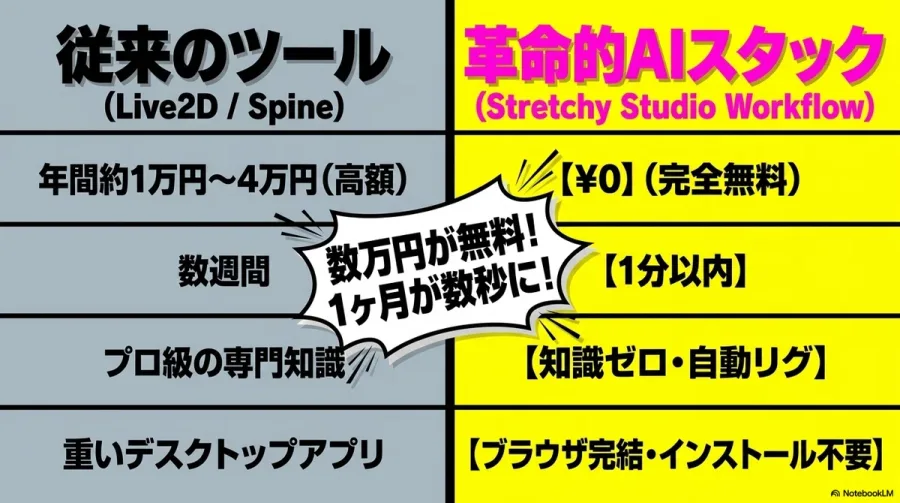
Just released on GitHub in April 2026, Stretchy Studio is a free, browser-based, open-source tool that instantly rigs AI-generated still illustrations and turns them into professional-grade mesh deformation animations.
Its biggest feature is that it is designed exclusively for "See-Through," allowing anyone to easily create VTuber models or 2D characters for games without relying on expensive software like traditional Live2D or Spine. Simply drop a PSD file, where a single anime-style illustration has been layer-separated by AI, and it completes the automatic rigging and organic deformation animation.
It is attracting attention as a full-scale animation tool for the AI era that achieves professional-level quality for free and instantly.
Overview
Stretchy Studio is a 2D character animation tool that fully integrates with the latest SOTA (State-of-the-Art) AI model called "See-Through." See-Through automatically decomposes a single still illustration into over 23 layers (over 30 layers including depth and left/right separation) and outputs them in PSD format, but the subsequent "rigging and animation" process was previously the biggest bottleneck.
Stretchy Studio is a tool born to bridge this gap, adopting a mesh-first approach. Instead of traditional bone-centric rigging, it is based on mesh deformation via vertex skinning.
This allows for intuitive expression of natural arm bending, hair flow, and even subtle organic movements like breathing. It runs entirely in the browser, and its appeal lies in its ease of use: no account required, no installation required, and completely free (MIT license).
The core features are as follows:
Magic Auto-Rigging via DWPose AI or heuristics (automatic skeleton generation in seconds)
Mesh warping via direct vertex manipulation (Live2D-style micro-expressions and stretching expressions)
Blender-style Shape Keys (blend deformations like smiles and blinks with sliders)
Automatic eye clipping and realistic limb bending
After Effects-style timeline (transform + direct editing of mesh vertices with keyframes)
Spine 4.0 JSON export (immediate compatibility with game engines)
As a high-performance browser application utilizing WebGL rendering, it runs smoothly. The developer is MangoLion, and it has quickly become a hot topic, especially in the Stable Diffusion community.
Performance
The greatest strength of Stretchy Studio is its "second-based workflow." The process is extremely fast: drag and drop a PSD generated by See-Through → launch the Rigging Wizard → AI automatically maps layers to a skeleton → fine-tune joint positions for about 30 seconds if necessary → start animation. While traditional manual rigging takes hours to weeks, Stretchy Studio achieves "rigging complete in seconds, animation ready in under a minute."
Technically, WebGL-based GPU rendering (VAO/EBO buffer management) ensures smooth operation even with complex multi-layered meshes. It also features excellent automatic mesh density adjustment and occlusion handling, naturally processing cases where hair might be hidden behind the neck.
Since animation allows for direct vertex-level deformation, "stretching" and "fluid movements" that are difficult to express with bones alone are extremely realistic. The Shape Keys feature also makes blending expressions and poses intuitive.
With Spine 4.0 JSON export, importing into major game engines like Unity, Godot, and Unreal is seamless. It also includes an audio synchronization feature, allowing for professional-grade motion creation by trimming and syncing background music and sound effects on the timeline.
Although it is still in the early stages at v0.2, the core functionality is stable and works exceptionally well with AI-generated layers. While decomposition accuracy may drop for non-anime styles or extremely complex illustrations, it currently offers top-class practicality for its target audience of anime/VTuber-style illustrations.
What problems does it solve?Now that AI illustration generation has become explosively popular, the biggest hurdle many creators face is the "difficulty of animating still images." Even with the emergence of excellent layer decomposition AI like See-Through, rigging requires specialized skills and expensive tools, making it common for a single VTuber model to cost tens to hundreds of thousands of yen and take weeks to months to complete. With Live2D costing about 10,000 yen per year and Spine Pro about 40,000 yen, the licensing costs are a heavy burden for individuals and indie developers.
Stretchy Studio completely removes this "rigging wall." Because AI automatically generates skeletons and allows for intuitive editing of mesh deformations, you can create professional-grade animations with zero specialized knowledge. As a result:
Rigging costs that used to be tens to hundreds of thousands of yen are now zero
Work time that used to take weeks is reduced to minutes
No need for expensive software subscriptions
Prevents AI-generated illustrations from "gathering dust" and converts them into ready-to-use animated characters
It fundamentally solves the long-standing frustration of "wanting to animate AI-drawn characters immediately," especially for VTubers, indie game developers, and AI art enthusiasts. Due to its mesh-first design, it can naturally express organic movements that tend to become stiff with traditional bone rigging, making it a highly satisfying tool in terms of quality.
How to use itStretchy Studio runs entirely in your browser, so you can get started right away. The basic usage flow is as follows:
Layer Generation (using See-Through)
Upload a still illustration to the free Hugging Face demo (https://huggingface.co/spaces/24yearsold/see-through-demo) → Automatic PSD output (local execution is also possible).Launch Stretchy Studio
https://editor.stretchy.studio → Drag and drop the PSD file.Automatic Rigging
Launch the Rigging Wizard → Generate a skeleton instantly using DWPose AI (WebGPU supported) or heuristics → Fine-tune joint positions as needed (about 30 seconds).Mesh/Layer Adjustment
Apply "Generate Mesh" to each part → Adjust vertex density and draw order in the Layers panel.Animation Creation
Switch to Animation mode → Set keyframes on the timeline (transform + direct mesh vertex editing) → Blend expressions with Shape Keys → Audio synchronization is also possible.Export
Output as Spine 4.0 JSON → Import into game engines or other tools to complete.
Practical use cases:
VTuber Model Creation: Instantly animate AI-generated characters in a Live2D style.
Indie Games: Immediate integration into Unity via Spine export.
Social Media & Video Content: Create moving character illustrations in a short amount of time.
Portfolio: Convert works that were only still images into dynamic demos all at once.
For developers, local execution is possible in a Node.js environment, and adding custom features is easy.
SummaryStretchy Studio is a revolutionary tool optimized for the AI era that turns beautiful still illustrations drawn by AI into "characters that move in seconds." By combining overwhelming accessibility—free, open-source, and browser-based—with organic animation expression through mesh deformation, it has democratized 2D rigging work that was previously expensive and difficult.
Although it is still in the early stages of development at v0.2, it is equipped with practical features such as Spine export and Shape Keys, and I am very much looking forward to future updates (further export support and stability improvements). When combined with See-Through, an era has arrived where the process from AI generation to animation completion can be finished in a few tens of minutes.
This is a tool I definitely want everyone who thinks "I want to move" their AI art, rather than just looking at it, to try at least once.
And one more thing!
What is ComfyStudio? A thorough explanation of the revolutionary desktop editor that integrates "generation and editing" into a single app, featuring a fully built-in ComfyUI for AI video editing.
First released on GitHub in February 2026, ComfyStudio (ComfyStudio Pro) quickly became a hot topic in the ComfyUI community as a full-featured video editor with ComfyUI workflows built directly in.
While traditional ComfyUI was "generation-focused," ComfyStudio is an AI-native video production tool that combines timeline editing, asset management, AI generation, and post-production into a single desktop app. Its greatest feature is the ability to seamlessly perform pre-visualization (previs), animatics, shot development, and final editing.
It is attracting attention as a tool that fundamentally solves the "divide between AI generation and editing" because it is open-source (MIT license), available for free local use, and is evolving rapidly by a solo developer.
OverviewComfyStudio is designed as an "AI-first video editor on the desktop." It is an Electron-based cross-platform app (supporting Windows/macOS/Linux) with full integration of ComfyUI as a backend. Users simply need to install ComfyUI separately to directly invoke image, video, and audio generation within the app.
The main components are as follows:
Timeline Editor: Full-scale video editing functions (cuts, moves, fades, keyframes, text layers, audio waveform display, etc.)
Generate Workspace: Instantly execute curated local/cloud ComfyUI workflows (text-to-image, image-to-video, image editing, music generation, etc.)
Director Mode: A guided mode that structurally generates shots, keyframes, and videos from script input
Asset Browser & Stock Search: Directly import assets via Pexels integration
LLM Prompt Helper: Automatically refine prompts by linking with local LM Studio
Export Queue: High-quality output with NVENC support and automatic dependency checking
The app is designed so that "generation does not interrupt editing," allowing you to call "Extend with AI" or "Starting keyframe for AI" directly from the timeline.
Hardware tiers (Lite/Standard/Pro/Cloud) are tagged for each workflow, with VRAM requirements displayed in advance. As of v0.1.6 (latest as of April 2026), animation subtitles, kinetic typography, and MoGraph workspaces have been added, covering motion graphics as well.
PerformanceThe greatest strength of ComfyStudio is its "practical editing speed" and "full utilization of ComfyUI's power." The timeline features hotkeys and presets similar to Premiere Pro, DaVinci Resolve, and Final Cut Pro, achieving professional-grade operability such as fixed horizontal mouse wheel scrolling, clip boundary jumping, precise timecode navigation, and ripple delete. Multi-clip movement and simultaneous cutting across all tracks are stable, dramatically speeding up daily editing workflows.
Generation performance maintains the same quality as ComfyUI while running seamlessly within the app. Examples of supported workflows:
Local: LTX 2.3 / WAN 2.2 image-to-video, Z Image Turbo text-to-image, Qwen Image Edit, etc.
Cloud: Partner nodes such as Nano Banana 2, Kling / Grok Imagine / Vidu
Others: Multi-angle generation, music generation, image editing
The dependency check feature is excellent, automatically diagnosing and reporting "missing custom nodes," "missing models," or "insufficient GPU capacity" before startup. When using the cloud, credit estimates are also displayed in real-time.
As a solo dev project, it has seen significant improvements in timeline UX and immediate reflection of user feedback in the short period from v0.1.0 to v0.1.6.
Improved visibility for NVENC exports and audio gain adjustment have already been implemented, balancing agility and stability. Although still in the pre-release stage, many have already called it "sufficiently practical" for previs/animatic purposes.
Now, let's review the content of the See-Through I introduced earlier.
Since I looked into this specifically because I wanted to link it with that, I have to take good care of it.
A Thorough Guide to Linking See-Through and ComfyStudio: A Practical Workflow for Seamlessly Connecting Layer Decomposition to Video Editing
The combination of See-Through (an AI that decomposes a single anime illustration into a multi-layered PSD with depth) and ComfyStudio (an AI video editor with fully integrated ComfyUI) is a powerful pipeline that can process AI-generated illustrations from "still image → layer decomposition → video editing/animation" in one go.
While there are few direct native integrations yet, you can connect them efficiently through practical integration via PSD files and utilizing the See-Through node within ComfyUI. Below, I will explain the specific methods based on the latest information (as of April 2026).
OverviewSee-Through automatically decomposes a single anime-style illustration into 23 or more layers (over 30 layers including left/right separation and depth), outputting a PSD file that retains transparent layers and depth information. The standard workflow is to automatically rig and animate this using Stretchy Studio, but ComfyStudio is the better choice if you want to perform video editing or generative expansion.
ComfyStudio features timeline editing capabilities while allowing you to execute ComfyUI workflows directly within it. By importing the PSD output from See-Through or using the See-Through node within ComfyUI to perform layer decomposition, you can cycle through generation, decomposition, and editing in a single environment.
There are two main integration routes:
See-Through (Hugging Face / ComfyUI) → PSD output → Import into ComfyStudio timeline
Decompose directly within ComfyStudio using the ComfyUI-See-through custom node → Drop generation results into the timeline
This allows you to create multi-layered assets from still illustrations and proceed to video creation and editing using ComfyStudio's Director Mode or Extend with AI.
Performance and BenefitsThe strength of this integration lies in "eliminating fragmentation." While See-Through alone stops at PSD output, bringing it into ComfyStudio allows for:
Keyframe editing, fades, and motion addition for each layer on the timeline
Calling ComfyUI workflows to execute image-to-video generation using layers (e.g., WAN 2.2 or LTX models)
Immediate cut editing and audio synchronization after generating multiple shots
Dependency check features to warn about VRAM shortages or missing nodes in advance
By using the ComfyUI-See-through plugin (GitHub: jtydhr88/ComfyUI-See-through), you can incorporate the SeeThrough Decompose node and SeeThrough Save PSD node within ComfyStudio, and even download the PSD directly in your browser. Processing time depends on the workflow, but basic settings (1280 resolution) take anywhere from a few minutes to over ten minutes. In low VRAM environments, you can optimize by lowering the depth resolution.
Combining it with Stretchy Studio is also excellent; if you rig a See-Through PSD in Stretchy and then bring it into ComfyStudio, it becomes even easier to utilize as animation material.
What Problems Does This Solve?A common challenge in AI illustration production is that "layer decomposition is possible, but transitioning from there to video editing or animation is cumbersome." Moving between different applications makes file management complicated and often causes you to lose the momentum of your ideas.
The See-Through + ComfyStudio integration solves this by:
Allowing you to place multi-layered assets on the timeline simply by dragging and dropping the PSD
Completing the loop of generation and editing within a single application (e.g., immediately generating a video from a new angle using the decomposed layers)
Significantly reduce manual layering and switching between external editors.
Achieve professional-grade timeline manipulation while leveraging a privacy-focused local ComfyUI environment.
Especially for VTuber asset production, short videos, and animatics, you can transform illustrations that were "dead and buried as still images" into moving content in a short amount of time.
How to Use (Step-by-Step)Here is a practical integration workflow. Preparation: Install ComfyStudio (latest version from GitHub), launch ComfyUI locally, and install the ComfyUI-See-through plugin (optional but recommended).
Route 1: Hugging Face See-Through → PSD → ComfyStudio (Easiest)
Upload your illustration to the Hugging Face See-Through demo (https://huggingface.co/spaces/24yearsold/see-through-demo).
Perform layer decomposition → download the PSD file (can be output directly in the browser).
Launch ComfyStudio and create a new project.
Drag and drop the PSD onto the timeline (it will be recognized as multiple layers, and each layer can be edited individually).
Enter prompts in Director Mode as needed → execute the ComfyUI workflow (e.g., video generation using layer references).
Adjust cuts, keyframes, and effects on the timeline → export via NVENC.
Route 2: Use the ComfyUI-See-through node directly within ComfyStudio
Open the ComfyUI interface in ComfyStudio (full node access available).
Add the SeeThrough Load LayerDiff Model + SeeThrough Load Depth Model nodes.
Connect the input illustration with a Load Image node → execute the SeeThrough Decompose node.
Connect the SeeThrough Save PSD node → after execution, download the PSD via the browser button (or handle layer PNGs + metadata directly).
Drop the generated layers into the ComfyStudio timeline.
Further animate by invoking Extend with AI or image-to-video workflows.
Advanced Tips
Using Stretchy Studio: First, upload a See-Through PSD to Stretchy Studio (https://editor.stretchy.studio) for automatic rigging and mesh deformation, then export as Spine JSON and import into ComfyStudio for video editing.
Workflow Saving: Save and reuse the See-Through + video generation pipeline built within ComfyStudio as a JSON file.
Optimization: When VRAM is low, reduce the depth resolution during decomposition and use in conjunction with cloud workflows (such as Kling).
Audio synchronization and kinetic typography can also be added within ComfyStudio.
ComfyStudio is not just a ComfyUI frontend, but a full-fledged video editor that places AI generation at the center of the editing process, making a significant impact on the 2026 generative AI video production scene.
By combining accessibility—being open-source, free, and local-first—with professional-grade timeline operations and seamless integration with generation, it eliminates the traditional divide between 'generation tools' and 'editing tools,' dramatically improving creator productivity.
Although still in the early stages of development at v0.1.6, the roadmap shows steady progress in editing precision, workflow expansion, and music video-specific features, maturing rapidly through the passion of a solo developer and community feedback.
The collaboration between See-Through and ComfyStudio is a practical solution that turns the layer decomposition of AI anime illustrations into a foundation for video editing. Its flexibility, ranging from simple file integration via PSD to fully embedded workflows using the ComfyUI-See-through node, is a major appeal.
While these tools are still in early development, the fusion of ComfyStudio's timeline functionality and ComfyUI's generative power significantly resolves the traditional fragmentation of 'generate, then edit in a separate tool.'
In the future, further native integration and enhanced export capabilities with Stretchy Studio are highly likely. Creators who want to quickly animate AI-drawn characters should first try See-Through via the Hugging Face demo and then bring it into ComfyStudio.
The barrier from still image to full-scale video production should drop dramatically.
Refer to the following resources for details:
ComfyUI-See-through GitHub (nodes and workflow examples)
ComfyStudio GitHub (timeline functionality and ComfyUI integration)
Stretchy Studio (option for enhanced rigging)
I also recommend trying it out and sharing your feedback or custom workflows with the community.
This is a tool I highly recommend to anyone already using ComfyUI, those looking to streamline previs or animatics, and everyone who wants to create video with AI.
With this, even a beginner like me should be able to animate things and do all sorts of stuff. It might be impossible, but I'll give it a try at least once.
That is all. The rest is just extra.
Content for myself.Lately, I've been wanting a GPU, but my eyes keep wandering in a different direction.
It's a problem that I want clothes way too much.
I end up wearing clothes that people tell me are cute on repeat.
I want to dress up just a little bit with some new clothes.
https://zozo.jp/shop/moment/goods-sale/78315492/?did=128045093&rid=201761
This is too cute. I want to wear it in yellow and show off my shoulders.
https://zozo.jp/shop/classicalelf/goods-sale/100763331/?did=162488151&rid=1003
This is also stylish.
https://zozo.jp/shop/classicalelf/goods-sale/100964585/?did=162751779&rid=204331
The gray ash color is so cute, I want it.
https://zozo.jp/shop/diavel/goods-sale/101417519/?did=163367818&rid=1004
I want to consider this one too.
Also, a memo for myself. I don't want to forget this.
I found it—the pastel green, chiffon-like dress worn by this vocalist. It's super cute.
Apparently, the song is from about 17 years ago. I love it so much.
I wonder where it's sold?