Hello everyone.
I am Wonder Sato from AI Co-creation Innovation.
"Even if I create an image with AI, the whole thing falls apart every time I try to make a small fix."
——If you use image generation, you have surely encountered this frustration at least once.
You want to change just the background, but for some reason, the product changes slightly too. As you keep editing, the image starts to melt and fall apart. This has been the fate of traditional image generation AI.
However, a tool has arrived that fundamentally flips that common knowledge on its head.
That tool is "Reve 2.0."
This is not a "gacha"-style image generator, but a completely new type of image generation AI agent that builds structures with code before drawing them. Its editing capability is god-tier!
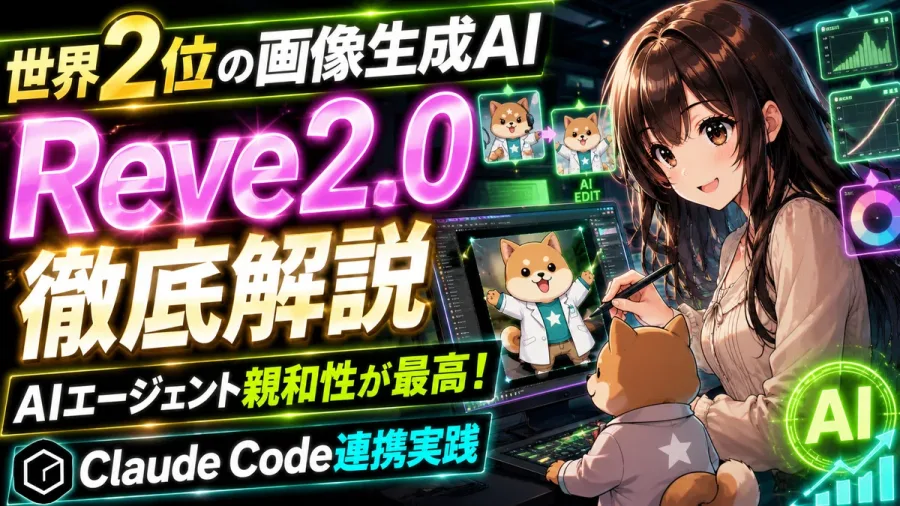
The thumbnail for this article was also edited with Reve 2.0.
The Claude logo ended up being the wrong one, so...
Partial editing with Reve 2.0! And with no quality loss! Plus, it transformed into 4K!
And it suddenly appeared and reached 2nd place in the world in the Text to Image category!
It has achieved a surprising score, suddenly overtaking the famous Nanobanana. Of course, GPT Image is currently overwhelmingly the strongest, but Reve 2.0 has incredible capabilities that even GPT Image cannot match.
Those are,
1. Noise-free partial correction by layer based on coding
2. Image generation loop by AI agent
3. Accurate image generation based on coding (no gacha feel)
.
These are unique, one-of-a-kind capabilities that only Reve 2.0 can do at the moment.
In this article, let's take a look at its mechanics, use cases, and the potential of combining it with Claude Code.
[Related Video]
Please watch the video to see the actual generation process
What is Reve 2.0? A new generation layout-first model from Palo Alto
Reve AI released on June 3, 2026Reve 2.0 is a next-generation AI image generation model released on June 3, 2026, by "Reve AI," a startup based in Palo Alto, California. Reve AI is a company founded in 2023, known for being established by researchers who have been involved in AI research at places like Google Brain and NVIDIA.
Breaking Free from the "Prompt Slot Machine"The biggest feature of this model is that it fundamentally rethinks the conventional "direct pixel generation from text" approach—what you might call a "prompt slot machine"—and adopts a "Layout-First" architecture. It is a paradigm shift where you draw the blueprint first, then create the image.
The AI That Structurally Creates Images with Code: How It Works
Elements Are Recognized as You Move the CursorThe first thing that surprises you is that simply moving the cursor across the screen allows you to recognize each element in the image one by one. The image is understood structurally, as in "this is a banana" and "this is a chair." This is because the image is created from the start by separating it into "layers."
Instantly World #2, and Resource-Efficient to BootWhat is also noteworthy is that immediately after its release, Reve 2.0 jumped to second place in the world on an independent benchmark (Arena.ai's Text-to-Image leaderboard). As of June 3rd, its score is 1280. While OpenAI's "GPT Image 2" is admittedly very strong and there is a point gap, taking second place by surpassing Google's latest image model is quite impactful. Moreover, it is reported that this was achieved with about one-tenth the GPU compute of major corporations, which sent shockwaves through the industry.
The Large Layout Model Draws the BlueprintWhy is this possible? The mechanism is as follows: while conventional image generation was a fuzzy process of "maybe an apple somewhere in the bottom left," Reve 2.0 first designs the layout with code.
Specifically, it receives inputs such as text or reference images, and a Qwen-based language layout model (Large Layout Model) specialized in spatial reasoning generates a "structured layout (blueprint)" like HTML or SVG. The placement, size, and attributes of each element are defined as code in advance, and then a dedicated rendering engine draws the image. It is a two-stage process where the LLM (Large Language Model) makes the plan and the diffusion model does the drawing. That is precisely why it can achieve accurate placement, such as "placing the apple exactly at this position."
Native 4K and Zero Degradation: Why Reve 2.0 Is Revolutionary
Native 4K Direct Pixel RenderingAnother feature of Reve 2.0 is its "native 4K" direct pixel rendering.
Conventional image generation was a method of gradually building up an image by removing noise from a hazy state. In contrast, Reve 2.0 aims for 4K from the start and draws it directly. It achieves ultra-high resolution at a commercial printing level without the need for upscaling. In other words, "what you see is the final product." Being able to output in 4K means it is also excellent as a finisher.
Proof of Quality with Fewer ResourcesFurthermore, one cannot overlook the fact that a startup achieved this world #2 ranking with a fraction of the computing resources of the giants. It is nothing short of brilliant to reach this ranking with limited resources rather than having abundant ones. It has proven that "with this method, high-quality image generation is possible even with fewer resources," and there is a strong possibility that other companies will imitate this approach in the future.
"Zero Degradation": No Breakdown No Matter How Many Times You EditAnd what will particularly resonate with designers is the "zero degradation" feature. Since editing in Reve 2.0 is done by rewriting the underlying layout code and re-rendering, the composition of the background and characters that you haven't selected won't break by even a single pixel. No matter how many dozens of times you make corrections, no noise accumulates at all. Only the parts you touch are redrawn, while everything else remains completely isolated and preserved.
In practice, even if you perform partial edits, such as changing only a girl's dress to red, everything else remains almost perfectly the same. This is a feat that is difficult even for GPT Image.
How to Use GPT Image, Nano Banana, and Reve 2.0
So, how should you choose between the major image generation AIs available now? Let's start by organizing the key points.
GPT Image: Best for interactive editing and complex instructions. No. 1 in creative direction.
Nano Banana: Excels at high-speed generation and integration. Suitable for drafts and mass production.
Reve 2.0: Best for layout control and iterative editing. A 'finisher' type.
Let's take a closer look at each of their unique characteristics.
GPT Image: The Director with No. 1 Creative DirectionGPT Image is ideal for interactive editing and complex instructions. Like a talented director, it does everything for you at once. It is currently the strongest, and its excessive creative direction is its charm. On the other hand, because of that creative power, it can sometimes change things too drastically when you just want to 'fix a part while maintaining the world view'.
Nano Banana: The Ready-to-Use Tool for High-Speed Generation and IntegrationNano Banana's strengths are high-speed generation and scaling. It is reliable when you want to create something quickly or integrate various elements. It is useful for tasks like drafting.
Reve 2.0: The 'Finisher' Type for Control and Iterative EditingAnd Reve 2.0 is strictly a 'finisher' type. It is perfect for layout control and iterative editing, competing in the same space as Microsoft Image 2.5.
You Can Leave the Choice to the AIWhat's interesting is that humans don't necessarily need to grasp all these differences. You can just let the AI understand the differences and ask, 'What are the differences between these?' The AI agent will then judge autonomously and assemble the workflow, saying, 'For this purpose, use Reve, and let's create it in this order.'
Is 9th Place in the Arena.AI Editing Category an Underestimation? Decoding the Mismatch in Evaluation Methods
Here, I'd like to go a bit deeper. Reve 2.0 was suddenly ranked 2nd in the Text-to-Image category, but it dropped significantly to around 9th place in the Image Edit category. Is this gap really because its 'editing is weak'? I believe this is an underestimation.
The Arena Only Measures 'Prompt Editing'The key lies in the Arena (LMArena) evaluation method. The Arena works by having users submit prompts and vote by comparing pairs of generated images. The community's votes directly determine the rankings, and there is no mechanism for operations like 'selecting an area on the screen and fixing only that part'.
In other words, the Arena's Image Edit category, by its structure, only measures prompt-based editing capabilities. And prompt editing is the very arena that Reve's own officials admit is their weakest point, noting that 'prompts are inherently ambiguous, and changing them slightly can alter the entire image.' The number 9 is a score that only captures the areas where Reve is weakest.
Reve's True Value Lies in 'Partial Selection Editing'On the other hand, Reve's true potential lies elsewhere. You select a layer (segment) on the screen and edit only that part—the selected area is re-rendered by rewriting the layout code, so it is redrawn from scratch while maintaining freshness, and the rest of the background and characters remain perfectly intact without a single pixel being distorted.
This operation of 'selecting a part and non-destructively recreating only that area' cannot be reproduced in principle by GPT-based models or the Nano Banana method, which regenerate the entire image. It is a feat that is only possible because the native editor holds the layout as code. And this strength is not captured in the Arena's prompt voting flow. That is why it is not reflected in the rankings.
Conclusion: The yardstick is not measuring the true potentialTo summarize, Reve's 9th place in editing is not because its 'editing is weak,' but because the Arena yardstick is not designed to measure non-destructive editing via region selection, which is Reve's true strength. While it has the capability of a 2nd place model in Text-to-Image, it falls behind in editing, which is likely due to this mismatch in measurement methods.
Prompt editing for MAI, partial selection editing for Reve—a new way to use them
So, when you want to edit, what should you choose? This is where Microsoft's 'MAI-Image-2.5' comes in as a counterpart.
MAI-Image-2.5: High precision in prompt editingMAI-Image-2.5 is a powerhouse that ranks 2nd in the Arena's Image Edit category (with a score of 1401 in Single-Image Edit) and 3rd in Text-to-Image.
Its strength lies precisely in the accuracy of its prompt editing. Microsoft reported that it won a majority in blind human evaluations across 12 editing categories. It understands scene structure, lighting, scale, and spatial relationships, performing edits that fit the context. Its features include the ability to perform local edits—such as object replacement, text updates, and blur removal—without changing other parts, and maintaining consistency in faces, hair, and clothing, making it resistant to failure even when instructed via text.
For example, here is an image generated by GPT Image, and I will input the prompt 'make it a night sky'.
When this is edited with IMA Image, the structure is maintained and it becomes a night sky.
However, with Reve 2.0, the composition changes significantly.
If you look closely, parts like the inlet have disappeared, haven't they? IMA Image maintains those details.
As you can see, IMA Image is superior when you want to change the entire image significantly. Since the Arena AI method uses this prompt-correction approach, Reve 2.0's true power is not demonstrated.
However, for partial selection correction, Reve 2.0 performs god-tier edits that other AIs cannot.
This is when only the dress is changed to red.
The background remains unchanged, and only the dress changes. If you do this with GPT Image or Nanobanana, everything changes little by little, resulting in subtle noise. However, because Reve 2.0 has separated layers, this does not happen. And since the corrected part is re-coded, it remains in a fresh state.
Because it is maintained in this way, freshness is preserved, and no noise is generated, it is perfectly fine for an AI agent to perform agent loops for corrections or polishing. This is another area where Reve 2.0 shows affinity with AI agents.
This maintenance capability of Reve 2.0 also exerts power in branding, which will be discussed later. In other words, it can perform tasks like changing only the background without changing the brand's appearance, allowing for brand maintenance.
Not a competitor, but a 'complementary relationship'From this, a clear way to use them separately emerges.
Prompt Editing → MAI-Image-2.5. Executes high-precision changes with text instructions, targeting only the intended areas without disrupting the rest.
Partial Selection Editing → Reve 2.0. Selects layers and re-renders only those parts, maintaining non-destructive integrity and freshness.
Although both are forms of "editing," their approaches are completely different, making them complementary rather than competitive. Use MAI when you want to quickly make local corrections with text, and use Reve when you need to refine and iterate strictly on a layer-by-layer basis. I believe the smartest way to use them is to switch between them depending on your goal.
Note that Arena scores fluctuate daily based on voting, so the exact rankings shift depending on the time. However, the logic behind how to use them remains the same.
Practical Use Cases for Reve 2.0 in Branding and E-commerce
Reve 2.0 truly shines in environments that deal with brands and products.
Accurate Concept Colors in RGBTake corporate concept colors, for example. These are defined by a very specific point in RGB. Tiffany's turquoise is not just any "turquoise"; it is strictly defined as "this specific color." To reproduce that color accurately, you need to input the RGB values. Since Reve 2.0 is code-based, you can specify these values directly. It achieves a level of precision that "something like turquoise" cannot. That is why it is overwhelmingly suited for branding.
Replacing Backgrounds Without Altering the ProductThe same applies to product photography. When dealing with "products that must never be distorted," such as perfume, traditional AI often slightly alters the main product even when instructed to "change only the background." However, with Reve 2.0, the product and background are separated as layers, so only the background changes while the product remains completely untouched. This is extremely useful for mass-producing images for e-commerce sites and advertising creatives while maintaining brand consistency.
Accurate Text for Thumbnails and DocumentsIn addition, you can pinpoint the font size, color, and position of text. The accuracy for Japanese is also quite high, and even when creating 4-panel comics, it finishes cleanly without garbled text. If you define template positions with code, you can create thumbnails exactly as you like. It can also be applied to presentation materials and UI mockups.
Below is an AI comic drawn with Reve 2.0, and the text has been rendered accurately. Especially with small text, characters tend to get crushed, but here they are drawn very clearly.
Also, since partial correction is possible, a workflow of drawing AI comics with Reve 2.0 and editing AI comics drawn by other AIs (especially for issues like crushed text) seems like a great idea.
Integration with Claude Code! The Ultimate Duo in the Age of AI Agents
Please watch the video to see the detailed generation process.
Why "Agent-Native"?Reve 2.0 is "AI agent-native," meaning it is a tool built for AI agents. This is because AI agents operate on code and are driven by code. The fact that Reve 2.0 is built on a language (code) means that AI can read and write it linguistically. There is no need to translate pixels into language; this is where the native compatibility lies.
The Ultimate Combination: Claude Code × Reve 2.0And the compatibility with Claude is outstanding. While Claude cannot generate images, it is extremely strong at coding. Claude Code, which is weak at image generation but the best at code, combined with Reve 2.0, which understands code—this makes me think that combining these two would truly be the ultimate pairing.
What AI agents hate is the noise that occurs with every edit—in other words, the collapse of context. With Reve 2.0, the context doesn't collapse no matter how many times the agent repeats its edits. New parts are generated fresh, while the rest remains untouched. This makes the workflow of repeatedly refining an image through feedback to create the ultimate AI illustration a reality.
I actually had Claude autonomously create a thumbnailI actually used Claude in Chrome and gave it the autonomous instruction: 'Search for Reve 2.0, understand how it works, and create a 16:9 thumbnail for an explanatory video. Specify precise parts using code, and specify font sizes with numerical values. Once generated, provide feedback and make sure to perform at least one revision to complete it.' Claude silently searched, accessed the screen, selected 16:9, and built the thumbnail by switching between prompts and code. I was able to confirm that it was passing font sizes and colors through code, and it even finished the thumbnail with Japanese text.
Pricing and Availability: Try It for Free First
Free Tier with No Sign-up RequiredReve 2.0 can be used via the web editor (reve.com) or API. The great thing is that there is a free tier that allows for 20 generations per day without the need to sign up. You can try it out casually at first to get a feel for it.
Pro Plan and Pay-as-you-goFor those who want to use it seriously, paid plans are also available.
Free Tier: No sign-up required, up to 20 generations per day
Pro Plan: $20/month. Increased generation limits and access to private mode
Credit Plan: Pay-as-you-go system. Free credits are also granted upon new registration
If you are looking for faithful reproduction of your prompts, I recommend starting with the free tier and choosing a plan step-by-step.
Challenges and Points of Concern
Of course, it's not all good news. Here are the three main points to keep in mind before you start using it.
High computational load: 4K rendering consumes credits quickly and can easily put a high load on the server
Occasional errors: Rendering failures, such as distorted fingers on people, can occur
Closed source: Unlike Ideogram 4.0, which was released on the same day, you cannot modify the underlying mechanism
I will elaborate on each of these a little more.
Computational Load and Credit ConsumptionFirst, because rendering in native 4K is extremely computationally intensive, there is the issue that API credits are consumed quickly and the server is prone to high loads. It is a cost in exchange for high quality.
Occasional rendering errorsAlso, even with structural rendering, errors such as distorted fingers on people can occasionally occur. It is worth keeping in mind that it is not perfect.
The fact that it is closed-sourceAnd one more thing. While Ideogram 4.0, released on the same day, is open-source, Reve 2.0 is closed-source. For developers who want to modify the underlying mechanisms themselves, this might be a point to note.
Summary: Toward an era of controllable creativity
Until now, image generation has been somewhat like a 'gacha' game. What you get depends on luck, and it was difficult to fix things exactly as you wanted.
However, with the arrival of Reve 2.0, we can now handle image generation logically and controllably. Creative AI has moved past its 'fireworks era' and evolved into a 'true design tool' that can be controlled.
The overwhelming expressive power of GPT Image, the speed of Nano Banana, and the structural control of Reve 2.0. Using these selectively according to your purpose, and further combining them with agents like Claude Code—such 'co-creation with AI' is sure to become the protagonist of future creativity.
If you are working on image generation, please try out Reve 2.0 at least once. I am sure you will see new possibilities.
#Reve2 #AIImageGeneration #GPTImage2 #NanoBanana #ClaudeCode #AIAgent #AIIllustration #aiart #AIImageEditing #qwenai #AIDesign #AIBranding #AIManga #AIThumbnail