It has been several years since I first learned that on the main US Amazon site, when you purchase a Kindle book and an Audible book, there is a service called Whispersync, which allows the e-book and Audible to sync and read aloud together, but I have never had the opportunity to benefit from it until now. As many others have mentioned in various articles, this is a feature that has not been realized on Amazon Japan.
Even when I try to follow the instructions on the Whispersync help page on Amazon Japan, I have not been able to get it to work with any of the books I have tried so far. For example, there are several such pages, and I have tried extensively with my Kindle devices and iPhone apps, but I have never succeeded.
However, when I set up an "e-book" and "Audible" book that support "Whispersync" purchased with my US Amazon account on the Kindle app for iPhone, I was finally able to use Whispersync.
I have posted an explanation regarding US Amazon accounts in this note.
The method is shown below. Please note that this is intended for those who want to purchase Kindle and Audible books from Amazon US and enjoy reading while using Whispersync.
Some people may not need the Whispersync feature, which plays the e-book and the narrated audio simultaneously. However, I think this will be helpful for those who want to use Kindle books and Audible purchased with a US Amazon account while in Japan.
As I will mention later, when you live in Japan and buy e-books and audiobooks from Amazon US, you need to be careful about the order and how you buy them. Please read until the end.
1) Purchase a linked Kindle and Audible book with your US Amazon account.
I added "Major Revision" to the title of this post because I have significantly revised the content related to this part.
Previously, I highly recommended buying the Audible book first and then the Kindle book.
As mentioned above, books purchased with a Japanese Amazon account cannot currently use Whispersync. This has not changed as of January 2023, but I have found a more convenient way to purchase them.
How to find works that support Whispersync
When I first posted this article, the method was to try the links displayed on the Amazon page and buy them, and if it worked, hooray!
However, I happened to find this page.
It was an article published seven years ago. According to this person's method, it is not the way I recommend, which is to start with Audible, but when I tried this person's method first, I found a Kindle and Audible book that supports Whispersync for "Anne of Green Gables" mentioned above.
For now, I will test a little more to see which is better, but at the moment, it is the following method.
1. First, search for books on the Kindle page.Log in to your US Amazon account and go to the Kindle search page.
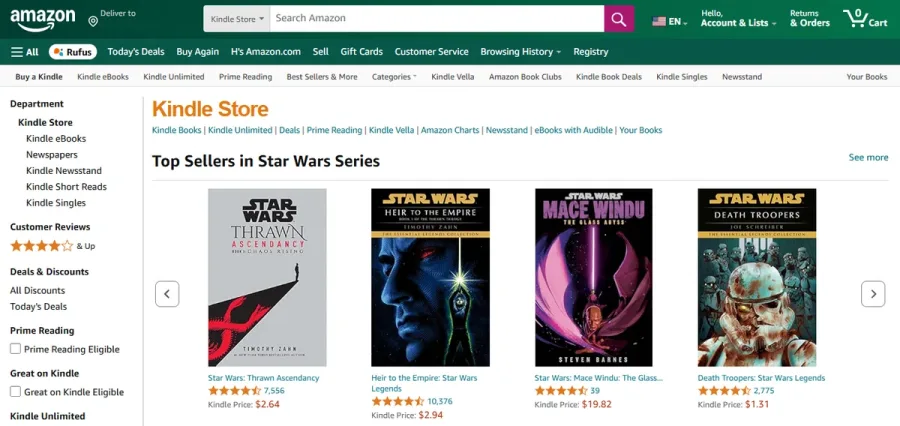
Amazon.com: Kindle Store
When you click this link, you will access the "Kindle Store." Since I searched for Star Wars, the Star Wars series is at the top.
Search for the book you want on this page.
If you search for "Anne of Green Gables" this time, this is the Kindle book that will appear at the top.
Please take a look below the "Buy now with 1-Click" button for this book.
You should be able to see it displaying "Add Audible narration to your purchase for just $7.49".
This indicates that it is a Kindle book with Audible set up for Whispersync.
3. $7.49 is cheaper than a monthly credit (coin)!Depending on the Kindle book, there are some Audible versions that are more expensive than this, but as far as I have seen, in most cases, you can purchase the Audible version as a set with the Kindle book for $7.49.
Since this is cheaper than the $14.95 monthly membership fee for US Audible, if you only buy about one book a month, it is much cheaper than purchasing a credit (the same as the old coins for Japanese Audible) every month.
Since finding this method, I have bought many Kindle books that have an Audible set, and "it is often very cost-effective to buy the Kindle and Audible as a set". As I have posted on Twitter (X) as follows, in the case of Jeffrey Archer's sequel to "Kane and Abel", "Shall We Tell the President?", you can purchase the Kindle book for $9.80 and the Audible version for just $3.
It is not necessarily the case that all Kindle and Audible sets are discounted, but when they are cheap, they can be as low as $3 like this. For older works, the Audible version is often $7.49 when purchased as a set, and for more recent works, many are in the $12.99 price range. In any case, there are instances where it is cheaper than US Amazon coins, so please check.
4. How to find the corresponding Audible version for a Kindle book you have already purchased on US AmazonNow, some of you may have this question, but as introduced in the link above, if you look at the "Find Your Match" page while logged into US Amazon, you can find the Audible versions with Whispersync set up for the Kindle books you already own.
Find Your Match
(Please use this while logged into US Amazon.)
By the way, I used this feature to search through all the Kindle books I own, so a message like "We couldn't find any audio companions for the Kindle books in your library" is displayed as shown in the figure below.
Reference) Display of Whispersync-eligible worksIf you search using the method above, you can easily find Kindle/Audible works that support Whispersync, but if there is a mark like the one in the figure below, it is sold as a book that allows Whispersync on US Amazon.
If you purchase the audiobook (first) and the Kindle book using the steps above, you will be able to use Whispersync using the smartphone app.
Up to this point, you have learned how to find Kindle/Audible works that support Whispersync.
Now, I will explain how to use the purchased Kindle/Audible works on your smartphone.
2) How to use the Whispersync feature
1. Sign in to the Kindle app on your smartphone using your US Amazon account.Download the Kindle app on your smartphone and sign in with your US Amazon account.
Please refer to this note for how to log in with a US Amazon account.
The image below shows the Kindle app on an iPhone signed in with a US Amazon account. You do not need the Audible app for Whispersync. The Kindle app on your smartphone is all you need.
For books where you have purchased both the Kindle and Audible versions, there will be an indicator in the upper right corner of the book showing that Whispersync is available. It looks like this (see the yellow box in the image below).
Let's download and open this Kindle book. It might look much like a Japanese Kindle book right after downloading, but if you wait a little while, a headphone icon will appear in the bottom right of the page as shown in the image below.
If you wait a little longer, you will be able to download the audiobook. (See the image below)
Tapping "Tap to download" on this display will allow you to download the audiobook. You can start playback even before it is fully downloaded. I have taken pictures of this as well for your reference.
Now that we've reached this point, it's time to "show me what Whispersync can do!" and try playing it. Since a video would be too much, please forgive me for using photos, but as you can see, the part currently being read aloud is highlighted.
Actually, the way the sound and text move in sync, like "karaoke reading," is irresistible.
Since it's a bit hard to tell from just this image, I tested and recorded a video of Whispersync in action on the smartphone app.
Since I couldn't embed the video, I've left a link to the Twitter post containing the video.
I was already impressed by successfully using Whispersync this time, but what surprised me even more, or rather, moved me even further, is this feature: if you long-press a word to look it up, the narration stops.
This is amazing.
When I happened to long-press this word, the highlighting disappeared, and the English-Japanese dictionary definition was displayed properly. And during that time, the narration stopped and didn't just keep playing on its own.
Even without Whispersync, if you have both Kindle and Audible content, you can listen to the audio while reading the Kindle book. Even a while ago, if you wanted to get the book and audio at the same time and read while listening to the narration, you could buy a paperback and a CD, and listen to the narration on a CD player with the book in one hand.
Now you can do both with just a smartphone, and you can even look up words in a dictionary. This alone was impressive, but previously, the audiobook narration would keep moving forward while I was clicking on words to look up their meanings.
However, now with Whispersync, the narration and the display of the text being read stop properly when you try to look up a word.
Also, thanks to improvements in the app, now when you finish looking up a word and tap the screen to return, the audio narration automatically resumes as well.
Previously, after finishing a word lookup, clicking on the page wouldn't restart the narration, and you had to manually start the audio playback again. It has been improved without me noticing.
Once you experience this, you won't be able to give up Whispersync for Audible and Kindle for English books.
Highly recommended. It was worth all the trouble I went through to get here.
4. Adjusting the narration speed on KindleIt wasn't in the previous Kindle app, but the features have been significantly improved without me noticing, and you can now change the playback speed of Audible audio downloaded for Kindle books.
The image below shows the Kindle app screen; the left is the previous version, and the right is the current one. On the left, there was no speed adjustment, just a play button.
However, in the current version, it says '1x', showing that you can adjust the speed.
When you tap the '1x' in the current app on the right in the image above, you get a screen like the one below. By default, it looks like it goes from '0.7-2.0', but you can also adjust the speed in 0.1 increments using the '+' or '-' buttons or the adjustment bar, and you can set it from '0.7-3.5'.
The image below shows the situation set to the maximum of '3.5'. I tried listening to it, but as expected, I couldn't understand English books at 3.5x speed at all. (lol
Now that I know speed adjustment is possible, I tried tapping various other things, and I found out that you can also set a sleep timer and check notes and highlights.
Tapping the area to the left of "1x" (the red-framed area in the image above) will display the management screen for that title. Until now, I thought it was just displaying the Audible book's cover art.
However, you can also adjust the speed from this screen, and if you click the button in the top left, it will display the chapter currently being read (shown in bold as in the image below) and the reading time for each chapter.
Also, the "Timer" button in the top right is indeed a timer, and you can set it to "End of current chapter" (in this case, 8 minutes remaining out of the 21-minute chapter reading time) or set a timer from 5 minutes up to 120 minutes.
Additionally, if you click the note-like icon in the top right, you can view or export all the notes and highlights you have made for that book. (This image shows highlights added randomly for sample display purposes.)
You can also fast-forward or rewind in 30-second increments, as well as skip chapters forward or backward, making it truly comprehensive.
Without me realizing it, the app's functionality had improved significantly.
⑥ Kindle/Audible IntegrationAs mentioned above, you can read and listen to audiobooks simultaneously using only the Kindle app.
So, what happens if you also install the Audible app, listen to it there, and then return to Kindle?
When you try to read with Whispersync on Kindle, a question like "You are reading at a different place in another app. Do you want to sync?" will appear. If you press "Yes," it will automatically advance to the point where you left off in Audible and start playback from there. I haven't been able to display the passage of time well, but the image below shows the situation when I returned to Kindle after listening only on Audible while writing this article. You can see that it has advanced by about 11 pages.
This feature is great for Americans who can advance their reading by listening, but if you are Japanese and reading while listening for the purpose of learning English, you might not really need the Audible app.
However, for example, when you are just listening while walking, jogging, or commuting, you can use Audible, and then when you are on the train, on your lunch break, or after returning home, you can skip the parts you already listened to and continue reading from there. It is definitely a very convenient feature to know about.
A lot of time has passed since I wrote the first note, but once you actually experience this Whispersync, you can't stop.
I feel like I could even buy the Kindle books and audiobooks I already bought on the Japanese Amazon all over again.
I was truly moved.
I hope this is helpful for those who think Whispersync sounds good but seems like a hassle.
3) Whispersync Features: Differences between devices and Japanese/US accounts
In this post, I have explained how to use it based on the Kindle app on a smartphone with a US Amazon account.
I have organized what is different between the Kindle/Audible apps, Kindle devices, and their respective Japanese and US accounts in a separate post.
Please refer to the following link for details on what is different for each account.
Thank you for reading to the end today.
If you have any questions, please feel free to leave your opinions or questions in the comments.
Reference: Past failures
Even if you live in Japan, as long as you have a US Amazon account, you can generally purchase almost any Kindle book. However, for Audible, there are some titles that residents of Japan (technically, those accessing from a Japanese IP address) cannot purchase.
Because of this, if you try to buy the Kindle book first and then the Audible version, you may end up with the sad result of not being able to buy the Audible version due to regional restrictions. (In fact, that is exactly what I did.)
An example of failure where I bought the Kindle first => I succeeded after that!
As you can see, this photo shows a Kindle book I purchased on January 1, 2021. The price for the audiobook is also shown. It says it can be bought for $9.99 or with an Audible credit (which seems to be called a 'coin' in Japan). Also, you can see the mark indicating that Whispersync is available at the bottom, right?
This purchase history clearly shows that I was excited to buy it on New Year's Day this year, but when I tried to buy the Audible version after purchasing this Kindle book, it was a title that crashed and burned with an error message saying it couldn't be sold due to regional restrictions (Star Wars: Queen's Shadow).
I was actually able to buy the Audible version! (Updated May 15, 2021)
I first posted this article on January 19, 2021.
At that time, as mentioned above, I couldn't buy "Star Wars: Queen's Shadow" because an error appeared.
However, I happened to try it just a moment ago, and to my surprise, I was able to buy it!
I was a bit impulsive and clicked the button as a test, not expecting it to work, but if I had known I could do this, I would have waited until I received my credit (or Audible coin in Japan)...
Why was I able to buy something that I couldn't before? I don't know the exact reason, but it seems that titles that were previously unavailable on the Japanese Amazon are now becoming available. I have summarized that here.
(May 15, 2021 End of update)
Referring back to the article I wrote, I chose a book that seemed likely to be purchasable, and the first memorable one where I bought the audiobook first and then the Kindle book is this: "Master & Apprentice (Star Wars)."
As mentioned above, if you purchase the audiobook first—which might have regional restrictions—you can avoid the "tragedy" of not being able to buy the audiobook due to regional restrictions after you have already bought the Kindle book.
If you want to enjoy reading with Whispersync, buy the audiobook first!
For reference, "Master and Apprentice" can be purchased on the Japanese Amazon in both Kindle and Audible formats. The link below is for the Kindle book, but you can also select Audible on the linked page. Of course, at this moment, a Japanese Amazon account cannot use Whispersync, but the narrator, Jonathan Davis, is very good.