README.md, CLAUDE.md, and what are AGENTS.md? I've organized them for beginners
The true nature of the ".md" files that suddenly increase when using AI tools
".md" files are not suspicious. Explaining the difference from regular notes
It's okay if you don't know Markdown. How to read, create, and use ".md" files
Why does AI prefer ".md" files? What I learned from actually using them
How to create ".md" files on Windows. Beware of the mistake of them becoming .md.txt
Why are instructions for AI in Markdown? A 5-minute introductory article
Table of Contents
Recently, ".md" files have been increasing in my folders
".md" is a regular text file called Markdown
The role of the common "XX.md"
Why do AI tools prefer Markdown?
The minimum Markdown syntax you need to remember
How to create ".md" files on Windows
Points to note when using them as instructions for AI
If you're going to start using them today, start with README.md
Recently, ".md" files have been increasing in my folders
Recently, when using AI tools like Codex or Claude Code, I've noticed an increase in unfamiliar files in my folders.
[Free Bonus] We will deliver 10 AI prompt templates for delegating work, along with an AI illustration kit including character settings and scene lists, via LINE. You can copy and use them → Receive (Free)
README.md, CLAUDE.md, AGENTS.md, SKILL.md.
They all end in ".md".
However, once you know what they are, they aren't difficult at all.
".md" is a plain text file that uses a writing format called Markdown. You can open it with Notepad, and you can read the contents without any special software.
So, why have they suddenly become so common recently?
One of the biggest reasons is AI agents. They are easy for both humans and AI to read, making it easy to leave project descriptions and instructions. Because of this convenience, Markdown files have suddenly become familiar in workplaces that use AI.
".md" is a plain text file called Markdown
Computer files have extensions that indicate their type.
For example, Word uses .docx, images use .png or .jpg, and spreadsheets use .xlsx. Similarly, .md indicates that it is a text file in Markdown format.
The content is basically just text. The file itself does not execute programs on its own.
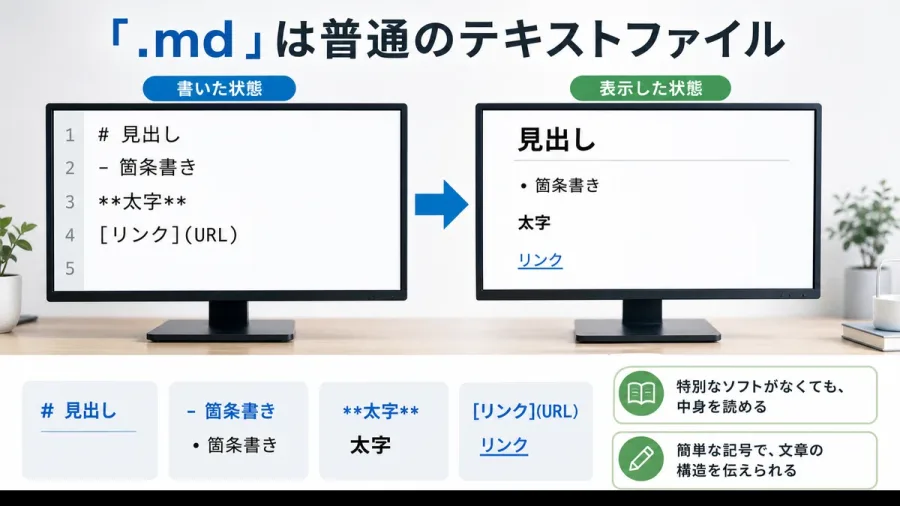
The feature of Markdown is that you can add structure to text using simple symbols.
# 大見出し
小見出し

- 箇条書き
- もう一つの項目

ここを太字にする

[リンクの名前](https://example.com)
When written this way, it is displayed neatly as headings, bullet points, bold text, or links in compatible apps.
The role of the "XX.md" you often see
Each file name has a general role. However, these are not names determined by law, but conventions shared by tools and developers.
README.mdThis is the "instruction manual you should read first" for that folder or project.
It contains information such as what it does, how to use it, necessary preparations, and points to note. It is common practice to look at README.md first when opening a folder for the first time.
CLAUDE.mdThis is a file used to convey project rules and work policies to Claude Code.
By leaving information such as the languages to use, testing methods, areas that should not be touched, and writing styles, you can reduce the effort of entering the same explanation every time.
AGENTS.mdThis is used to write instructions for AI coding agents that you want them to follow within the repository.
The scope of files to which the instructions apply depends on the tool. It is important not to judge by the name alone, but to check the specifications of the AI tool you are using.
SKILL.mdThis is a file that compiles repetitive work procedures or specialized know-how into a format that AI can reuse.
Think of it as saving a work template you have decided on once, such as "write note articles in this structure" or "create images under these conditions."
In other words, "XX.md" is an instruction manual that makes the role of its contents easy to understand through its filename.
Why do AI tools prefer Markdown?
The reason Markdown is convenient for AI tools is that it is easy to understand the structure of the text.
If there is a "#", it can be judged as a heading; if there is a "-", a bullet point; and if there are code fences, a program example. Even in long explanations, it becomes easier to distinguish where the rules are, where the procedures are, and where the examples are.
The same applies to humans. It can be read without dedicated apps and can be handled on Windows, Mac, or Linux.
Furthermore, the fact that it can be saved as a file is also important.
Instead of telling the AI every time in chat to "write in Japanese," "do not delete existing files without permission," or "run tests," you can leave them in the project's instruction manual. If the AI can refer to that file when it starts working, you can reduce the repetition of explanations.
Markdown is not a format exclusive to AI. However, it is a good fit as a format for humans and AI to read the same instruction manual and share the same rules.
The minimum Markdown writing style to learn
You don't need to memorize everything from the start. In reality, you only really use about the following four.
# 見出し

- 箇条書き

1. 番号付きリスト

重要な言葉
Even just with these, ordinary notes become much easier to read.
If it is an instruction manual for AI, just using "Purpose," "Rules to follow," "Work procedures," and "Completion criteria" as headings will organize the information. Even if the text is not perfect, the AI finds it easier to handle just by being able to see the structure.
How to create ".md" files on Windows
The easiest way is to create a new file in a text editor like Visual Studio Code and save it with a name like "memo.md".
You can create them even with Windows Notepad. On the save screen, enter the filename as README.md and select UTF-8 for the character encoding.
One thing to be careful of here is the mistake of it becoming README.md.txt.
If file extensions are hidden in Windows, it might look like README.md, but it could actually have .txt at the end. You can check this by turning on "File name extensions" under the "View" tab in File Explorer.
Also, on the Notepad save screen, it is safer to set the file type to "All files".
The .md files you create can be opened with Notepad, Visual Studio Code, or other similar programs.
Points to note when using them as instructions for AI
While Markdown is convenient, just giving it a filename doesn't guarantee that an AI will read it.
Which names are automatically recognized and which folder instructions take priority varies by tool. Codex may not treat CLAUDE.md the same way, and there are also rules for the scope of application for AGENTS.md.
Another important thing is not to unconditionally trust Markdown obtained from external sources.
Even if .md itself is just a regular text file, it could contain text designed to make an AI perform specific operations. It is safer to read the contents of downloaded projects or files from people you don't know before passing them to an AI.
Avoid writing passwords, API keys, or personal information directly into instruction files. The advantage of being easy for both humans and AI to read also means that information you don't want seen is also easy to read.
If you want to start using it today, start with README.md
If you want to try Markdown, try creating one README.md in your work folder and writing down your "Objective," "Storage Location," and "Next Steps." You won't get lost when you open it later, and it can also be used as an explanation when asking an AI to do work.
The "XX.md" you see often lately is not a difficult program.
It is a light and easy-to-handle notebook that both humans and AI can read the same explanation from. When you think of it that way, doesn't it suddenly become something more familiar?
Summary | ".md" is an instruction manual that humans and AI read together
The true nature of the "XX.md" you see often lately is a text file that uses a writing style called Markdown. It is not a special program, but a regular text file that can even be opened with Notepad.
In Markdown, you can represent headings with #, bullet points with -, and bold text with ``. It can be read even without formatting, and it is displayed clearly in compatible apps. This characteristic of being "readable as-is" and "having a clear structure" makes it suitable for both humans and AI.
To start, it is enough to learn just the # for headings, - for bullet points, 1. for numbered lists, and text for bold. You don't need to memorize complex writing methods; you can start with the feeling of just adding a few symbols to a regular memo.
README.md is used for project guides, CLAUDE.md and AGENTS.md for policies for AI tools, and SKILL.md for recording work templates used repeatedly. However, which files are read automatically and the scope to which instructions are applied varies by tool. It is important not to make assumptions based on the name alone and to check the documentation of the tool you are using.
When creating one on Windows, be careful not to end up with "README.md.txt". It is safer to show file extensions in Explorer, and if using Notepad, select "All files" and UTF-8 when saving.
Also, just because a Markdown file looks safe does not mean the content written inside is safe. Check the contents of files received from external sources, and make sure not to write sensitive information like passwords or API keys.
The reason we see ".md" more often in the AI era is that instructions written for humans can be passed directly to AI as well. Instead of explaining the same rules in chat every time, you can save them in a file and share them. This is a small difference, but the longer you continue working, the more you will realize how convenient it is.
If you want to try it today, please create one README.md in your work folder. Just three things are enough: "the purpose of this folder," "where it is saved," and "what to do next."
If there is any "XX.md" you have seen recently that you do not understand, please let me know the filename in the comments. If you found this helpful, I would be happy if you could "like" it so you can look back on it later.
I am distributing "10 AI prompt templates for your 30 minutes every morning" that I couldn't fit into this article for free on LINE.
You can use them just by copying and pasting.