When you have an agent write code, the first few turns look fine. The problem arises when you delve into project-specific rules. Build procedures, test execution protocols, naming conventions, files that must not be touched. The agent doesn't know these. With every session, you end up repeating the same explanations.
A README does not solve this problem. The reader of a README is a human. It is a document for understanding the project's purpose, setting up the environment, and reaching the first contribution, not a document for an agent to decide 'which command to run next'.
The answer that emerged is AGENTS.md. You write the build procedures, test protocols, code styles, and prohibitions necessary for the agent to work in a single Markdown file. It is an open format jointly formulated by over 20 tools including OpenAI Codex, Google Jules, Cursor, and Factory, and as of February 2026, it has been adopted by over 60,000 open-source projects.
In the previous article, I wrote about how to create skills (SKILL.md). Skills are specialized knowledge that an agent 'calls on demand.' On the other hand, AGENTS.md corresponds to basic project information that an agent 'reads automatically every time.' This is not a discussion of Skills vs AGENTS.md, but rather how to use both properly.
Recently, a new term has appeared in the discussions surrounding this area: Harness Engineering. It is a concept named by Terraform creator Mitchell Hashimoto, referring to the engineering practice of 'creating a mechanism so that if an agent makes a mistake, it never makes the same mistake again.' In Charlie Guo's definition, a harness is a mechanism composed of four elements—constraints, tools, documentation, and feedback loops—to keep an agent productive and on track. Within this, AGENTS.md is positioned as the core component of the documentation layer.
Charlie Guo's 'The Emerging Harness Engineering Playbook', published in February 2026, summarized practices from OpenAI, Stripe, and individual developers, showing that this new form of engineering is rapidly converging. AGENTS.md is not just a file format. It is the core of the documentation layer that constitutes the harness and the foundation that supports the collaboration between teams and agents.
In this article, I will summarize the overall picture of AGENTS.md. What it is, how to write it, what should be included, and what should not. I will also cover the role AGENTS.md plays in harness engineering and the patterns that have emerged from practitioners.
1. What is AGENTS.md?
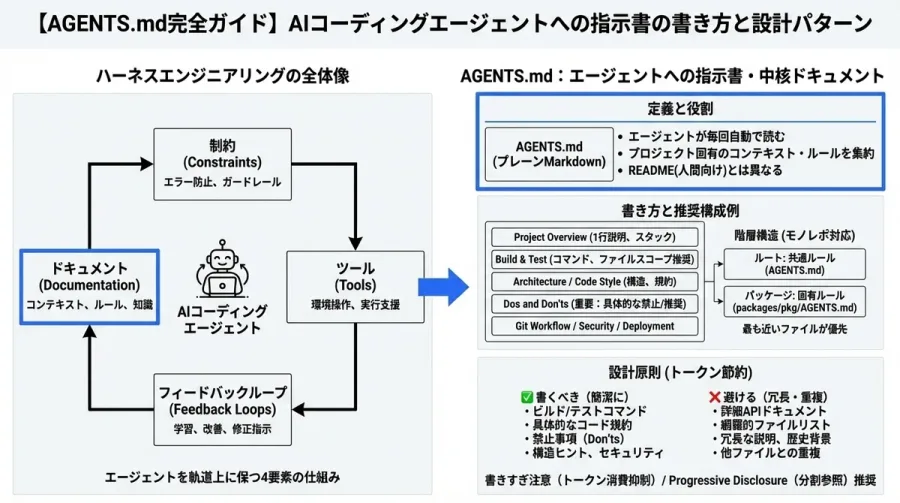
AGENTS.md is a 'README for agents.' It is a Markdown file placed at the root of a repository that provides project-specific context and instructions to AI coding agents.
The official website (agents.md) definition is simple.
If README.md is for humans, AGENTS.md is for agents. It aggregates information that would be redundant if written in a README but is essential for agents, such as build procedures, test commands, code conventions, and prohibitions.
FeaturesSupported ToolsAccording to the official AGENTS.md repository, the following tools are supported.
Claude Code uses its own CLAUDE.md, but it serves the same role as AGENTS.md. When using both tools, a method of centralized management via symbolic links is suggested.
2. How to write AGENTS.md
AGENTS.md is plain Markdown. No schema or YAML front matter is required. Headings serve as clues to the content, and the agent parses the text as is.
Minimal AGENTS.mdStart with the minimal configuration.AI Hero is an AI engineering education platform run by Total TypeScript founder Matt Pocock, used by over 50,000 developers. Their AGENTS.md guide recommends the following three points as the bare minimum.
A one-line project description
Package manager specification (if not using npm)
Non-standard build/test commands
# Project

E-commerce platform built with Next.js 16 and PostgreSQL.
Build & Test

- Package manager: pnpm (do NOT use npm or yarn)
- Install: pnpm install
- Dev server: pnpm dev
- Test: pnpm test
- Lint: pnpm lint
- Type check: pnpm tsc --noEmit
This alone solves the problem of being asked for the build command every time.
Recommended Section StructureAdd the following sections according to the scale of your project.
# AGENTS.md
Project Overview
1行のプロジェクト説明。技術スタック。
Build & Test
ビルド、テスト、リント、型チェックのコマンド。
Architecture
主要モジュールの構造。ディレクトリの役割。
Code Style
命名規約、フォーマッター設定、Lint規則。
Dos and Don'ts
推奨パターンと禁止パターン。
Git Workflow
ブランチ戦略、コミットメッセージ規約、PR要件。
Security
認証フロー、APIキー管理、機密データの扱い。
Deployment
デプロイ手順、環境変数の設定。
Builder.io's Steve Sewell cites Dos and Don'ts as the most effective section.
## Dos and Don'ts
Do
- Use functional components with hooks (not class components)
- Use MUI v3 components from @mui/material
- Use emotion CSS for styling: css= ...
- Reference design tokens from src/tokens/
- Write unit tests for new utility functions
Don't
- Don't hardcode colors or spacing values
- Don't use inline styles
- Don't add new npm dependencies without discussion
- Don't modify files in src/legacy/ (deprecated)
Abstract instructions like "write good code" do not work. List specific file paths, library names, and prohibited operations.
File-scoped CommandsSpecifying commands to run on a single file rather than building the entire project significantly reduces agent execution time and token consumption.
## Quick Validation (prefer these over full project builds)

- Type check single file: npx tsc --noEmit path/to/file.tsx
- Format single file: npx prettier --write path/to/file.tsx
- Lint single file: npx eslint --fix path/to/file.tsx
You can place multiple AGENTS.md files. Agents search upwards from the working directory and prioritize the closest file.
monorepo/
├── AGENTS.md              # 共通ルール(モノレポ目的、パッケージナビ)
├── packages/
│   ├── frontend/
│   │   └── AGENTS.md      # React/Next.js固有のルール
│   ├── backend/
│   │   └── AGENTS.md      # Go/gRPC固有のルール
│   └── shared/
│       └── AGENTS.md      # 共有ライブラリのルール
Write information common to all packages (CI/CD procedures, commit conventions) in the root, and write rules specific to the technology stack at the package level.
3. What to write and what not to write
The biggest pitfall of AGENTS.md is writing too much. Every token in the file is read with every request. Files that are too large crowd out the tokens available for task-specific reasoning.
What to writeWhat not to writeSize guidelinesThe AI Hero guide points out that the upper limit of instructions that current LLMs can maintain consistency with is about 150 to 200. Qiita's best practice article recommends a length of 60 to 300 lines. If it exceeds 500 lines, split it into separate files using Progressive Disclosure.
Progressive DisclosureInstead of stuffing a massive amount of rules into AGENTS.md, organize them using a file hierarchy.
docs/
├── AGENTS.md          # インデックス(60-100行)
├── TYPESCRIPT.md      # TypeScript規約
├── TESTING.md         # テスト戦略
├── API.md             # API設計ガイド
└── DEPLOYMENT.md      # デプロイ手順
Write only an index in AGENTS.md and delegate the details to separate files. Agents are good at file exploration, so they will read only the necessary files when needed.
OpenAI's internal team strictly follows this method. They created a structure that starts with a small AGENTS.md and references design documents and architecture maps. Furthermore, they built a system where a background agent periodically scans for outdated documents in the repository and automatically issues cleanup PRs. They even leave the maintenance of document freshness to the agents.
Anthropic's engineering team faced a different challenge in their research on long-running agents: the loss of memory from previous work every time a session ends. As a countermeasure, they prepared a JSON-formatted progress file and feature list separate from AGENTS.md. While agents can freely rewrite Markdown, JSON has a fixed schema, making inappropriate overwrites less likely. While AGENTS.md conveys the project's "rules," the JSON file plays the role of inheriting the "current status."
The Danger of ObsolescenceThe greatest enemy of AGENTS.md is obsolescence. Structural information like file paths changes quickly. If you write "Authentication logic is in src/auth/handlers.ts" and the file is moved, the agent will confidently look in the wrong place.
There are two countermeasures.
Write only information that is unlikely to change: Commands, conventions, and prohibitions are unlikely to change. File paths are prone to change.
Manage it as a living document: Make it a habit to update AGENTS.md during refactoring.
So far, I have discussed "what to write," but there is a more important question: when to write it.
OpenAI's Sam Brockman writes this as a recommendation to his team: "Create and maintain an AGENTS.md. Update it every time an agent makes a mistake or struggles with a task." This is the philosophy of using AGENTS.md not as a static document, but as a feedback loop.
Mitchell Hashimoto states this practice even more succinctly: "Every time an agent makes a mistake, create a mechanism so it never makes the same mistake again." In the AGENTS.md for his terminal emulator Ghostty, each line corresponds to a specific past failure of the agent.
In other words, the best time to update AGENTS.md is not when you prepare to "write it," but the very moment the agent fails. Failure -> Identify cause -> Add one line to AGENTS.md. By continuing to cycle through this, the document becomes not a definition of "expected quality," but a map of "landmines actually stepped on."
4. Vercel's Experiment: AGENTS.md vs Skills
In January 2026, Vercel published a comparative experiment between AGENTS.md and Skills. It was an experiment to verify whether agents could correctly use new APIs in Next.js 16 (such as use cache, connection(), and forbidden(), which are information not included in the model's training data).
Experimental ResultsWhen using Skills by default, the success rate was no different from the baseline. In 56% of the evaluation cases, the skill was not called. The agent had access to the documentation, but did not use it.
Why AGENTS.md WonVercel's analysis cites three factors.
1. No decision points
The content of AGENTS.md is automatically read with every request. The agent does not need to decide, "Should I read this document now?" Skills are loaded asynchronously on-demand, which leads to instances where they are forgotten to be called.
2. Consistency
AGENTS.md is present in every turn. Because Skills are loaded conditionally, there is a vulnerability where changing the phrasing of an instruction can significantly alter the results.
3. No ordering issues
With Skills, a decision is required on whether to "read the document first or explore the project." AGENTS.md eliminates that decision entirely.
Compressed Index TechniqueVercel compressed a 40KB document into 8KB and embedded it into AGENTS.md using a pipe-delimited format. They achieved a 100% success rate with an 80% compression ratio.
When to use Skills vs. AGENTS.mdVercel's conclusion is not to choose "one or the other."
AGENTS.md: Common knowledge for the entire project. Build procedures, code conventions, and architecture. Information needed for every request
Skills: Knowledge specialized for specific actions. Executing migrations, code review procedures, and deployment flows. Information called only when needed
AGENTS.md for broad, horizontal improvements; Skills for deep, vertical expertise. This is Vercel's recommended approach.
5. AGENTS.md within the Harness
AGENTS.md does not function on its own. It is a core component within the entire "harness" that keeps the agent running stably. I wrote in detail about the concept and three principles of harness engineering in the article before last, and about practical patterns from various companies in the previous article. Here, I will focus on its relationship with AGENTS.md.
According to research published by Charlie Guo in February 2026, practitioners regardless of scale are converging on the same structure. Whether it's an individual developer with 6,600 commits per month, an OpenAI internal team with 1 million lines and zero manual code, or Stripe with 1,000+ PRs per week, all are centered on the four elements of a harness: constraints, tools, documentation, and feedback loops.
What AGENTS.md handles is the third element, "Documentation as the System of Record." When an agent fails, you update AGENTS.md so that the same failure does not occur in the next session. As this cycle continues, AGENTS.md evolves from a static document into a learning apparatus for the harness.
There is also quantitative evidence. The LangChain DeepAgents team improved their benchmark (Terminal Bench 2.0) from 52.8% to 66.5% (+13.7pt) solely through harness improvements. The model remained gpt-5.2-codex. This was the result of controlling behavioral patterns with mechanisms like LoopDetectionMiddleware (detecting repetitive edits) and PreCompletionChecklistMiddleware (enforcing verification before completion). You can improve by 13 points just with the harness, without changing the model.
6. 5 Anti-patterns
1. Massive AGENTS.mdEvery token in AGENTS.md is read every time. If it exceeds 500 lines, the context available for task-specific reasoning is squeezed.
Countermeasure
Aim for 60 to 300 lines. If it exceeds this, split it into separate files using Progressive Disclosure.
If you write 'Authentication logic is in src/auth/handlers.ts' and the file is moved, the agent will search for it in the wrong place with confidence. The faster information changes, the more dangerous it is.
Countermeasure
Focus on writing information that is unlikely to change (commands, conventions, prohibitions). Avoid listing file paths. Update AGENTS.md during refactoring.
'Write good code' or 'Follow best practices' do not work. Agents are looking for specific commands, file names, and patterns.
Countermeasure
Bad example: 'Use consistent code style'
Good example: 'Use functional components with hooks. No class components. CSS via emotion: css= ... '
When multiple developers add to AGENTS.md, contradictory rules accumulate. The agent cannot resolve the contradictions and will either ignore one or return half-baked output.
Countermeasure
Review AGENTS.md periodically. Run refactoring prompts to detect contradictions. Clarify rule ownership.
Success stories so far share a common trait: they are either greenfield (new development) or teams that designed the harness from scratch. Trying to retrofit a harness onto a 10-year-old codebase causes different problems. There are no architectural constraints. Tests are sparse. Documentation is fragmented. The same thing happens as when you run a static analysis tool for the first time on a codebase that has never been checked: you get buried in alerts.
Charlie Guo clearly identifies this as an 'unsolved challenge.' How do you start harness engineering in an existing project? There is no universal answer yet, but from the author's experience, I can say: start small. First, write an AGENTS.md (or CLAUDE.md) of 60 lines. Add one line every time the agent fails. Introduce architectural constraints little by little during refactoring. Do not wait to build a perfect harness before using it; grow it while you use it.
7. Current State of the Ecosystem
Standardization of AGENTS.mdAGENTS.md spread rapidly in early 2026. Major tools like OpenAI Codex, Google Jules, Cursor, VS Code, and GitHub Copilot support it, and over 60,000 OSS projects have adopted it. GitHub repository stars have exceeded 17,000, and proposals for v1.1 (explicit Progressive Disclosure, clarification of scope) are being discussed.
The fact that the format maintains the simplicity of 'writing whatever you want in Markdown' has supported its rapid adoption. There is no YAML schema or validation.
Relationship with Claude CodeClaude Code uses CLAUDE.md instead of AGENTS.md. While they serve the same role, more projects are managing both for compatibility reasons. Centralized management via symbolic links is becoming an established, practical solution.
Passive Context and Active ContextVercel's experiments have demonstrated the distinction between AGENTS.md (passive context) and Skills (active context). Common knowledge that is frequently referenced goes into AGENTS.md, while specialized knowledge that is only called when needed goes into Skills. This two-layer structure is solidifying as the best practice as of 2026.
Investment compounds. A single line update in AGENTS.md prevents all future failures of the same type. The initial cost is not small, but the returns accelerate.
Summary
AGENTS.md is a 'README for agents.' It is simple, but it is directly linked to the quality of the agent's output.
What to write is clear: build procedures, test commands, code conventions, and prohibitions. What not to write is also clear: redundant documentation, file paths that change frequently, and abstract guidance. The timing for writing has also become clear: the very moment the agent fails.
AGENTS.md is also the starting point for harness engineering. Documentation only functions when integrated with constraints, tools, and feedback loops. However, this is the right place to start.
Start by writing an AGENTS.md (or CLAUDE.md) for your project in 60 lines. Just three sections—build commands, test commands, and Dos and Don'ts—are enough. When the agent fails, add one line. That repetition will eventually become a harness before you know it.