I'm Makurin, a gadget blogger.
The price of the standard password management app, 1Password, was increased a little while ago.
The new pricing applies to new contracts starting November 2025, and to existing users starting from their renewal in March 2026.
The answer to "this is the cheapest way to buy it," which we could previously rely on, has changed completely due to the price hike.
Previously, there was a loophole involving in-app purchases for 4,000 yen per year, but that was also closed by the 2025 price increase.
As a heavy user who uses 1Password every day, I have re-investigated everything to find out where to buy it for the lowest price.
In conclusion, the current cheapest route is the 3-year version from SourceNext.
If you are in a hurry, you can go ahead and check the SourceNext version of 1Password first.
However, there are two places to buy it: direct from SourceNext and Amazon, and as of November 1st, both Amazon and direct sales are at the list price of 17,980 yen.
By reading this article, you will clearly understand "why that is the cheapest" and "how much of a difference there is compared to official or in-app purchases."
1Password Pricing Plans [Latest Version After 2026 Price Hike]
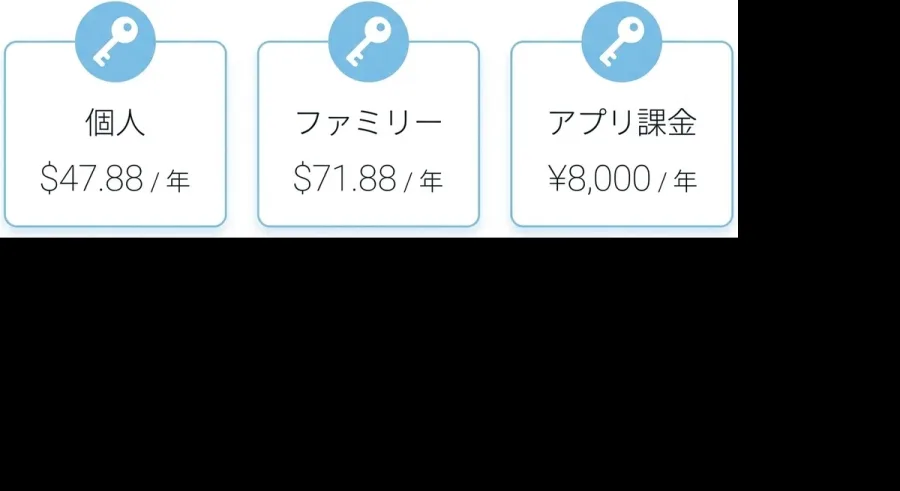
1Password's official pricing is $47.88 per year for the individual plan and $71.88 per year for the family plan.
With this price hike, the individual plan increased by about 33%, and since it is denominated in dollars, the payment amount in yen will change depending on the exchange rate.
The individual plan is $47.88 per year1Password's individual plan (Individual) is $47.88 per year.
You can choose between annual payment and monthly payment.
With annual payment, it is $3.99 per month ($47.88 per year), which is an increase of about 33% from the pre-hike annual price of $35.88.
However, new subscriptions have a first-year discount, allowing you to start at $2.99 per month ($35.88 per year) (from the second year onwards, it is the standard $47.88 per year). Therefore, for the first year only, you can effectively use it at the same price as before the hike.
The official 1Password website charges in dollars, and since contracts from Japan also incur a 10% consumption tax, the actual payment will be equivalent to $52.67 per year.
Converting to yen at approximately 158 yen per dollar (as of October 7, 2026), the calculation is approximately 8,300 yen per year.
Accumulated over 3 years, it is about 25,000 yen.
The number of devices is unlimited, covering all major environments including Windows, macOS, Linux, iOS, and Android.
Watchtower, which checks for password leaks, is also included as standard, making it more reliable than just a simple vault.
The Family plan is $71.88 per yearThe Family plan for families is $71.88 per year.
If paid annually, it is $5.99 per month, and the base fee covers up to 5 people.
This is also subject to the price hike, having been raised from $59.88 per year.
For new Family subscriptions, the first year is discounted to $4.49 per month ($53.88 per year) (standard rates apply from the second year onwards).
Converting to yen, it is approximately 12,500 yen per year, and for 3 years it is about 37,500 yen.
If used by 5 family members, the cost drops to about 2,500 yen per person per year.
It supports not only passwords but also passkeys, and is protected by 256-bit AES encryption, just like the individual plan.
The 8,000 yen per year in-app purchase is no longer a loopholeIn-app purchases on iPhone and Android are around 8,000 yen per year, and are no longer the "cheap loophole" they once were.
Via the App Store, there was a nearly double price increase in November 2025, from about 4,000 yen to 8,000 yen per year.
The Google Play route is also around 8,200 yen per year, with the level being almost the same.
Before the price hike, it was known as a significantly cheaper route than the official website, but now there is almost no difference from the official dollar payment (approximately 8,300 yen per year).
Depending on the exchange rate, there are even times when in-app purchases are slightly cheaper.
Even so, the level of around 8,000 yen per year is nowhere near the annual equivalent (about 6,000 yen) of the Sourcenext 3-year version described below.
Please remember that no matter which subscription entry point you choose, it will cost more than the Sourcenext 3-year version.
The way to buy 1Password for less is the Sourcenext 3-year version
The cheapest way to use 1Password is the Sourcenext 3-year version.
The price is fixed in Japanese yen and is not affected by exchange rates, making it about 7,000 yen cheaper for an individual compared to three years of the official regular price.
Sourcenext direct sales are 17,980 yen for 1 user and 27,980 yen for 5 usersOn the Sourcenext direct sales site, the 1-user version is sold for 17,980 yen (tax included) and the 5-user version for 27,980 yen (tax included).
There was a price revision on May 13, 2026, and it increased from the old prices of 12,800 yen / 21,480 yen.
Even so, it is cheaper than the official dollar-based payment, and its strength is that it is fixed in Japanese yen.
Furthermore, limited-time sales are sometimes held for direct sales, and from October 11 to 26, 2026, it could be bought cheaply without a coupon.
The content is exactly the same as the official version, and there are no inferior aspects in terms of functionality.
Payment also supports not only credit cards but also Amazon Pay and convenience store deferred payment, making it easy to buy even for people who do not want to use a card.
◆Click here for Sourcenext's 1Password
The Amazon Sourcenext 3-year version can also be the effective lowest price during salesAmazon also carries the Sourcenext 3-year version (1-user), and during sale periods, it can sometimes be cheaper than direct sales.
The list price is 17,980 yen, the same as direct sales.
However, during sales such as Time Sales or Prime Day, it can drop to around 15,000 yen.
In the mid-October 2026 sale, it dropped to 13,800 yen, but as of November 1, it has returned to the same list price of 17,980 yen as direct sales.
Sale prices fluctuate, so it is not guaranteed, but if you are not in a hurry, it is recommended to compare Amazon and Sourcenext direct sales (17,980 yen, no sale as of November 1).
If there is a sale, you can also get points back, so for those in the Amazon ecosystem, this is often the lowest effective price. Conversely, when Amazon sales are not running, buying directly during their own sales or coupon periods is the cheapest option.
How much cheaper is it compared to 3 years from the official site?Let's compare the cost of paying for 3 years on the official site with Sourcenext.
The officialindividual plan is about 8,300 yen per year, so 3 years will costabout 25,000 yen.
On the other hand, the Sourcenext 1-user version is 17,980 yen, so the difference is about 7,000 yen.
When comparing family plans, the difference is even greater.
The official family plan is about 37,500 yen for 3 years, while the Sourcenext 5-user version is 27,980 yen, so the difference is about 9,500 yen.
For clarity, here is the comparison:
Individual, 3 years: Official approx. 25,000 yen → Sourcenext 17,980 yen (save approx. 7,000 yen)
Family 5-user, 3 years: Official approx. 37,500 yen → Sourcenext 27,980 yen (save approx. 9,500 yen)
Note that the official pricing page prominently displays the price after the first-year discount (2.99 USD per month for individuals, 4.49 USD per month for families).
Even when including the first-year discount in the calculation, over a 3-year total, Sourcenext is cheaper by about 4,900 yen for individuals and about 6,400 yen for families.
The difference above is based on using the service for 3 years at the regular price without discounts.
If there is this much difference over 3 years, I think you can choose the Sourcenext version without hesitation.
◆Click here for 1Password from Sourcenext
What happens after the 3 years are up?The Sourcenext 3-year version does not have automatic renewal, and once it expires, your features will be restricted.
Since there is no automatic billing like an official subscription, no cancellation procedure is required.
If you want to continue, you will simply purchase the 3-year version again.
Even after expiration, you can still view and copy your registered passwords.
However, you will no longer be able to use auto-fill or register/edit new passwords, so if you want to keep using it, you will need to repurchase it.
Including this convenience, I choose to use 1Password from Sourcenext.
However, when the Amazon version is cheaper, you should also compare it with Amazon.
◆Click here for 1Password from Sourcenext
Points to note before purchasing
There are three points you should be aware of before buying the Sourcenext version.
The one-time purchase version has already been discontinued, the remaining period will not be carried over if you switch from the official version, and the business plan is not eligible for the 3-year version.
The one-time purchase version (perpetual license) has already been discontinuedSome people might wonder, "Isn't there a version I can buy once and use forever?"
New sales of the one-time purchase version (perpetual license) of 1Password ended in 2021, and since 1Password 8, which was released sequentially starting in 2021, it has become subscription-only.
Now, Windows, Mac, and smartphones are all unified into a subscription model.
A common misunderstanding here is the 3-year version from Sourcenext.
This is a plan where you "pay for 3 years in advance," and it is not a license that can be used forever.
If you forget to renew because you "thought you bought a perpetual license," you will panic when you can't register new passwords, so be careful.
Please be aware in advance that you will need to buy it again after 3 years.
Steps to switch from the official subscription to the Sourcenext versionEven if you are already using the official subscription, you can switch to the Sourcenext version.
The procedure is as follows.
Purchase the 3-year version from Sourcenext
Check your serial number on your My Page
Send the code from "Start Using"
Link the code to your existing account on the official 1Password site
Cancel your original official subscription
To cancel, follow the instructions in the email from 1Password Billing Support and reply to confirm; the license will be applied once that is done.
With this method, you can keep all the passwords you have already saved.
However, please note that the remaining period of your old plan will not be carried over.
If you have a lot of time left on your official subscription, it is better to wait until your renewal is approaching to switch so you don't waste it.
Business plans are not eligible for the 3-year versionThe cost-effective 3-year version is only available for individual and 5-person family plans.
For Teams and Business plans used by companies or teams, official website subscription contracts are the standard.
Sourcenext also has a corporate window for large-volume licenses, but this is a contract based on inquiries.
There is no 14-day free trial for the Sourcenext version, so those who want to try it first should use the official trial.
For corporate use that requires team management features and audit logs, it is safer to simply choose the official version.
Summary: How to avoid overpaying for 1Password
1Password's prices have been raised, but if you choose the Sourcenext 3-year version, you can use it for about 7,000 yen less for individuals and about 9,500 yen less for families compared to three years of the official regular price.
It is also reassuring that it is fixed in Japanese yen, so you won't be affected by exchange rate fluctuations.
Here is a summary of the key points again.
Official subscriptions are $47.88 per year for individuals and $71.88 per year for families (monthly payment options are also available)
In-app purchases have also been raised to around 8,000 yen per year, so it is no longer a cheap loophole
The cheapest option is the Sourcenext 3-year version, which is 17,980 yen at list price for both direct sales and Amazon as of November 1st
I personally use the SourceNext version, and I am quite satisfied with the peace of mind that the price remains unchanged even as the yen continues to weaken.
If you are still hesitant, first check out 1Password from SourceNext.
Amazon I recommend comparing it with the sale price on and choosing whichever is cheaper at the time.
This was Makurin!
◆Click here for 1Password from SourceNext
Q: Can I keep using 1Password for free?A: No, 1Password is paid-only and does not have a free plan. There is only a 14-day free trial, and once the period ends, you will need to sign up for a paid plan (monthly or annual payment).
Q: Can I buy 1Password in Japanese yen?A: The official website is priced in US dollars, but with the SourceNext version, you can buy it at a fixed price in Japanese yen. Since it is not affected by exchange rates, the SourceNext version is advantageous when the yen is weak.
Q: When does the 1Password price hike start?A: New contracts will be subject to the new pricing from November 17, 2025, and existing users will be subject to the new pricing upon renewal on or after March 27, 2026. The personal plan has increased from $35.88 to $47.88 per year, an increase of approximately 33%.