This is about the preparation for Rustlings and my impressions after trying it.
*The reason the screenshots look different from each other is that I have mixed in a virtual environment created for exercises that have already been solved.
Note
This article (and this series) is intended to be posted as a sort of memo while a beginner dabbles in Rust.
Therefore, the credibility throughout this series is extremely low.
Also, please forgive me if I am doing things in a messy or strange way from the perspective of an expert.
What is Rustlings?
It is a collection of practice problems for Rust. It seems to be based on resources like the Rust documentation, The Rust Programming Language (Japanese version).
Preparation
I will install Rust and Rustlings. Since I will be editing in VS Code after launching Rustlings, it might be better to run it in the VS Code terminal...
curl --proto '=https' --tlsv1.2 -sSf https://sh.rustup.rs | sh
// rustのpath通しのためシェルの再起動が必要かも
// windowsはguiのインストーラです

// でrustlingsのプログラムをインストール
cargo install rustlings

// rustlingsフォルダを置くための親ディレクトリへ移動
cd /develop //とか。お好みで

// でrustlingsフォルダが作成されます
rustlings init

// でrustingsで移動
cd rustlings/

// で起動
rustlings
It seems there is also a Japanese version...
Launch
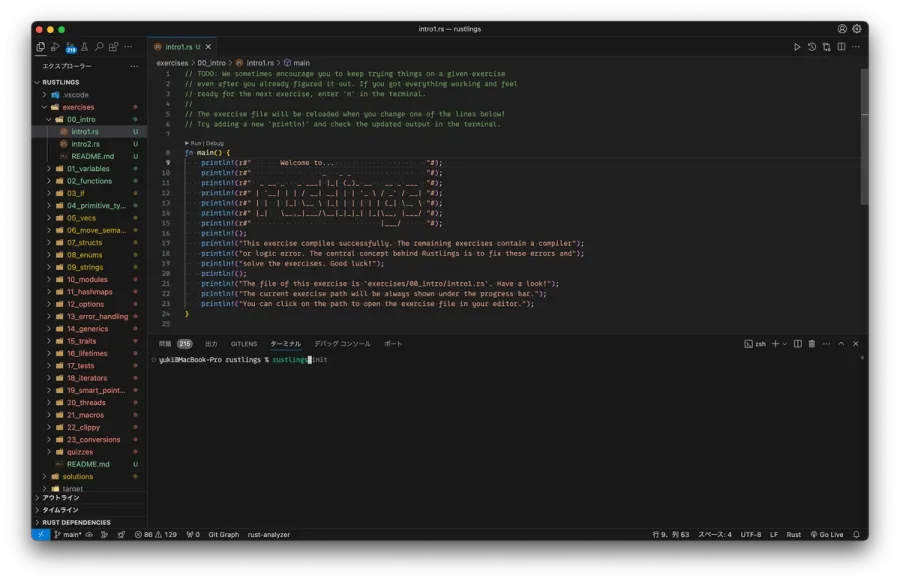
When you run 'rustlings init', a folder with the following structure will be created directly under the current directory. Open this 'rustlings' folder in VS Code.
├── rustlings
│   ├── Cargo.lock
│   ├── Cargo.toml
│   ├── exercises
│   ├── solutions
│   └── target
The colors might differ because the progress is different, but the screen will look something like this. Then, launch Rustlings in the VS Code terminal with the following command.
rustlings
When you launch it, I think a screen like this will appear in the terminal. The terminal shows the results, progress, and the file path currently being checked. By the way, if you are in VS Code, you can open that file by clicking it while holding down the Cmd key.
WorkflowRegarding the Rustlings workflow, the exercise you progressed to last will be displayed when you launch Rustlings. (The first time, it is exercises/00_intro/intro.rs) 00_intro/intro.rs is cleared as is, but from then on, you will solve the exercises.
Launch Rustlings
The current exercise is displayed
Open the exercise file (Cmd + click in VS Code)
-
Solve the exercises
Edit the file
Once you solve an exercise, type 'n' to go to the next one (type 'q' to quit and save, or 'l' for the exercise list)
-
If you get stuck, you can type 'h' into the terminal to get a hint.
I think it's totally fine to look things up too
It says, "The compiler is telling you that the print macro name is incorrect. It also suggests an alternative." Rust's compiler errors are quite excellent, so I guess the point is to look at those.
Impressions
Actually, I've done up to about 09, and since it's basic stuff, it's not incredibly difficult. Here and there, I've checked https://doc.rust-jp.rs/book-ja/ and for exercises that were absolutely impossible, I looked up the answers on blogs and such. It seems there are answers available too. The ratio (based on my feeling) is about Solved:Checked Docs:Checked Answers = 6:3:1.
It's an opportunity to read other people's codeSince I'm only doing Rust as a hobby, I haven't really made a habit of looking at source code written by others. However, while doing Rustlings (and because my English skills are low, my understanding of the comments is shallow), there were times when I had to judge what was happening based solely on the source code.
Usually, I only look at my own code, so even if I forget things, I still remember the intent of the code to some extent. However, Rustlings code is written by complete strangers, and I basically had to read information only from the code and infer how it was being used. That was actually a pretty good experience. I think it's good not just for multi-person development, but also for purely improving one's code comprehension skills.
Also, it might be good to take this opportunity to read other code. By the way, as for other exercises, there is also something called "100 Exercises To Learn Rust". Looking online, it seems like it might be a bit difficult.
Next time
Maybe I'll introduce the Rustlings exercises or the ones I didn't understand.