Have you ever seen cute emojis in emails or chats and wondered, "How do they type those on a computer?"
It's easy on a smartphone because there's an emoji button, but you don't see an emoji key on a computer keyboard, do you?
Actually, you can bring up a list of emojis on your computer instantly by pressing a few keys at the same time. In this article, I'll show you how to do it on both Windows and Mac
For Windows
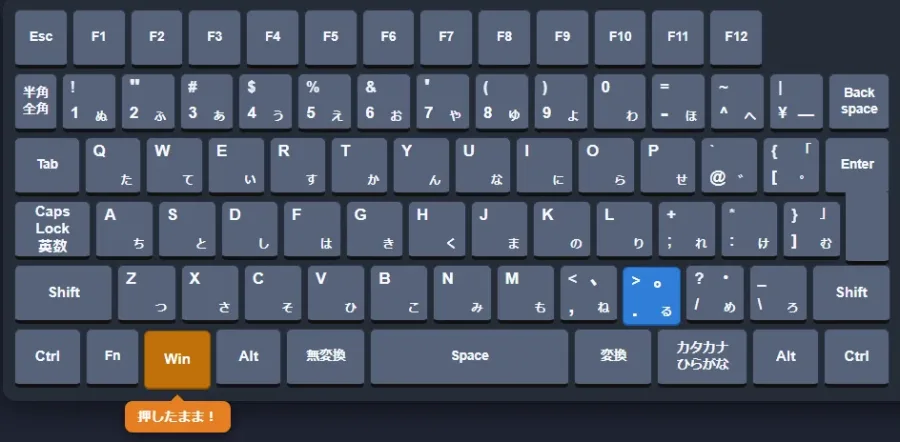
Press the following two keys at the same time.
Windows key + . (period) key
Windows key... The key with the flag icon on the bottom left of the keyboard
. (period) key... The key marked with "." or ">"
When you hold down the Windows key and press the period key, a list of emojis will appear on the screen. Then, just click the emoji you want to use
For Mac
Press the following three keys at the same time.
Control key + Command key + Space key
Pressing these at the same time will also bring up the emoji list. Just select the emoji you want to use, and it will be inserted into your text.
Alternatively, the fn key
To use the fn key to bring up emojis, you need to be running macOS 11 Big Sur or later.
Note: To assign emoji input to the fn key
Open "System Settings" from the Apple menu in the top left of the screen
Select "Keyboard"
Change the "Press key to" or "Press fn key to" option to "Show Emojis & Symbols"
Summary
It's useful to remember these shortcuts when you want to insert emojis on your computer.
Windows... Windows key + . (period)
Mac... Control + Command + Space or the fn key
The list contains not only face emojis but also many symbols and marks. Please try using them as a little accent for your emails, chats, or documents
Articles to make typing easier[Typing] How to enter the comma in "1,000" without hesitation
[Typing] Get Katakana conversion in one go! Conversion methods other than the space key
[Windows] Enter names, addresses, and email addresses in an instant! PC "Word Registration"
[Mac] Enter names, addresses, and email addresses in an instant! PC "Word Registration"
There are still many such "handy tips to know" for typing. At our school, we carefully teach these tricks one by one.
[Meet a new you at Happy Clover Computer School]
If you're thinking, "I'd like to get serious about computers soon," it's our turn! People like these are learning happily at their own pace.
✅ Want to gain confidence for work or a career change
✅ Want to step up from a smartphone
✅ Want to graduate from the fear of "breaking it"
✅ Want to enjoy hobbies more
Without worrying about those around you, ask what you want to know until you are satisfied. Happy Clover supports your desire to "become able to use a computer."
✨ Check out our daily classroom life and the latest information on Instagram!
https://www.instagram.com/happyclover.pcschool/
Useful ways to use computers and AI are available on YouTube!
https://www.youtube.com/channel/UCVUWU5EXa7uNOxDnAzo1o0Q
For details and inquiries, visit our website
https://www.happyclover-kawama.com/
#Emoji #ShortcutKeys #Typing #PCConvenientTips #PCBeginner #PC #ChibaPrefecture #NodaCity #ComputerSchool #HappyClover