Are you familiar with a game called "GeoGuessr"?
This is a geography quiz game released on May 9, 2013, that uses Google Street View to have you guess random locations around the world.
It is a simple yet highly entertaining game where you guess the location on Google Maps based on a randomly selected Street View image.
Everyone has likely used a map app on their smartphone, and this is like an extension of that; it's a game full of charm that you can easily play on your computer or smartphone while also gaining geographical knowledge.
For reference, I've included a video from RTA in Japan.
However, as of February 2024, the free tier of GeoGuessr was discontinued, and it became a paid service. Following that change, "FreeGuessr" was announced by another developer.
Since it is currently completely free to play, I decided to give it a try.
FreeGuessr is a browser game that doesn't require an app and can be played in browsers like Google Chrome, Safari, and Microsoft Edge.
If you are playing on a smartphone, I recommend using a Wi-Fi environment because it consumes a lot of data.
1. Access the site
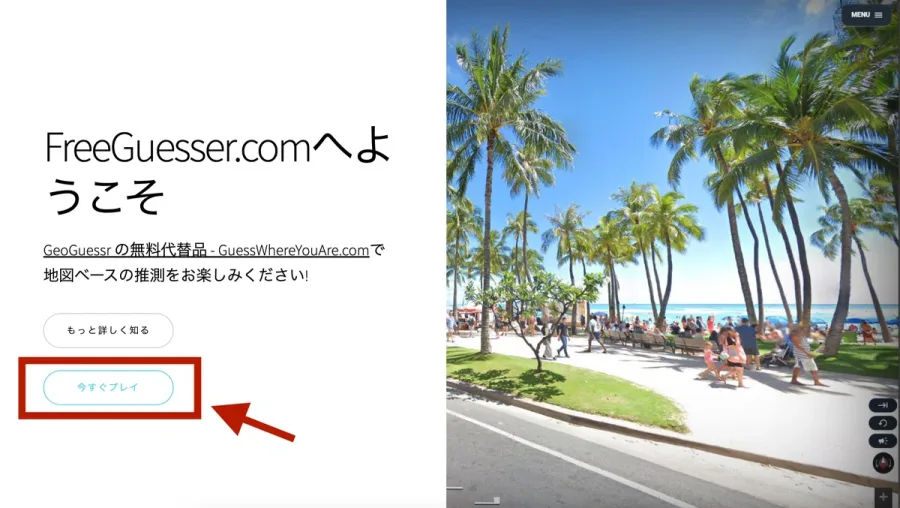
First, access the FreeGuessr site (here). I played on a PC for this article, but it is also possible on a smartphone.
Once the site is open, click "PLAY NOW".
2. A random Street View image is displayed
The map loads and a randomly selected Street View image is displayed.
You can play as is, but you can also narrow down the region from the settings.
On the mini-map in the bottom left, select the location that matches the starting point and place a pin to make your guess. The system rewards you for how close your pin is to the actual starting point.
You can select options like "Skip this location" or "Return to start" from the icon in the bottom right.
Since you need to guess the starting point on the map, you can return to the start to re-examine things if you have traveled too far down the road.
If you really can't figure it out, you can press skip to move on to the next area.
3. Look for clues in the surroundings (signs, buildings, terrain, etc.)
You need to look around to gather information, or click the arrows to move forward and find new information to guess where in the world you are.
I started moving, but all I could tell was that it looked like Japan...
I'll keep clicking the arrows to move toward what looks like a larger road.
I reached a larger road, so I'll immediately start looking for information I can understand from text, like signs.
And then...
Wow, I found a river sign!!!
And in small text, "Saga Prefecture". This is getting exciting.
However, I still want more information, so I'll keep going.
It seems helpful to get information from shops, signs, and area codes, but area codes are quite a high hurdle.
Oh!National Route 207 and "Kashima City" signs found!! I should be able to narrow it down with this.
4. Guess on the map and place a pin
Once you've identified the location to some extent, place a pin on the mini-map.
I was able to find the national route, but national routes are longer than I thought...
Come to think of it, I found a roadside station earlier. There's also the river I found earlier! I'll compare the information I've seen so far with the map.
5. Results announcement! (The closer the distance, the higher the score)
Click "Guess pin on map" to see the results!!
What will the results be...?
The distance to the pin is 66m! That's pretty close!!
By clicking "Next Trip", you can challenge yourself with a new problem.
You can configure game settings by selecting the main menu in the top right.
For single-player, you can enjoy playing in an area you set yourself by clicking "New Game".
I'm not very good at world geography, so I narrowed it down to Japan and it was quite fun. You can choose your favorite places, such as the whole world, by continent, or by individual country.
Also, while the round time is set to unlimited by default, you can set a maximum time limit of 5 minutes. I tried playing with the 5-minute setting, and it felt just right because I had to hurry to find information, and it was fun even when I couldn't find the location.
From the Party menu in the main menu, you can also challenge the same questions together with people you know.
By selecting the party host, you can invite friends.
You can access it immediately via a URL, invitation code, or by scanning a QR code, so there is no extra hassle.
By configuring game rules, the number of rounds, and other detailed settings before starting, you can compete with your friends.
My personal recommended settings are as follows.
Rule: BEST GUESSER
Map: Japan
Countdown after first guess: 1 minute
Round time: 5 minutes
It's a system where you get more points the closer you are to the starting point. It might be interesting to make the countdown after the first guess a little shorter.
I also tried it with unlimited time, but since I was able to get to a pretty good spot even in 5 minutes, I felt it was better to set a time limit.
To summarize my impressions of playing on the Japan map, there were the following benefits:
・You gain geographical knowledge
・It's fun when a place you know appears
・Rural landscapes are interesting because the difficulty increases
・Signs are reliable
For those who have been curious about GeoGuessr but haven't played it yet, why not give it a try? The controls aren't bad, and I was able to enjoy it normally.
It seems like it would be fun to play with a large group, and I think it would have been fun if this existed in school classes. Also, I'm curious about which professions are good at this. Are people in the tourism industry strong?
Since you can easily play it on your smartphone, it's also recommended for killing time.