It was used more than I expected
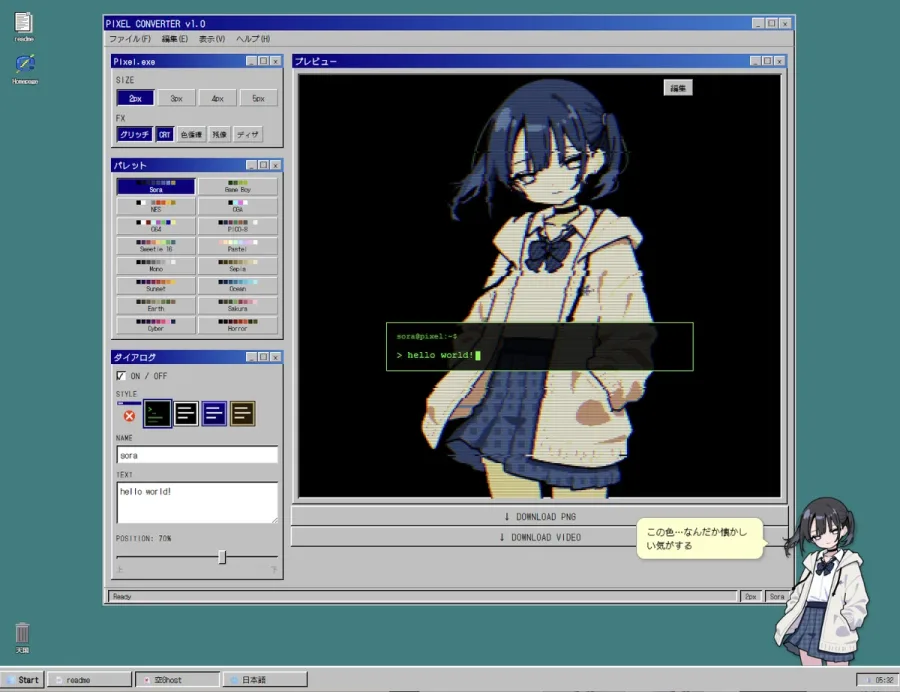
I recently released a web tool called "Sora's Pixel Converter". It's a tool that lets you convert images into pixel art style just by dragging and dropping them.
https://pixel-converter.ameniwa.com
Since its release, it has reached 26.43 million impressions on X alone, with over 290,000 link clicks. Many more people have interacted with it than I had imagined.
https://x.com/ameniwa_/status/2024817166726631600
The motivation for making it was very simple: I can't draw pixel art myself.
Why I made it
I usually use Illustrator to draw illustrations, but I've never done pixel art. However, I had always thought it would be cool if my illustrations could look like pixel art.
I tried a few existing web converters, but they either lacked palette selection, required pressing a button to re-convert every time I changed a parameter, or had a somewhat dry UI. I felt they weren't what I wanted, so I decided to make one myself.
What it can do
Palette selection: I have prepared 16 types of color palettes. From retro styles like Game Boy, Famicom, and C64, to pastel and cyberpunk styles. Some of the palettes are based on those from Lospec, which is widely used in the pixel art community. The default "Sora" is my own original palette.
Effects: Five types: Glitch, CRT, Color Cycling, Trails, and Dither. They can all be combined. Combining Glitch + CRT, or using all of them at once, gets pretty chaotic, which I personally find fun.
Dialogs: You can overlay 5 types of dialog boxes. The text can be edited freely.
Export: Supports exporting as still images (PNG) and videos (MP4).
Usability: I've made it so you can preview the conversion results in real-time.
A "fun tool" rather than a "useful tool"
In terms of design philosophy, this tool prioritizes being fun to play with and accessible to everyone over efficient conversion or creating proper data.
The initial motivation was impure—rather than wanting to create proper pixel art or assets, I wanted something that looked cool, stylish, and might go viral on social media. I turned that feeling directly into a tool.
I value the feeling of playing with it, such as the Win95-style desktop UI, the addition of dialogs, and the way the image breaks down with FX like glitches. Conversely, I omitted most detailed settings and focused on building out parts that are useless for a tool, like the Start menu and taskbar.
Image conversion tools tend to be just about the "input to output" process, but I aimed to make the time spent tweaking the parameters fun in itself.
The character in the bottom right is "Sora." She is my original character. If you click her, she speaks. It's a tribute to "Ukagaka."
How it works
I've often been asked, "Are you using AI to convert it?" but I'm not using any AI at all. (This is unrelated to OpenAI's video generation AI, Sora, just to be clear.)
What I'm doing can be broadly divided into two parts.
1. Downsampling
First, the image is divided into a grid based on the specified pixel size (2px to 5px). The colors of the pixels within each grid cell are aggregated to determine one representative color. This becomes one "dot."
2. Palette Mapping
The representative color is replaced with the closest color from the selected palette. I use Euclidean distance in color space to calculate the "closest" match. Since doing this in RGB space deviates from human perception, I convert it to Lab color space before calculating the distance.
For dithering, I implemented the Floyd-Steinberg error diffusion method. This is a technique where the error generated during palette mapping (the difference between the original color and the replaced color) is distributed to neighboring pixels. This allows for natural-looking gradients even with a limited number of colors.
The glitch effect is achieved by shifting the RGB channels of the image data, inserting scanline noise at random positions, or causing partial pixel shifts. The CRT effect is a composite of scanlines and a vignette (peripheral dimming).
Everything runs on the client side, so images are never sent to a server. It is processed using the Canvas API and exported directly.
Other
It supports 9 languages (English, Japanese, Korean, Traditional and Simplified Chinese, Spanish, French, German, and Portuguese). Many of my social media followers are from overseas, so I made it multilingual from the start.
Conclusion
It runs entirely in the browser. No app installation or member registration is required.
I think it's interesting how the combination of palettes and effects can create unexpected atmospheres. Please give it a try if you'd like.
https://pixel-converter.ameniwa.com