Obsidian has a concept called frontmatter ( YAML front matter ).
You can include metadata for a file by adding YAML-formatted information at the beginning of a file created in Obsidian.
---
key: value
key2: value2
key3: [one, two, three]
key4:
- four
- five
- six
---
This notation was popularized by Jekyll, Hugo, and Gatsby, which are static site generators.
As of Obsidian version 0.12.12, the following four keys are supported by default.
tags (more information)
aliases (more information)
cssclass
publish (Publish and unpublish notes > Automatically select notes to publish and Publish and unpublish notes > Ignore notes)
Viewing Meta information of Web pages downloaded with MarkDownload
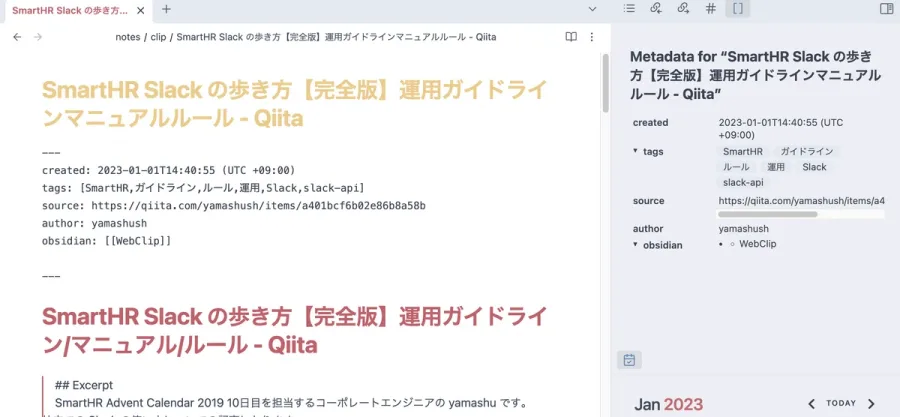
You can use a Chrome extension called MarkDownload to download Web pages as Markdown files.
The downloaded file contains the following Meta information at the beginning of the file.
MarkDownload - Markdown Web Clipper - Chrome Web Store
Adding Meta information to notes
When I create notes in Obsidian, I include the following frontmatter at the beginning.
By doing this, Obsidian becomes easier to use, such as being able to search based on information set in tags when viewing information relationships in Graph View.
---
created: 2023-01-04T13:15 (UTC +09:00)
tags: [obsidian,note,YAML front matter]
type: blog
author: My Name

---
Also, since I have saved the following template in ~/templates/Template Notes, I can easily enter the necessary information just by calling the template with a command.
---
created: date:YYYY-MM-DDTtime:HH:mm (UTC +09:00)
tags: []
type:
author: My Name

---
Adding Reading Memo Meta information
In Obsidian, you can achieve convenient operations using extensions by adding Meta information to Markdown files. Please refer to the following YouTube video for details.
I created the following template for reading memos by referring to the content of the YouTube video above. I am looking forward to accumulating data.
---
created: date:YYYY-MM-DDTtime:HH:mm (UTC +09:00)
Alias:
Author:
	-
Cover: "![[]]"
Category:
Rating:
Status:
ISBN:
tags: []
type: book

---
Reference Information
YAML front matter - Obsidian Help
YAML front matter - Obsidian Japanese Help - Obsidian Publish