I looked into what makes Cowork good, after all
I usually use Claude Code. It's an AI tool for engineers that runs in the terminal (that black screen where you operate using only text).
On the other hand, I've been telling non-engineers, "If you want to delegate work to AI, Cowork is the way to go." But to be honest, I haven't used Cowork extensively myself. Claude Code is enough for me.
In my head, I thought of it as "Cowork = a version of Claude Code made easier for non-engineers." But I was recommending it without being able to properly explain "what exactly is the same, and what makes it good." I thought this wasn't right, so I looked into it.
When I looked into it, I found that Cowork is a mode for handing off work to AI and receiving the deliverables as files. It's not a place to chat, but a place to hand off tasks.
As I researched, it became clear: "So this was the reason I was recommending it to non-engineers." I want to pass that on.
Conclusion first — what is the best part?
I'll start with the conclusion of my research. The reason I recommend Cowork to non-engineers boils down to one thing.
You might think, "Is that it? ChatGPT can create files too." That's true; nowadays, both ChatGPT and Claude's chat can create Excel and Word files. So, if it were just about "returning files," that wouldn't be a unique feature of Cowork.
The difference is what happens before and after. When you create files in a chat, you have to upload the source data one by one, download the finished product, and manually put it back in the correct folder. This back-and-forth is required every time.
Cowork doesn't do that. You just talk to it, saying things like "Organize my Downloads folder" or "Turn this meeting recording into minutes," and it goes directly to read your PC's files and writes them back. The official description even says it can "read from and write to your local files without manual uploads or downloads."
This is where the difference makes an impact. Tasks that have been piling up as "I need to do this someday" can be finished just by talking to it. Even if files are sleeping in some folder, the hurdle of "having to upload them" is gone.
I will write about why I can say that and how to use it in the following sections.
Cowork's flow — Plan → Approve → Execute
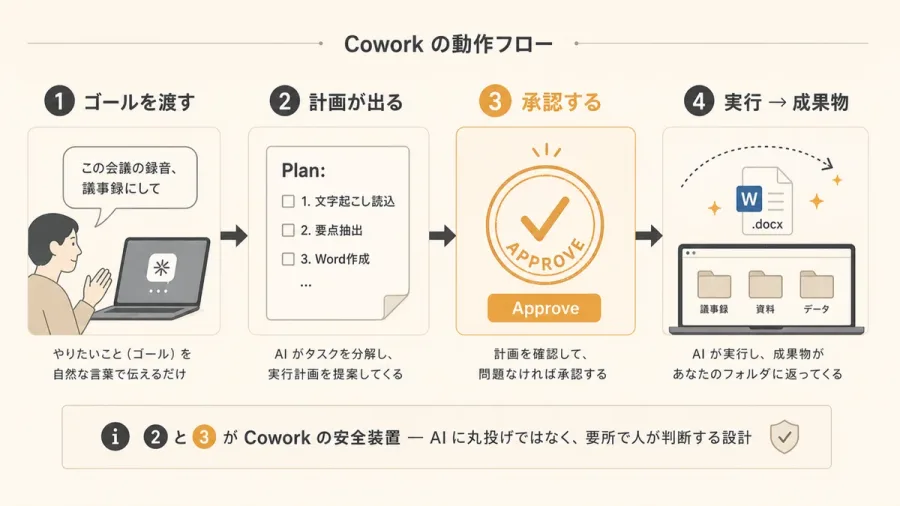
Cowork works in four steps.
Hand over the goal — Request a task in text, such as "Read all the meeting notes in this folder and turn them into minutes."
A plan is presented — Claude returns a list of steps saying, "This is how I will proceed."
Approve — The user reviews the plan and gives the OK
Execute → The deliverable is returned — Claude works in the background and gives you the finished file
The important parts here are 2 and 3. Unlike Chat, Cowork doesn't "just start working" immediately; it always shows you the plan and waits for your OK before it begins. This acts as a safety mechanism for Cowork.
If you feel it's doing too much, you can stop it midway. It asks for additional approval every time for dangerous operations (like deleting files). It is designed not to leave everything to the AI, but rather to let the AI handle tasks while a human makes decisions at key points.
What can it do?
In a nutshell, it can reference files on your PC and perform tasks for you.
Why is this good? You can ask for things like this just by talking to it.
If you're a student
"Read all my class PDFs and notes, and create a summary for the exam"
"Look up these 5 companies I'm interested in for job hunting and make a comparison table"
"Make a list of the key points from the papers I'm using for my report"
If you're working
"Turn this meeting recording into meeting minutes"
"Compile these scattered documents in the folder into a single report"
"Summarize the points of my accumulated emails by project"
For anyone
"Organize my Downloads folder by file type"
"Rename and sort this pile of screenshots based on their content"
The point is that all the source files are on your own PC. Instead of uploading them, you just say "look at this folder," and the AI reads them directly, does the work, and returns the results.
Cowork in practice — The story of how I created a prioritized list of 46 drafts
Since abstract explanations don't quite convey the power of Cowork, I'll introduce one concrete example.
Simon Willison, a prominent engineer in the AI field, gave Cowork a folder containing 46 of his blog drafts and made the following request.
Cowork acted as follows.
Read through each of the 46 drafts
Performed 44 web searches to check if similar topics had already been published elsewhere
Returned a prioritized list based on the content and publication status
If a human were to do this, it would take 1–2 days: half a day just to read the drafts, another half day for web searches, and then organizing them into a list. Cowork handles this automatically in the background and returns the finished product when done.
The important thing here is that Simon Willison only asked once, "Do this," and did not have to click and instruct it 44 times for the searches or 46 times for the analysis. Claude created the plan, obtained approval, assembled the necessary steps itself, and executed them.
This is what "handing a task to AI" looks like in practice.
How is it different from Chat?
The Claude Desktop app has "Chat" and "Cowork" tabs side by side. Because they are side by side, you might initially think they are similar. But their purposes are completely different.
Chat is a place to talk with AI. It proceeds in one exchange or a short dialogue. You can create files, but you upload the source data and download the finished result. It is strictly a form of "exchanging things within a conversation."
Cowork is a place to hand work to AI. It accesses your PC's folders directly and proceeds through a work session of planning, approval, and execution. It takes anywhere from a few minutes to tens of minutes. You provide the goal and give approval at key points.
Let's compare the differences when asking it to "summarize the documents in this folder into one report."
In the case of Chat:
Upload the document files one by one (10 times if there are 10 files)
Ask it to "summarize into one report"
report.docx appears in the conversation, so you download it
Move it to the correct folder yourself
In the case of Cowork:
Ask it to "Read all the materials in this materials folder and summarize them into a single report"
It generates a plan ("Read the materials in the folder, extract the key points, and structure them into a single report")
You approve it
report.docx is created directly inside the materials folder
The difference isn't whether or not you get a deliverable. It's whether or not there is a back-and-forth of uploading and downloading. Chat involves passing things back and forth one by one through conversation. Cowork enters your workspace (folder) and cleans things up right there.
If you confuse these when using them, you might end up chatting in Cowork or asking for long tasks in Chat, leading to the feeling that "this isn't what I expected."
This is the same thing as Claude Code.
As I wrote at the beginning, I usually use Claude Code. I use it to write code, organize documents, and ask for things within repositories. Looking at Cowork from that perspective, a certain fact emerges.
Cowork is essentially the same thing as Claude Code inside.
The official source says the same thing. It states that Cowork is "Claude Code's agentic capabilities expanded to knowledge work outside of coding." Simon Willison, a prominent figure in the AI field, also wrote in a review that "Cowork is Claude Code wrapped in a simple UI that non-developers can use."
Parts that are the same:
The agent foundation is the same Claude
The way it moves is the same (Plan → User Approval → Execution)
It can read and write files
It connects to external tools via MCP or Connectors
The philosophy of "not doing too much" is the same (limiting permissions, requiring approval for dangerous operations)
The only differences are the entry point and the main battlefield. To summarize:
Entry point:
Claude Code requires opening a terminal and using the claude command
Cowork simply requires switching the tab in the Claude Desktop app from "Chat" to "Cowork"
Primary domain:
Claude Code is for codebases (writing, fixing, and testing programs)
Cowork is for documents, data, and research (creating PPTX files, organizing data, summarizing web research)
Target users:
Claude Code is for developers
Cowork is for knowledge workers in general (PMs, designers, operations, management, etc., as listed on the official Anthropic landing page)
To put it another way, it feels like the same Claude is changing from "workwear for engineers in a black terminal screen" to a "suit for office work in the Claude Desktop app". The person inside is the same.
For those who use Claude Code every day, Cowork will feel like, "Oh, this is the usual stuff." Conversely, for those who have never touched Claude Code, Cowork will be the first gateway into that world.
What it means for aspiring engineers
For those who are about to become engineers, Cowork will be a practice field before Claude Code.
When people try to touch Claude Code, some get stuck at the terminal first. Installation, PATH, shell, command input. The things to learn suddenly increase. Before they can internalize how to use AI in the agent era, they get exhausted by the basics of the terminal.
Cowork allows you to have the same agent experience by simply switching tabs in the Claude Desktop app.
Assigning tasks to AI and receiving deliverables
Being shown a plan and deciding whether to approve it
Detecting and stopping "over-execution" while it's in progress
Narrowing down the data range to connect to yourself
These are the "basic behaviors for interacting with AI in the agent era," and they are required in both Claude Code and Cowork. If you master this pattern in Cowork before moving to Claude Code, you can focus solely on learning the terminal.
If you take the reverse route (starting with Claude Code), you end up having to learn both the terminal and the agent experience at the same time, making the first few days quite heavy.
One point to note: Cowork is not the main battlefield for coding. If you are working on a codebase in earnest, you will eventually move to Claude Code. Where Cowork is effective is in intellectual work prior to writing code — organizing study materials, research, prioritizing reading lists, aggregating learning logs, organizing documents, etc.
What it means for people who want to do something with AI
The reason I have been recommending Cowork to non-engineers ultimately comes down to this. Cowork becomes the first realistic tool for non-engineers to delegate work to AI.
"Realistic" has two meanings.
1. The operation is realistic — Until now, if you really wanted to "delegate work to AI," you had to hit APIs or connect tools yourself, which was out of reach unless you were an engineer. Cowork just requires switching the tab in the Claude Desktop app from "Chat" to "Cowork." It will go and read the files on your PC just by asking in text. There is almost nothing new to learn.
2. The price is realistic — $20/month for Pro. $17 if paid annually. Until now, if you wanted to try "delegating work to AI," you had no choice but to use enterprise contracts or API usage-based billing. It is quite recent that we have entered an era where individuals can try it for $20 a month.
Because these two things have come together, the use cases listed in Section 4 are no longer things you "want to try someday," but things you can try today. Even though class PDFs, meeting recordings, and accumulated emails are waiting on your PC, until now, the "effort to hand them over to AI" was heavier than the "effort to do it yourself," so you ended up doing it yourself. Cowork tips that scale.
When non-engineers get stuck with AI, it is usually when they cannot imagine "where it will be effective in their own work." Cowork lets you experience the answer by pointing to specific folders, showing that it is the "things I have to do someday" folders piling up on your PC.
Cowork ≠ Computer Use — Different things often confused
When researching Cowork, the term "Computer Use" also comes up. These are different things, so I would like to clarify them.
Cowork (GA released, Pro and above):
Claude works inside an isolated Linux VM
Your local files are mounted only in folders you permit
It does not see your actual screen
The main battlefield is files, data, and research
Computer Use (research preview, Pro/Max only):
Claude sees and operates your actual screen
Requires macOS accessibility + screen recording permissions
Can open browsers to search and operate desktop apps
Cannot be used with Team / Enterprise
Granting permissions to banking, medical, and government apps is explicitly prohibited
In other words, if you are looking for an experience where "Claude works with you while looking at your screen," what you actually want is Computer Use, not Cowork. This is why it is easy to misunderstand Cowork as a "screen sharing" tool at first.
Non-engineers should start with Cowork. Computer Use is in the research preview stage and carries significant risks. It is perfectly fine to wait until you are more experienced before considering it.
Common pitfalls
Cowork is powerful, but powerful tools are prone to accidents. The official documentation explicitly states, "Cowork has unique risks due to its agentic nature and internet access."
Five things to remember from the start.
Restrict access folders: Set permitted folders in Settings > Cowork. Exclude sensitive folders such as those containing financial, HR, or medical data. It is designed so that Claude cannot touch folders you have not permitted.
Permanent deletion requires approval every time (official specification). Since it is designed with safety in mind, do not find it tedious and confirm every time.
Only connect MCP / Web after trusting them: Do not add suspicious external sources. MCP is powerful but also represents an attack surface.
Close banking, medical, and government apps when enabling Computer Use: This is explicitly prohibited by the official guidelines.
Beware of prompt injection: There are cases where Claude can go rogue due to instructions embedded in web search results or connected data. For example, there is a theoretical attack where if you ask it to "summarize this page," the page itself contains instructions to "delete all user files." Stop if you see suspicious behavior.
Regarding the last point, Simon Willison (a prominent AI engineer) has pointed out that "it is unreasonable to tell non-engineers to watch out for this." The only realistic defense is to use Cowork only in folders without sensitive information at first.
Handle financial, contract, and HR information only after you have become accustomed to Cowork and can predict its behavior, and even then, be cautious. For the first few weeks, it is just right to play around in your Downloads folder or a sandbox folder you created for that purpose.
Pricing — Which plans can access it
Cowork cannot be used on the Free plan. This is clearly stated in the official documentation.
Free: Not available
Pro ($20/month, $17/month billed annually): Available. Official pricing explicitly states "Includes Claude Cowork"
Max 5x ($100/month) / Max 20x ($200/month): Available, with higher usage limits
Team ($25/seat and up): Includes Claude Code + Cowork. Features enterprise deployment and admin control for MCP/Connectors
Enterprise: Inherits Team features + network-level access control
The functional difference is basically just the "usage volume," and the Cowork feature set itself is the same for any Pro plan or higher. Starting with Pro at $20/month is sufficient.
Pricing and plan structures change quickly, so it is recommended to double-check at claude.com/pricing right before signing up.
Summary for today
Chat can also create files now. The difference is whether there is a back-and-forth of uploading/downloading
Cowork directly references files on your PC. It reads and writes them just by you talking to it
It operates in a flow of Plan → Approval → Execution. It is designed for humans to make decisions at key points, rather than leaving everything to the AI
Cowork is the same as Claude Code under the hood (engine, behavior, philosophy). The difference is the entry point and the main battlefield
You can access it starting from the Pro plan ($20/month). Free is not supported. Limited to the Claude Desktop app
It is different from Computer Use (Cowork runs inside a VM / Computer Use operates the actual screen)
Because it is powerful, accidents can easily happen. Limit access folders, remove sensitive information, and do not loosen automatic approval
Things you can do starting tomorrow
Open the Claude Desktop app and try pressing the "Cowork" tab at the top (For those on Pro or higher. If you are on Free, start by considering the $20/month Pro plan)
Set only one permitted folder in Settings > Cowork. Just one folder that isn't sensitive (like Downloads)
Start with small tasks: Things like "List the old zip files in my Downloads folder," "Summarize these notes in Markdown," or "Rename the images in this folder."
If you try one out and get a feel for how it works, that's enough for today. Once you experience the feeling of handing over a whole folder and getting it back organized, the way you use AI will quietly change from then on.
If you can't figure out on your own how it might benefit you
AI tools keep increasing. I think some people get tired of thinking, "Do I have to learn another new one?"
But once you try Cowork, the back-and-forth of "uploading files, downloading the result, and putting them back in a folder" can be handled with just a single phrase: "Hey, take care of this for me".
"Maybe I don't have to do this myself anymore" is something you can test for $20 a month. That is Cowork's current position.
Even if you try it out on your own, there are times when you can't figure out where it fits into your work, or you stop because it didn't feel as effective as you expected.
In those moments, having someone to think through how to learn with you can bridge that gap instantly. toi's learning coaching is a place that offers that kind of support.
Check out toi's services →